
Desk lighting around a monitor can either calm your setup or make it harder to focus. The right pick helps you work, study, game, or take video calls without fighting glare, awkward shadows, or a cluttered desk. Here, you’ll find clamp lamps, monitor bars, RGB accent lights, and conference lighting, each suited to a different kind of screen setup. The focus stays on fit, controls, and real day-to-day use, so you can match the light to your space instead of forcing your space to match the light.
Quick Shortlist For Busy Desks

MACASA LED Desk Lamp with Clamp, Dual Head Monitor Light, Remote

MACASA LED Desk Lamp with Clamp, 18W Dimmable Light, No Remote
MACASA LED Desk Lamp with Clamp, Dual Head Monitor Light, Remote

Govee Gaming Light for Monitor G1, RGBIC LED Backlight for 27-34 Inch PC

HOUHUI RGB LED Strip Lights 6.56Ft for 40-60in TV Backlight
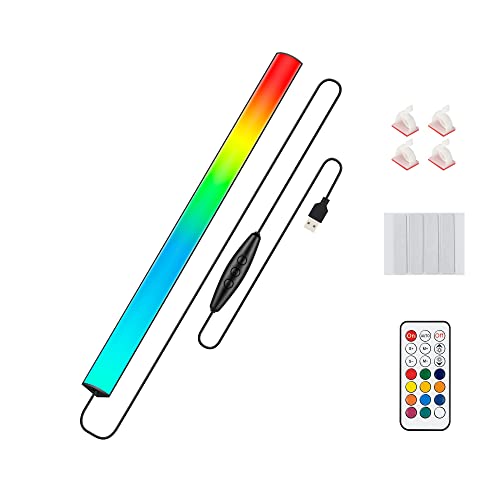
JUSJUBR Under Monitor RGB Light Bar, LED Light for Desk Gaming Setup

yAyusi Dual-lamp Video Conference Lighting, LED Streaming Light with Remote and Touch Control

Colorpanda 16.14″ Monitor Light Bar, 250LM USB LED Desk Lamp
More Details On Our Top Picks
Clamp-mounted desk lighting makes sense in a busy home office, and this MACASA model leans into that setup well. The dual-head layout gives you more reach across a keyboard and monitor area, while the remote and touch controls keep brightness changes from becoming a desk shuffle.
The 24W output and five color temperatures from 3200K to 6500K give you room to shift from softer evening work to cleaner task lighting. The trade-off is that the extra control set can feel like more lamp than a minimal desk needs, so it suits people who like to fine-tune their setup.
What We Like
- Dual heads help spread light across wider desks without crowding the monitor area.
- Remote control makes brightness changes easier from your chair during work or study sessions.
- Five dimming levels let you adjust the lamp for focused reading or softer evening use.
- The memory function saves your last settings, which is handy in a shared workstation.
- The anti-glare cover is a practical fit for long hours in front of a screen.
Points To Note
- The control set is richer than a basic clamp lamp, so setup takes a little more attention.
- Dual heads can feel like more hardware than you need on a very small desk.
Feature Snapshot
Who It Suits Best
You’ll get the most out of this lamp in a home office, dorm desk, or workbench where you want both reach and control.
Where A Sibling Pick Shines
MACASA LED Desk Lamp with Clamp, 18W Dimmable Light, No Remote is the simpler fit for you if you want fewer controls and a lighter setup.
This is the cleaner, less fussy MACASA option, and that matters on a desk already crowded with a keyboard, notebook, and monitor stand. The 18W format trims the feature set down to the essentials, so you get clamp lighting without the remote layer found on the 24W version.
The anti-glare cover still gives it a screen-friendly tilt, which helps for late study nights and desk work where reflected light gets annoying fast. In most small spaces, that straightforward setup is the point, though you give up some convenience compared with the dual-head remote model above.
Highlights
- Simpler control style suits desks where you want fewer moving parts.
- Clamp mounting keeps the base off the desktop, which helps in tighter work areas.
- The anti-glare cover is useful for people who spend long stretches on a laptop or monitor.
- 18W output gives you enough task light without pushing the setup into overkill.
Small Caveats
- No remote means every adjustment happens at the lamp itself.
- The lighter spec profile makes it less flexible than the dual-head 24W version.
- Clamp hardware needs enough edge clearance, so very thick or busy desktops may be awkward.
At A Glance
Who Will Love This
Students, dorm setups, and compact desks are the natural match for this lamp.
Another Choice May Suit
MACASA LED Desk Lamp with Clamp, Dual Head Monitor Light, Remote fits better for you if you want more reach and remote adjustment from your chair.
This second 24W MACASA version follows the same dual-head idea as Pick 1, but it stands out for shoppers who want that broader control set without leaning into a more complicated gaming look. The remote, touch buttons, timer, and memory function create a desk lamp that works well for repeated routines, especially in a home office shared by more than one person.
You’ll notice the value here in everyday repetition, not flash. The 45-minute, 1-hour, and 2-hour shutoff options make it easier to keep a study session moving, while the five brightness levels and five color temperatures let you set a mood that suits spreadsheets, reading, or evening coursework.
Reasons To Buy
- Dual heads spread light across the desk more evenly than a single narrow lamp.
- Timer settings help you build a work rhythm without watching the clock.
- Memory support is convenient in rooms where the same lighting setting gets reused every day.
- The broad 3200K to 6500K range covers softer and cleaner-looking desk light.
- Remote plus touch control gives you flexibility from either side of the desk.
Areas To Watch
- The richer control set makes it a bit more involved than the no-remote MACASA lamp.
- Timer features are useful, though they matter more to structured work sessions than casual use.
Core Details
Built With In Mind
Remote-friendly desks, shared offices, and study setups suit this lamp particularly well.
Swap It Out When
MACASA LED Desk Lamp with Clamp, 18W Dimmable Light, No Remote makes more sense for you if you prefer fewer controls and a simpler footprint.
Govee takes the monitor-light idea in a more immersive direction, and that matters most for gaming setups where the screen is only part of the experience. The 27 to 34 inch fit range keeps the focus on larger PC monitors, while the RGBIC layout gives you more layered color than a basic single-color strip.
The color-matching idea is the real hook here, because the light can follow on-screen changes in a way that suits high-motion gaming or themed desk decor. The trade-off is that this kind of setup makes more sense for a dedicated station than a plain office desk, so it’s a better style statement than a universal work light.
Positives
- RGBIC lighting allows different color segments, which gives the backlight a more detailed look.
- The monitor-size focus makes it a strong fit for larger desktop screens.
- Color matching can bring more energy to gaming and streaming spaces.
- Curved monitor support broadens the range of setups you can use it with.
- Double strip beads help the lighting appear more even across the back edge.
Honest Caveats
- The styling leans heavily toward gaming, so it may feel busy in a plain office.
- Its best use is tied to specific monitor sizes, not every screen on your desk.
- Feature depth is higher than a simple monitor bar, which can feel like extra setup for casual use.
Details At A Glance
Whose Shelf It Belongs On
You’re the right match for this pick if your monitor is large, your desk setup is style-driven, and your lighting should react to the screen.
A Better Fit Elsewhere
Colorpanda 16.14″ Monitor Light Bar, 250LM USB LED Desk Lamp suits you better if you want a calmer, more work-focused monitor light.
This HOUHUI strip is less about a dedicated monitor bar and more about turning the space behind a screen into softer bias light. The 6.56-foot length and USB power make it a flexible add-on for TV setups, monitor stations, mirrors, or cabinets, especially when you want color without a bulky fixture.
Compared with the Govee pick above, it’s simpler and less immersive, but that simplicity helps in mixed-use rooms. A softer glow behind the screen can make evening viewing feel easier on the eyes, though the look is more ambient accent than precise task lighting.
Bright Spots
- The 6.56-foot strip gives you enough length for many monitor or TV backlight jobs.
- USB power keeps the setup easy to place near a computer desk or media console.
- Remote control adds convenience for changing the mood without reaching behind furniture.
- IP65 protection helps the strip handle damp or splash-prone spots better than a plain indoor-only accent light.
Room For Improvement
- It works more like ambient bias lighting than a true monitor task lamp.
- Stick-on strip placement can take patience during first setup, especially around corners.
- The style is better for soft background color than detailed desk illumination.
Quick Facts
Made For
People who want a soft glow behind a TV, monitor, mirror, or shelf will get the most from this strip.
Reach For A Different Pick
JUSJUBR Under Monitor RGB Light Bar, LED Light for Desk Gaming Setup works better if you want a tighter accent under the screen rather than behind it.
JUSJUBR keeps things small and desk-friendly, which is useful on a setup where every inch matters. The 12-inch bar sits more like an accent layer under a monitor or along a keyboard edge, so it makes sense for gaming desks, shelf displays, and compact work zones.
The huge mode count is the obvious draw, but the real ownership benefit is flexibility without taking over the desk. You get a remote and cable switch, so the light can sit in a fixed position while still being easy to change, though the shorter bar means broad screen coverage is not its job.
Standout Traits
- The 12-inch size fits neatly under many monitors and small shelf spaces.
- 353 color-change modes give you a lot of visual variety for a compact light.
- USB power keeps it easy to pair with a PC-based setup.
- Remote plus inline switch control makes everyday adjustments straightforward.
Softer Spots
- The short body keeps it from acting like full backlight coverage for larger screens.
- So many modes are useful, though some people will stick to just a handful.
- Compact lighting can look best on clean desks, so cable placement matters.
Feature Card
The Right Fit
You’ll appreciate this light most in a compact gaming desk or a simple PC corner where you want accent color without bulk.
Skip It When
Govee Gaming Light for Monitor G1, RGBIC LED Backlight for 27-34 Inch PC suits you better if your monitor is large and you want a more immersive backlight.
Video calls are where this yAyusi setup makes the most sense, because two light bars can spread light more evenly across your face than a single small clip light. That matters in a home office, coaching setup, or recording corner where you want your face to look more even on camera without dragging a ring light into the frame.
The remote and touch control give you quick adjustments, and the dual-bar layout feels more deliberate than the lighter accent products in this list. The trade-off is that it’s specialized lighting, so it shines brightest for calls and recordings rather than general desk illumination.
Best Bits
- Two light bars create a broader front-facing spread for calls and recordings.
- Remote and touch control make it easy to adjust during a meeting.
- The setup works well for laptop cameras, external webcams, and desk-mounted call stations.
- It suits people who want a cleaner on-camera look than a desk lamp can usually provide.
Worth Noting
- Its focus is narrow, so it’s less useful as an all-purpose desk light.
- Two bars can mean a slightly larger footprint around the monitor area.
- Video-call lighting is only as neat as the cable routing, so desk tidiness matters.
Core Details
Who Should Grab It
You’re the right fit for this model if your desk doubles as a video-call station and your lighting needs are mostly camera-facing.
Look Elsewhere When
Colorpanda 16.14″ Monitor Light Bar, 250LM USB LED Desk Lamp fits you better if you want something aimed more at screen-adjacent reading and general desk use.
The Colorpanda bar reads like a calmer monitor companion, which suits workstations that need light without drama. Its 16.14-inch length and 250LM output give you a straightforward screen-top setup, and the touch control keeps day-to-day use simple.
Compared with the RGB-heavy picks in this roundup, this one is more about consistent desk comfort than visual effects. The CRI 95 detail is useful because higher color fidelity generally helps text, documents, and artwork look more natural on a screen-side setup, though it still stays in the monitor-light lane rather than acting as a room lamp.
What We Like
- The 16.14-inch length works well for a range of monitor widths.
- Touch control keeps adjustments quick while you stay focused on the screen.
- 250LM is a sensible level for desk-adjacent lighting without feeling overdone.
- CRI 95 points to stronger color fidelity, which helps for visual tasks and general clarity.
- It suits both flat and curved monitors, which widens placement options.
Minor Gripes
- The lighting style is restrained, so it won’t satisfy someone looking for color effects.
- As a monitor bar, it works best in a focused desk zone rather than across a larger room.
Feature Rundown
Best Suited To
You’ll like this light most if your desk is work-first, your monitor is the center of the setup, and you want a clean screen-top bar.
Where The Extra Money Goes
Govee Gaming Light for Monitor G1, RGBIC LED Backlight for 27-34 Inch PC makes more sense for you if you want more visual motion and a stronger gaming aesthetic.
How To Choose The Right Led Lights For Computer Monitor
Match The Light To The Job
Start with the job your desk light needs to do. A clamp lamp with dual heads helps when you want broader task coverage for notes, paperwork, and keyboard work, while a monitor light bar is better when your goal is cleaner screen-adjacent illumination with less clutter. RGB strips and gaming lights belong in setups where mood matters as much as function.
That difference matters more than most spec sheets admit. A 24W lamp with remote control can feel generous for a shared office, while a 12-inch accent bar makes more sense in a compact gaming station. The right fit usually comes from the shape of your desk before anything else.
Controls, Placement, And Daily Convenience
Control style changes how pleasant a light feels over time. Remote control, touch buttons, and inline switches each solve a different annoyance, so think about whether you want to adjust lighting from your chair or don’t mind reaching for the lamp itself. Memory functions help in repeated routines, especially for study sessions or shared desks.
Placement matters just as much. Clamp mounts save desktop space, monitor bars keep the light near the screen, and strip lights work best when you have a clean edge or back surface to follow. A neat setup tends to feel calmer, almost like the desk has been given a cleaner outline.
Color Range, Brightness, And Screen Comfort
Brightness and color temperature shape comfort in direct ways. Warmer settings can feel easier in the evening, cooler settings suit concentration-heavy work, and multiple dimming levels help you avoid a harsh beam bouncing off a display. Anti-glare covers and asymmetric lighting designs are worth attention because they change how much light reaches your eyes and screen surface.
Technical terms help here. CRI, or color rendering index, describes how faithfully colors appear under the light, so a higher number is useful for visual work and general clarity. For most desks, that matters more than dramatic effects, especially during long sessions at a monitor.
Fit The Light To Your Room And Monitor Size
Screen size and room size should guide the final choice. Larger monitors often benefit from wider bars or backlights designed for 27 to 34 inch displays, while smaller desks usually feel better with a compact 12-inch bar or a single clamp lamp. Video-call lighting is a separate category, so a lamp that flatters your face on camera may not be the right tool for reading at night.
That’s where honest trade-offs help. A flashy RGB backlight can look great, but a quieter monitor bar may serve you better for everyday office work. Pick the light that matches the way you sit down at the desk most days, not the version of your setup that only appears once in a while.
Things Worth Knowing First
Mistakes Worth Dodging
A common mistake is choosing by color effects first and use case second. Accent lighting can look fun, but it won’t always help with document work, coding, or long reading sessions. Another common slip is ignoring clamp clearance or monitor width, which can make a light awkward the moment you try to mount it.
It also helps to separate task light from mood light. A strip behind the monitor and a light bar over the screen solve different problems, and mixing them up leads to disappointment. Match the form to the job and you avoid a setup that looks busy but works poorly.
When Paying More Pays Off
Higher-tier models usually cost more because they add control layers, wider compatibility, or smarter lighting behavior. Dual bars, remote operation, timer settings, and screen-reactive RGB systems all take more engineering than a simple plug-in bar. You’re paying for convenience, versatility, and a more tailored fit to a specific setup.
That extra spend makes sense for people who use the desk hard every day. If your workstation doubles as a meeting spot, gaming station, or long study zone, richer controls can save time and make the light feel more natural to use. For a basic desk corner, a simpler lamp often does enough without the extra complexity.
Bottom Line
The best LED monitor light for your setup depends on how you actually use the desk. A clamp lamp suits focused work, a monitor bar suits clean everyday lighting, and RGB options make the most sense when atmosphere is part of the goal. Match the light to the monitor, the desk size, and the kind of hours you spend there, and the choice becomes much easier. Keep it practical, and your screen space will feel more comfortable right away.
