
Led screen keyboards make more sense once you live with them for a while. The display can keep battery, connection, or mode status in plain view, while a knob trims backlight, volume, or media control without extra key gymnastics. That matters most for you if you split time between work, gaming, and a laptop setup that changes often. The shortlist below focuses on layouts, switch feel, and control features that can make daily use feel smoother.
The Shortlist At A Glance

AULA S98 Pro Wireless Mechanical Keyboard with Screen & Knob

Redragon K719 PRO Wireless 95-Key Gasket Gaming Keyboard

Redragon K719 PRO Wireless 95-Key Gasket Gaming Keyboard
LexonElec M96 Wireless Gaming Keyboard, Knob Control
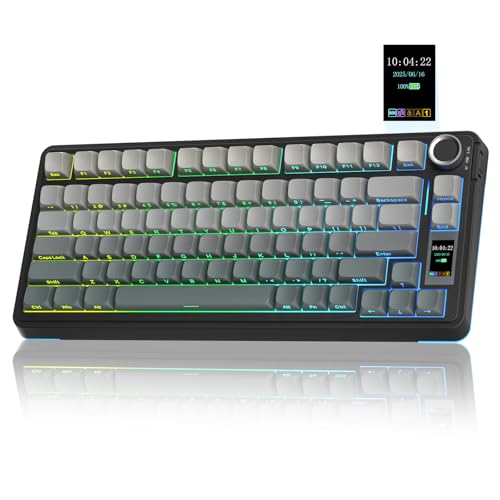
AULA S75 PRO Wireless Mechanical Keyboard with Screen&Knob
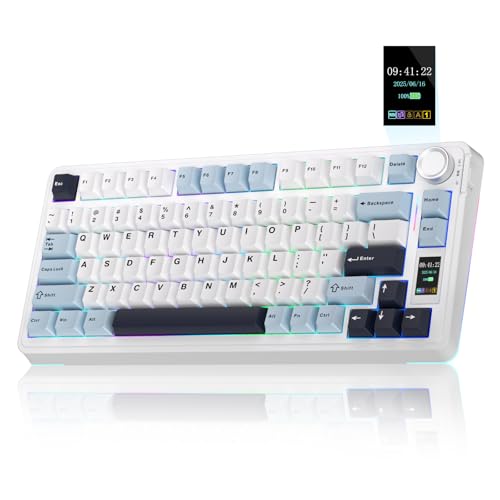
AULA S75 PRO Wireless Mechanical Keyboard with Screen&Knob
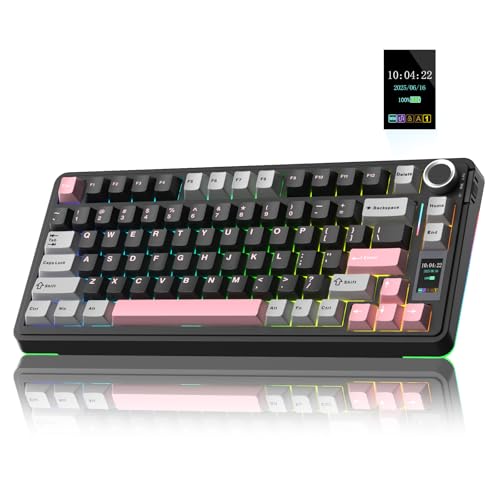
AULA S75 PRO Wireless Mechanical Keyboard with Screen&Knob

AULA S99 Pro Wireless Keyboard, Display Screen & Media Knob
More Details On Our Top Picks
The S98 Pro leans into control-first design, with a display and knob that make it easy to check status and adjust settings without memorizing shortcuts. That suits your desk well if you jump between devices or keep a keyboard around for both work and gaming.
Compared with the more compact AULA S75 Pro options below, this one gives you a fuller layout presence and a more feature-forward feel. The trade-off is simple, it takes up more desk room, so it fits best where space is less tight.
Strong Points
- Screen feedback keeps battery and connection info visible at a glance.
- The knob reduces menu hopping for volume and lighting adjustments.
- Hot-swappable switches make future switch changes much easier.
- PBT keycaps usually hold up better to shine than softer plastics, which helps for long-term desk use.
- Tri-mode support gives you flexibility across a desktop, laptop, or tablet setup.
Things To Consider
- The larger body needs more room than the 75 percent options in this roundup.
- Side-printed legends can take some getting used to during the first stretch of use.
- Any screen and knob setup adds a little more software dependence than a plain board.
Feature Snapshot
Who It Suits Best
Desk users who want a feature-rich keyboard with screen feedback and easy control fit this one well.
Where A Sibling Pick Shines
AULA S75 PRO Wireless Mechanical Keyboard with Screen&Knob suits you better if you want a smaller layout for a tighter desk.
Redragon’s 95-key layout sits in a nice middle zone, smaller than a full-size board but still roomy enough for everyday shortcuts and number work. The gasket build and five-layer dampening point to a softer typing character, so your desk can feel less sharp and more controlled during long sessions.
Compared with the AULA S98 Pro, this board feels more focused on typing feel and practical layout than visual flair. You may appreciate that balance most in a home office, especially where gaming and spreadsheet work share the same keyboard.
Positives
- The 95-key layout keeps a number pad without growing into a full desktop footprint.
- Gasket mounting usually gives the board a softer, cushioned feel under your fingers.
- The built-in screen helps you keep track of battery and connection state at a glance.
- A single knob simplifies brightness and playback control, which is handy during mixed work and game use.
Worth Noting
- Gasket boards can feel different from standard mechanical frames, so the typing style is a personal fit.
- The screen and control layer add another surface that needs basic dusting now and then.
- At 95 keys, it still asks for more desk space than the 75 percent AULA options.
Core Details
Built With In Mind
Gamers and home-office users who want a quieter, less cramped board should feel at home here.
Another Choice May Suit
AULA S99 Pro Wireless Keyboard, Display Screen & Media Knob fits better for you if a full number pad and macro-friendly layout matter more.
This version of the K719 PRO keeps the same core shape, screen, and knob approach, so you get the same functional idea with a slightly different listing focus. That makes it useful as a second look for you if finish, bundle details, or stock presentation matter more than the headline feature set.
The honest read is that it serves the same profile as the other Redragon entry, just without demanding a fresh learning curve. For someone comparing two closely related options, that can be enough to make the choice easier.
Highlights
- The 95-key format keeps the layout efficient without feeling cramped.
- The TFT screen gives you quick status visibility during daily use.
- The knob streamlines media and lighting changes, which saves time across repeated sessions.
- Tri-mode connectivity suits mixed device routines at a desk or in a shared room.
Small Caveats
- Because it mirrors the sibling model closely, the decision may come down to the exact listing detail you prefer.
- The screen, like any small display, benefits from a little regular wipe-down.
- If you want the smallest footprint in this group, the AULA S75 Pro remains easier to place.
Details At A Glance
Who Will Love This
You fit this keyboard well if you want a practical 95-key layout and a control screen without jumping to full size.
Swap It Out When
Redragon K719 PRO Wireless 95-Key Gasket Gaming Keyboard in the other listing is the cleaner choice for you if you want to compare identical hardware paths side by side.
The M96 is the neatest-feeling option in this roundup, because the 94-key layout trims a bit of bulk while keeping useful functionality close at hand. That can matter a lot on a smaller desk, or on a setup where you want a wireless keyboard that still looks tidy next to a laptop.
Compared with the Redragon 95-key boards, this one reads as lighter and more minimalist. The trade-off is that you give up a little of the roomier, more established feel, so it suits you best when desk space is the real constraint.
Upsides
- The 94-key layout trims width while preserving a practical working set.
- Bluetooth and 2.4G support give you two wireless paths for different setups.
- The display screen adds useful status visibility without making the board feel oversized.
- PBT keycaps are a smart touch for regular use, since they tend to resist shine better over time.
- The 3000mAh battery spec gives you a better sense of endurance than a tiny cell would.
Room For Improvement
- The product info is lighter on detail than some of the other picks here, so you may want to check the listing closely.
- A small-display board benefits from careful setup, especially if you move it between rooms often.
- The 94-key format will feel a touch less roomy than the 95-key Redragon options for users who want more spread.
Quick Facts
Perfect Match For
Space-conscious gamers and laptop users who want a compact wireless board with a display should look here first.
Look Elsewhere When
AULA S98 Pro Wireless Mechanical Keyboard with Screen & Knob suits you better if you want richer connectivity and a more feature-loaded control set.
The S75 Pro hits a useful middle ground: smaller than a full board, but still large enough to feel familiar during long typing stretches or casual gaming. The display and knob keep the interface friendly, so you spend less time hunting through shortcuts and more time just using the board.
Compared with the AULA S98 Pro, this one gives you a tighter footprint and a calmer desk presence. That makes it easier to place in a shared work area, though the reduced size means you lose some of the spread that full-size users may prefer.
Bright Spots
- The 75 percent layout saves desk room without stripping the board down too far.
- The screen keeps core status info within a quick glance.
- Hot-swap support makes switch changes easier later on.
- Pre-lubed switches can feel smoother out of the box, which helps during long typing sessions.
- Side-printed PBT keycaps support a cleaner top-down look and better wear resistance than thinner plastics.
Points To Note
- You give up the number pad, so spreadsheet-heavy work may feel less direct.
- The compact shape may feel a little tight at first if you are used to larger boards.
- Software-linked screen features can take a bit of setup time the first time around.
Feature Rundown
Made For
You fit this keyboard well if you want a compact wireless board for gaming, writing, and general desk use.
A Better Fit Elsewhere
AULA S99 Pro Wireless Keyboard, Display Screen & Media Knob suits you better if you need a number pad and macro-style extras.
This AULA version keeps the same 75 percent structure and display-plus-knob approach, but it reads a little more stripped back in the listing. That can work well for you if you care more about a tidy mechanical board than a long feature checklist.
Compared with the S75 Pro above, it points even more squarely toward straightforward daily use. The honest trade-off is that you still have the same compact layout compromises, so number-heavy work is better served elsewhere in this roundup.
Best Bits
- The 75 percent size keeps your desk open for a mouse or notebook.
- The screen-and-knob layout makes everyday control feel less fussy.
- Hot-swap support adds flexibility for future switch changes.
- Pre-lubed switches help the board feel smoother right away.
Areas To Watch
- The smaller format leaves no room for a dedicated number pad.
- Compact boards can take a day or two to feel natural for larger hands.
- Side-printed legends may be less immediate than front-printed ones at first glance.
At A Glance
The Right Fit
Minimalist gaming setups and smaller home desks suit this board well.
Reach For A Different Pick When
LexonElec M96 Wireless Gaming Keyboard, Knob Control fits better if you want a slightly more compact footprint with wireless flexibility.
This S75 Pro listing leans into the essentials, which is useful for you if the screen, knob, and hot-swap setup already cover what matters most. It stays close to the same compact shape as the other AULA 75 percent options, so the learning curve should feel familiar.
Compared with the more feature-heavy AULA S98 Pro, this one keeps the focus tighter and the desk footprint smaller. The catch is that you lose the extra room and a little of the feature spectacle, but many setups do better with less clutter anyway.
Reasons To Buy
- The 75 percent layout makes it easier to keep a clean desk.
- Screen and knob control keep common adjustments close at hand.
- Hot-swappable design gives you more room to personalize later.
- PBT keycaps help the board feel more durable across regular use.
Softer Spots
- You still lose the number pad, so data entry work may feel less smooth.
- The trimmed layout works best after a short adjustment period.
- Side-printed legends can be a little less immediate for first-time users.
Feature Card
Whose Shelf It Belongs On
It belongs on the desk of a gamer or remote worker who wants a compact mechanical board without extra clutter.
Skip It When
AULA S99 Pro Wireless Keyboard, Display Screen & Media Knob is the better match for you if you need a larger layout and more side keys.
The S99 Pro is the most full-featured shape in this list, and that matters because the number pad plus macro keys give you more room to spread out. For spreadsheet work, editing, or a desk that doubles as a gaming station, that fuller layout can feel like a welcome step up.
Compared with the S75 Pro models, this board gives you a more traditional working width and more control surfaces. The trade-off is obvious, it asks for more desk space, so it makes the most sense in setups that can comfortably hold a larger board.
Positives
- The full layout makes number entry and shortcuts easier to keep in one place.
- Bluetooth, 2.4G, and USB-C give you three practical connection paths.
- The media knob helps you change volume without shifting away from your work.
- The screen keeps connection and battery status visible, which helps in multi-device routines.
- Macro keys are a plus for users who like to streamline repeated actions.
Honest Caveats
- The larger frame needs the most desk room of any pick here.
- An uncustomizable display is less flexible than the more playful screen setups on some smaller boards.
- Extra keys can feel unnecessary if you mainly type and rarely use shortcuts.
Core Details
Best Suited To
You should look at this one if your desk handles both serious typing and shortcut-heavy work.
Consider Something Else When
LexonElec M96 Wireless Gaming Keyboard, Knob Control is the easier fit if you want a smaller board that leaves more mouse space.
How To Choose The Right Led Screen Keyboards
Screen And Knob Use Should Match Your Routine
A display is only helpful when it shows the status you actually check, like battery, connection mode, or typing state. A knob matters most when you change volume or lighting often, because it cuts down on shortcut hunting. For a desk that shifts between work and play, that little control layer can feel smoother than extra function combos.
The trade-off is software dependence, especially on boards that support custom images or extra screen behavior. That’s fine for a dedicated setup, but it can be a mild hassle on shared or borrowed machines. If you want the simplest route, choose a board whose screen is informative rather than flashy.
Layout Size Changes Daily Comfort
Full-size and near-full layouts suit you when you type numbers often, manage spreadsheets, or like a wider key spread. The AULA S99 Pro and Redragon K719 Pro both sit in that more spacious camp. Smaller 75 percent boards save desk room and leave more space for mouse movement, which helps on compact desks.
The catch is adjustment time. A smaller board can feel tidy and efficient, yet the missing number pad may slow down data-heavy work. Choose the layout that matches the task you do most, not the one that looks busiest on the page.
Switch Feel And Keycap Material Shape Long-Term Use
Hot-swappable switches matter because they let you change switch feel later without replacing the whole board. Pre-lubed switches often feel smoother from the start, while gasket mounting and layered dampening usually soften sound and bottom-out feel. Those details matter most in quieter rooms or for long typing sessions where harshness gets tiring.
PBT keycaps are worth paying attention to as well. They usually resist shine better than thinner plastics, which helps a board keep its clean look after repeated use. You still want to think about cleaning, though, because textured keycaps and screen surfaces both collect dust over time.
Things Worth Knowing First
Common Shopping Slip Ups
Many people focus only on the screen and forget the rest of the board. A bright display means little if the layout feels cramped or the connection modes do not match your laptop, desktop, or tablet habits. Check the size first, then the control features, then the wireless options.
Another common miss is underestimating how much desk space a larger board eats. A full or near-full layout can crowd a small setup fast, especially beside a mouse pad. Compact boards solve that, but they ask for a little adaptation time.
The Upgrade Payoff
Higher-tier boards tend to cost more because you are getting more than plastic and switches. Display hardware, knobs, multi-mode connectivity, hot-swap support, PBT keycaps, and layered dampening all add parts and assembly work. That extra complexity often shows up as a calmer sound profile and easier day-to-day control.
The upgrade makes most sense when you spend long hours at the keyboard or switch devices often. For a shared office desk, a home gaming station, or a laptop-heavy workflow, those extras can save time and reduce small annoyances. If your use is simple typing, a leaner model may be enough.
Closing Thoughts
Led screen keyboards make sense when you want more than a plain typing slab. The right one gives you status at a glance, easier media control, and a layout that fits the way you really use your desk. For a compact setup, the AULA S75 Pro models are the cleanest route. For a fuller, more desk-dominant layout, the AULA S99 Pro and Redragon K719 Pro options bring more room to work with.
