
Choosing a monitor feels simple until you start comparing refresh rates, panel types, stand adjustments, and desk space. You want a screen that fits your daily routine, whether that means spreadsheets, study sessions, couch gaming, or a cramped home office corner. This roundup focuses on models with different strengths, so you can match the panel to how you actually use your computer.
Quick Look At The Shortlist

Dell 27 240Hz Gaming Monitor SE2726HG 27-inch FHD

AOC 24 Inch Computer Monitor FHD 120Hz 24B35H3
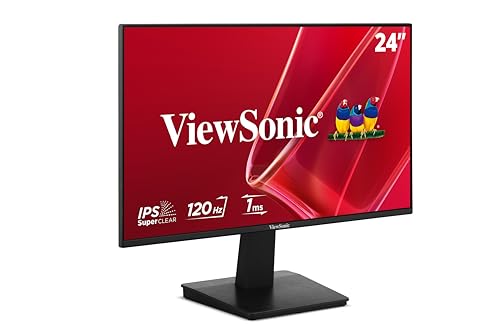
ViewSonic VA2448-MH 24 Inch 1080p 120Hz Monitor

19-inch Full HD 75Hz Small Thin Monitor

Acer 21.5in FHD 100Hz Office Monitor KB220Q H2bi

Philips 22 Inch Computer Monitor FHD 120Hz 22E2N1100

AOC 25 Gaming Monitor FHD 260Hz 25G51Z

Philips 22 Inch Computer Monitor FHD 100Hz 221V8LB
More Details On Our Top Picks
A 27-inch screen with fast motion handling suits you well when gaming feels more important than desk savings. The IPS panel matters here because it keeps color and viewing angles steadier than a basic TN-style panel, so the screen still looks clean from a slight side angle.
The honest trade-off is that a big 1080p panel can look less dense than a sharper 1440p option, especially at arm’s length. Still, for a daily setup that mixes work, play, and long sessions, the ComfortView Plus low-blue-light approach and tilt adjustment make this a sensible, no-fuss choice.
Strong Points
- 240Hz refresh support keeps fast motion feeling cleaner, which helps in shooters and other quick games.
- IPS panel behavior gives you steadier color and better off-angle viewing than many budget gaming screens.
- DisplayPort 1.4 plus two HDMI inputs give you room for a PC and a second device.
- The tilt stand is simple, useful, and easy to live with on a normal desk.
Points To Note
- Full HD on 27 inches is fine for gaming, though text can look less crisp than on a smaller or higher-resolution panel.
- The fixed stand only tilts, so a monitor arm may suit you better for deeper ergonomic tuning.
- It leans hard toward speed, which means office-only shoppers may be paying for more motion performance than they need.
Feature Snapshot
Who It Suits Best
You get the most from this model in a gaming-first desk setup where fast motion matters and a 27-inch panel feels comfortable.
Where A Sibling Pick Shines
AOC 24 Inch Computer Monitor FHD 120Hz 24B35H3 makes more sense for general use and smaller desks, especially when you want less bulk than the Dell 27 240Hz Gaming Monitor SE2726HG.
This AOC lands in a very practical middle ground, with a 24-inch footprint that fits most desks without feeling cramped. Fast IPS means you get the quicker response style people usually want for casual gaming, while still keeping the wider-angle behavior that makes shared viewing easier.
For a dorm room, a hybrid work desk, or a simple living-room station, that balance is the appeal. The trade-off is straightforward, it does a lot well but doesn’t lean as aggressively into gaming speed as the Dell 27 240Hz Gaming Monitor SE2726HG or the AOC 25G51Z.
What We Like
- 24-inch sizing hits a comfortable sweet spot for daily use.
- 120Hz refresh support keeps scrolling and light gaming smoother than basic 60Hz panels.
- HDMI and VGA make older and newer computers easier to connect.
- VESA mount support helps you clear desk space or pair it with an arm.
Small Caveats
- The panel is tuned for broad everyday use, so speed-focused gamers may still want more headroom.
- VGA is useful for older gear, though most newer setups will rely on HDMI.
- Like many glossy-looking consumer monitors, dust and fingerprints can call for regular wipe-downs.
Core Details
Who Should Grab It
You fit this monitor best when you want one screen that handles work, streaming, and light gaming without getting too specialized.
A Better Fit Elsewhere
ViewSonic VA2448-MH 24 Inch 1080p 120Hz Monitor suits you better if you want a frameless look and built-in speakers for a cleaner desk.
Frameless styling gives this ViewSonic a cleaner look than the AOC 24B35H3, and that matters more than it sounds like it would on a compact desk. The included speakers also reduce the number of extras you need on day one, which is handy for casual office setups or a laptop corner in the bedroom.
One thing worth considering is that the built-in speakers suit system sounds and light video far better than rich music playback. Still, for a second monitor, a student desk, or a room where you want fewer cables, it feels neatly judged rather than overbuilt.
Highlights
- Frameless edges make multi-monitor setups look cleaner.
- 120Hz refresh support keeps everyday motion smooth.
- HDMI and VGA cover current and older hardware.
- Built-in speakers reduce the need for separate desktop audio gear.
- Anti-glare treatment helps in bright rooms with window light.
Areas To Watch
- Built-in speakers are practical, though they usually suit basic use more than fuller sound.
- At 24 inches and Full HD, it is meant for comfort and flexibility rather than sheer pixel density.
Details At A Glance
Best Suited To
You get the most from this model in a tidy home office or study space where a simple, polished setup matters.
Where A Sibling Pick Shines
Acer 21.5in FHD 100Hz Office Monitor KB220Q H2bi suits you better if you want a smaller office display with stronger color coverage for routine work.
This YOTETION screen makes sense for cramped desks, travel-heavy setups, and older laptops that just need a practical external display. The smaller 19-inch size keeps it easy to place, and the anti-glare finish helps when the monitor sits near a window or under a bright lamp.
The trade-off is obvious, you are choosing compact convenience over a big immersive canvas. That makes it a good utility pick, not the choice for someone who wants a cinematic workspace or lots of side-by-side windows.
Bright Spots
- Small footprint fits tight desks and shared spaces.
- 75Hz refresh support is a modest step up from the plainest office monitors.
- HDMI and VGA give you flexible hookup options.
- Anti-glare treatment helps cut distracting reflections in bright rooms.
Room For Improvement
- The 19-inch class works best for utility, not expansive multitasking.
- Its lower-resolution panel is more about function than crisp, dense detail.
- Small monitors can feel a little cramped for heavy spreadsheet work.
Technical Sheet
Built With In Mind
You suit this monitor best if your priority is a small, practical screen for laptop expansion or a spare desk.
A Better Fit Elsewhere
ViewSonic VA2448-MH 24 Inch 1080p 120Hz Monitor works better for you if you want a larger everyday display with a cleaner frame.
Acer’s 21.5-inch size keeps the screen compact, but the 100Hz panel and 1ms response spec give it a bit more liveliness than plain office displays. That mix works well for someone who spends the day on documents, then moves into a bit of gaming or streaming after hours.
Compared with the smaller YOTETION 19-inch monitor, this one gives you more room without turning into a desk hog. The honest read is that it’s aimed at practical everyday use first, yet the color coverage and motion support help it feel more capable than a bare-bones office panel.
Reasons To Buy
- 21.5-inch size fits neatly on compact desks.
- 100Hz refresh support gives a smoother feel for scrolling and light games.
- AdaptiveSync compatibility helps reduce tearing when frame rates vary.
- sRGB 99% coverage is useful for color-sensitive everyday work.
Softer Spots
- It is built for everyday use, so larger productivity fans may want a bigger canvas.
- HDMI and VGA cover the basics, though there are no extra ports listed.
- The slim office design is easy to place, but it may still need careful cable routing to stay tidy.
Core Details
Whose Shelf It Belongs On
You get a strong fit here if you want a smaller office monitor that still feels lively for mixed use.
Look Elsewhere When
Dell 27 240Hz Gaming Monitor SE2726HG fits better for you if gaming speed matters more than desk efficiency.
The 22-inch size keeps this Philips easy to place, and the IPS panel gives it a cleaner visual feel than many basic VA office screens. For a small desk, a shared dorm setup, or a laptop station that needs a dependable second display, that shape makes a lot of sense.
You also get a 4-year advance replacement plan in the listing, which stands out for people who prefer a longer support cushion on paper. The trade-off is that it stays fairly straightforward, so you’re paying for a tidy everyday monitor rather than a feature-heavy showpiece.
Positives
- 22-inch footprint is friendly to smaller desks.
- 120Hz overclocked support gives motion a smoother feel.
- IPS panel behavior helps with consistency from different seating angles.
- VESA compatibility gives you placement flexibility.
- Flicker-free and low-blue-light features support more comfortable long sessions.
Minor Gripes
- It is a straightforward monitor, so you won’t find extra flair or a built-in speaker set.
- 22 inches is practical, though power users may want more screen real estate.
- Overclocked refresh is useful, but the setup still sits in the everyday-monitor lane rather than the high-speed gaming lane.
Feature Rundown
Right Fit For
You fit this monitor best if you want a compact, comfortable screen for daily office use with a little extra motion smoothness.
Another Choice May Suit
Philips 22 Inch Computer Monitor FHD 100Hz 221V8LB suits you better if you prefer a VA panel and tilt adjustment over the IPS look.
This AOC is aimed squarely at speed, and the 260Hz panel spec tells you that right away. For esports-style gaming or any setup where you care about rapid response more than screen size, it feels purpose-built rather than casual.
The 25-inch form keeps it a little more compact than the Dell 27 240Hz Gaming Monitor SE2726HG, which can help on smaller desks. The trade-off is that the value lives in performance-first features, so office-only use probably won’t justify the premium feel.
Standout Traits
- 260Hz refresh support is built for fast-motion gaming.
- 0.5ms MPRT helps motion blur stay in check during quick action.
- IPS panel behavior keeps color and viewing angles more usable than many speed-first alternatives.
- G-SYNC Compatible support helps smooth frame pacing with the right graphics setup.
- VESA mounting and tilt adjustment make placement more flexible.
Honest Caveats
- The speed-first focus means you pay for gaming traits that casual office use may never fully tap.
- HDR Ready is useful as a signal of capability, though the real payoff depends on the content and your source device.
- The compact size is handy, but some mixed-use desks will still feel happier with a larger panel.
At A Glance
The Right Fit
You get the most from this monitor if you chase fast response and play competitive games on a regular basis.
Skip It When
Philips 22 Inch Computer Monitor FHD 100Hz 221V8LB is the calmer choice for everyday work, especially when you don’t need this much speed.
The VA panel gives this Philips a different character from the IPS models above, with a look that many home users will find comfortable for movies, browsing, and general work. It is a straightforward 22-inch screen, so it avoids the bulk of the larger gaming picks while still feeling more substantial than the tiny 19-inch option.
For a family PC, a second monitor, or a desk that needs something plain and reliable, that balance works well. The tilt stand and low-blue-light feature help it settle into a normal daily routine without asking much from you.
Best Bits
- 22-inch size is easy to fit into home or office spaces.
- 100Hz refresh support keeps motion smoother than standard office screens.
- VA panel behavior often suits everyday video and darker content nicely.
- Flicker-free and low-blue-light features support longer viewing sessions.
- Tilt adjustment makes basic positioning simple.
Things To Consider
- VA panels usually trade some side-angle consistency for their contrast style.
- It is a comfortable everyday screen, not a speed-first gaming specialist.
- The 22-inch class is practical, though some spreadsheet-heavy setups may want more width.
Quick Facts
Perfect Match For
You fit this monitor best when you want a calm, general-purpose screen for daily use without paying for gaming extras you won’t use.
Where A Sibling Pick Shines
ViewSonic VA2448-MH 24 Inch 1080p 120Hz Monitor suits you better if you want a bigger 24-inch frame and built-in speakers on the same desk.
How To Choose The Right Led Screen Monitors
Start With Your Main Use
Your daily routine should lead the decision. Fast-paced gaming points you toward higher refresh rates and lower response times, while office work and streaming are usually happier with a comfortable 22 to 24-inch panel and solid viewing angles.
Panel type matters too. IPS panels usually keep color and angle consistency steadier, while VA models often lean into stronger contrast for general viewing, and that difference becomes more noticeable once you sit with the screen every day.
Match Size To Desk Space
A 27-inch monitor gives you more room to spread out windows, but it also asks for more desk depth and a bit more attention to text sharpness at Full HD. Smaller 19- to 22-inch screens fit tighter spaces more easily and feel less demanding on compact workstations.
That trade-off shows up in ownership, not just the spec sheet. Bigger screens can feel more immersive, while smaller ones are easier to place, easier to clean around, and often simpler to pair with a laptop.
Look Beyond Resolution Alone
Full HD is common across this list, but the experience changes with panel size, refresh rate, and how close you sit. A 1080p screen on 22 inches feels different from the same resolution stretched across 27 inches, especially for text and fine detail.
Refresh rate is the other half of the story. A 100Hz or 120Hz panel can make scrolling and motion feel smoother in everyday use, while 240Hz and 260Hz models are aimed at much faster gaming habits.
Connections And Comfort Still Matter
HDMI covers most modern laptops and desktops, while VGA keeps older gear in the conversation. Tilt adjustment, VESA mounting, and built-in speakers can also change how easy the monitor is to live with, especially in a shared room or a compact setup.
Low blue light, flicker-free design, and anti-glare finishes are practical comforts, not flashy extras. They matter most in long work sessions, bright rooms, or a desk that gets used morning through night.
What To Weigh Before You Decide
Mistakes Worth Dodging
Many shoppers get caught up in refresh rate alone and forget the basics, like whether the screen size actually suits the desk. A 27-inch panel can feel awkward on a shallow table, while a 19-inch monitor can feel cramped for spreadsheets or split-screen work.
Another common miss is connection fit. VGA helps older systems, HDMI handles most current setups, and VESA mounting matters more than people expect once the desk starts to feel crowded.
The Upgrade Payoff
Higher-tier monitors usually cost more because they combine faster panels, stronger motion handling, more flexible mounts, and often better comfort features. You are also paying for the difference between a screen that merely displays content and one that feels smoother during long sessions.
That upgrade makes the most sense for competitive gaming, long workdays, or a desk that you use for many hours at a time. For basic browsing and email, a simpler monitor often does the job just fine.
Final Thoughts
The best choice depends on how you sit, what you run, and how much room you have in front of you. The Dell 27 240Hz Gaming Monitor SE2726HG and AOC 25 Gaming Monitor FHD 260Hz 25G51Z are the speed-focused standouts, while the Philips and ViewSonic options stay easier to recommend for everyday desks. Pick the size and motion level that fits your routine, and the rest gets a lot simpler.
