
Searching for Looking Pc Monitors usually means you want a screen that fits real life, not just a spec sheet. You may need smoother motion for games, easier text for long workdays, or a cleaner desk setup for a small room. The eight options below cover that spread with a mix of speed, size, ergonomics, and speaker support. You’ll also see where a smaller, simpler monitor makes more sense than a larger, higher-resolution one.
Quick Look At The Shortlist

Dell 27 240Hz Gaming Monitor SE2726HG 27-inch FHD

Acer 21.5in FHD Office Monitor KB220Q H2bi

Dell 24 Monitor SE2426H 23.8-inch FHD

Dell 27 Plus Monitor S2725HSM 27-inch FHD

Dell 27 Plus QHD Monitor S2725DSM 27-inch QHD

Sceptre New 22-Inch Gaming Monitor E225W-FW144 Series

Sceptre Curved 24-inch Gaming Monitor C248W-1920RN Series
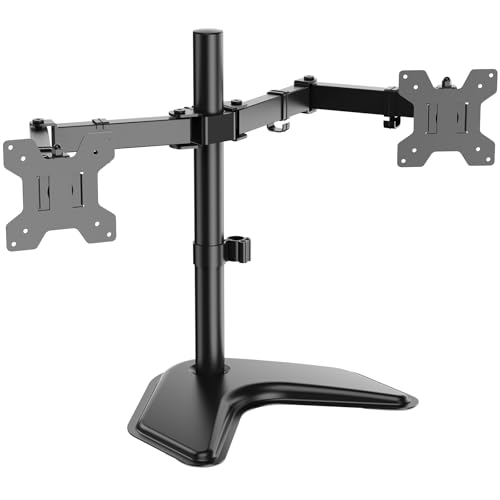
WALI Freestanding Dual Monitor Stand MF002
More Details On Our Top Picks
For fast-paced games, this Dell keeps the focus on motion first. A 240Hz refresh rate means the screen can update far more often than a standard 60Hz panel, so quick camera pans and twitch aim should look calmer and more controlled. The IPS panel gives you wider viewing angles than many basic gaming screens, which helps in a shared setup or a desk that sits off-center.
The honest trade-off is resolution, since FHD on 27 inches is aimed more at speed than razor-fine text. That said, the AMD FreeSync Premium support and two HDMI ports make it a sensible bridge between PC and console use, and the DisplayPort 1.4 input suits a desktop gaming rig. You also get tilt adjustment, so the stand works better on a straightforward desk than a fully ergonomic arm.
Strong Points
- 240Hz refresh rate keeps motion fluid for competitive play and fast scrolling.
- IPS technology helps color and viewing angles stay steady across the panel.
- AMD FreeSync Premium helps reduce visible tearing during supported gameplay.
- Two HDMI ports plus DisplayPort 1.4 give you flexible device hookups.
- Tilt adjustment helps you fine-tune the viewing angle on a desk setup.
Things To Consider
- 27-inch FHD can look less dense than a sharper QHD screen at close range.
- Tilt-only adjustment leaves less flexibility than the height and swivel options on the Dell 27 Plus models below.
- For text-heavy office work, the speed focus may feel like more monitor than you need.
Feature Snapshot
Who It Suits Best
Competitive gamers and casual console players who want speed first will get the most out of this screen.
Where Another Pick Suits Better
Dell 24 Monitor SE2426H 23.8-inch FHD fits you better for mixed-use desks that need a slightly smaller footprint and a more balanced feel.
This Acer makes sense for a compact office or a small home desk where space matters as much as image quality. The 21.5-inch size keeps the footprint tidy, and the ZeroFrame design, which means very slim borders, helps it feel less bulky beside a laptop or second display. You get a monitor that looks calm on a desk without drawing attention away from the work.
Its 100Hz refresh rate is a nice middle ground for daily use, especially compared with the sharper gaming-first pace of the Dell 27 240Hz monitor. The 1ms response time and AdaptiveSync support help smooth motion in light gaming, while the HDMI, VGA, and VESA mount support make it easy to fit older systems or a wall-mounted setup. The trade-off is simple, you’re choosing practicality over a large cinematic canvas.
Highlights
- 21.5-inch size fits tighter desks and smaller work areas.
- 100Hz refresh rate feels smoother than a basic office panel.
- AdaptiveSync support helps reduce stutter with compatible graphics output.
- HDMI and VGA keep older and newer devices in play.
- VESA mounting gives you a cleaner, more flexible desk layout.
- sRGB 99% supports color-conscious everyday work and content viewing.
Minor Gripes
- 21.5 inches can feel small for split-screen multitasking.
- VGA is handy for legacy gear, but it won’t matter for most newer desks.
- The compact frame suits office work better than immersive gaming.
Core Details
Who Will Love This
Office users, students, and small-space setups get the most value from this compact, straightforward display.
Look Elsewhere When
Dell 27 Plus QHD Monitor S2725DSM suits you better for sharper text and more room to spread out windows on a larger desk.
Among the smaller screens here, this Dell lands in a very easy-to-live-with spot. The 23.8-inch panel gives you a little more room than the Acer while staying compact enough for a modest desk, and the 144Hz refresh rate keeps motion more lively than a typical office monitor. That balance makes it a decent fit for work during the day and games or streaming at night.
The 1ms MPRT, or moving picture response time, helps moving images blur less, which matters when you jump between browser tabs, video, and fast scenes. You also get IPS viewing angles and AMD FreeSync, so it feels more polished than a bare-bones value screen. The only real catch is that it still stays in Full HD, so you’re buying smoothness more than extra desktop detail.
Best Bits
- 23.8-inch size stays desk-friendly without feeling cramped.
- 144Hz refresh rate gives you a snappier feel than standard office panels.
- 1ms MPRT helps keep motion clearer in fast scenes.
- IPS panel supports broad viewing angles for shared setups.
- AMD FreeSync helps gameplay look steadier on compatible systems.
Areas To Watch
- Full HD on 23.8 inches is practical, though not especially dense.
- Tilt-only adjustment limits ergonomic fine-tuning.
- For heavy multitasking, a larger QHD screen still gives you more breathing room.
Feature Rundown
Made For
You’ll get the most from this screen if you want a compact all-rounder for schoolwork, office tasks, and casual gaming.
Another Choice May Suit
Dell 27 Plus Monitor S2725HSM is the better fit for you if built-in speakers and a larger 27-inch panel matter more than compact size.
This Dell starts to make more sense once you want a monitor that handles both work and casual entertainment without extra accessories. The built-in 3W speakers keep a desk cleaner, and the 27-inch size gives you enough room for side-by-side windows, browser tabs, and a video call without everything feeling cramped. The Ash White finish also gives it a lighter visual presence than the darker screens above.
Compared with the Dell 24 SE2426H, this one leans more into comfort and desk versatility than compactness. Height, tilt, pivot, and swivel adjustment give you real ergonomic range, and pivot means the screen can rotate from landscape to portrait, which helps if you live in documents, code, or long web pages. The trade-off is that FHD on 27 inches is still a practical choice rather than a sharply detailed one.
Positives
- Built-in speakers reduce the need for a separate audio device at the desk.
- Height, tilt, swivel, and pivot adjustment give you flexible positioning.
- 27-inch size works well for multitasking and shared media viewing.
- 144Hz refresh rate keeps everyday motion smoother than basic office screens.
- AMD FreeSync helps supported games look steadier.
Worth Noting
- FHD on 27 inches is workable, though not as sharp as QHD.
- The speakers are useful for convenience, but they won’t replace a dedicated audio setup.
- Larger footprint asks for a desk with a bit more width.
Technical Sheet
The Right Fit
You’ll like this one most if you want a roomy, ergonomic monitor for home office use, streaming, and light gaming.
Where A Sibling Pick Shines
Dell 27 Plus QHD Monitor S2725DSM is the stronger fit for detail-focused work and sharper text on a similar 27-inch frame.
This is the screen that makes a stronger case for work that involves text, timelines, or multiple windows at once. QHD means 2560 x 1440 resolution, so you get more desktop space and finer detail than the 1080p models above, and that makes the 27-inch panel feel more purposeful rather than just larger. For a home office that also handles movies or games, that extra clarity is easy to appreciate.
Compared with the Dell 27 Plus FHD model, this one gives you the same general size and speaker setup but with a sharper canvas and DisplayPort 1.4 alongside HDMI. The height, tilt, pivot, and swivel stand also helps it work as a daily desk tool rather than a pure entertainment screen. The trade-off is that the upgrade only really pays off when your work or habits benefit from finer detail, not just bigger visuals.
Upsides
- QHD resolution gives you more usable space for windows and spreadsheets.
- 27-inch size pairs well with the sharper pixel density.
- 144Hz refresh rate keeps motion smooth for both work and play.
- Dual 3W speakers add simple built-in sound for everyday use.
- DisplayPort 1.4 and HDMI make desktop hookups straightforward.
- Full stand adjustability supports a more comfortable long-session setup.
Softer Spots
- QHD makes the most sense on a capable PC or laptop.
- The built-in speakers are handy, but they remain a convenience feature.
- It asks for a desk setup that can justify the sharper panel.
Details At A Glance
Who Should Grab It
You’ll appreciate this model most if you want sharper text, more workspace, and a monitor that still handles games and streaming well.
Swap It Out When
Dell 27 Plus Monitor S2725HSM is the easier fit if you want the same size with a simpler Full HD panel and don’t need the extra detail.
Small desks benefit from monitors that stay out of the way, and this Sceptre does that well. The 22-inch size is easy to place in a dorm room, starter office, or secondary gaming corner, while the 144Hz refresh rate keeps it from feeling like a basic budget screen. Built-in speakers also help reduce cable clutter, which matters when your setup already feels tight.
The trade-off is obvious: you’re getting a compact FHD monitor, not a big field of view or a premium desktop canvas. Still, HDMI and DisplayPort connections give it enough flexibility for a console or PC, and the machine-black finish keeps the look simple. It’s a sensible fit for limited space, not a statement piece.
Bright Spots
- 22-inch size fits narrow desks and smaller rooms.
- Up to 144Hz keeps motion smoother than standard entry-level screens.
- HDMI and DisplayPort make it easy to connect modern gear.
- Built-in speakers help keep the desk less crowded.
Small Caveats
- The smaller panel feels less expansive for multitasking.
- Sound from built-in speakers is convenient, though not a substitute for fuller audio.
- The compact frame works best when space is the main concern.
Core Details
Built With In Mind
Students, dorm-room gamers, and anyone working with a small desk will find this screen easy to live with.
Where Shoppers Go Wrong
Dell 27 Plus QHD Monitor S2725DSM is the better fit for you if you want more desktop space and sharper text for daily productivity.
The curved shape gives this Sceptre a more wrapped-in feel than the flat screens above, and that changes the mood of a desk in a nice way. R1500 curvature means the panel bends with a moderate arc, which helps the image sit a little more naturally in front of you without going overly dramatic. The metal-pattern finish also gives it a more styled look than the plain black models in this list.
It’s a solid fit for casual gaming, streaming, or a home desk where appearance matters nearly as much as function. HDMI and VGA keep it flexible with newer and older devices, while VESA wall mount support helps you reclaim desk room. The catch is that the curved effect is mostly about comfort and immersion, not a substitute for higher resolution or a faster refresh rate.
Reasons To Buy
- Curved 24-inch panel gives the desk a more immersive feel.
- R1500 curvature is moderate and easy to adapt to.
- 98% sRGB supports a more color-aware picture for general use.
- HDMI and VGA cover both current and older devices.
- VESA wall mount support helps free up desk space.
Points To Note
- Curvature is a taste issue, so it won’t suit everyone.
- VGA is mostly there for legacy hardware.
- The style is appealing, though the screen still stays in Full HD.
Quick Facts
Whose Shelf It Belongs On
This suits you best if you want a curved display for casual gaming, streaming, or a visually cleaner desk setup.
Reach For A Different Pick When
Dell 24 Monitor SE2426H is the better fit if you want a flat screen with a faster-feeling 144Hz refresh rate for mixed use.
Once you move beyond one screen, desk layout starts to matter almost as much as image quality. This WALI stand gives you a freestanding V-base, so you can place dual monitors without drilling into a wall or clamping to the back of the desk, and that makes it easier for rented rooms or shared workspaces. The detachable plates and height adjustment add a little more flexibility than a fixed, bare-metal base.
It supports 13- to 27-inch screens and up to 22 pounds per arm, which covers a wide range of flat monitors in this roundup. Tilt, swivel, and rotation help you line up two screens for side-by-side work, and the VESA 75 x 75 mm and 100 x 100 mm pattern support keeps compatibility broad. The trade-off is that a freestanding base takes some desk depth, so shallow worktops may feel tighter than you expect.
Standout Traits
- Freestanding design avoids wall mounting and desk clamping.
- Dual-arm layout helps you build a cleaner two-screen desk.
- Supports 13- to 27-inch monitors for broad compatibility.
- Each arm handles up to 22 pounds.
- Tilt, swivel, and rotation give you flexible positioning.
- Detachable plates and height adjustment make setup less fussy.
Room For Improvement
- The V-base uses more desk depth than a wall mount.
- Mounting and cable routing still take a little planning.
- It suits dual-monitor desks better than single-screen setups.
Core Details
Perfect Match For
This is the right call for you if you run two monitors and want a cleaner, more adjustable desk without using wall mounts.
Another Choice May Suit
Dell 27 Plus Monitor S2725HSM is a better fit when you only need one display with built-in speakers and a simple all-in-one setup.
How To Choose The Right Looking Pc Monitors
Match Screen Size To Your Desk
Screen size changes your daily experience more than most spec sheets suggest. A 21.5-inch panel like the Acer keeps things tidy for small desks, while 27-inch models give you room for spreadsheets, split windows, and a more relaxed viewing distance. The sweet spot depends on how close you sit and whether the monitor needs to share space with notebooks, a laptop, or a dock.
Resolution matters just as much, because size without enough pixel density can look soft. Full HD works well on 22 to 24 inches for most casual use, but a 27-inch QHD panel, such as the Dell 27 Plus QHD, gives you cleaner text and more workspace. That sharper canvas is especially useful for editing, coding, or all-day office work.
Think About Motion Before Color
Refresh rate tells you how often the image updates each second, and it shapes how smooth motion feels. A 144Hz or 240Hz screen can make fast games, quick scrolling, and frequent window switching feel far less choppy than a basic 60Hz panel. For competitive play, that difference often matters more than a stylish frame or speaker grille.
Response time is the monitor’s delay in changing pixels, and lower numbers usually help motion look cleaner. You’ll see that in items like the Dell 24 SE2426H and Dell 27 240Hz monitor, which aim for smoother action than the Acer office display. For mixed work and entertainment, 100Hz is a friendly middle ground, especially on a compact desk.
Check Ports, Stands, And Desk Fit
Ports decide how painless setup feels. HDMI covers most modern gear, DisplayPort often suits desktop PCs, and VGA still matters for older devices or reused hardware, so the right mix saves you from adapters you never planned to buy. The WALI stand also shows why mounting support matters, because VESA compatibility opens the door to arm setups and better desk organization.
Ergonomics matter too, especially for long sessions. Height, tilt, swivel, and pivot help you bring the panel into a comfortable position, while tilt-only stands keep things simpler but less flexible. That’s the quiet difference between a monitor that just sits there and one that disappears into your routine.
Decide How Much Convenience You Want Built In
Built-in speakers can reduce clutter, and they’re handy for calls, casual video, and quick audio without extra gear. Models like the Dell 27 Plus Monitor and Sceptre New 22-Inch Gaming Monitor take that route, which suits bedrooms, dorm rooms, and tight home offices. The trade-off is predictable: convenience first, depth of sound second.
Color support and panel style matter in a different way. IPS screens usually hold up better for side angles and shared use, while curved panels create a more enveloping feel on a desk. The right choice comes down to whether you value a cleaner workday, smoother games, or a setup that handles both without feeling compromised.
Things Worth Knowing First
Hidden Buying Traps
Many people focus on screen size and forget the stand. A 27-inch panel with limited tilt can be awkward on a shallow desk, and a bigger monitor can actually feel less comfortable than a smaller one with better adjustment. Refresh rate also gets overemphasized, so don’t pay extra for speed you won’t notice in spreadsheets or email.
Another common miss is buying for tomorrow instead of today. If your laptop only needs a clean office display, a compact 100Hz or 144Hz panel may be enough. If your work involves multiple windows or detailed text, a sharper QHD screen is the smarter long-term fit.
The Case For Spending Up
Higher-tier monitors usually cost more because they add sharper resolution, faster motion handling, better stands, or both. That’s the difference between a basic Full HD screen and a QHD panel with more usable desktop space, or between a fixed stand and one with height, pivot, and swivel control. In practical use, those upgrades show up as less eye strain from cramped layouts and less fiddling during the day.
Spending more makes sense when the monitor is the center of your desk. You’ll feel the value if you work long hours, juggle several windows, or care about fluid gameplay on a capable PC. For a guest room, dorm room, or secondary workstation, a simpler model can be the cleaner move.
Closing Thoughts
Your best Looking Pc Monitors choice depends on how you use the desk, not just how the screen looks in a photo. For speed, the Dell 27 240Hz stands out; for sharper everyday work, the Dell 27 Plus QHD earns the strongest nod; and for tight spaces, the Acer and Sceptre 22-inch options keep things easy. Pick the monitor that matches your room, your habits, and the amount of detail you actually notice day to day. That’s the version you’ll live with most comfortably.
