
Mini-LED 4k monitors make a lot of sense when you want crisp text, deeper contrast, and fast motion without jumping to a massive TV-sized setup. That mix matters for home offices, gaming desks, and shared spaces where one screen has to do a bit of everything.
The picks below lean toward displays with useful stand adjustments, modern ports, and refresh rates that suit both everyday work and fast-paced play. You’ll see where each one fits best, and where a simpler or more specialized option may be the smarter call.
The Shortlist At A Glance

INNOCN 32″ Mini LED 4K 160Hz Monitor

KTC 27 Inch 4K Gaming Monitor H27P6

AOC 27 Inch Gaming Monitor Q27G3XMN

Dell 27 240Hz Gaming Monitor SE2726HG
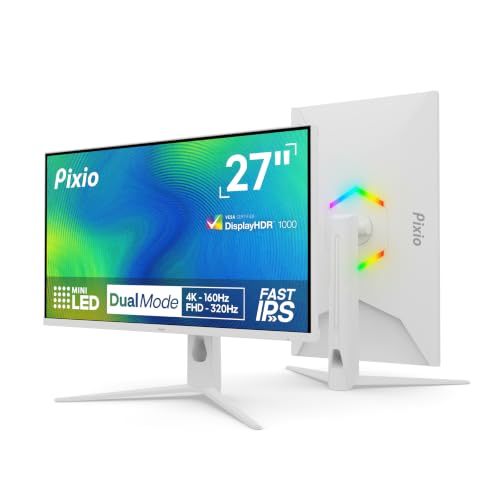
Pixio PX27UM Mini LED White 27 inch
INNOCN 27″ 2K 1440P 320Hz Mini LED Monitor GA27T1M
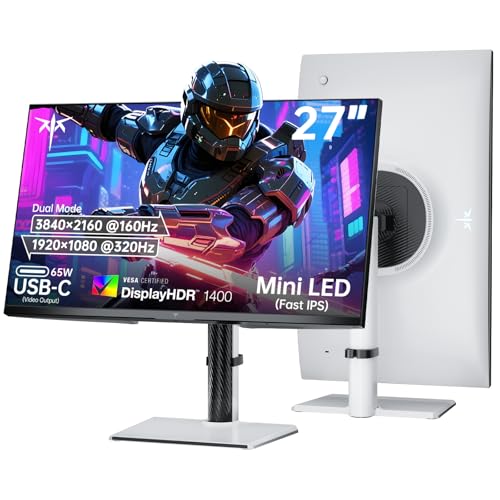
KTC 27 Inch Dual Mode Mini LED Monitor

KTC 27 Inch 4K Mini-LED Gaming Monitor M27U6
More Details On Our Top Picks
A 32-inch panel gives you room to spread out, and this INNOCN leans into that with 4K resolution, Mini LED backlighting, and a 160Hz refresh rate. That combination suits you well for a desk that switches between spreadsheets, creative work, and games after hours.
The height-adjustable stand helps with ergonomics, while USB Type-C keeps laptop setups cleaner than a tangle of adapters. The honest trade-off is that a screen this large asks for more desk depth, so it feels best in a dedicated setup rather than a cramped corner.
Strong Points
- 32-inch size gives you generous workspace for editing, multitasking, or immersive play.
- 4K resolution keeps text and UI elements sharp at close desk distance.
- 160Hz refresh suits fast games and smooth scrolling without feeling overbuilt.
- USB Type-C can simplify a laptop desk with one cable for many users.
- The height-adjustable stand helps you match eye level without stacking books under it.
Things To Consider
- The larger footprint needs a sturdier desk and a bit of breathing room.
- Mini LED can bring more visual punch, but it also tends to place a premium on careful tuning in dark scenes.
- You may want a clean cable path planned in advance, especially with a multi-device setup.
Feature Snapshot
Who It Suits Best
You’ll like this most if you want a large 4K screen that can handle both work and gaming without feeling cramped.
A Better Fit Elsewhere
KTC 27 Inch 4K Gaming Monitor H27P6 suits you better if you want a smaller desk footprint with more input and mode flexibility.
The dual-mode setup is the headline here, because you get 4K at 160Hz for detailed work and slower-paced games, then 1080p at 320Hz for competitive motion. That makes sense for someone who bounces between single-player visuals and twitchy shooters on the same desk.
USB-C at 90W is especially useful for laptop docking, and KVM support means one keyboard and mouse can switch across devices more cleanly. The trade-off is that this kind of flexibility can feel like overkill for a simple one-device setup, so your use case matters more than the spec sheet.
What We Like
- Dual-mode operation lets you choose between sharper detail and higher-speed play.
- 90W USB-C is a practical dock-like feature for many laptop users.
- KVM support helps simplify multi-device desks without extra switching gear.
- Adaptive Sync reduces the tearing that can distract during fast movement.
- Height adjustment makes it easier to dial in a comfortable viewing position.
Room For Improvement
- The feature set is broad enough that casual users may not use all of it.
- Switching modes is useful, but it also adds a bit of setup thinking up front.
- Like many feature-packed monitors, cable planning pays off once you connect multiple devices.
Details At A Glance
Who Should Grab It
You’re the best fit here if you want one monitor that can serve both a productivity laptop and a fast gaming rig.
Another Choice May Suit
Pixio PX27UM Mini LED White 27 inch is the cleaner fit for you if the white finish matters more than KVM switching.
This AOC sits in a nice middle ground for you if you want speed without giving up a sharper-than-1080p desktop. The 180Hz refresh rate and Mini LED backlight should appeal to anyone who splits time between shooters, strategy games, and general work.
It also has the kind of practical stand and port mix that keeps a desk from feeling fussy. Compared with the larger INNOCN 32-inch pick, this one should feel easier to place in a standard bedroom or apartment setup, though the screen still asks for decent viewing distance.
Upsides
- QHD resolution gives you a sharper desktop than standard Full HD.
- 180Hz refresh rate is a strong fit for quick game movement and smooth scrolling.
- Mini LED backlighting should help contrast feel more defined than basic edge-lit panels.
- Height adjustment and VESA support give you flexibility in how you mount or position it.
- USB 3.2, HDMI 2.1, and DisplayPort 1.4 offer practical connection options.
Points To Note
- QHD is a sensible middle step, but you won’t get the same fine detail as 4K.
- Mini LED performance still depends on how comfortable you are with dimming-zone behavior in dark scenes.
- At 27 inches, it fits well on many desks, though very large layouts may feel more spacious on a 32-inch panel.
Core Details
Whose Shelf It Belongs On
You’ll get the most from this if you want a strong all-round gaming monitor that still looks polished for day-to-day desk work.
Look Elsewhere When
INNOCN 32″ Mini LED 4K 160Hz Monitor suits you better if you prefer a larger 4K canvas for creative work and multitasking.
This Dell takes a simpler route than the Mini LED models above, and that’s exactly the point for many setups. A 27-inch Full HD panel at 240Hz gives you fast motion for esports-style play without asking for the stronger graphics hardware that 4K tends to need.
The tilt-only stand keeps things straightforward, while IPS panel tech helps color hold up better than you’d expect at this tier. You may find the resolution a little plain after looking at the sharper displays in this list, but for a secondary gaming screen or a tighter budget, it stays practical.
Highlights
- 240Hz refresh rate is a strong match for quick reaction games.
- 27-inch size keeps the footprint manageable on smaller desks.
- IPS technology supports more consistent color than many basic gaming panels.
- Two HDMI ports and DisplayPort 1.4 make console or PC hookups easy.
- ComfortView Plus is useful for long desk sessions because it reduces blue light output without flattening color too much.
Softer Spots
- 1080p looks less detailed than the QHD and 4K picks in this roundup.
- The stand only tilts, so height adjustment is off the table unless you add an arm.
- Fast panels can still show their limits in image-rich creative work compared with the Mini LED options.
At A Glance
Built With In Mind
You’re the right fit here if you want a fast, straightforward gaming screen and don’t need the detail level of 1440p or 4K.
Where A Sibling Pick Shines
AOC 27 Inch Gaming Monitor Q27G3XMN suits you better if you want deeper contrast and a sharper QHD image without moving up to a full 4K setup.
White gaming monitors are still a niche look, and this Pixio makes that choice feel more deliberate than decorative. The dual-mode layout is useful too, since you can lean on 4K at 160Hz for everyday clarity or switch to 1080p at 320Hz for faster play.
That fully adjustable stand matters more than it sounds, especially on a desk where height, tilt, and placement need a lot of fine tuning. Compared with the Dell SE2726HG, this one asks for more budget and more graphics headroom, but it gives you a much richer feature mix in return.
Reasons To Buy
- The white finish helps a lighter desk setup feel more coordinated.
- 4K and 1080p dual modes cover both visual detail and speed.
- Fast IPS should keep motion and color more balanced than a plain budget panel.
- Adaptive Sync helps keep gameplay smoother across supported sources.
- The fully adjustable stand is useful when you want to fine-tune posture and screen angle.
Small Caveats
- The white finish can show dust and smudges more easily than darker models.
- Dual-mode monitors usually make more sense once you already know which mode you’ll use most.
- At this level, the feature set is more compelling for mixed use than for a bare-bones gaming station.
Feature Card
Perfect Match For
You’ll appreciate this most if you want a stylish 27-inch monitor that can shift between productivity and faster play without looking bland.
Swap It Out When
Dell 27 240Hz Gaming Monitor SE2726HG makes more sense if you want to keep the spend and setup simpler for pure 1080p gaming.
This INNOCN leans hard into speed, and that makes it a good match for FPS-focused desks where motion clarity matters more than sheer screen size. The 1440p resolution is easier to drive than 4K, so you get a more realistic pairing for high refresh gameplay on a wider range of graphics cards.
FreeSync and G-SYNC compatibility add welcome flexibility, especially when you move between different systems or consoles. The trade-off is obvious enough: you give up the extra pixel density of 4K, but in exchange the panel stays better aligned with competitive play and a neater 27-inch footprint.
Bright Spots
- 320Hz refresh is a strong fit for competitive motion and quick aim tracking.
- QHD resolution balances clarity and system demand better than 4K for many setups.
- Mini LED backlighting should provide stronger contrast than basic IPS gaming screens.
- FreeSync and G-SYNC compatibility help widen device support.
- The included stand and speaker support make it more convenient for a simpler desk.
Areas To Watch
- 320Hz matters most in fast competitive use, so casual work users may not need that much headroom.
- Speakers on monitors usually serve as backup audio rather than the main event.
- Mini LED can add value, but it also makes you more likely to notice how well a game is tuned for HDR.
Feature Rundown
Made For
You’re the strongest fit here if your desk is built around competitive gaming and you want a 27-inch display that stays quick.
Where Another Pick Suits Better
KTC 27 Inch Dual Mode Mini LED Monitor suits you better if you want more premium HDR punch and a wider feature spread.
This KTC goes after the higher-end end of the category with HDR1400, dual-mode operation, and a 65W USB-C port. That mix should suit you well if you want a monitor that can pull double duty for a laptop desk, a gaming PC, and a cleaner cable run.
Compared with the H27P6 above, this one pushes the premium angle harder, especially for people who care about brighter HDR presentation and a more flexible stand. The catch is simple: the feature spread only makes sense if your desk and graphics setup can keep up.
What We Like
- HDR1400 is the kind of spec that signals a more ambitious visual platform.
- 4K at 160Hz gives you a serious mix of detail and motion smoothness.
- 1080p at 320Hz keeps it relevant for faster competitive sessions.
- 65W USB-C is handy for tidier laptop-first workstations.
- Height, tilt, swivel, and pivot adjustments make placement far easier to tailor.
Worth Noting
- The premium spec mix makes more sense for a well-equipped desk than a basic setup.
- Very bright HDR-style use can make surrounding room lighting and cable management feel more important.
- It offers a lot, but that also means you’ll want to spend a little time dialing in settings.
Core Details
Right Fit For
You’ll get the most value here if you want a premium-feeling 27-inch screen with flexible positioning and strong display ambitions.
Reach For A Different Pick When
INNOCN 27″ 2K 1440P 320Hz Mini LED Monitor GA27T1M suits you better if you want a lighter ask on your graphics hardware.
The M27U6 is the gentler option in this roundup, with 4K at 75Hz and FHD at 144Hz instead of the much faster modes found on the gaming-first picks. That makes it feel more balanced for daily work, media, and occasional play than for chasing the highest frame rates.
Its white finish, fully adjustable stand, and 148% sRGB claim make it easier to picture on a desk used for both content and casual gaming. You may find it less tempting than the 160Hz and 320Hz models above, but for mixed use with a calmer pace, it lands in a sensible spot.
Positives
- 4K resolution gives you a crisp desktop for documents, browsing, and creative tasks.
- Dual-mode support offers a second speed profile for lighter gaming sessions.
- Fully adjustable ergonomics make it easier to fit into a shared or changing workspace.
- The white finish looks cleaner in bright rooms or lighter furniture setups.
- Adaptive Sync helps motion stay steadier in supported content.
Areas To Watch
- 75Hz at 4K is modest next to the faster gaming displays in this list.
- 144Hz in FHD mode is fine for general play, though esports-focused desks may want more headroom.
- White finishes typically need a bit more wiping to stay looking fresh.
Feature Rundown
Best Suited To
You’re the best match here if you want a polished 27-inch Mini LED screen for work, media, and lighter gaming.
Where Another Pick Suits Better
Pixio PX27UM Mini LED White 27 inch is the stronger fit if you want the same white look but much faster dual-mode performance.
How To Choose The Right Mini-Led 4k Monitors
Match The Screen Size To Your Desk
A 27-inch Mini-LED 4K monitor usually feels right for most desks because it keeps text sharp without taking over the room. A 32-inch model, like the INNOCN 32-inch pick above, gives you more space for side-by-side windows, but it also needs more depth and a steadier viewing position.
That size choice matters more than it first appears. Bigger panels can feel immersive, yet they can also force you to turn your head more, which is fine in a dedicated setup and less ideal on a shallow apartment desk.
Choose Refresh Rate For Your Main Use
Refresh rate is how many times the screen updates each second, so higher numbers usually feel smoother in motion. A 160Hz or 180Hz Mini-LED 4K display works well for mixed use, while 240Hz and 320Hz options lean harder toward fast gaming.
For esports-style play, a higher refresh rate can matter more than extra pixel density. For work, browsing, or single-player games, the better image and richer contrast of Mini LED may matter more than chasing the fastest number on the page.
Check Ports, Power, And Switching
USB-C can turn a monitor into a cleaner laptop dock, especially when it also carries power. The 90W port on the KTC H27P6 and the 65W port on the KTC HDR1400 model are especially useful for people who want fewer cables on the desk.
HDMI 2.1 and DisplayPort 1.4 are worth attention too, because they shape what your PC or console can actually send to the screen. KVM support helps even more if you switch between a work laptop and a gaming tower, since one keyboard and mouse can follow the display more neatly.
Don’t Ignore Stand Adjustments And Color Range
Height, tilt, swivel, and pivot adjustments sound minor until you sit with the monitor every day. A stand that moves well can save your neck, and it can also make a larger screen feel less tiring during long sessions.
Color coverage numbers such as DCI-P3 or sRGB point to how wide the display’s color range can be. That matters for photo work, design, and media, but the trade-off is that more color ambition often comes with a higher cost and more setup time.
Things Worth Knowing First
Common Shopping Slip Ups
A common mistake is focusing only on 4K and ignoring refresh rate. That works poorly for fast gaming, because a sharp panel can still feel sluggish if the motion side of the spec sheet is modest.
Another easy miss is desk space. A 32-inch monitor or a fully adjustable stand can be a great fit, but only when your desk depth, arm choice, and cable route all leave enough room to breathe.
What The Higher Tier Buys
Higher-tier Mini-LED 4K monitors usually cost more because they pack in better backlight control, stronger HDR targets, wider color coverage, and more flexible stands or ports. That’s the part that often separates a simple gaming screen from a monitor that can also handle creative work and laptop docking.
The upgrade is worth it when you use the screen every day and care about both image quality and comfort. For lighter use, a simpler 27-inch Full HD gaming panel can make more sense, since not every desk needs premium contrast and every bell-and-whistle connection at once.
Final Thoughts
Your best Mini-LED 4K monitor depends on how you split time between work, games, and general desk use. The INNOCN 32-inch model stands out for size and speed, while the KTC H27P6 and Pixio PX27UM make more sense if you want dual-mode flexibility in a 27-inch frame. For a more modest path, the Dell SE2726HG keeps things simple and fast. Pick the one that matches your desk and the way you actually spend your hours.
