
You want a Mini-Led Monitor 4k that fits how you actually use a desk, not just how it looks on a spec sheet. Some of these picks lean hard into fast gaming, others make more sense for mixed work, console play, or color-heavy editing, so the useful part is matching the panel size, refresh rate, and stand adjustability to your space.
The Shortlist At A Glance

INNOCN 32″ Mini LED 4K 160Hz Monitor
Samsung 32″ Odyssey Neo G8 (G85NB) 4K UHD 240Hz Curved Gaming Monitor
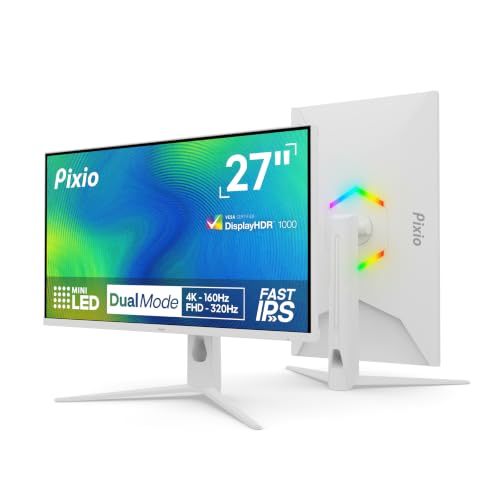
Pixio PX27UM Mini LED White 27 inch Dual Mode UHD 4K 160Hz/FHD 1920×1080 320Hz Gaming Monitor
INNOCN 27″ 2K 1440P 320Hz Mini LED Gaming Monitor GA27T1M

KTC 27 Inch 4K Mini-LED Gaming Monitor M27U6
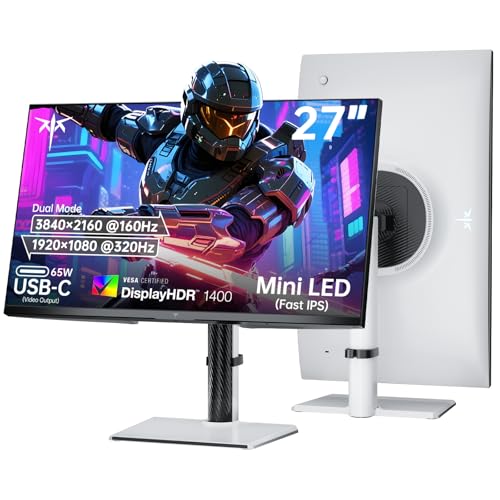
KTC 27 Inch Dual Mode Mini LED Monitor 4K 160Hz 1080P 320Hz

KTC M27T6S 27 Inch Gaming Monitor 1440P Mini LED 210Hz

INNOCN 32″ Mini LED 4K UHD 3840 x 2160 Monitor 32M2V
More Details On Our Top Picks
A 32-inch panel with 4K resolution and 160Hz refresh rate lands in a sweet spot for you if you split time between games, creative work, and regular desktop tasks. The IPS panel should keep viewing angles more consistent than a basic TN screen, while Mini LED backlighting is the part that tends to matter most for contrast-heavy scenes and HDR-style content.
The trade-off is simple, this is still a fairly large desk presence, so smaller setups may feel crowded. The height-adjustable stand and USB Type-C connectivity give you useful day-to-day flexibility, especially on a work desk that also handles a laptop.
Strong Points
- 32-inch sizing gives you room for side-by-side windows without forcing everything into tiny tiles.
- 160Hz suits fast motion well, which is helpful for action games and general desktop smoothness.
- USB Type-C can simplify a laptop setup by carrying display and other basics through one cable path.
- 99% DCI-P3 color coverage points to wide color reach, which matters for photo work and rich-looking media.
- Height adjustment helps you line up the screen with your seating position instead of stacking books under it.
Things To Consider
- The size is generous, so narrow desks may need a careful measure before you commit.
- High refresh gaming makes the most sense with a capable graphics setup.
- Mini LED panels can look excellent, but brightness and contrast behavior still depend on content and settings.
Feature Snapshot
Who It Suits Best
You get the most value from this one as a mixed-use desktop user who wants one screen for both games and everyday work.
A Better Fit Elsewhere
Samsung 32″ Odyssey Neo G8 (G85NB) 4K UHD 240Hz Curved Gaming Monitor suits you better if competitive play matters more than USB-C convenience or office flexibility.
Fast competitive play is where this Samsung makes its case, because 240Hz and a 1ms response target the kind of motion clarity you notice in shooters and racing games. The 1000R curve, which means a very tight wrap around your field of view, also gives the panel a more immersive feel than the flatter INNOCN and KTC options above.
The honest trade-off is that curved ultrafast gaming hardware tends to feel more specialized than all-purpose desk gear. Its matte display and HDMI/DisplayPort setup help, but this pick makes the most sense when gaming is the main event and you already know you like a curved screen.
What We Like
- 240Hz refresh rate supports very fluid motion in fast genres.
- 1ms response target helps limit blur during sharp camera movement.
- 1000R curvature can make the screen feel more enveloping from a normal desk distance.
- Matte finish cuts down on reflective glare from bright rooms.
- G-Sync and FreeSync Premium Pro support gives you broader compatibility with gaming setups.
Points To Note
- The curved shape is a strong preference item, so flat-panel fans may not warm to it.
- It is tuned more for gaming than for color-critical work on a shared desk.
- A screen this quick asks more from your system, especially at 4K.
Core Details
Built With In Mind
You should look at this monitor first if your desk time centers on fast games and you prefer a curved display that fills your view.
Where A Sibling Pick Shines
INNOCN 32″ Mini LED 4K 160Hz Monitor is the gentler choice for you if the same size plus USB Type-C and a taller work-to-play balance matter more than 240Hz speed.
The dual-mode layout is the headline here, because you can shift between 4K at 160Hz and 1080p at 320Hz depending on whether you want sharper detail or faster motion. That makes the Pixio feel unusually adaptable, especially for you if one day is a story-heavy single-player session and the next is all about high-speed shooters.
White finishes can look cleaner on a modern desk, but the bigger win is practical flexibility. The fully adjustable stand helps you set the screen up neatly, and the Mini LED backlight with fast IPS panel gives you a very different experience from the more straightforward KTC M27T6S below.
Highlights
- Dual-mode operation lets you prioritize resolution or speed with a settings change.
- 27-inch sizing keeps the screen manageable on smaller desks.
- Fast IPS is a good fit for both quick motion and everyday desktop clarity.
- White finish suits lighter desk setups and rooms with a cleaner look.
- Fully adjustable stand helps you dial in height and angle more easily.
Softer Spots
- Switching between modes adds one more setting choice to your routine.
- 27 inches gives you less sprawling workspace than the 32-inch picks.
- The most useful mode depends on the game or task, so the value is tied to how you work.
Details At A Glance
Whose Shelf It Belongs On
This suits you best when you want one monitor that can shift between high-detail work and very fast gaming without taking over the whole desk.
Another Choice May Suit
KTC 27 Inch Dual Mode Mini LED Monitor 4K 160Hz 1080P 320Hz is the better fit for you if a 65W Type-C port and HDR1400 matter more than Pixio’s white design.
Speed is the whole point here, and the 27-inch 1440p format keeps the load lighter than 4K while still looking sharp from a normal desk distance. In most gaming setups, that combination is easier to drive than a 32-inch 4K panel, which matters if your graphics hardware is good but not extreme.
The 320Hz ceiling and Mini LED backlight make this a very focused tool for fast action. HDMI 2.1, DisplayPort, and the adjustable stand round out the package, though the strength of this model is really in responsiveness rather than all-around desk versatility.
Bright Spots
- 320Hz refresh rate is built for very quick motion in shooters and other twitch-heavy games.
- 1440p keeps image detail higher than standard Full HD without the heavier 4K demand.
- Mini LED backlighting helps the screen look more vivid in darker scenes.
- FreeSync and G-SYNC compatibility make it easier to pair with different gaming systems.
- Adjustable stand gives you room to set the panel at a comfortable height.
Minor Gripes
- The feature set is most appealing for gaming, so general office use feels less central.
- 27 inches gives you less workspace than the larger 32-inch options.
- Very high refresh rates are most useful with hardware that can feed them properly.
Quick Facts
Best Suited To
You should look here first if your main goal is a smaller monitor that keeps competitive play front and center.
Swap It Out When
Samsung 32″ Odyssey Neo G8 (G85NB) 4K UHD 240Hz Curved Gaming Monitor makes more sense for you if you want a bigger 4K canvas and prefer a dramatic curved view.
The M27U6 takes a calmer route than the Pixio above, with 4K at 75Hz and Full HD at 144Hz instead of chasing the highest possible frame ceiling. That makes it easier to treat as a daily monitor, especially for you if the desk does a bit of everything and gaming is only part of the picture.
The 27-inch size is sensible, the white finish keeps it visually light, and the adjustable stand gives you a decent amount of placement freedom. The trade-off is that the refresh targets are more modest, so you are paying for balance rather than a pure speed story.
Upsides
- Dual mode gives you a sharper 4K setting and a faster 144Hz option.
- 27-inch form factor fits comfortably on many home desks.
- Adaptive Sync helps reduce visible tearing in supported setups.
- HDR 1000 support points to stronger contrast potential in compatible content.
- Tilt, swivel, pivot, and height adjustment make it easier to fine-tune the screen position.
Room For Improvement
- 75Hz in 4K mode is modest compared with the faster picks in this list.
- Refresh behavior will feel more restrained to anyone used to very high-speed panels.
- Adjustable stands are handy, but they also take a little more desk depth than basic fixed feet.
At A Glance
Who Will Love This
This is a sensible match for you if you want a 27-inch screen that handles daily work and occasional gaming without feeling overly aggressive.
Look Elsewhere When
Pixio PX27UM Mini LED White 27 inch Dual Mode UHD 4K 160Hz/FHD 1920×1080 320Hz Gaming Monitor is the stronger choice for you if faster gaming modes matter more than a gentler 4K workload.
This KTC feels built for a desk that has to do more than one job, because 4K at 160Hz and 1080p at 320Hz give you a wide spread of choices. The 65W Type-C port is the detail that stands out for mixed-use setups, since it can help simplify a laptop connection without adding another tangle of adapters.
HDR1400 sits above the HDR1000 class used by several other screens here, so this model is clearly aimed at a more demanding picture-first crowd. That said, the real value is still practical, since HDMI 2.1, DP 1.4, and the adjustable stand make the monitor easier to live with every day.
Best Bits
- 4K 160Hz mode gives you a sharp and very fast desktop image.
- 1080p 320Hz mode gives you a lighter path for very high frame-rate play.
- 65W Type-C support is useful for modern laptop docking habits.
- HDR1400 suggests stronger highlight handling than lower-tier HDR ratings.
- HDMI 2.1 and DP 1.4 widen compatibility with consoles and PCs.
Areas To Watch
- All those modes and ports can make setup feel more complex at first.
- The feature depth is strongest when you actually use the switching options.
- 27 inches keeps it compact, though it still needs a sensible desk depth.
Feature Card
Right Fit For
You get the most out of this monitor as a power user who wants one screen to handle gaming, laptop docking, and sharper HDR-capable content.
Where Shoppers Go Wrong
KTC M27U6 makes more sense for you if you want a gentler, more budget-conscious dual-mode approach with less emphasis on high-end connectivity.
1440p at 210Hz is a sensible middle ground, and that makes this KTC easier to recommend for everyday gaming than the more extreme 240Hz and 320Hz panels above. The Mini LED backlight and 157%sRGB color figure also give it more visual punch than a plain fast IPS screen would.
The taller stand adjustments and VESA support help it slide into a normal home setup without much fuss. It does not chase the biggest numbers in every category, but that restraint is part of the appeal, because you get a monitor that feels practical rather than showy.
Positives
- 210Hz is fast enough for smooth play without pushing into the most demanding tier.
- 1440p keeps text and game detail nicely balanced on a 27-inch panel.
- Mini LED lighting helps dark scenes keep more depth.
- 157%sRGB suggests a lively color range for games and streaming.
- Height adjustment, swivel, pivot, and tilt support help with daily ergonomics.
Small Caveats
- The headline numbers are strong, but the screen still sits below the 4K class for sheer detail.
- Faster alternatives exist in this list for people chasing the highest frame ceiling.
- Like many adjustable monitors, it benefits from a little setup time to get the stand just right.
Spec Overview
The Right Fit
This is a strong match for you if you want one monitor that feels quick in games but still stays comfortable for daily desk work.
Where A Sibling Pick Shines
INNOCN 27″ 2K 1440P 320Hz Mini LED Gaming Monitor GA27T1M is the better option for you if raw motion speed matters more than this model’s balanced everyday feel.
The 32M2V looks like the most desk-friendly 32-inch all-rounder in this group, especially because it pairs 4K detail with 144Hz refresh and a well-equipped USB-C path. That mix works nicely for you if your desk serves gaming, office work, and occasional content creation without feeling like a permanent battlestation.
The adjustable stand, built-in stereo speakers, and broad input support make daily ownership easier than a more bare-bones panel. It does ask for space, though, and the size makes the whole setup feel a little like a large framed print on your desk, so smaller rooms may need care.
Reasons To Buy
- 4K at 144Hz gives you a strong blend of detail and motion smoothness.
- Mini LED backlighting with 1152 zones supports richer contrast behavior.
- USB-C with up to 90W power delivery can simplify laptop use.
- HDMI 2.1 and DisplayPort 1.4 broaden compatibility with modern gear.
- Built-in speakers add convenience for casual desktop use.
Worth Noting
- The 32-inch footprint is best suited to a desk with room to breathe.
- Integrated speakers are convenient, though many setups will still sound better with separate audio.
- Because it aims for both gaming and creative work, it is less specialized than the most aggressive speed-first models.
Core Details
Built For In Mind
You should put this one at the top of your list if you want a large 4K screen that still feels useful for gaming and office work on the same desk.
Not Your Match When
Samsung 32″ Odyssey Neo G8 (G85NB) 4K UHD 240Hz Curved Gaming Monitor is the better fit for you if you care more about ultrafast gaming and a curved panel than USB-C convenience.
How To Choose The Right Mini-Led Monitor 4k
Start With How You Actually Use The Desk
Panel size matters more than many shoppers expect. A 32-inch screen, such as the INNOCN 32M2V or Samsung Neo G8, gives you more room for side-by-side windows and a more immersive game image, while a 27-inch model keeps the footprint easier to manage in a tighter room.
Refresh rate should match the kind of motion you notice. 144Hz to 160Hz is already smooth for most play, but 210Hz, 240Hz, and 320Hz start making more sense for fast shooters, racing games, and high-frame-rate PC setups.
Match Resolution To System Strength
4K gives you clean text and sharper detail, yet it asks more from your graphics hardware. A dual-mode monitor, like the Pixio PX27UM or KTC dual-mode options, lets you switch to a faster lower-resolution mode for titles that benefit from higher frame rates.
That flexibility matters more than it looks on paper. You may find it easier to live with one monitor that can change personalities than with a screen that only excels in one narrow role.
Look At Backlight, Color, And Stand Design
Mini LED is worth attention because it usually brings more controlled contrast than a plain edge-lit display. It does not erase the limits of LCD technology, but in darker games or video work, the added zone control can make the picture feel more layered and less washed out.
Color coverage numbers such as DCI-P3 or sRGB matter for anyone doing photo work, streaming, or content editing. Stand movement matters just as much in daily life, since height, tilt, swivel, and pivot can save your neck during long sessions.
Things Worth Knowing First
Common Shopping Slip Ups
Many people fixate on the highest refresh number and forget about desk fit. A 32-inch curved monitor can feel great for gaming, but it may crowd a small workspace or sit awkwardly close to your eyes.
Another common miss is buying more speed than your system can comfortably feed. A 320Hz panel sounds impressive, yet it only pays off when the rest of your setup is ready for it.
Where The Extra Money Goes
Higher-tier Mini LED monitors usually pay for denser backlight control, stronger HDR behavior, faster panels, and more flexible connectivity. That’s why models like the KTC dual-mode screen with HDR1400 or the INNOCN 32M2V tend to cost more than simpler 4K options.
The upgrade makes sense when you care about smoother motion, cleaner contrast in dark scenes, or easier laptop docking. For casual use, a more moderate 1440p or 4K screen can still feel like a very sensible buy.
Closing Thoughts
You have a strong range of choices here, from speed-first 27-inch gaming panels to larger 32-inch screens that handle both work and play with less compromise. The right Mini-Led Monitor 4k for you comes down to size, refresh rate, and how much flexibility you want from the stand and ports. Choose the one that matches your desk instead of chasing the biggest number on the page, and you’ll end up with a screen that feels natural to use every day.
