
Finding an all-in-one that feels simple at the desk matters more than flashy specs. You want a screen that’s easy to read, ports that make sense, and enough speed for email, photos, video calls, and everyday web use without constant fuss. This roundup focuses on setups that suit home offices, kitchen counters, and shared family spaces, with a close eye on display size, memory, storage, and the little details that make daily use smoother.
Quick Look At The Shortlist

HP 2025 22″ FHD All-in-One Desktop Computer

Lenovo IdeaCentre All-in-One Desktop Computer 24″ FHD

GMKtec Mini PC Ryzen 5 3500U 16GB RAM 512 SSD

Dell 27″ All-in-One Desktop, FHD, Intel Core 5 120U
Lenovo IdeaCentre 24″ FHD All-in-One Desktop 16GB RAM
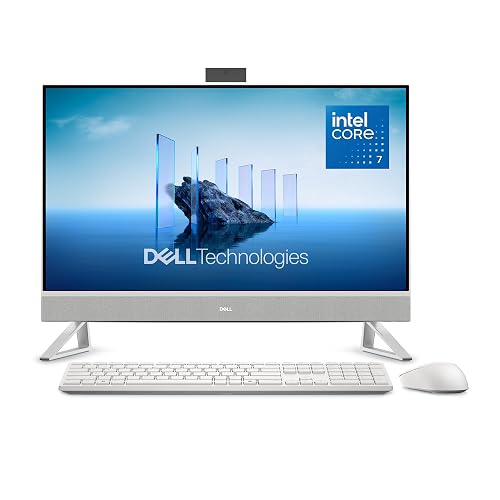
Dell 27″ All-in-One Desktop, FHD, Intel Core 7 150U
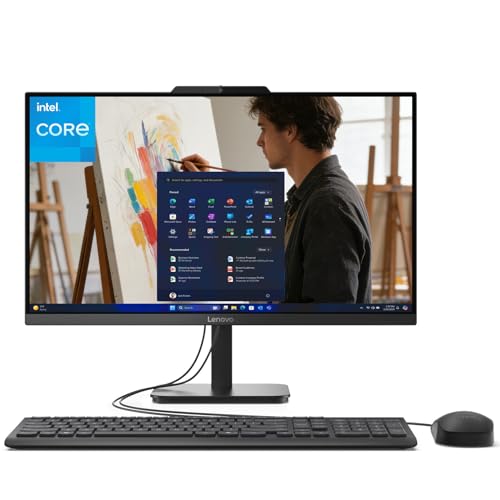
Lenovo IdeaCentre 24 23.8″ N100 16GB 1TB SSD
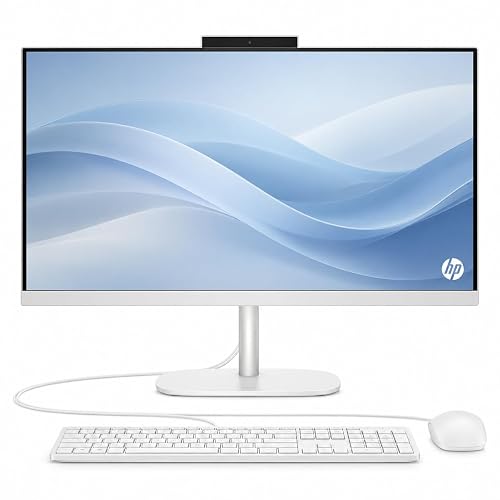
HP OmniStudio 24″ Full HD All-in-One Desktop Computer
More Details On Our Top Picks
The 22-inch screen keeps the footprint tight, which helps on a smaller desk or a kitchen counter that doubles as a mail station. The 13th Gen Intel quad-core chip, 8GB of DDR5 memory, and 128GB of storage point to light everyday work rather than heavy multitasking, so email, web browsing, and video calls stay in its comfort zone.
That balance makes sense for a home setup that needs to stay neat and simple. HDMI and USB-C add useful display and accessory options, while Wi-Fi, an HD webcam, and Windows 11 Pro make the machine feel ready for routine communication. The trade-off is obvious: storage is modest, so a photo-heavy household may want cloud storage or an external drive.
What We Like
- Compact 22-inch format saves desk space and keeps the setup visually calm.
- DDR5 memory helps the system feel snappier during everyday app switching.
- HDMI and USB-C make it easier to connect a monitor, printer, or docking accessory.
- Windows 11 Pro suits someone who wants a more business-like desktop environment.
Things To Consider
- 128GB of storage fills quickly once photos, downloads, and updates start piling up.
- The 22-inch display is friendly for small spaces, though it can feel tight for side-by-side windows.
- It fits lighter use better than bigger household workloads.
Feature Snapshot
Who It Suits Best
It suits a senior who wants a compact desktop for email, browsing, and video calls without a lot of setup drama.
Where A Sibling Pick Shines
Lenovo IdeaCentre 24″ FHD All-in-One Desktop Computer 24″ FHD makes more sense for someone who wants a larger screen and more breathing room for reading.
After the smaller HP, this Lenovo feels more relaxed on the desk thanks to its 24-inch anti-glare IPS screen. IPS, or in-plane switching, usually gives you wider viewing angles and steadier color from the side, which helps in a shared room or a chair that doesn’t sit square to the display. The 8GB of memory and 512GB SSD keep the focus on comfortable everyday use rather than serious content creation.
That 512GB solid-state drive is the big comfort point here, because it gives you much more room for documents, photos, and software than the first HP. Wi-Fi 6 and Bluetooth 5.2 round out a setup that works well for wireless accessories, and the anti-glare panel should feel easier on the eyes near windows or bright lamps. The honest read is that this one leans practical, not flashy, which is often exactly what matters.
Upsides
- 24-inch screen gives your eyes more room for reading and side-by-side windows.
- Anti-glare IPS panel helps cut reflections in bright living spaces.
- 512GB SSD offers far more breathing room for files than the smaller storage options above.
- Wi-Fi 6 and Bluetooth 5.2 support a tidy, wireless-friendly desk.
- Lenovo’s everyday-focused layout suits casual home use without adding clutter.
Softer Spots
- 8GB RAM is fine for simple use, though it leaves less headroom for heavier multitasking.
- The bigger display needs a little more desk width than the HP 22-inch model.
- It makes more sense for comfort than raw speed.
Details At A Glance
Built With In Mind
It suits a home user who wants a larger screen for reading, streaming, and light office work without a steep learning curve.
A Better Fit Elsewhere
Dell 27″ All-in-One Desktop, FHD, Intel Core 5 120U fits you better if a bigger screen and extra internal headroom matter more than keeping the machine compact.
This one changes the formula completely, because it’s a mini PC rather than an all-in-one. You supply the monitor, keyboard, and mouse, and in return you get a very small box with a Ryzen 5 3500U processor, 16GB of memory, and a 512GB SSD, which makes it appealing for a neat desk or a TV-based setup.
The trade-off shows up in the extra pieces you need to buy or already own, so it fits better for someone who doesn’t mind a more modular desk. Triple 4K display support, HDMI 2.1, USB-C, DisplayPort, 2.5GbE LAN, Wi-Fi, and Bluetooth give it impressive connection flexibility for the size. For a home office that values tidy cabling and a small footprint, it’s a smart technical choice.
Standout Traits
- Very small footprint keeps the desk open and uncluttered.
- 16GB memory and a 512GB SSD give it more headroom than several lighter-use picks here.
- Triple 4K display support helps a multi-monitor setup feel realistic.
- 2.5GbE LAN can suit a faster wired network at home.
- USB-C, HDMI 2.1, and DisplayPort make the box unusually flexible for its size.
Points To Note
- You need your own monitor and peripherals, which adds setup steps.
- It suits a more technical household better than a plug-and-go desktop.
- The compact design is helpful, but it doesn’t offer the simple all-in-one screen format some seniors prefer.
Core Details
Who Will Love This
It suits a senior who already has a monitor and wants a tiny, tidy computer for email, browsing, and light office use.
Look Elsewhere When
HP OmniStudio 24″ Full HD All-in-One Desktop Computer is the smoother match for someone who wants an all-in-one screen with fewer separate pieces.
The 27-inch screen is the main story here, and it’s a good one for anyone who likes text to feel roomy instead of crowded. Compared with the Lenovo 24-inch model, this Dell gives you more visual space for email, browsing, and family photo viewing, while the Core 5 120U, 16GB of DDR5 memory, and 512GB SSD add a more comfortable performance cushion.
Dell also includes a keyboard and mouse, which saves you a separate purchase and makes the unboxing path more straightforward. Wi-Fi 6E and Bluetooth round out the wireless side, and Intel graphics handle everyday display work without fuss. The larger chassis takes more room, though, so a compact desk may feel squeezed.
Bright Spots
- 27-inch display gives you a generous reading and viewing area.
- 16GB DDR5 memory offers more breathing room than 8GB models.
- 512GB SSD balances speed and practical storage space.
- Keyboard and mouse are included, which reduces setup shopping.
- Wi-Fi 6E suits a more modern home network.
Areas To Watch
- The larger body needs more desk width than the 24-inch choices.
- It’s a stronger fit for comfort and clarity than for portability.
- The bigger display can feel like more than you need for very basic email-only use.
Feature Card
The Right Fit
It suits a senior who wants a larger, easier-to-read desktop for daily browsing, family photos, and long writing sessions.
Swap It Out When
Lenovo IdeaCentre 24″ FHD All-in-One Desktop 16GB RAM makes more sense if your desk is narrower and you still want a tidy all-in-one layout.
This Lenovo sits in the sweet spot between the compact HP and the larger Dell, which makes it easy to place in a bedroom office or a shared den. The 24-inch FHD screen, 16GB of memory, and 512GB SSD point to a setup that handles everyday browsing, document work, and casual media use with less worry about running out of room too soon.
Intel Graphics keep the design simple, and Wi-Fi 6 plus Bluetooth 5.2 make it a clean fit for wireless accessories and dependable internet access. It’s a sensible middle ground, though the model’s appeal comes more from balance than from a standout specialty. For most home users, that’s exactly the kind of calm decision that feels right.
Best Bits
- 24-inch screen keeps the footprint manageable while still feeling roomy.
- 16GB memory gives you more comfort for multitasking than 8GB models.
- 512GB SSD gives you useful storage for files and installs.
- Wi-Fi 6 and Bluetooth 5.2 suit a tidy wireless desk.
Minor Gripes
- It focuses on balance, so it lacks a strong specialty edge.
- The Intel 4-core processor is fine for everyday work, not heavier duties.
- The case color and style are understated, which may feel plain to some homes.
Quick Facts
Best Suited To
It suits someone who wants a balanced all-in-one for everyday home use without leaning too hard toward either compactness or a giant screen.
Another Choice May Suit
Dell 27″ All-in-One Desktop, FHD, Intel Core 5 120U fits you better if you’d rather move up to a larger display and a roomier feel.
This Dell takes the same 27-inch format as the earlier model and pushes storage and bundled extras farther. The Core 7 150U, 16GB of memory, and 1TB PCIe NVMe SSD make it feel better suited to a home office that keeps lots of files on hand, while the NVMe drive, meaning a fast solid-state drive, helps the system wake and load quickly.
That extra storage is the most obvious everyday advantage, especially for photo libraries, documents, and a fuller software load. Dell also includes keyboard, mouse, McAfee+ Premium, and a 15-month mail-in service, which adds a bit of convenience and support value. The honest caveat is that many seniors won’t need this much headroom, so the upgrade only makes sense when you plan to use it.
Reasons To Buy
- 1TB NVMe storage gives you much more room than 512GB models.
- 27-inch FHD screen keeps text and windows easy to manage.
- Core 7 150U brings a stronger everyday performance tier.
- Included keyboard, mouse, and extra service simplify setup and ownership.
Room For Improvement
- The larger storage and extras make the system more than casual use really requires.
- It needs a fair amount of desk space.
- Some households may not use the added software bundle enough to justify it.
Technical Sheet
Whose Shelf It Belongs On
It suits a home user who expects to keep a large photo library, many documents, or multiple apps installed.
Consider Something Else When
Dell 27″ All-in-One Desktop, FHD, Intel Core 5 120U fits better for simpler needs and a lighter setup budget in terms of hardware headroom.
This Lenovo leans into storage and simple daily use, which makes it appealing for someone who likes to keep files on the machine rather than offloading everything to cloud services. The 23.8-inch FHD screen sits close to the earlier 24-inch models in size, while the N100 processor and 16GB of memory signal basic computing that still leaves some room to breathe.
The 1TB SSD is the standout feature, because it gives you a lot of local room for photos, paperwork, and installed software. Office 365 is included, Wi-Fi 6 and Bluetooth keep the setup current, and Windows 11 Home makes the machine feel familiar. The trade-off is plain enough: the N100 chip suits modest jobs, so it’s better for calm routines than for demanding speed.
Positives
- 1TB SSD provides generous local storage.
- 16GB memory is comfortable for light multitasking.
- 23.8-inch FHD screen keeps the size practical for a desk or side table.
- Office 365 inclusion helps someone who wants to start using it right away.
- Wi-Fi 6 and Bluetooth support current home connections and accessories.
Worth Noting
- The N100 processor is best kept to routine tasks.
- Storage is generous, but that doesn’t turn it into a speed-focused machine.
- The nameplate bundles are useful, though some homes may already have similar software.
Feature Rundown
Made For
It suits a senior who wants lots of storage and a familiar everyday desktop for documents, photos, and routine web use.
Reach For A Different Pick When
HP OmniStudio 24″ Full HD All-in-One Desktop Computer is a better fit for someone who wants a bundle that feels a bit more polished out of the box.
The HP OmniStudio feels tuned for a tidy first desktop because it bundles the main pieces together: a 24-inch Full HD screen, 16GB of DDR5 memory, Intel quad-core processors, 128GB of storage, WiFi 6, keyboard, and mouse. That makes the setup path easier for someone who wants a single box on the desk and fewer decisions to make on day one.
Compared with the other 24-inch options, this one leans into convenience rather than deep storage. The 128GB SSD keeps the system responsive, but it also means your file habits matter, especially for photos or downloaded media. For a senior who values a neat workspace and simple starting point, that trade feels understandable.
Highlights
- 24-inch Full HD screen gives you a familiar desktop size.
- 16GB DDR5 memory supports smoother everyday use.
- Keyboard and mouse are included, which makes setup easier.
- WiFi 6 fits well in a modern home network.
- The bundle suits someone who wants fewer separate purchases.
Small Caveats
- 128GB storage is modest for anyone who keeps lots of files locally.
- The bundle is convenient, though it favors simplicity over expansion.
- Storage habits matter more here than on the 512GB and 1TB options above.
Core Details
Built With In Mind
It suits a senior who wants a neat, ready-to-go desktop for browsing, video calls, and light home use.
Another Choice May Suit
Lenovo IdeaCentre 24 23.8″ N100 16GB 1TB SSD fits better for someone who wants far more local storage without changing the screen size much.
How To Choose The Right Alls In One Computer For Seniors
Screen Size And Readability
A 22-inch model works nicely on a tighter desk, but a 24-inch or 27-inch screen usually feels easier for reading mail, forms, and family photos. Anti-glare panels help in bright rooms, while IPS panels tend to give more stable viewing from the side. That matters in a kitchen nook, a sunlit den, or any place where you don’t sit perfectly centered all day.
Memory, Storage, And Everyday Speed
Memory, or RAM, affects how smoothly multiple apps stay open at once. For simple web use and email, 8GB can be enough, while 16GB feels more relaxed for lots of browser tabs, photo folders, and video calls. Storage matters just as much, because 128GB fills fast and 512GB or 1TB gives you far more breathing room for documents, downloads, and pictures.
Setup Simplicity And Desk Fit
All-in-one desktops win points because the computer lives behind the display, so you only need one main unit on the desk. That setup helps in a small office or shared family space, but the larger 27-inch models need more room than the compact 22-inch versions. Included keyboard and mouse bundles also save you a little setup hassle, which is useful for anyone who wants less unpacking and fewer separate purchases.
Choose By Use, Not By Spec Sheet
A modest chip can still work well for email, streaming, and recipe browsing, while a faster processor makes sense for heavier multitasking. In plain terms, the right machine is the one that matches your routine instead of sitting in the corner with unused power. A clean, calm desktop with enough storage often feels more useful than a flashy setup that complicates daily use.
A Quick Reality Check
Mistakes Worth Dodging
A common slip-up is choosing too little storage, then running into slow cleanup later when photos and downloads pile up. Another is buying a screen that’s smaller than your comfort level, which can make text feel cramped during longer sessions. Keep the room, the task list, and your eyesight needs in view, not just the processor line.
The Upgrade Payoff
Higher-tier models usually spend more on a larger display, more memory, and bigger solid-state storage. That extra money tends to show up in comfort, easier multitasking, and less file management over time. The upgrade makes the most sense for someone who keeps a lot of documents, uses the desktop daily, or wants a roomier screen that feels easier to live with.
Frequently Asked Questions
What size all-in-one works best for seniors?
A 24-inch display is the sweet spot for many homes because it balances readability and desk space. A 27-inch model makes text feel more open, while a 22-inch unit works better on a smaller table.
Is 8GB of memory enough for everyday use?
Yes, 8GB can handle email, browsing, and video calls for simple routines. 16GB gives you more breathing room, especially when several apps stay open at once.
How much storage should you look for?
128GB is tight for local files, so it suits lighter storage habits. 512GB is a much easier starting point, and 1TB helps if you keep many photos or documents on the machine.
Do all-in-one desktops save desk space?
Yes, they usually do, because the computer and screen live in one body. The larger 27-inch versions still need a fair amount of room, so measure the desk first.
Is a mini PC a good substitute for an all-in-one?
It can be, but it changes the setup because you need your own monitor and peripherals. That works well for a tidy custom desk, though it’s less straightforward than an all-in-one.
Closing Thoughts
The right all-in-one for seniors feels clear, calm, and easy to live with. A smaller HP suits tight spaces, the Lenovo and Dell 24-inch models bring a comfortable middle ground, and the 27-inch Dell options give you more room to read and work. Storage and screen size matter more than flashy extras for most homes. Choose the one that matches your desk, your habits, and the amount of screen comfort you want each day.



