
Touch-screen all-in-ones make sense when you want a cleaner desk, fewer cables, and a display that’s easy to tap through email, schoolwork, recipes, or video calls. For a family room, home office, or shared workspace, the right setup can feel calm instead of crowded. The picks below lean on screen size, storage, memory, and processor class so you can match the machine to how you actually use it.
Quick Look At The Shortlist
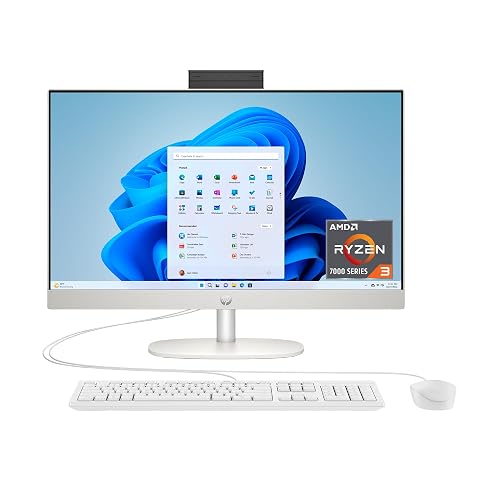
HP 23.8 inch All-in-One Desktop PC 24-cr0420 (2025)
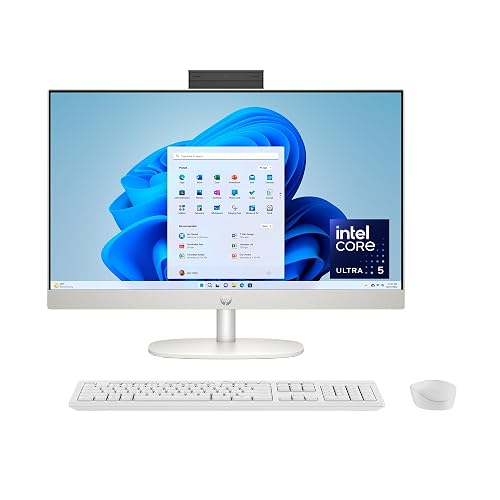
HP 23.8 inch All-in-One Desktop PC 24-cr1170 (2025)
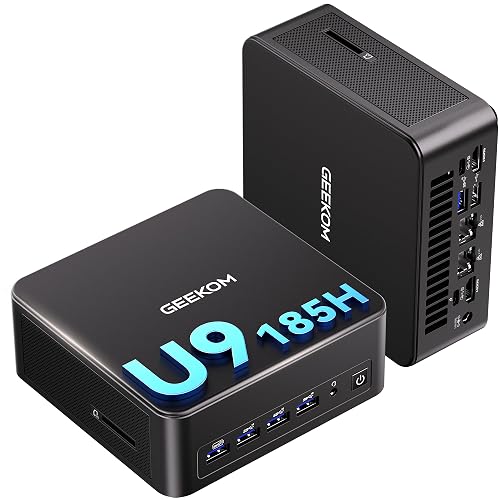
GEEKOM IT13 MAX Mini PC

Lenovo IdeaCentre All-in-One Desktop Computer
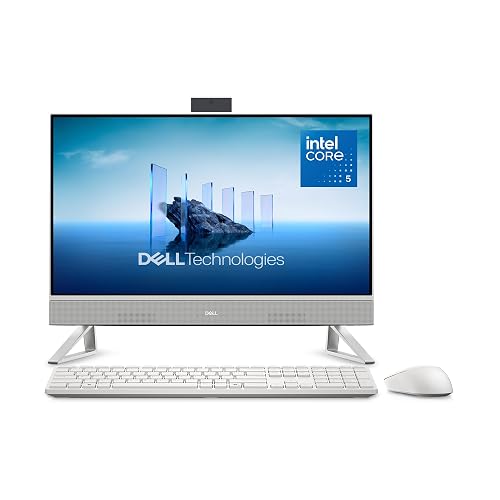
Dell 23.8 inch All-in-One Desktop EC24250

Lenovo IdeaCentre 24 inch FHD All-in-One Desktop 2026 Edition
HP 27 inch All-in-One Desktop PC
HP 27” FHD Touchscreen All-in-One
More Details On Our Top Picks
For a desk that mostly handles browsing, homework, video calls, and streaming, this HP keeps the setup straightforward. The 23.8-inch Full HD touch screen gives you enough space for split windows without turning the machine into a bulky centerpiece.
The Ryzen 3 7320U, 8 GB of memory, and 256 GB SSD make sense for lighter routines, though large photo libraries or heavier creative work will push past its comfort zone faster than the other HP in this list. You get the clean Shell White look and a compact footprint, which suits shared spaces and smaller home offices.
Strong Points
- Touch input makes everyday tapping, scrolling, and menu work feel direct.
- The 23.8-inch Full HD panel gives you room for side-by-side browser tabs.
- Solid-state storage helps the system feel quicker at startup and during routine app loading.
- The modest footprint fits neatly on a study desk or spare-room corner.
Things To Consider
- 8 GB of memory is fine for everyday work, but not as forgiving for many heavy apps at once.
- 256 GB fills sooner than the 512 GB and 1 TB models in this roundup.
- Light-duty hardware suits casual use better than demanding editing or large data tasks.
Feature Snapshot
Who It Suits Best
Casual home users, students, and anyone who wants a neat all-in-one for everyday web tasks will get the most from this model.
A Better Fit Elsewhere
Lenovo IdeaCentre 24 inch FHD All-in-One Desktop 2026 Edition suits a household that wants more memory and a bigger storage cushion.
Compared with the first HP, this one feels more ready for a busier workday. The Intel Core Ultra 5 125U and 512 GB SSD give you more breathing room for multitasking, file storage, and the steady stream of browser tabs that tends to pile up on a family machine.
The three-sided micro-edge display keeps the frame slim, and the high screen-to-body ratio helps the 23.8-inch panel feel a bit more expansive on the desk. That matters most in small offices or shared rooms, where a tidy visual profile can make the space feel less crowded.
What We Like
- 512 GB of storage gives you more practical room for documents, downloads, and media.
- The Core Ultra 5 class processor is a better fit for busier multitasking than the Ryzen 3 model above.
- The slim bezel design helps the screen feel larger without increasing desk clutter.
- Touch input still keeps navigation quick for everyday tasks and schoolwork.
Minor Gripes
- 8 GB of memory is still the same ceiling as the lower-cost HP, so it can feel tight during heavier multitasking.
- The design language is clean, but not especially distinctive next to the larger Dell and HP 27-inch options.
- For long-term storage of lots of photos or videos, even 512 GB can disappear faster than you expect.
Core Details
Who Will Love This
Home workers, students, and family desks that need a cleaner all-in-one with better storage will appreciate this one most.
Skip It When
Dell 23.8 inch All-in-One Desktop EC24250 suits you better when built-in speakers and 16 GB of memory matter more than touch-focused polish.
This one breaks away from the all-in-one shape entirely, which matters because your desk may benefit more from a compact box and a separate display than from a fixed screen. The Intel Core Ultra 9 185H, 24 GB of LPDDR5 memory, and 500 GB SSD point toward more serious multitasking, office stacks, and heavier app work.
Unlike the HP and Lenovo touch-screen all-in-ones, this mini PC gives you more flexibility in monitor choice and placement. It makes sense for a workstation-style setup, server room use, or a tidy home desk where raw processing is more important than an integrated display.
Bright Spots
- The Core Ultra 9 chip gives you a clear step up in processing headroom.
- 24 GB of LPDDR5 memory supports heavier multitasking with less friction.
- Dual 2.5G LAN ports suit wired network setups and multi-device environments.
- WiFi 7 and an SD 4.0 slot add modern connectivity and useful expansion.
- Quad-display support can help a workbench or control station feel orderly.
Areas To Watch
- You’ll need a separate monitor, keyboard, and mouse, which adds planning.
- This is not a touch-screen all-in-one, so it fits a different kind of desk.
- The compact format asks for a little cable management to stay tidy.
Details At A Glance
Built With In Mind
Power users, IT setups, and desk setups that already have a monitor will get the most from this mini PC.
Where A Sibling Pick Shines
HP 27 inch All-in-One Desktop PC suits you better when you want the screen and computer in one tidy body.
Lenovo keeps this one straightforward, and that’s part of the appeal. The 24-inch Full HD IPS panel should suit everyday desk work well, while the anti-glare finish helps cut down reflections in bright rooms or near windows.
With 8 GB of memory and a 512 GB SSD, it lands in the same practical zone as the second HP, though the Lenovo leans a bit more toward comfortable viewing than flashy extras. Wi-Fi 6 and Bluetooth 5.2 make it easy to slot into a modern home setup without adding much fuss.
Reasons To Buy
- The 24-inch screen gives you a little more visual room than the 23.8-inch models.
- IPS panel tuning usually helps colors and viewing angles feel stable across a desk.
- Anti-glare coating is helpful in rooms with lamps, windows, or shifting daylight.
- 512 GB storage supports a more practical mix of apps, files, and school projects.
Softer Spots
- 8 GB RAM keeps it in the same everyday lane as the entry HP rather than a heavier multitasking tier.
- The Intel 4-core processor is best matched to routine use, not demanding creative projects.
- Owners who keep lots of local media may still want a larger storage cushion.
Feature Rundown
The Right Fit
Home workers and students who want a calm, comfortable screen with a tidy footprint will get along with this Lenovo.
Swap It Out When
Dell 23.8 inch All-in-One Desktop EC24250 suits you better if built-in speakers and 16 GB memory matter more than anti-glare tuning.
Dell’s 23.8-inch model feels like the most balanced blend of everyday specs in this group. The Intel Core 5 120U, 16 GB of DDR5 memory, and 512 GB SSD give it more room than the 8 GB models above, which helps once your day includes email, browser tabs, calls, and a few desktop apps at once.
The included keyboard and mouse make setup easier, and the Dolby Atmos speaker tuning adds a more engaging sound profile than the simpler audio setups in the HP and Lenovo all-in-ones. It still stays compact, so it works nicely on a home office desk where you want one machine to cover a lot of ordinary jobs.
Highlights
- 16 GB of DDR5 memory gives you more breathing room for multitasking.
- The 512 GB SSD offers a sensible middle ground for work files and media.
- Built-in speakers tuned with Dolby Atmos help casual music and video playback feel fuller.
- Keyboard and mouse in the box reduce the number of extra parts you need to source.
Room For Improvement
- It does not include touch input, so the interaction style differs from the touchscreen HP and Lenovo options.
- The 23.8-inch display is still modest compared with the two 27-inch HP choices.
- Owners who prefer a touch-first workflow may find it less convenient for quick taps and swipes.
Quick Facts
Best Suited To
Home office users and mixed-purpose household desks will appreciate the extra memory and sound tuning here.
Look Elsewhere When
HP 23.8 inch All-in-One Desktop PC 24-cr1170 (2025) suits you better when touch control and a slim bezel matter more than bundled accessories.
This Lenovo looks built for households that want a little more memory without moving into a much larger footprint. The 16 GB of RAM and 512 GB SSD help it stay comfortable for shared use, while the 24-inch FHD panel gives you enough room for school portals, spreadsheets, and streaming in the same day.
It sits above the earlier Lenovo in one important way, the memory level gives you more breathing room before things start feeling crowded. Wi-Fi 6 and Bluetooth 5.2 keep accessory and network connections straightforward, which suits a family setup or a desk that sees more than one person over the week.
Standout Traits
- 16 GB of memory helps the system handle more open apps at once.
- The 24-inch display gives you a little more visual space than 23.8-inch rivals.
- Wi-Fi 6 and Bluetooth 5.2 fit well in a current home network setup.
- The overall package feels sensible for shared family use and schoolwork.
Points To Note
- The Intel 4-core processor keeps it in a practical everyday category rather than a power-user tier.
- It does not bring the touch interface found on the HP all-in-one models.
- Blue styling is a matter of taste, so it won’t blend as quietly into every room as Shell White.
Feature Card
Whose Shelf It Belongs On
Families, students, and shared desks that need a bit more memory in a tidy all-in-one will get the most from this Lenovo.
Another Choice May Suit
HP 27 inch All-in-One Desktop PC suits you better when a larger screen and touch input matter more than a compact family-friendly footprint.
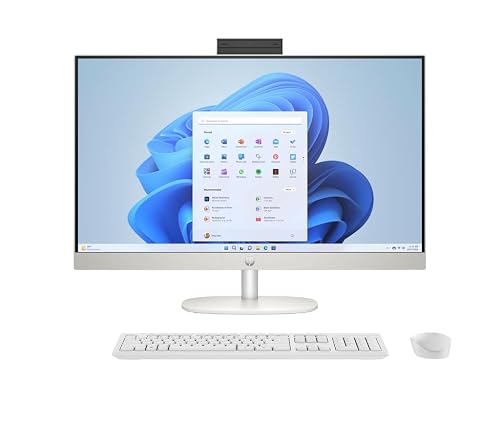
The jump to a 27-inch touch screen changes the feel right away, because spreadsheets, side-by-side documents, and family browsing all get more elbow room. The Ryzen 5 7520U, 16 GB of RAM, and 1 TB SSD also make this HP easier to live with over time than the smaller 8 GB, 256 GB options near the top of the list.
Built-in speakers add a simple audio layer, and Windows 11 Pro gives it a more work-ready profile than the Home editions below it. For a home office that doubles as a media spot, this one has the kind of space and storage that keeps things from feeling cramped, almost like moving from a one-bedroom desk to a small studio setup.
Upsides
- The 27-inch panel gives you more space for multitasking and reading.
- Touch input works well for casual browsing and quick on-screen navigation.
- 1 TB of storage gives you a much larger file buffer than the 512 GB and 256 GB models.
- 16 GB of memory helps keep work and entertainment apps open with less friction.
- Windows 11 Pro suits a more work-focused home setup.
Small Caveats
- The larger screen takes more desk depth than the 23.8-inch models.
- Built-in speakers are handy, though dedicated external audio still has more room to grow.
- Some households may find the 27-inch size more than they need for simple web use.
Technical Sheet
Best Match For
Home office users and families who want a larger touch display with more storage will get the most from this HP.
Reach For A Different Pick When
Dell 23.8 inch All-in-One Desktop EC24250 suits you better if bundled keyboard, mouse, and Dolby Atmos speakers matter more than a larger screen.
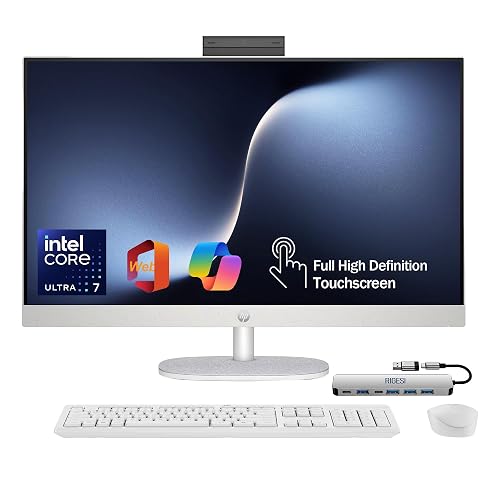
This HP sits at the most complete end of the roundup, especially for a desk that needs to do more than one thing well. The Intel Core Ultra 7 155U, 16 GB of DDR5 memory, and 1 TB SSD put it above the other all-in-ones in the list for users who want a roomier buffer for work, storage, and everyday browsing.
The included USB-C docking station and the HDMI and Ethernet ports widen how you can connect it, which makes sense in a home office that also handles external displays or wired networking. The 27-inch touch display, Windows 11 Pro, and preloaded web office setup give it a polished, almost ready-made feel without demanding a separate tower.
Positives
- The Core Ultra 7 chip gives you the strongest processor tier in this group.
- 16 GB DDR5 memory is a comfortable match for busy multitasking.
- 1 TB of storage gives you a lot of room for files and apps.
- USB-C docking support makes it easier to tie into a larger desk setup.
- Ethernet and HDMI add useful flexibility for wired networking and display expansion.
Trade Offs
- It asks for more desk space than the smaller 23.8-inch all-in-ones.
- The included extras make sense for work, but they are more than a casual web-only setup needs.
- Touchscreen all-in-ones can be easy to admire, yet cable planning still matters behind the unit.
Core Details
Who Should Grab It
Work-from-home users, home office managers, and power-oriented households will appreciate how complete this HP feels.
Where Another Pick Suits Better
HP 27 inch All-in-One Desktop PC suits you better if you want a simpler large-screen all-in-one without the added dock-focused setup.
How To Choose The Right Alls In One Desktop Computer Touch Screen
Screen Size, Space, And How You Sit
A 23.8-inch all-in-one usually lands in the sweet spot for most desks. It keeps the footprint manageable while still giving you enough room for documents, browser tabs, and video calls.
A 27-inch screen makes more sense for split windows, spreadsheets, and people who sit a little farther back from the desk. The trade-off is simple, it asks for more depth and can feel large in a tight room.
Memory And Storage Shape The Day
Memory, or RAM, is the short-term workspace your machine uses while apps stay open. Eight gigabytes works for lighter use, while 16 GB gives you more breathing room once you start juggling calls, tabs, and office files.
Storage matters just as much for long-term comfort. A 256 GB SSD is fine for basics, 512 GB is a safer middle ground, and 1 TB suits homes that keep photos, downloads, and lots of media on the machine.
Processor Class Changes The Feel
Processor choice decides how quickly the system handles everyday work and how graceful it stays under load. The Ryzen 3 and Intel 4-core chips suit basic routines, while the Core Ultra 5, Core Ultra 7, and Ryzen 5 options offer more headroom for busier days.
Mini PCs sit in a different lane altogether, since they trade the built-in screen for more flexibility and often stronger raw specs. That makes them better for desk owners who already have a monitor and want to build a cleaner, more modular setup.
Touch, Ports, And Real-World Comfort
Touch screens matter most when you want quick taps, easy zooming, or a family-friendly interface that feels direct. They matter less on a desk where you already rely on keyboard shortcuts and a mouse all day.
Ports shape how painless setup feels. HDMI, Ethernet, USB-C docking, and bundled accessories can turn a good machine into a more useful one, especially in a home office that needs fewer loose ends.
Things Worth Knowing First
Mistakes Worth Dodging
Many shoppers focus on the screen and forget the memory. An all-in-one with 8 GB can feel fine at first, then feel crowded once your browser tabs, video call, and office apps all wake up together.
Another common miss is buying too little storage for a family desktop. A 256 GB drive fills fast, so home users who keep photos or downloads locally usually feel better with 512 GB or more.
What The Higher Tier Buys
More money in this category usually goes toward larger screens, stronger processors, more memory, and bigger solid-state drives. You also tend to get better port selection, stronger audio tuning, or extras like docking support.
That upgrade makes sense for work-from-home desks, shared family use, or anyone who wants fewer compromises over time. For simple browsing and email, though, a midrange all-in-one is often enough.
Frequently Asked Questions
What size touch-screen all-in-one works best for most desks?
For most home offices, 23.8 inches gives you a useful balance of screen room and compact footprint. A 27-inch panel feels better for split-screen work and people who keep the machine as a main workstation.
Is 8 GB of memory enough for everyday use?
Yes, 8 GB can handle browsing, homework, streaming, and light office work. The limit shows up sooner once you keep many apps open at once.
Does SSD storage matter much in an all-in-one?
Yes, a solid-state drive helps the system feel quicker during startup and app loading. Bigger capacities mainly matter for downloads, photos, and saved media.
Are touch screens useful on a desktop?
They are useful for quick taps, scrolling, zooming, and casual navigation. They matter less for users who spend most of the day on keyboard and mouse input.
What makes a 27-inch model worth it?
A 27-inch all-in-one gives you more room for side-by-side windows and a more relaxed viewing distance. It also tends to suit shared family setups and home office desks better than a smaller panel.
Closing Thoughts
The right all-in-one depends on how busy your desk really gets. For light home use, the smaller HP models and Lenovo options keep things simple and tidy, while the Dell and larger HP choices give you more breathing room for multitasking, storage, and daily comfort. The GEEKOM mini PC stands apart for anyone who already has a monitor and wants more flexibility than a fixed all-in-one. Match the screen size, memory, and storage to your actual routine, and the right pick becomes pretty easy to spot.



