
Finding a compatible processor for an older LGA 1155 desktop can feel harder than the installation itself. You may be restoring a family PC, refreshing an office tower, or keeping a dependable gaming system useful without replacing the entire motherboard and memory. These seven options cover higher-end Ivy Bridge chips, practical Core i5 choices, and a basic Celeron for light tasks. You’ll see the important differences in cores, clock speed, cache, condition, and intended use so your upgrade matches the system you already own.
The Shortlist At A Glance

Intel Core i7-3770K Processor 3.5 GHz

Intel Core i5-3470 Processor BX80637I53470

Intel Core i7-3770 Quad-Core Processor

Intel i5-3470 3.2GHz Processor

Intel SR0T8 Core i5-3470 OEM Renewed

Intel Celeron G1610 2.60GHz Processor
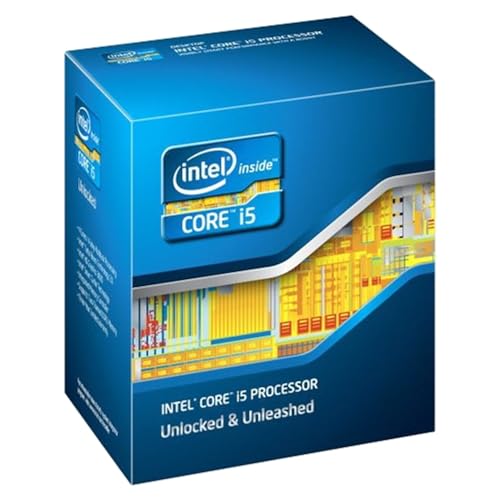
Intel Core i5-2320 Socket 1155 CPU
More Details On Our Top Picks
For an older desktop that still has a capable motherboard, the Core i7-3770K offers a substantial step above dual-core and standard Core i5 options. Its four physical cores and Hyper-Threading, which lets each core handle an additional thread, suit heavier multitasking, older games, photo work, and several active applications.
The “K” suffix identifies an unlocked processor, giving experienced desktop builders more adjustment flexibility than the locked chips below. You’ll need a compatible LGA 1155 board and suitable cooling, though, and the used-market condition can vary. The honest read is that it makes the most sense as a targeted restoration rather than a fresh modern platform.
Strong Points
- Four cores and eight threads help keep browser tabs, office tools, and background tasks responsive together.
- Its 3.5 GHz base speed gives older desktops a confident feel during everyday work.
- The unlocked design appeals to experienced enthusiasts with a compatible motherboard.
- An 8 MB cache, a fast local memory area, helps repeated data access stay efficient.
- Compared with the Core i5-3470, it gives you more multitasking headroom.
Things To Consider
- Used processors can arrive with different cosmetic conditions, so inspect the listing details carefully.
- Installation calls for fresh thermal compound and careful cooler seating, especially during a restoration.
Key Specs
Who It Suits Best
You’ll get the most from this chip as an experienced desktop restorer handling multitasking, older games, or demanding legacy software.
Where Another Pick Suits Better
Choose the Intel Celeron G1610 2.60GHz Processor for a low-demand office computer where email, documents, and basic browsing matter more than speed.
Daily desktop work rarely needs the extra threads of the i7-3770K, and that’s where the Core i5-3470 feels sensible. Its four-core layout suits documents, media playback, light creative work, and older games without pushing you toward the enthusiast-focused K-series chip.
At 3.20 GHz, it gives a dependable foundation for a home office tower or family computer. The listing information doesn’t provide a complete package description, so you’ll want to confirm cooler, thermal compound, and return details before installation. You may find this a better match than the renewed alternatives when a straightforward retail processor listing matters.
What We Like
- Four cores handle ordinary multitasking more comfortably than the dual-core Celeron G1610.
- The 3.20 GHz speed fits routine office, school, and home-computing workloads.
- LGA 1155 compatibility makes it useful for targeted Ivy Bridge system repairs.
Worth Noting
- The image and listing details are limited, so confirm exactly what arrives before opening your desktop.
- You’ll need to plan cooler installation and thermal compound separately unless the listing states otherwise.
- It has less multitasking capacity than the i7-3770 options.
At A Glance
Made For
You’ll find the best fit here as a home-office or family-PC owner replacing an older LGA 1155 processor.
Consider Something Else When
Reach for the Intel Core i7-3770 Quad-Core Processor when your workstation regularly handles multiple demanding applications.
Eight threads give the renewed Core i7-3770 a clear role in a multitasking workstation. You can pair its four cores with an existing LGA 1155 board for office software, older editing tools, virtual machines, or games that benefit from additional thread capacity.
Its 3.4 GHz clock sits just below the 3770K’s listed speed, while the locked design is less appealing to overclocking enthusiasts. That restraint can make the standard i7 easier to position in a routine replacement, but renewed condition deserves extra attention. Depending on your motherboard firmware and cooler, setup may be refreshingly direct or require a little more preparation.
Highlights
- Four cores and eight threads support demanding multitasking on a legacy desktop.
- The 3.4 GHz speed gives older workstations useful responsiveness.
- An 8 MB cache supports repeated data access during active workloads.
- Up to 3.9 GHz turbo frequency can provide extra speed during suitable workloads.
- Renewed availability gives you a practical route to extend an existing system.
Trade Offs
- Renewed condition means cosmetic appearance and included accessories may differ.
- The locked processor offers less tuning flexibility than the Core i7-3770K.
- Cleaning the socket area and applying fresh thermal compound remain sensible ownership steps.
Feature Snapshot
Right Fit For
You’ll appreciate this choice most as a workstation owner who needs more threads but doesn’t need an unlocked processor.
Look Elsewhere When
The Intel Core i5-3470 Processor BX80637I53470 suits you better for ordinary documents, browsing, and family-PC duties.
A plain processor listing can be useful during a repair, and this renewed i5-3470 keeps the choice uncomplicated. The 3.2 GHz quad-core design fits a typical office tower handling documents, browser tabs, video playback, and light school software.
Compared with the similarly named retail i5-3470, this listing provides fewer visible details, so you’ll need to verify the exact chip and included parts. That matters during a quick desktop rebuild, where missing cooling hardware can delay installation. For most basic LGA 1155 repairs, its familiar model number remains the main attraction.
Upsides
- Four cores give everyday applications room to run together.
- The 3.2 GHz speed suits routine home and office use.
- The familiar i5-3470 model simplifies matching a known replacement.
Room For Improvement
- Limited listing information makes included cooling hardware unclear.
- Renewed condition calls for careful inspection before socket installation.
- The i5 platform lacks the extra threads found in the i7-3770 models.
Quick Facts
Who Will Love This
You’ll find this most useful as a DIY desktop repairer replacing a known i5-3470 in a modest home or office tower.
Not Your Match When
Choose the Intel SR0T8 Core i5-3470 OEM Renewed when a clearly identified OEM part number matters more to your repair plan.
The SR0T8 identifier makes this renewed OEM processor particularly useful for a system builder matching a known business desktop part. Its four-core i5-3470 design and 3.2 GHz speed cover office applications, point-of-sale duties, web use, and light media work without the extra cost or complexity of an i7.
OEM means original equipment manufacturer, so the chip may arrive as a component rather than a boxed retail package. You’ll want to plan for cooler compatibility and inspect the contact surface before installation. Compared with the less-detailed renewed i5 listing, this option gives you a more specific model reference, though the package contents still deserve confirmation.
Best Bits
- The SR0T8 marking helps you compare the part against an existing desktop record.
- Four cores suit steady office workloads and light multitasking.
- The OEM format works well for component-level restoration projects.
- Its 3.2 GHz speed fits many everyday LGA 1155 systems.
Small Caveats
- An OEM processor may not include a cooler or retail packaging.
- Renewed condition means you should clean the cooler and apply fresh thermal compound during setup.
Details At A Glance
Best Suited To
You’ll benefit most as a desktop technician or experienced DIY restorer matching an OEM i5-3470 part.
A Better Fit Elsewhere
The Intel Core i5-3470 Processor BX80637I53470 is a better match for you when a standard processor listing feels easier to verify.
Basic computing doesn’t require an i7, and the dual-core Celeron G1610 keeps an LGA 1155 rebuild focused on essentials. At 2.60 GHz, it suits documents, email, light browsing, and a simple classroom or office system.
Compared with every Core i5 and i7 here, the two-core design leaves less room for heavy multitasking. You may notice that limit during large spreadsheets, modern browser workloads, or active background processes. Still, its modest role can be exactly right for a quiet secondary desktop, provided your expectations stay firmly in the light-duty range.
Plus Points
- Dual-core operation covers straightforward documents and web tasks.
- The 2.60 GHz speed fits a simple home-office computer.
- LGA 1155 compatibility gives older systems another replacement route.
Areas To Watch
- Two cores provide less multitasking capacity than the four-core choices.
- The listing offers limited visible detail, so confirm the package before installation.
- Cleaning the socket and refreshing thermal compound remain sensible during a used-part rebuild.
Core Details
Whose Shelf It Belongs On
You’ll suit this processor best as a light-use computer owner restoring a secondary, classroom, or office desktop.
Swap It Out When
Select the Intel Core i5-2320 Socket 1155 CPU for a better fit with four-core everyday multitasking.
The Core i5-2320 gives you four cores on the earlier Sandy Bridge version of the LGA 1155 platform. Its 3.0 GHz speed fits office work, media playback, older games, and routine desktop use, making it a sensible match for a system that predates the Ivy Bridge options above.
The included heat sink and fan, stated in the available product context, can simplify a replacement compared with an OEM-only chip. You’ll still need to confirm the package condition and check your motherboard support before fitting it. For a basic repair, its older architecture is a limitation, but its four-core layout keeps it more capable than the Celeron G1610.
Bright Spots
- Four cores support ordinary multitasking better than the dual-core choice.
- The 3.0 GHz speed suits everyday desktop work.
- The stated heat sink and fan can reduce installation planning.
- Socket 1155 compatibility fits Sandy Bridge-era system repairs.
- Turbo Boost 2.0 can raise speed during suitable workloads.
Points To Note
- Its older generation may offer less headroom than the Ivy Bridge i5-3470.
- Confirm cooler condition and motherboard firmware before installation.
Technical Sheet
The Right Fit
You’ll find this most suitable as a home-office owner repairing a Sandy Bridge-era LGA 1155 computer.
Reach For A Different Pick When
Move to the Intel Core i7-3770 Quad-Core Processor for a better fit with heavier multitasking and thread-heavy software.
How To Choose The Right Cpus For 1155 Socket
Start With The Exact Platform Match
LGA 1155 identifies the physical socket on the motherboard, but socket shape alone doesn’t settle compatibility. You also need to identify the motherboard chipset, firmware support, memory type, and the processor generation already installed. An Ivy Bridge chip such as the i5-3470 or i7-3770 may need firmware support that an older Sandy Bridge board doesn’t provide automatically.
Check the existing processor model before ordering. A desktop that already uses an i5-2320 gives you a useful clue, but the board manual remains the safer reference.
Match Cores And Threads To Your Routine
Cores are physical processing units, while threads describe how many work streams the processor can manage. Two cores can cover documents and email, four cores suit general multitasking, and four cores with eight threads provide more breathing room for editing tools, older games, and workstation software.
Your daily pattern matters more than a longer model name. A secondary office tower can make good use of the Celeron G1610, while a busy home workstation benefits from an i7-3770 or i7-3770K.
Read Clock Speed Alongside Cache
Clock speed describes the processor’s operating frequency, measured in GHz. It helps with responsiveness, but it doesn’t tell the entire story because core count, thread count, architecture, and cache also affect how a desktop feels.
Cache is a small, fast memory area built into the processor. The 8 MB cache on the i7 choices can help repeated workloads, while the 6 MB cache on the i5-2320 remains suitable for ordinary use. Treat these figures as part of the overall match, not a standalone ranking.
Plan The Physical Installation
Used and renewed processors may arrive as component-only parts, while a retail listing may include cooling hardware. Confirm the cooler, thermal compound, and package details before opening your case. During installation, clean the socket area carefully, avoid bending contact pins, and seat the cooler evenly so your restored system starts with sensible preparation.
Before You Commit To A Legacy CPU
Mistakes Worth Dodging
A common mistake is choosing by socket number alone. LGA 1155 covers more than one processor generation, so you’ll want the motherboard model and firmware details beside you before selecting an i5 or i7.
Another slip involves assuming an OEM or renewed chip includes every installation part. Check the listing contents, then set aside suitable thermal compound and a compatible cooler for a smoother rebuild.
The Upgrade Payoff
Higher-tier options cost more because additional cores, threads, cache, clock speed, and unlocked tuning can make demanding legacy workloads feel less restricted. The Core i7-3770K especially targets enthusiasts who value adjustment flexibility.
Paying more makes sense for sustained multitasking, older editing software, or a cherished desktop that still meets your needs. Basic documents and browsing rarely justify moving beyond a four-core i5.
Closing Remarks
You can keep an LGA 1155 desktop useful by matching the processor to the motherboard, workload, and installation plan rather than chasing the longest model name. The Core i7-3770K suits experienced enthusiasts, the i7-3770 brings strong multitasking, and the i5 choices cover practical repairs with fewer demands. The Celeron G1610 belongs in a genuinely light-duty system, while the i5-2320 fits earlier quad-core builds. Check firmware and package details first, then choose the chip that gives your existing computer the right amount of room to work.
