
A GeForce RTX 4090 build demands more than raw graphics power. You need a suitable processor pairing, dependable power delivery, adequate cooling, and enough room inside your case for large components and thick cables. This roundup covers three graphics cards, three GPU power-cable options, and a water-cooling block, so you can match the listing to the part your build actually needs. Daily gaming, high-resolution creation, and custom liquid cooling each call for a different approach. The honest read is straightforward: check compatibility before you focus on appearance or headline specifications.
The Shortlist At A Glance
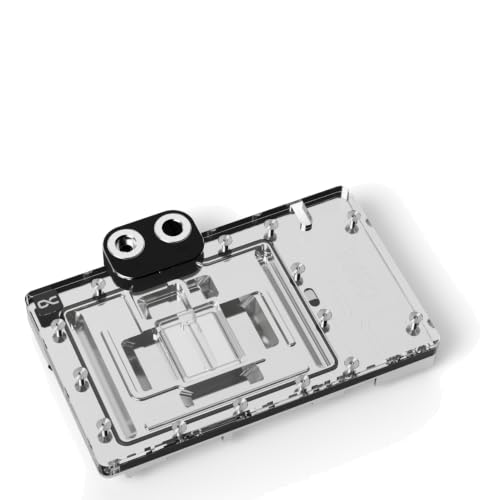
Alphacool Core RTX 4090 Founders Edition Backplate
Fasgear 12V-2×6 Adapter Extension Cable White
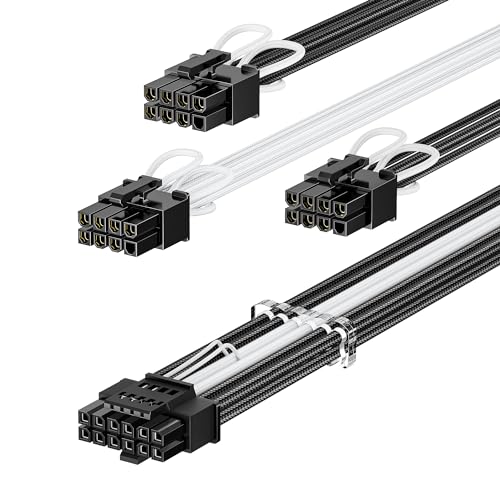
Fasgear 12VHPWR Cable 70cm PCIe 5.1
Fasgear 12VHPWR Cable 600W PCIe 5.1

ASUS ROG Strix RTX 4090 OC Edition

VIPERA NVIDIA GeForce RTX 4090 Founders Edition

MSI GeForce RTX 4090 Gaming X Trio 24G
More Details On Your Top Picks
Custom liquid cooling changes the role of this Alphacool block. Chrome-plated copper forms the main cooling surface, while the included backplate gives the card-side installation a more finished appearance. You get addressable RGB lighting too, although that adds wiring and software coordination to a loop that already requires careful planning.
The 0.4 mm fin structure and matching fin spacing are aimed at moving coolant across a dense surface. You may find this approach most useful in a workstation or gaming tower where a full loop already handles the processor and graphics card. Compared with the air-cooled ASUS ROG Strix card, this choice trades simpler ownership for a more integrated cooling layout.
Strong Points
- Chrome-plated copper suits a dedicated liquid-cooling loop.
- The backplate can give the card area a cleaner installed look.
- Addressable lighting helps coordinate a custom system theme.
- The fine fin spacing supports a compact cooling surface for loop builders.
Things To Consider
- Installation requires a compatible custom loop, fittings, tubing, and maintenance routine.
- RGB wiring adds another connection to manage inside a crowded case.
Key Specs
Who It Suits Best
You benefit most from this block as an experienced custom-loop builder planning liquid cooling for an RTX 4090 Founders Edition card.
Consider Something Else When
Choose MSI GeForce RTX 4090 Gaming X Trio 24G instead for a conventional air-cooled gaming system with less installation work.
Small cases often turn GPU power routing into a frustrating exercise. This white Fasgear adapter uses a 16-pin male connector on the graphics-card side and two 8-pin female connectors for the power supply leads, giving you another way to arrange the cable path. The 16AWG conductors are thicker than many basic computer wires, though compatibility remains the deciding factor.
For a 4090 build, you need to match the adapter to both the card connector and the power supply output. Its white jacket can work neatly in a light-themed case, but it won’t disguise poor routing or a strained connection. Compared with the 70cm Fasgear cable, this adapter focuses on extension flexibility rather than extra reach.
What We Like
- The extension format can help route power around a dense graphics card area.
- 16AWG wire provides a substantial cable construction for a high-power GPU connection.
- White insulation suits coordinated light-color PC interiors.
Worth Noting
- The two-8-pin arrangement won’t suit every power supply or graphics-card setup.
- Measure your routing path before installation, especially in compact cases.
- Owners commonly need to keep cable bends gentle and connections fully seated during maintenance.
At A Glance
Made For
You gain the most from this adapter as a PC builder with a compatible PSU who needs a cleaner 4090 cable route.
Not Your Match When
Fasgear 12VHPWR Cable 600W PCIe 5.1 suits you better when your full modular supply has three available 8-pin ports.
Long cable runs are the reason to consider this Fasgear option. Its 70cm length gives full-size towers more room to route the GPU lead behind the motherboard tray, while the 16-pin end connects to the graphics card and three 8-pin, 4+4-style plugs connect to compatible power supplies.
The trade-off is strict PSU matching. The listing targets Corsair, Great Wall, and Thermaltake supplies with the relevant CPU-style 8-pin ports, so you need to confirm the exact supply family before installation. Compared with the shorter adapter extension, this cable gives you a direct longer run but less flexibility across PSU brands.
Highlights
- 70cm length helps with tall cases and concealed cable management.
- Three 8-pin inputs distribute the connection across a compatible modular PSU.
Trade Offs
- Brand and port compatibility are narrower than the title’s broad GPU list suggests.
- Extra cable length can create storage loops in a compact chassis.
- Replacement or rerouting means checking every PSU-side connection again.
Technical Sheet
Right Fit For
You should consider this cable for a large chassis using a listed compatible modular PSU with three available 8-pin ports.
A Better Fit Elsewhere
Fasgear 12V-2×6 Adapter Extension Cable White fits you more closely when your setup needs two 8-pin connections and a shorter extension.
Fasgear positions this cable for a 600W 16-pin GPU connection, with three 8-pin plugs on the PSU side. That layout can simplify a 4090 installation in a full modular system because the cable runs directly from the supply rather than adding an extension between two cable sections.
The important detail is the three-port requirement. You need a compatible Corsair, Great Wall, or Thermaltake full modular PSU with three unused 8-pin sockets, and a suitable power rating for your complete system. Compared with the 70cm cable, this option emphasizes its 600W designation, while the available source details don’t provide a length for planning case routing.
Upsides
- The 600W designation aligns with demanding high-end GPU power connections.
- Three 8-pin PSU plugs support a direct modular installation.
- The 12V-2×6 connector format gives newer GPU builds a current connection option.
- A direct cable can reduce clutter compared with stacking adapters and extensions.
Room For Improvement
- It requires a full modular PSU from a limited brand group.
- Three open PSU ports must be available before installation.
Feature Snapshot
Best Suited To
You are the right fit for this cable as a builder using a compatible full modular PSU and a high-power RTX graphics card.
Another Choice May Suit
Fasgear 12VHPWR Cable 70cm PCIe 5.1 is better for your build when a long routing distance matters more than the stated 600W label.
For a high-end gaming tower, the ASUS ROG Strix card brings the specification mix you expect from a large enthusiast GPU: an OC designation, 24GB of GDDR6X memory, PCIe 4.0, HDMI 2.1a, and DisplayPort 1.4a. Its enlarged axial-tech fan design is intended to move more air, while the vapor chamber and machined heat spreader focus on heat transfer.
You may appreciate that headroom during long 4K gaming sessions or demanding creation work, provided your case has room for the card and your airflow is properly arranged. The catch is size and system planning, especially compared with the more straightforward VIPERA Founders Edition listing. This ASUS choice suits enthusiasts who value a substantial cooler and a factory-overclocked design more than a compact installation.
Bright Spots
- 24GB of GDDR6X memory supports demanding games and creative applications.
- HDMI 2.1a and DisplayPort 1.4a cover modern high-resolution display setups.
- The vapor-chamber cooler is suited to sustained high-load sessions.
- The enlarged fan design is aimed at greater airflow through the heatsink.
- PCIe 4.0 compatibility fits a current enthusiast platform.
Points To Note
- A substantial cooler can make case clearance and support planning more demanding.
- Higher-end cooling hardware generally calls for careful dust cleaning and airflow management.
Feature Rundown
Who Will Love This
You will value this card most as an enthusiast gamer or creator building a spacious, well-ventilated RTX 4090 system.
Reach For A Different Pick When
VIPERA NVIDIA GeForce RTX 4090 Founders Edition is a cleaner fit for your build when you want a Founders Edition-style card listing rather than this larger custom-cooled model.
The VIPERA listing centers on the RTX 4090 Founders Edition design and its 16,384 CUDA cores. CUDA cores are parallel processing units that handle graphics and compute tasks, so the specification matters to you during demanding games, rendering, and other GPU-heavy work.
Display support is a strong part of the fit: 4K at 120Hz HDR and 8K at 60Hz HDR are listed alongside variable refresh support through HDMI 2.1a. You may find that capability useful for a living-room display or a high-refresh desktop setup, though the listing provides fewer physical-design details than the ASUS ROG Strix card. That makes this a straightforward choice for display-focused builds, not a detailed cooling comparison.
Reasons To Buy
- 16,384 CUDA cores provide substantial parallel processing capacity.
- Listed 4K 120Hz HDR support suits high-refresh gaming displays.
- 8K 60Hz HDR support gives compatible large-format screens a clear use case.
Minor Gripes
- The provided listing details leave cooler construction and case-clearance planning less clear.
- You still need to confirm power, airflow, and display-cable requirements for your complete system.
- Routine dust cleaning around the graphics card remains part of long-term ownership.
Quick Facts
The Right Fit
You suit this listing as a gamer or creator who prioritizes RTX 4090 compute capacity and high-resolution display support.
Where A Sibling Pick Shines
ASUS ROG Strix RTX 4090 OC Edition serves you better when documented cooling hardware and an OC design are central to your build.
MSI’s Gaming X Trio listing takes a broad approach for people who game and create on the same desktop. You get 24GB of GDDR6X memory, a 2,595 MHz clock specification, PCI Express Gen 4, a 384-bit memory interface, three DisplayPort 1.4a outputs, and HDMI 2.1a.
That output mix works well for a multi-monitor desk or a 4K and 8K display plan, while the TRI FROZR 3 thermal design and three-fan layout target sustained heat removal. For most large gaming towers, this is a practical middle path between the liquid-only Alphacool block and the more specialized cable choices. You may find the card’s physical footprint demanding, so measure the case before planning the final layout.
Plus Points
- 24GB GDDR6X memory supports demanding gaming and creation workloads.
- The 2,595 MHz clock specification suits performance-focused desktop builds.
- Three DisplayPort 1.4a outputs help with multi-screen workspaces.
- HDMI 2.1a supports modern high-resolution display arrangements.
- TRI FROZR 3 and three fans address heat dissipation during long sessions.
- The 384-bit interface provides a wide memory connection for GPU workloads.
Small Caveats
- A triple-fan card needs careful case-clearance and airflow planning.
- Dust buildup around three fans and a large heatsink increases routine cleaning work.
Core Details
Whose Shelf It Belongs On
You are the strongest match for this MSI card as a gamer or creator using several displays in a roomy desktop case.
Swap It Out When
Alphacool Core RTX 4090 Founders Edition Backplate suits you more when your priority is integrating the GPU into a custom liquid loop.
How To Choose The Right Cpus For 4090
Start With The Workload
Your processor pairing depends on the screen resolution and software you use. High-refresh 1080p gaming places more pressure on the CPU because the graphics card can render frames quickly, while 4K gaming shifts more of the workload toward the GPU. A processor with strong single-thread performance suits competitive games, whereas video editing, 3D work, and streaming benefit from more cores and threads.
For a daily gaming desktop, choose a CPU that keeps frame delivery consistent without forcing you to overspend on processing power you won’t use. Content creators should give more weight to core count, memory capacity, and application support.
Check Platform Fit
A CPU only works with a matching motherboard socket and chipset. You need to confirm socket support, BIOS requirements, memory compatibility, and the motherboard’s expansion layout before selecting a processor for your 4090 system.
Your platform also affects storage and connectivity. PCIe is the high-speed interface used by graphics cards and solid-state drives, so a current platform can give you more flexibility for multiple drives and add-in cards.
Plan Cooling And Power
A 4090 build produces substantial heat, and the CPU cooler must fit beside a large graphics card. Air coolers need enough vertical clearance, while liquid coolers require radiator space, pump placement, tubing access, and a maintenance plan. The Alphacool block belongs to a custom loop, not a basic air-cooled desktop.
Power planning includes the processor, graphics card, storage, fans, and future upgrades. Cable compatibility matters just as much as the supply’s output rating, especially with the Fasgear options that require particular PSU brands or connector layouts.
Match The Case To The Hardware
Large custom-cooled graphics cards can occupy several expansion slots and restrict airflow around the CPU socket. Measure GPU length, card thickness, radiator clearance, cable-bend space, and front-panel room before choosing the case.
You also need unobstructed airflow for long gaming or rendering sessions. A spacious case with sensible intake and exhaust placement often makes a better pairing for the ASUS ROG Strix or MSI Gaming X Trio than a compact chassis.
Things Worth Knowing First
Mistakes Worth Dodging
The common mistake is treating every 4090 cable as interchangeable. Connector shape alone isn’t enough, so you need to match the cable to the exact PSU brand, modular design, available ports, and GPU connection. The same check applies to water blocks, since the Alphacool option is intended for a specific Founders Edition card layout.
Another misstep is choosing a CPU based only on core count. Your games, creative applications, target resolution, and memory plan should guide the decision instead.
Where The Extra Money Goes
Higher-tier graphics cards often charge more for larger cooling assemblies, stronger power delivery, factory clock targets, extra display outputs, and higher-end construction. Those additions matter most during long workloads, multi-monitor use, or high-refresh gaming.
You gain less from premium hardware in a basic 4K setup that already meets your frame-rate target. Paying more makes sense for sustained creation work, extensive display connectivity, custom cooling, or a spacious enthusiast build.
Final Verdict
You need to separate the graphics card choices from the cable and cooling accessories before building around an RTX 4090. ASUS ROG Strix RTX 4090 OC Edition and MSI GeForce RTX 4090 Gaming X Trio 24G suit substantial gaming desktops, while VIPERA NVIDIA GeForce RTX 4090 Founders Edition centers on display and compute capability. Fasgear’s cables require exact PSU matching, and Alphacool’s block belongs in a planned custom loop. Check your case, power supply, motherboard, and workload first, then choose the component that fits your system rather than chasing the longest specification list.
