
Choosing a processor or complete desktop for an RX 7800 XT can get confusing fast, especially when listings mix graphics cards, CPUs, and ready-made systems. You need a balanced platform that keeps your graphics card fed, fits your resolution, and leaves enough cooling and power headroom for long gaming sessions. This shortlist covers RX 7800 XT graphics cards, a Ryzen 7 7800X3D processor-and-board bundle, and complete PCs built around newer Radeon graphics. You’ll find practical trade-offs for 1440p gaming, streaming, upgrades, and everyday work.
The Shortlist At A Glance

GIGABYTE Radeon RX 7800 XT Gaming OC 16GB Graphics Card

Sapphire Pulse AMD Radeon RX 7800 XT Gaming 16GB GDDR6 Dual Video Card

Gigabyte Radeon RX 7800 XT Gaming OC 16G Graphics Card

STORMCRAFT Falcon AI Gaming PC R7 7800X3D RX 9070 XT 16G 32GB DDR5 1TB SSD

Micro Center AMD 7800X3D Processor with GIGABYTE B850 Gaming WF Motherboard
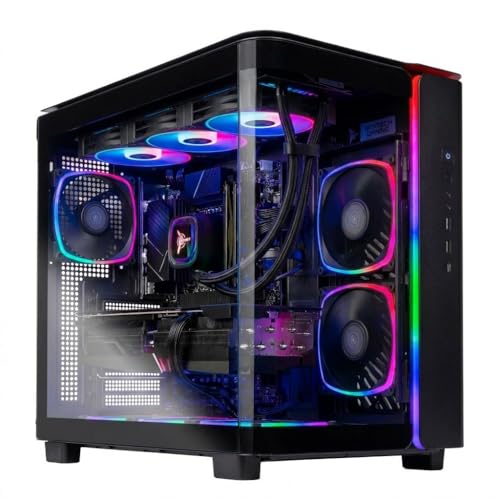
Skytech Gaming King 95 Gaming PC Ryzen 7 7800X3D RX 9070 XT

Skytech Gaming Edge Gaming PC Ryzen 7 7800X3D RX 9070 XT
More Details On Our Top Picks
Three 90mm fans, seven composite copper heat pipes, and a copper contact plate give this card a cooling setup suited to long gaming sessions. Its 16GB of GDDR6 memory, meaning fast graphics memory, pairs with a 256-bit bus for demanding 1440p play, while the metal backplate adds structural support.
Compared with the dual-fan Sapphire Pulse, this Gigabyte card has a more elaborate thermal layout and broader display connectivity, including two DisplayPort 2.1 and two HDMI 2.1 outputs. You may find the larger cooler easier to live with in a well-ventilated tower, though clearance deserves attention before installation.
Strong Points
- 16GB memory gives modern games useful texture headroom at 1440p.
- Three fans and multiple heat pipes spread heat across the cooling assembly.
- The backplate helps protect the board during installation and cable management.
- Two current DisplayPort and HDMI connections suit multi-monitor desks.
Things To Consider
- The sizeable cooler can complicate tight cases and nearby expansion slots.
- Dust buildup around three fans means routine case cleaning matters.
Key Specs
Who It Suits Best
You’ll get the most from this card in a well-ventilated 1440p gaming desktop with room for a larger cooler.
Consider Something Else When
Sapphire Pulse AMD Radeon RX 7800 XT suits compact-minded builds that favor a simpler dual-fan layout.
For a straightforward 1440p card, Sapphire’s Pulse design keeps the focus on a dual-fan cooler and carefully shaped composite heat pipes. Those pipes move heat through the fin stack, so your case airflow does more of the final heat removal.
That simpler approach can suit a daily gaming desktop better than the more elaborate Gigabyte Gaming OC, particularly in a case where internal space is limited. In our view, the trade-off is less cooling hardware and fewer clearly listed extras, so enthusiasts wanting RGB or a larger thermal assembly may prefer another option.
What We Like
- Dual-fan cooling keeps the card layout comparatively focused.
- Composite heat pipes are matched to the cooler’s shape for even heat movement.
- 16GB GDDR6 memory supports demanding game textures and multitasking.
Worth Noting
- A dual-fan design may leave less thermal headroom than the larger Gigabyte card during sustained loads.
- Owners commonly find that regular dust removal helps preserve airflow through the cooler.
- Specific case clearance should be checked before installation.
Feature Snapshot
Made For
You’ll find this option most appealing for a conventional gaming tower where compact cooling and uncomplicated installation matter.
Not Your Match When
GIGABYTE Radeon RX 7800 XT Gaming OC 16GB suits you better for a roomier case and a more extensive fan-and-heat-pipe system.
Gigabyte’s second Gaming OC listing centers on the familiar trio of Windforce fans, RGB Fusion lighting, and a protective metal backplate. That combination makes sense for a gaming and streaming desktop where you want a supported board, visible lighting, and a cooling layout built for sustained graphics work.
It closely overlaps the first Gigabyte card, so your decision may come down to the exact listing, included details, and fit inside your case. The honest read is that the shared 16GB, 256-bit memory arrangement is attractive, while the limited source detail makes careful listing verification worthwhile.
Highlights
- Three Windforce fans provide active airflow across the heatsink.
- RGB Fusion lets you coordinate lighting with a compatible setup.
- The metal backplate adds rigidity during handling.
- Dedicated graphics hardware fits gaming and streaming workloads.
- 16GB GDDR6 memory gives you room for detailed visual settings.
Trade Offs
- The overlapping model names can make listing comparison confusing.
- Three-fan maintenance requires occasional dust cleaning around the shroud.
At A Glance
Right Fit For
You’ll appreciate this card in a gaming-streaming build where lighting and a reinforced board matter as much as core graphics hardware.
Look Elsewhere When
Sapphire Pulse AMD Radeon RX 7800 XT is a clearer fit for you when a simpler, dual-fan card is easier to place and maintain.
Starting with a complete desktop changes the problem entirely: you don’t need to match a separate CPU, board, cooler, memory kit, and power supply. The Falcon pairs a Ryzen 7 7800X3D with an RX 9070 XT, 32GB of DDR5 memory, a 1TB SSD, an 850W power supply, and a 360mm liquid cooler.
That hardware suits high-refresh 1080p or 1440p play, while USB-C, Bluetooth, Wi-Fi, and ARGB fans make the system practical for a mixed gaming and office desk. You may find the tempered-glass presentation appealing, but liquid cooling adds a pump and radiator to keep clean and monitor over time.
Upsides
- 32GB DDR5 memory gives gaming, streaming, and productivity useful breathing room.
- The 1TB SSD leaves space for a starting game library and quick system loading.
- A 360mm AIO cooler spreads CPU heat across a large radiator.
- USB-C, Bluetooth, and Wi-Fi reduce accessory and cable complications.
- The 7800X3D and RX 9070 XT create a strong pairing for high-refresh play.
Minor Gripes
- A 360mm radiator needs a compatible case mounting position.
- Liquid cooling involves more components to inspect than a basic air cooler.
- Prebuilt component brands and expansion details deserve confirmation on the listing.
Technical Sheet
Who Will Love This
You’re the right match for this Falcon when you want a ready-to-use desktop for high-refresh gaming, streaming, and general work.
A Better Fit Elsewhere
Micro Center AMD 7800X3D Processor with GIGABYTE B850 Gaming WF Motherboard suits you more when you already own a graphics card and prefer building around it.
For a custom build, this bundle gives you the Ryzen 7 7800X3D and a GIGABYTE B850 Gaming WF motherboard in one platform-focused purchase. AM5 is the processor socket, while DDR5 and PCIe 5.0 support point toward newer memory, storage, and expansion hardware.
The bundle makes more sense than a complete PC for you when your case, graphics card, and power supply are already chosen. One thing worth considering is cooling: the processor listing specifies that a cooler isn’t included, so installation planning matters more here than with the prebuilt Falcon.
Plus Points
- Combines the CPU and motherboard, reducing platform-matching work.
- PCIe 5.0 and Gen 5 M.2 support prepare the build for newer components.
- USB-C, HDMI, DisplayPort, and Wi-Fi 6 expand connectivity options.
- AM5 and DDR5 create a modern base for a customized gaming desktop.
Room For Improvement
- The missing cooler adds a separate installation decision and expense.
- Component assembly requires comfort with socket, memory, and firmware setup.
Quick Facts
Built With In Mind
You’ll benefit most as a hands-on PC builder assembling a custom gaming system around an existing or separately chosen graphics card.
Swap It Out When
STORMCRAFT Falcon AI Gaming PC suits you better when you want the processor, graphics card, memory, storage, and cooling already assembled.
Skytech’s King 95 takes the same Ryzen 7 7800X3D and RX 9070 XT pairing into a complete desktop with 24GB of DDR5-6000 memory, a 1TB Gen4 NVMe M.2 SSD, and a 360mm ARGB liquid cooler. That combination is aimed at high-refresh gaming rather than a small, quiet office tower.
Wi-Fi 5, Windows 11, an 850W Gold ATX 3 power supply, and no preinstalled bloatware keep the setup familiar. Depending on your desk and case placement, the large cooler and gaming-oriented chassis may feel like more hardware than you need, while graphics-card branding can vary.
Bright Spots
- The 7800X3D processor is well matched to high-frame-rate gaming.
- 24GB DDR5-6000 supports games and everyday multitasking.
- The Gen4 NVMe SSD provides quick application and game loading.
- A 360mm ARGB AIO handles processor cooling in sustained workloads.
Points To Note
- Memory capacity is lower than the Falcon’s listed 32GB.
- Wi-Fi 5 is an older wireless standard than the bundle’s Wi-Fi 6.
- Owners commonly need to keep radiator surfaces and fan areas clear of dust.
Feature Rundown
Whose Shelf It Belongs On
You’ll suit this desktop best when high-refresh gaming and a substantial liquid-cooled tower matter more than compact dimensions.
Another Choice May Suit
Skytech Gaming Edge Gaming PC is a better fit for you when a similar core platform has the more appealing case presentation or listing details.
The Edge shares the King 95’s central hardware recipe: Ryzen 7 7800X3D, RX 9070 XT, 24GB DDR5-6000, 1TB Gen4 NVMe storage, 360mm ARGB cooling, and an 850W Gold ATX 3 power supply. That makes it a sensible route into current PC gaming without assembling each component yourself.
Windows 11, Wi-Fi 5, and no listed bloatware keep the software setup approachable for a first desktop. You may find the 24GB memory capacity sufficient for gaming and ordinary work, although the Falcon’s 32GB gives heavier multitasking more room, and the graphics-card brand may vary.
Best Bits
- Strong CPU and GPU pairing suits high-refresh 1080p and 1440p play.
- 1TB Gen4 storage gives you a useful starting library.
- 360mm ARGB cooling supports sustained processor workloads.
- Windows 11 and no listed bloatware simplify initial setup.
Small Caveats
- 24GB RAM sits below the Falcon’s 32GB configuration.
- Wi-Fi 5 may feel limiting in crowded wireless environments.
- Port selection and graphics-card branding should be confirmed before checkout.
Core Details
The Right Fit
You’ll suit the Edge as a first-time desktop owner seeking a ready-made system for gaming, streaming, and general home use.
Reach For A Different Pick When
STORMCRAFT Falcon AI Gaming PC is better suited to you when 32GB memory and broader listed connectivity matter more than matching the Skytech platform.
How To Choose The Right Cpus For 7800 Xt
Match The Processor To Your Graphics Card
An RX 7800 XT is a 1440p-oriented graphics card, so your CPU needs enough game-processing capacity to avoid holding back high frame rates. The Ryzen 7 7800X3D is a gaming-focused eight-core, 16-thread processor, making it a strong match for high-refresh monitors and competitive titles.
For a mostly single-player setup at 60Hz, a less specialized CPU can still make sense. Competitive players, streamers, and anyone targeting very high frame rates benefit more from the 7800X3D platform.
Check The Platform Before Ordering
AM5 identifies the socket used by compatible AMD desktop processors. The Micro Center bundle includes an AM5 motherboard with DDR5 and PCIe 5.0 support, which gives you a clear foundation for newer memory and storage.
Graphics-card-only listings require you to provide the rest of the platform. Confirm motherboard socket support, memory type, case clearance, power connections, and cooler compatibility before placing the card into your build.
Cooling And Power Need Room
A graphics card and CPU both send heat into your case during long sessions. Three-fan cards such as the Gigabyte Gaming OC need useful airflow, while the Falcon, King 95, and Edge use 360mm all-in-one coolers, which combine a pump, radiator, tubing, and fans.
Power supply capacity matters just as much. The complete PCs here list 850W units, while a custom build requires you to match the supply to your selected graphics card and the rest of your hardware.
Decide Between Parts And A Complete PC
A standalone graphics card makes sense when your current processor, board, memory, and power supply are ready. A CPU-and-board bundle reduces compatibility work, but you still need cooling, memory, storage, a case, and a graphics card.
A prebuilt desktop costs you less assembly time and gives you a working starting point. In exchange, you have less control over exact component brands, internal layout, and future upgrade choices.
Things Worth Knowing First
Mistakes Worth Dodging
The product title can lead you toward the wrong category. RX 7800 XT listings are graphics cards, while the 7800X3D listings cover a processor, a motherboard bundle, or a complete PC, so check the included hardware rather than relying on the shared numbers.
Case dimensions, cooler mounting, memory capacity, and power connections deserve a quick review before checkout. A large 360mm radiator or triple-fan card can require more internal space than an older office case provides.
Where The Extra Money Goes
Higher-tier complete systems generally bundle stronger graphics hardware, more memory, larger cooling, and a higher-capacity power supply. Those additions matter for high-refresh gaming, streaming, and demanding creative workloads.
A standalone card or processor bundle can be the smarter route for you when you already own compatible parts. Paying more for a prebuilt makes sense when reduced setup work and a ready-to-use system matter most.
Closing Remarks
Your right choice depends on the kind of system you already have and the amount of assembly you want to handle. GIGABYTE Radeon RX 7800 XT Gaming OC and Sapphire Pulse AMD Radeon RX 7800 XT suit graphics-card upgrades, while the Micro Center bundle gives custom builders an AM5 starting point. STORMCRAFT Falcon and the Skytech desktops make the transition easier with complete hardware packages. Check case space, cooling, memory, power, and included components carefully, then choose the configuration that fits your desk and gaming habits.
