
Pairing the right processor with an RTX 5070 can make the difference between a balanced gaming system and a build that leaves performance unused. You’ll find both standalone CPUs for custom desktops and complete systems that already combine the graphics card, memory, storage, and cooling. Daily gaming, streaming, creative work, case size, and upgrade plans all point toward different choices. This shortlist helps you match the processor platform to your setup rather than chasing specifications in isolation.
The Shortlist At A Glance

AMD Ryzen 9 5900XT 16-Core, 32-Thread Desktop Processor

GIGABYTE GeForce RTX 5070 WINDFORCE OC SFF 12G Graphics Card

KOTIN Prebuilt Gaming PC RTX 5070 12GB, Ryzen 7 9700X, 32GB DDR5
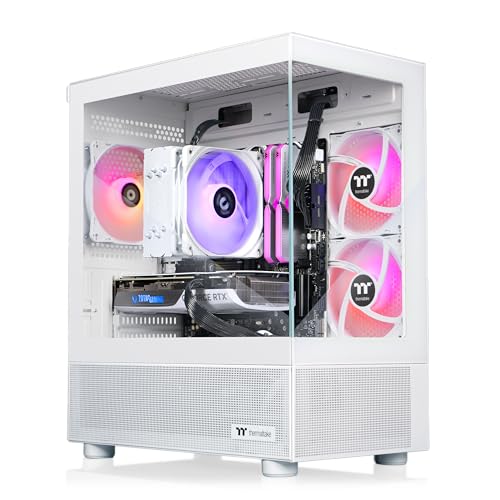
Thermaltake LCGS View i1470S-170 Gaming Desktop (Core i7-14700F, RTX 5070)
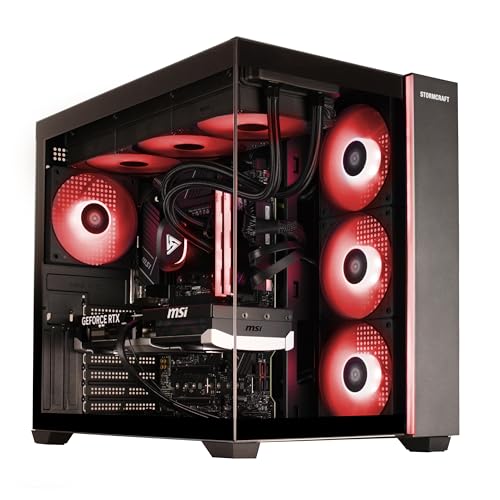
STORMCRAFT Falcon Prebuilt RTX 5070 Gaming PC, R7 7800X3D

AMD Ryzen 5 9600X 6-Core, 12-Thread Desktop Processor
More Details On Our Top Picks
Sixteen cores and 32 threads give you plenty of parallel processing for video exports, large projects, streaming, and heavy multitasking. A core handles instructions, while a thread represents a processing path, so the high thread count suits workloads that keep many tasks active at once.
The AM4 socket and DDR4-3200 support make this a sensible route for an existing compatible desktop rather than a fresh platform build. You may find the older memory and platform limits less appealing for a new system, but daily gaming with an RTX 5070 can still benefit from the strong multi-core headroom.
Strong Points
- 16-core, 32-thread layout supports demanding creation and multitasking work.
- Unlocked design gives experienced desktop users tuning flexibility.
- 72 MB of cache helps keep frequently accessed data close to the processing cores.
- PCIe 4.0 support fits many established AM4 graphics and storage configurations.
- The AM4 compatibility can reduce the amount of surrounding hardware needed for an upgrade.
Things To Consider
- A cooler isn’t included, so you need to budget space and installation effort for a compatible cooling solution.
- DDR4 and AM4 limit forward-looking upgrade options compared with the newer Ryzen 5 9600X platform.
Key Specs
Who It Suits Best
You benefit most from this processor as an AM4 desktop owner handling gaming alongside streaming, editing, or other multi-threaded work.
Consider Something Else When
Choose AMD Ryzen 5 9600X instead for a new AM5 build with DDR5 memory and a newer expansion path.
For a custom RTX 5070 desktop, the graphics card sets the visual workload while your CPU handles game logic, background apps, and system tasks. This GIGABYTE card uses 12GB of GDDR7 memory, which stores graphical data close to the GPU for modern gaming and creative software.
The SFF designation points toward a smaller-form-factor build, and the WINDFORCE cooling system is aimed at managing heat in a compact enclosure. Space planning still matters, since small cases leave less room around power connectors and airflow paths than a standard tower.
What We Like
- 12GB GDDR7 memory gives the RTX 5070 room for detailed game assets and creative workloads.
- Small-form-factor positioning suits desks where a conventional tower feels oversized.
- PCIe 5.0 support aligns with a newer motherboard platform.
- The three-part WINDFORCE cooling design gives you a dedicated approach to GPU heat management.
Worth Noting
- Compact case installation can make cable routing, dust removal, and component access more fiddly.
- You still need a separate processor, motherboard, memory, storage, power supply, and case.
- Graphics-card dimensions and available clearance deserve a careful check before installation.
Feature Snapshot
Made For
You’re a strong match for this card when you’re assembling a compact RTX 5070 gaming desktop and can confirm case clearance in advance.
Not Your Match When
KOTIN Prebuilt Gaming PC suits you better when you want the graphics card, CPU, memory, storage, and cooling assembled together.
For a first gaming desktop, this KOTIN configuration removes much of the matching work. You get an RTX 5070 12GB graphics card beside an eight-core Ryzen 7 9700X, while 32GB of DDR5-6000 memory gives you room for games, browsers, voice chat, and creative applications.
The built-in 11.3-inch smart display adds live CPU and GPU temperature and usage information, plus weather data, which can be handy beside a busy gaming station. In most rooms, the 1TB NVMe SSD, 850W 80+ Gold PSU, 360mm liquid cooler, WiFi 7, and ARGB case create a convincing all-in-one setup, though liquid cooling brings more hardware to maintain than an air cooler.
Highlights
- RTX 5070 graphics and Ryzen 7 9700X create a balanced modern gaming foundation.
- 32GB DDR5-6000 supports multitasking without forcing an immediate memory upgrade.
- The 1TB PCIe 4.0 NVMe SSD keeps game and application loading responsive.
- The integrated screen lets you check temperatures and utilization without leaving your game.
- Windows 11 Home arrives installed, reducing setup steps for a new desktop owner.
- WiFi 7 supports a current wireless networking setup where compatible equipment is available.
Trade Offs
- A 360mm liquid cooler needs suitable case space and adds pump and radiator hardware to the ownership checklist.
- The smart display is distinctive, but its usefulness depends on how much desk space you have around the tower.
Technical Sheet
Right Fit For
You’ll appreciate this configuration as a beginner or busy gamer who wants 1440p and 4K capability without sourcing each component separately.
Where Another Pick Suits Better
STORMCRAFT Falcon suits you more for high-refresh competitive gaming centered on the Ryzen 7 7800X3D.
A glass-sided case changes the role of this desktop from hidden hardware to visible room furniture. The Intel Core i7-14700F, RTX 5070, 32GB DDR5-6000, and 1TB NVMe M.2 storage give you a capable foundation for gaming, streaming, and everyday creative work.
The ARGB air cooler keeps the cooling layout more straightforward than KOTIN’s 360mm liquid system, which may appeal in a long-term home setup. Tempered glass does show fingerprints and dust, so you’ll want regular exterior care, especially beside a desk used for snacks or pets.
Upsides
- Core i7-14700F provides substantial processing capacity for demanding desktop use.
- 32GB DDR5-6000 is well suited to gaming alongside streaming and background applications.
- 1TB NVMe M.2 storage supports quick application and game loading.
- Tempered-glass styling and RGB memory suit a display-oriented gaming room.
Minor Gripes
- Glass panels require more frequent dust and fingerprint cleaning than an opaque enclosure.
- The air-cooling approach is simpler to maintain, but it lacks the large radiator look of the KOTIN and STORMCRAFT systems.
- The prebuilt format gives you less control over selecting each individual component.
At A Glance
Whose Shelf It Belongs On
You’re the right fit as a gamer who wants a capable prebuilt tower that also makes RGB hardware part of the room’s visual design.
Swap It Out When
KOTIN Prebuilt Gaming PC fits you better when a built-in system display and liquid cooling matter more than glass-panel presentation.
High-refresh gaming places unusual value on CPU responsiveness, and the Ryzen 7 7800X3D makes this Falcon especially appealing for esports, streaming, and VR sessions. The RTX 5070 supplies the graphics horsepower, while 32GB of DDR5-6000 memory keeps the surrounding desktop experience comfortable.
An AMD B850 chipset platform, 1TB SSD, 850W PSU, and 360mm AIO cooler give you a thoroughly modern prebuilt package. You may prefer this gaming-first balance over Thermaltake’s Intel configuration for competitive play, though the large liquid cooler means more installation and maintenance complexity than a basic air-cooled tower.
Bright Spots
- Ryzen 7 7800X3D is a strong fit for high-frame-rate gaming workloads.
- RTX 5070 graphics cover demanding 1440p play and suitably equipped 4K setups.
- DDR5-6000 memory and a 1TB SSD reduce early upgrade pressure.
- 850W power capacity and a 360mm AIO leave room for a substantial gaming configuration.
- The platform targets esports, streaming, and VR rather than gaming alone.
Points To Note
- The 360mm radiator needs appropriate mounting space and a clear airflow plan.
- One terabyte can fill quickly beside a large modern game library, so storage expansion may enter your future plans.
Quick Facts
Who Will Love This
You’ll get the most from this desktop as a competitive gamer, streamer, or VR user who values high-refresh CPU performance.
Reach For A Different Pick When
AMD Ryzen 9 5900XT suits you more when an existing AM4 workstation needs many processing threads for creation work.
A six-core, 12-thread layout keeps this processor focused and efficient for a new RTX 5070 gaming desktop. Zen 5 is the underlying architecture, and the 5.4 GHz maximum boost figure gives you a useful indicator of its single-thread responsiveness for games and everyday applications.
The AM5 socket, DDR5-5600 support, 38 MB cache, and PCIe 5.0 capability on compatible motherboards make the platform feel more forward-looking than the Ryzen 9 5900XT’s AM4 base. Depending on your editing workload, six cores may feel less comfortable than KOTIN’s eight-core Ryzen 7, but the smaller CPU is a clean match for gaming-focused custom builds.
Plus Points
- Zen 5 architecture brings a current AMD platform to a custom desktop.
- Six cores and 12 threads suit gaming, office work, and moderate creation tasks.
- Unlocked operation gives experienced users room for manual tuning.
- AM5 and DDR5 support make later platform expansion more practical than an AM4 upgrade.
Room For Improvement
- A cooler isn’t included, so your build plan must include compatible CPU cooling.
- Six cores offer less multi-thread headroom than the Ryzen 9 5900XT for lengthy renders and heavy production workloads.
- PCIe 5.0 support depends on the motherboard selected for your build.
Core Details
The Right Fit
You’re well matched with this CPU as a DIY builder creating a new RTX 5070 gaming desktop around AM5 and DDR5.
Look Elsewhere When
STORMCRAFT Falcon suits you more when you want a complete tower and prioritize the Ryzen 7 7800X3D for high-refresh gaming.
How To Choose The Right Cpus For A 5070
Match CPU Workload To Your Games
The RTX 5070 handles much of the rendering work, but your CPU still manages game simulation, input, background applications, and frame preparation. Six cores can suit a gaming-first desktop, while eight or more cores help you stream, edit, compile, or keep several demanding programs active. High-refresh esports games also place more emphasis on CPU responsiveness than slower-paced single-player titles.
Choose The Platform Before The Chip
A CPU socket determines which motherboard you can use. AM4 supports the Ryzen 9 5900XT and commonly pairs with DDR4, while AM5 supports the Ryzen 5 9600X and newer DDR5 memory. A current platform usually makes more sense for a fresh build, whereas AM4 can be sensible when you already own a compatible board and memory kit.
Plan Cooling, Power, And Case Space
Unlocked processors allow manual tuning, but that flexibility requires a suitable cooler and a motherboard with the needed support. The standalone AMD options do not include a cooler, so add that component before finalizing your parts list. Complete desktops reduce the matching work, although a 360mm liquid cooler needs more mounting space and upkeep than the air-cooled Thermaltake system.
Consider Your Actual Resolution
At 1440p, the graphics card often carries the heavier load, making a balanced midrange CPU practical for many gaming setups. At very high refresh rates, a gaming-focused chip such as the Ryzen 7 7800X3D can make more sense. For 4K creative work, streaming, or rendering, core count and memory capacity deserve more attention than boost speed alone.
Before You Choose Your Setup
Mistakes Worth Dodging
A common error is treating a CPU and a complete desktop as interchangeable choices. The GIGABYTE card is only a graphics component, while KOTIN, Thermaltake, and STORMCRAFT include the surrounding platform, so your parts list changes substantially.
Socket confusion can also derail a build. AM4 and AM5 require different motherboard and memory decisions, and the standalone AMD processors need separate cooling. Check case clearance, cooler mounting, power capacity, and storage needs before settling on a compact build.
Where The Extra Money Goes
Higher-tier systems often charge for more cores, newer memory platforms, stronger cooling, larger power supplies, or prebuilt assembly. Those additions matter most during streaming, rendering, high-refresh gaming, and long multitasking sessions.
You may not need every upgrade for a straightforward 1440p gaming desktop. Spending more makes sense when the extra processing capacity or included components prevent near-term replacements, while a simpler Ryzen 5 9600X build can keep a focused gaming budget under control.
Final Verdict
Your best choice depends on the desktop you’re building, not just the RTX 5070 itself. Choose AMD Ryzen 9 5900XT for an AM4 productivity upgrade, AMD Ryzen 5 9600X for a new AM5 foundation, or the GIGABYTE card for a custom compact build. KOTIN gives you a feature-packed assembled system, Thermaltake adds visible glass-panel styling, and STORMCRAFT leans toward high-refresh gaming. Match the CPU platform, cooling plan, and workload first, then choose the form that suits your space.
