
Your RTX 3060 still has plenty of life for 1080p gaming, streaming, creative work, and everyday multitasking, but the right processor keeps frame pacing smooth and prevents the graphics card from waiting on the rest of your system. You’ll find upgrade-friendly AM4 chips, complete desktops, and newer DDR5 hardware below. The shortlist suits first-time builders, commuters who need a compact workstation, and gamers replacing an older CPU without rebuilding everything. Pay close attention to motherboard compatibility, memory capacity, storage, and the difference between purchasing a processor alone and getting a complete tower.
The Shortlist At A Glance

AMD Ryzen 7 5800X3D Desktop Processor

STGAubron Gaming PC Desktop Core i7 RTX 3060 12G 32G RAM 1TB SSD

AMD Ryzen 5 5500 with Wraith Stealth Cooler

STGAubron Gaming PC Desktop Core i5 RX 550 16G RAM 512G SSD

Corsair Vengeance i7500 Gaming PC Black Core i5-14600K RTX 5060
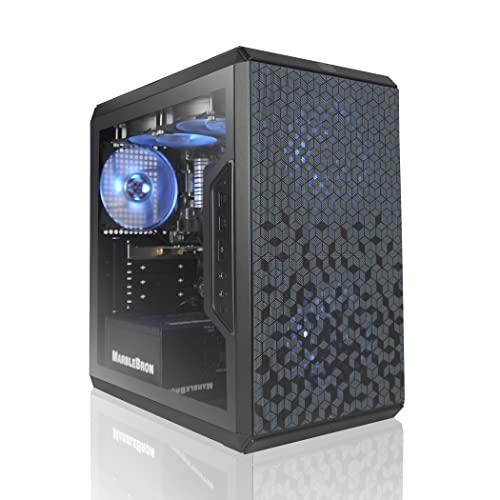
Q-Box Series Gaming PC Ryzen 5 5500 RTX 3050 Liquid Cooler

HP Pavilion Gaming Desktop PC TG01 Ryzen 5 4600G RTX 3060
More Details On Our Top Picks
AM4 owners seeking a gaming-focused upgrade get an eight-core, 16-thread chip with AMD 3D V-Cache. Cache is fast-access memory close to the processor, and the large L3 pool can help game data stay available during play. That makes this a particularly appealing route for your existing B550 or X570 system with an RTX 3060.
Compared with the Ryzen 5 5500, you gain two cores and a much larger cache design, which suits busy gaming sessions with voice chat, browsers, and background applications. The honest trade-off is platform age, DDR4 memory, and the need to provide a suitable cooler, so you’ll want to confirm your motherboard firmware and cooling plan first.
Strong Points
- Eight cores and 16 threads give you useful headroom for streaming and multitasking.
- 3D V-Cache targets the game-data access patterns that matter during many gaming sessions.
- AM4 compatibility can let you refresh an established desktop instead of replacing every major component.
- DDR4-3200 support keeps this choice practical for existing memory kits.
- A 4.5 GHz maximum boost clock supports responsive bursts in everyday software.
Things To Consider
- A cooler isn’t included, so installation requires a separate compatible cooling solution.
- Older AM4 systems may need a firmware update before the processor starts properly.
Key Specs
Who It Suits Best
You’ll get the most from this processor as an AM4 gamer who wants stronger RTX 3060 performance without moving to a new memory platform.
Where Another Pick Suits Better
Choose the Corsair Vengeance i7500 Core i5-14600K system instead for a complete newer desktop with liquid cooling and DDR5 memory.
You avoid the build process here, receiving a complete tower centered on an RTX 3060 with 12GB of graphics memory, 32GB of system RAM, and a 1TB SSD. That combination gives you generous room for large game libraries, editing projects, and several demanding applications open together. Wi-Fi 6 and Bluetooth 5.0 also help a busy desk stay less dependent on cables.
Compared with the compact HP Pavilion TG01, this STGAubron gives you more memory and storage for streaming or video editing. You may find the larger tower easier to upgrade and cool, although prebuilt desktops deserve a careful check of internal component access, fan noise, and cable layout after delivery.
What We Like
- RTX 3060 graphics with 12GB memory gives your 1080p gaming setup useful breathing room.
- 32GB RAM is well suited to streaming, editing timelines, and heavy browser use.
- The 1TB SSD reduces the need for immediate storage expansion.
- Wi-Fi 6 and Bluetooth 5.0 simplify connections in a home office.
- DisplayPort and HDMI outputs support common monitor arrangements.
Worth Noting
- The listing identifies the processor as Core i7 up to 3.9 GHz, without naming a specific generation.
- Prebuilt towers can have less straightforward upgrade access than a self-assembled desktop.
- Keep ventilation paths clear during long gaming or editing sessions.
Feature Snapshot
Made For
This tower suits you best as a streamer, student, or editor who wants RTX 3060 graphics and substantial memory without assembling individual parts.
Consider Something Else When
The AMD Ryzen 7 5800X3D processor fits you better when you already own an AM4 motherboard and want a focused gaming upgrade.
For a fresh AM4 build around an RTX 3060, six cores and 12 threads give you a sensible starting point. The included Wraith Stealth cooler removes a separate installation decision, while the 3.6 GHz base speed and 4.2 GHz boost specification suit gaming, schoolwork, and general multitasking. Precision Boost 2, Precision Boost Overdrive, and Resizable BAR add platform-level tuning features.
The Ryzen 5 5500 asks less of your cooling plan than the Ryzen 7 5800X3D, but its smaller cache and PCIe 3.0 support make it less attractive for a long-term enthusiast build. Depending on your motherboard, a BIOS update may be necessary, so compatibility belongs on your setup checklist before assembly.
Highlights
- Six cores and 12 threads handle modern games plus everyday multitasking.
- The included cooler keeps your initial parts list shorter.
- 65W thermal design power supports a straightforward air-cooled desktop plan.
- Zen 3 architecture gives your RTX 3060 a capable mainstream partner.
Trade Offs
- PCIe 3.0 limits expansion bandwidth compared with newer platforms.
- Some AM4 motherboards require firmware preparation before installation.
Technical Sheet
Right Fit For
You’ll appreciate this chip as a first-time builder who wants a manageable AM4 gaming system with the cooler included.
A Better Fit Elsewhere
STGAubron Gaming PC Desktop Core i7 RTX 3060 12G 32G RAM 1TB SSD suits you more when you need a complete tower with abundant memory and storage.
A home office, school desk, or light gaming station gets a complete Windows 11 tower here, with 16GB RAM and a 512GB SSD. The RX 550 is an entry graphics card, so you should view this as a general-use desktop that can handle lighter games rather than a close match for an RTX 3060-focused build. Wi-Fi 6 and Bluetooth 5.0 make setup easier in rooms far from the router.
Compared with the STGAubron RTX 3060 tower, this model gives you less graphics capability, memory, and storage, but it may suit a quieter workload and a smaller software library. In a busy kitchen, home office, or student room, that simpler role can be exactly the point. The catch is limited headroom for demanding modern games.
Upsides
- 16GB RAM supports ordinary multitasking, schoolwork, and office applications.
- A 512GB SSD gives you quicker startup and application loading than a mechanical drive.
- Wi-Fi 6 and Bluetooth 5.0 support current everyday connectivity.
Room For Improvement
- The RX 550 is a significant step down from the RTX 3060 options listed here.
- 512GB can fill quickly after several large games and creative applications.
- Prebuilt upgrade space and power connections deserve inspection before adding hardware.
Quick Facts
Best Suited To
This desktop fits you as a student or home-office user who values a complete setup more than demanding RTX 3060 gaming performance.
Not Your Match When
Choose the HP Pavilion Gaming Desktop PC TG01 Ryzen 5 4600G RTX 3060 instead for a compact tower aimed at stronger 1080p gaming.
You’re looking beyond an RTX 3060 here, with a complete Corsair desktop pairing an Intel Core i5-14600K and RTX 5060. Liquid CPU cooling means a sealed coolant loop manages processor heat, while six RS120 ARGB fans and the 3500X ARGB case indicate a cooling-first layout. The wraparound tempered-glass panels also give you a clear view of the internal components.
For long gaming sessions, editing, or high-refresh displays, this system offers far more platform headroom than the Ryzen 5 5500 machines. You may find its 16GB memory adequate to start, though larger editing projects can make an eventual memory expansion appealing. The honest trade-off is that its newer hardware exceeds the needs of an RTX 3060-focused setup.
Bright Spots
- Core i5-14600K provides a modern desktop foundation for gaming and demanding software.
- RTX 5060 gives you a newer graphics platform than the RTX 3060 systems listed here.
- Liquid CPU cooling helps manage processor heat during extended workloads.
- Six case fans support airflow through the mid-tower enclosure.
- DDR5 memory marks a newer platform direction than the AM4 choices.
Points To Note
- Liquid cooling adds more components to monitor than a basic air cooler.
- Tempered-glass panels show dust and fingerprints, so regular cleaning keeps the display tidy.
At A Glance
Who Will Love This
This desktop suits you as an enthusiast who wants a finished, modern tower for demanding games, editing, and future component upgrades.
Reach For A Different Pick When
The STGAubron Gaming PC Desktop Core i7 RTX 3060 12G 32G RAM 1TB SSD is a closer fit for you when RTX 3060 graphics and abundant memory meet your needs.
The Q-Box gives you a ready-built path into PC gaming with a Ryzen 5 5500, RTX 3050 6GB graphics card, 16GB DDR4-3200 memory, and a 500GB SSD. A liquid CPU cooler comes installed, which may appeal to you more than sourcing a separate cooler for the standalone AMD chip. AC Wi-Fi, Windows 11, and the listed keyboard and mouse help shorten the distance from delivery to first setup.
Compared with the HP Pavilion TG01, the RTX 3050 system offers less graphics memory than the RTX 3060 but includes more immediately usable system memory. The 500GB drive can feel tight beside a large game library, so you’ll want to plan storage expansion. Liquid cooling also deserves sensible dust control and a clear airflow path around the case.
Plus Points
- Ryzen 5 5500 gives you six cores and 12 threads for everyday gaming workloads.
- RTX 3050 6GB provides dedicated graphics for entry-level 1080p play.
- 16GB DDR4-3200 is a practical starting point for games and schoolwork.
- The included liquid cooler simplifies the initial hardware list.
Small Caveats
- 500GB storage may fill quickly after installing several large games.
- AC Wi-Fi is an older wireless standard than the Wi-Fi 6 systems here.
- Liquid cooling requires more attention to dust and component access than a basic air cooler.
Core Details
Built With In Mind
This tower is suited to you as a new PC owner who wants a ready gaming setup with cooling, operating system, and accessories included.
Swap It Out When
STGAubron Gaming PC Desktop Core i7 RTX 3060 12G 32G RAM 1TB SSD is better suited to you for heavier streaming, editing, and larger game installations.
Small desks often make a full-size gaming tower awkward, and the TG01 takes a more compact route while pairing a Ryzen 5 4600G with an RTX 3060. You also get 8GB RAM, a 256GB SSD, Wi-Fi, Bluetooth, Windows 11, and an RJ-45 wired network connection. For 1080p gaming, the dedicated graphics card matters more than the modest storage allocation, though the system memory is the first area you may want to expand.
Compared with the STGAubron RTX 3060 desktop, this HP gives you less RAM and storage but a compact prebuilt format that suits an office or bedroom desk. You may find the 256GB drive restrictive after a few large installations, so external or internal expansion planning matters. The compact enclosure can also make maintenance and upgrades less roomy than on a mid-tower.
Best Bits
- RTX 3060 graphics support capable 1080p gaming and creative workloads.
- The compact TG01 format works well beside a monitor on a smaller desk.
- Ryzen 5 4600G provides six cores and 12 threads for multitasking.
- Wi-Fi, Bluetooth, and RJ-45 give you flexible network and accessory connections.
Areas To Watch
- 8GB RAM is a lean starting point for modern gaming and streaming.
- 256GB SSD capacity leaves limited room for large game libraries.
- Compact cases can make dust removal and component upgrades more involved.
Details At A Glance
Whose Shelf It Belongs On
This desktop fits you as a space-conscious gamer who wants RTX 3060 graphics in a compact ready-made system.
Another Choice May Suit
The Q-Box Series Gaming PC Ryzen 5 5500 RTX 3050 Liquid Cooler is a better match for you when 16GB RAM and included accessories matter more than RTX 3060 graphics.
How To Choose The Right Cpus For Rtx 3060
Match Processor Strength To Your Games
Your RTX 3060 generally pairs sensibly with a mainstream six-core processor for 1080p gaming, especially with a 60Hz or 75Hz monitor. Higher refresh gaming, simulation titles, large multiplayer matches, and streaming benefit from additional cores and cache, which is where the Ryzen 7 5800X3D or a modern Core i5 system makes more sense. A CPU with more processing threads also gives you room for voice chat, browser tabs, recording software, and background downloads.
Check The Platform Before You Spend
Socket AM4 processors such as the Ryzen 5 5500 and Ryzen 7 5800X3D require a compatible AM4 motherboard. You’ll also need DDR4 memory, and some older boards may need a firmware update before recognizing a newer Ryzen 5000-series chip. The 5800X3D does not include a cooler, while the Ryzen 5 5500 includes the Wraith Stealth, so your parts list changes significantly between these two options.
Don’t Ignore Memory And Storage
For a new complete desktop, 16GB RAM is a practical starting point, while 32GB better suits streaming, editing, and heavy multitasking. Storage matters just as much during ownership. A 256GB SSD can fill rapidly after Windows, applications, and a few large games, whereas 1TB gives you noticeably more breathing room.
Decide Between A Chip And A Complete Tower
A standalone CPU makes sense when you already own a case, motherboard, memory, storage, and power supply. A complete tower saves assembly time and usually includes the operating system, but you should inspect upgrade access, cooling layout, and the exact processor generation. Compact systems are easier to place in a small office, while mid-towers usually provide more room for cleaning and future hardware changes.
Things Worth Knowing First
Mistakes Worth Dodging
A common mistake is pairing a processor with an incompatible motherboard or forgetting that a BIOS update may be needed. Check the socket, memory type, and firmware support before you remove the old chip. You’ll also want to distinguish an RTX 3060 desktop from a CPU-only listing, since the Ryzen 7 5800X3D and Ryzen 5 5500 require the rest of your system.
Storage is another easy oversight. A 256GB or 500GB SSD may feel comfortable on day one, but large games and video files consume that space quickly. Plan a second drive or choose a 1TB configuration for a less cramped setup.
Where The Extra Money Goes
Higher-tier systems cost more because you’re paying for newer processor architecture, stronger graphics, liquid cooling, DDR5 memory, larger storage, or a more capable case and fan arrangement. Those additions matter most for high-refresh gaming, editing, streaming, and long ownership periods. For casual 1080p play and schoolwork, a Ryzen 5 or an RTX 3060 prebuilt can keep your setup more focused.
Final Verdict
Your best direction depends on the system you already have. The Ryzen 7 5800X3D makes the most sense for an AM4 gaming upgrade, while the Ryzen 5 5500 keeps a new DIY build straightforward. Choose STGAubron or HP for a ready RTX 3060 desktop, and consider Corsair when you want a newer, stronger platform beyond that graphics class. For smaller budgets and lighter workloads, the RX 550 tower remains practical. Match the processor, memory, cooling, and storage to your actual routine, and your RTX 3060 setup should feel balanced rather than overbuilt.
