
Choosing a processor for an RX 7600 gaming build gets complicated once platform support, core count, cooling, and memory enter the picture. You also have two graphics cards and a CPU cooler in this shortlist, so you can compare the parts that shape a complete system rather than focusing on one chip in isolation. For entry-level desktops, the Intel Pentium Gold G-6400 keeps things straightforward, while the AMD Ryzen 7 8700F and Ryzen 5 7600X3D suit more demanding gaming and creative workloads. Your motherboard socket and chipset still decide which upgrade makes sense.
The Shortlist At A Glance

Intel® Pentium Gold G-6400 Desktop Processor

AMD Ryzen™ 7 8700F
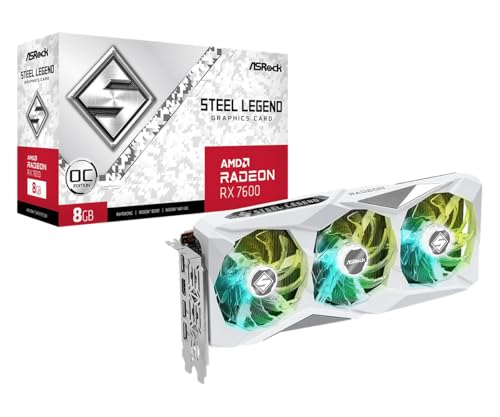
ASRock Radeon RX 7600 Challenger 8GB OC

Intel® Celeron G-5900 Desktop Processor
XFX Speedster SWFT210 Radeon RX 7600 Graphics Card

AMD RYZEN 5 7600X3D Raphael AM5

Thermaltake Gravity i3 92mm CPU Cooler
More Details On Our Top Picks
For a basic desktop paired with an RX 7600, the Pentium Gold G-6400 offers a clear, low-complexity starting point. Its two cores and four threads suit browsing, office work, media playback, and lighter gaming tasks, though demanding modern games can expose its limits.
The 4.0 GHz clock gives everyday apps a responsive feel, while the 58W rating can simplify power planning. You need an LGA1200 motherboard using an Intel 400-series chipset, and the boxed package doesn’t include a thermal solution, so installation requires a separate cooler.
Strong Points
- Four processing threads handle everyday multitasking better than a two-thread entry chip.
- Its 4.0 GHz clock suits browsing, documents, and light desktop work.
- The 58W rating can help keep a modest system easier to cool.
Things To Consider
- Two cores leave less room for streaming, heavy multitasking, and newer CPU-heavy games.
- You need a separate cooler, and LGA1200 limits future platform upgrades.
Key Specs
Who It Suits Best
You get the best fit as a basic-system builder using the RX 7600 for lighter games and general desktop work.
Consider Something Else When
Choose the AMD Ryzen 7 8700F instead for frequent content creation, streaming, or heavier multitasking.
Eight cores and 16 threads give the Ryzen 7 8700F a much broader workload range than the Pentium Gold G-6400. You can pair it with an RX 7600 for gaming, then move into video work, coding, or background applications without the same tight CPU ceiling.
The Zen 4 architecture, DDR5 support, and maximum boost of 5.0 GHz point toward a modern AM5 build. Its unlocked design allows overclocking, although that route adds heat, tuning effort, and a stronger need for appropriate cooling.
What We Like
- Eight cores and 16 threads provide useful space for creative applications.
- A 5.0 GHz maximum boost supports quick bursts in games and desktop software.
- DDR5 compatibility gives your new system a current memory platform.
- Unlocked operation appeals to enthusiasts who enjoy manual tuning.
Worth Noting
- AM5 requires a compatible motherboard and DDR5 memory, raising the rest-of-build demands.
- Overclocking can make cooling and stability management more involved.
- Check cooler compatibility before assembly because the supplied listing details do not include a thermal solution.
Feature Snapshot
Made For
You benefit most as a multitasking gamer or content creator building a new AM5 desktop around the RX 7600.
Not Your Match When
The Intel Pentium Gold G-6400 suits you better for a low-demand LGA1200 office system with minimal platform changes.
Strictly speaking, the ASRock Challenger isn’t a CPU, but it belongs in an RX 7600-focused shortlist because it is the graphics card your processor must support. Its RDNA 3 design, 8GB of GDDR6 memory, and PCIe 4.0 interface make it a natural reference point for a balanced 1080p gaming desktop.
The dual-fan cooler includes 0dB silent operation, meaning the fans can stop during lighter workloads. You get three DisplayPort 1.4 outputs and HDMI 2.1, while the two-slot, 269.2 x 131.8 x 40.3mm format still demands a case check.
Highlights
- 8GB of GDDR6 memory supports common 1080p gaming configurations.
- Dual fans spread cooling across the card during longer sessions.
- 0dB operation can reduce fan noise during lighter desktop use.
- HDMI 2.1 and three DisplayPort 1.4 outputs support flexible monitor setups.
- The metal backplate adds structure to the card during installation and storage.
Trade Offs
- The 40.3mm thickness and two-slot layout need clearance inside compact cases.
- A single 8-pin power connector adds a cable-planning step during installation.
Technical Sheet
Right Fit For
You get the strongest match as a 1080p gamer who wants a quiet, current graphics card in a carefully measured case.
Where Another Pick Suits Better
The XFX Speedster SWFT210 Radeon RX 7600 suits you more when a simpler dual-fan graphics-card design is your priority.
At 3.4 GHz, the Celeron G-5900 targets simple desktop duties rather than a demanding RX 7600 gaming configuration. It can make sense for a low-cost office computer, file server, or temporary build, but its two cores and two threads create a narrow workload ceiling.
The 58W rating is easy to understand for basic cooling plans, yet the LGA1200 socket and Intel 400-series requirement tie you to an older platform. You also need to provide a separate thermal solution, which matters during a first-time installation.
Upsides
- Two cores cover email, documents, browsing, and simple media tasks.
- The 58W rating supports a modest cooling arrangement.
Room For Improvement
- Two threads can feel restrictive during multitasking or current CPU-heavy games.
- The separate cooler requirement adds another part to source and install.
- Intel 400-series compatibility limits motherboard selection and later upgrades.
Quick Facts
Best Suited To
You should choose this chip for a simple office or utility desktop where gaming performance isn’t the main requirement.
Look Elsewhere When
The Intel Pentium Gold G-6400 gives you more useful multitasking capacity for a closely related LGA1200 build.
The XFX Speedster SWFT210 is another graphics-card option rather than a processor, and its role is easy to understand: it supplies the RX 7600 graphics hardware around which your CPU choice is balanced. The RDNA 3 architecture, 8GB GDDR6 memory, and dual-fan cooling suit a straightforward gaming tower.
Its boost clock reaches up to 2655 MHz, while HDMI and three DisplayPort outputs give you room for several monitor arrangements. You may find the simple design easier to fit and maintain than a more elaborate cooler, though case clearance and power connections still deserve a check before assembly.
Bright Spots
- 8GB GDDR6 memory supports a capable midrange gaming configuration.
- The SWFT dual-fan cooler spreads heat across two fans.
- Three DisplayPort connections help multi-monitor desk setups.
- The uncluttered format can make installation and dust cleaning more manageable.
Points To Note
- This is a graphics card, so it doesn’t replace the processor in your build.
- Dual-fan cooling still depends on clear case airflow for sustained workloads.
Feature Rundown
Who Will Love This
You get the right fit as a gamer assembling a clean RX 7600 system with uncomplicated dual-fan cooling.
Another Choice May Suit
The ASRock Radeon RX 7600 Challenger 8GB OC suits you more when 0dB fan-stop operation and specified display outputs matter most.
Gaming-focused AM5 builds deserve attention here, and the Ryzen 5 7600X3D brings six cores, 12 threads, and a large 96MB L3 cache. Cache is fast on-chip storage that can reduce repeated trips to system memory, so this design may suit game-heavy use more closely than general productivity.
The 4.1 GHz speed and DDR5-5200 support place it in a modern platform, with compatibility spanning A620, B650, B650E, B840, B850, X670, X670E, X870, and X870E chipsets. A heatsink isn’t included, so you need a separate cooler and careful AM5 installation planning.
Reasons To Buy
- Six cores and 12 threads give gaming systems useful multitasking capacity.
- The 96MB L3 cache is a distinctive fit for cache-sensitive game workloads.
- Broad listed chipset support gives you several AM5 motherboard paths.
- DDR5-5200 support keeps the memory platform current for a new build.
Minor Gripes
- The missing heatsink adds a separate cooling decision and installation step.
- AM5 and DDR5 require more supporting hardware than the older Intel choices.
- Depending on your case, cooler clearance deserves attention before assembly.
Core Details
Whose Shelf It Belongs On
You gain the most from this processor as an enthusiast building an AM5 desktop mainly for gaming with an RX 7600.
Reach For A Different Pick When
The AMD Ryzen 7 8700F fits you better for content creation and heavily threaded workloads beyond gaming.
The Thermaltake Gravity i3 isn’t a CPU, but it can solve an important build problem for a compatible processor. Its aluminum extrusion heatsink and 92mm seven-blade fan provide a compact air-cooling setup rated for up to 95W, making it a practical companion for modest desktop systems.
The LGA1700 mounting system separates it from the LGA1200 options above and makes socket matching essential. Spring screws and a backplate help hold the cooler securely, while the compact footprint may suit a smaller case, though the fan and heatsink still need occasional dust cleaning.
Best Bits
- A 92mm fan keeps the cooler’s footprint manageable in tighter cases.
- The aluminum heatsink transfers processor heat into the airflow path.
- Spring screws and a backplate support a secure mounting process.
- The stated 95W capacity suits modest LGA1700 desktop processors.
- Seven fan blades provide a straightforward cooling layout with few parts to maintain.
Small Caveats
- LGA1700 compatibility makes it unsuitable for the LGA1200 and AM5 processors in this list.
- Dust buildup around the 92mm fan and fins can reduce airflow over time, so routine cleaning helps.
At A Glance
Built With In Mind
You get the right match as a small-form-factor builder using a compatible LGA1700 processor with moderate cooling needs.
Swap It Out When
The AMD Ryzen 5 7600X3D suits you more for AM5 gaming because this Thermaltake cooler doesn’t match its socket.
How To Choose The Right Cpus For Rx 7600
Start With Socket And Chipset
Your processor must physically and electrically match your motherboard. LGA1200 covers the Pentium Gold G-6400 and Celeron G-5900, while the Ryzen 7 8700F and Ryzen 5 7600X3D use AMD’s AM5 platform. The Thermaltake Gravity i3 uses LGA1700, so it belongs with a compatible Intel 1700-pin processor rather than either older Intel chip or either AMD model.
Check the chipset before you plan the rest of the system. A 400-series board suits the two LGA1200 chips, while the Ryzen choices need an AM5 board and DDR5 memory.
Match Core Count To Your Routine
Core count describes how many processing units handle tasks, while threads represent the work streams those cores can manage. Two cores and two threads on the Celeron G-5900 suit basic documents and browsing, but four threads on the Pentium Gold G-6400 provide more breathing room.
Gaming with an RX 7600 usually benefits from a more capable CPU once you add streaming, recording, browser tabs, or creative software. The Ryzen 7 8700F’s eight cores and 16 threads target that broader routine, while the Ryzen 5 7600X3D’s six cores and 12 threads focus more directly on gaming balance.
Consider Cache, Memory, And Cooling
Cache is fast storage built into the processor. The Ryzen 5 7600X3D lists 96MB of L3 cache, a substantial capacity that makes it appealing for a gaming-first build, while the Ryzen 7 8700F emphasizes Zen 4 processing, DDR5 support, and a 5.0 GHz maximum boost.
Cooling affects installation as much as performance planning. The Pentium and Celeron listings require a separate thermal solution, the Ryzen 5 7600X3D doesn’t include a heatsink, and the Thermaltake cooler only supports LGA1700. Confirm socket, case clearance, and cooler capacity before ordering parts.
Things Worth Knowing First
Mistakes Worth Dodging
A common mistake is treating every item in this list as a CPU. The ASRock Challenger and XFX Speedster are RX 7600 graphics cards, while the Thermaltake Gravity i3 is a cooler. Use them to complete or compare a build, not as substitutes for a processor.
Another error is pairing an old socket with a new motherboard. LGA1200, AM5, and LGA1700 require different boards, so check the socket and chipset before you plan memory, cooling, or case installation.
Where The Extra Money Goes
Higher-tier processors add cores, threads, newer memory support, larger cache, or greater tuning flexibility. You notice those differences during streaming, compiling, editing, and multitasking, not only inside a game.
Spending more makes sense for a new AM5 gaming system or a desktop that needs several demanding applications open together. Basic office work has less to gain, so the Pentium Gold G-6400 can be the more sensible match than an eight-core chip.
Final Verdict
Your ideal choice depends on the system you actually plan to build. The Intel Pentium Gold G-6400 fits basic LGA1200 desktops, the AMD Ryzen 7 8700F gives you broader multitasking capacity, and the Ryzen 5 7600X3D targets an AM5 gaming build with substantial cache. The ASRock and XFX cards help define the RX 7600 graphics side, while the Thermaltake cooler addresses LGA1700 cooling. Check socket, chipset, memory, and cooler fit first, then choose the performance level that matches your daily workload.
