
Video editing puts different demands on your computer than browsing or office work. You need enough processing power for timelines, exports, color work, and background tasks, while memory and storage affect how smoothly your projects stay organized. This shortlist covers complete desktops plus standalone processors, so you can match your upgrade path to your workspace. You’ll find compact systems for smaller desks, renewed towers with generous memory, and newer platforms aimed at heavier creative workloads.
The Shortlist At A Glance


HP ProDesk 600G4 Tower Desktop Computer i7-8700 32GB 1TB SSD


More Details On Our Top Picks
A small-form-factor chassis makes this renewed Dell easy to place beside a monitor or under a modest desk. The Intel Core i7-7700 supplies four processing cores at 3.60GHz, while 32GB of DDR4 memory gives your editing software room for a timeline, browser tabs, and music tools together.
The 1TB solid-state drive, or SSD, uses flash storage for quicker startup and project access than a traditional hard drive. You may find the older platform better suited to 1080p projects and basic cuts than demanding high-resolution work, but dual-monitor support helps keep bins and previews visible.
Strong Points
- 32GB RAM reduces slowdowns during ordinary multitasking.
- The 1TB SSD gives you useful working space for active media.
- The compact case fits smaller editing desks.
- Dual-monitor support can separate the timeline from preview panels.
Things To Consider
- The four-core processor has less headroom for long, complex exports than newer options.
- Renewed hardware deserves careful inspection of vents and ports during setup.
Key Specs
Who It Suits Best
You’ll get the most sense from this Dell for beginner editors making 1080p videos in a compact home workspace.
Consider Something Else When
Choose the Dell Pro Tower Plus Core Ultra 7 265 for newer editing software, three displays, and heavier export schedules.
The HP ProDesk takes a more spacious tower approach than the compact Optiplex 7050. Its Intel Core i7-8700 runs six cores at 3.4GHz, giving you a stronger base for simultaneous editing, web research, and office tasks in a shared home workspace.
With 32GB DDR4 RAM and a 1TB SSD, you can keep active projects and supporting applications close at hand. The honest read is that this renewed tower makes more sense for practical 1080p work than a new high-end workstation, and its larger enclosure needs more desk or floor space.
What We Like
- Six cores offer a useful step up for multitasking over the four-core Dell Optiplex 7050.
- 32GB memory helps your editing application and other desktop tools coexist.
- A 1TB SSD keeps routine file access responsive.
- Wi-Fi and Bluetooth simplify placement away from a wired network.
- The tower format may be easier to access than a small-form-factor case.
Trade Offs
- The older platform won’t match the newer Core Ultra systems for connectivity and efficiency.
- Dust management matters more in a tower that sits near the floor.
- Renewed condition means you should confirm included accessories before installation.
At A Glance
Made For
This HP suits you best as a home office and editing computer for moderate projects, streaming, and routine multitasking.
Not Your Match When
The Intel Core Ultra 7 Processor 270K Plus suits you better for a fresh custom build with DDR5 and newer platform support.
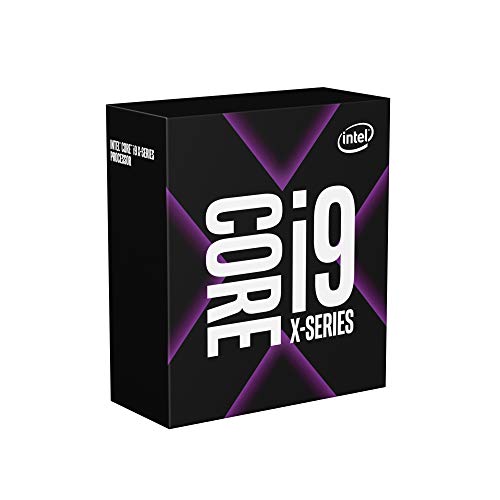
Standalone processors change the decision entirely: you need a compatible workstation rather than a ready-to-use desktop. The unlocked Intel Core i9-10900X provides 10 cores and 20 threads, with threads representing the processor’s ability to manage separate streams of work, which helps with rendering and encoding workloads.
Its speed reaches 4.7GHz, but the 165W rating points toward a serious cooling and power setup. Depending on your existing X299 motherboard, this can extend an enthusiast editing system without replacing its entire foundation.
Highlights
- Ten cores and 20 threads suit demanding multi-step exports.
- Up to 4.7GHz supports responsive timeline interaction in suitable software.
- The unlocked design gives experienced builders more tuning flexibility.
- LGA2066 compatibility makes it relevant for existing X299 workstations.
Minor Gripes
- You need a discrete graphics card, compatible board, cooler, memory, and storage.
- The 165W rating can make cooling and case airflow more involved.
- An older LGA2066 platform offers less future expansion than current platforms.
Technical Sheet
Right Fit For
You’ll appreciate this processor most as an experienced creator upgrading an existing X299 workstation.
Look Elsewhere When
Pick the Beelink SER5 Mini PC Ryzen 5 5500U for a ready-made, compact system with simpler setup and lighter editing needs.
For a new editing workstation, the Core Ultra 7 270K Plus brings a much newer foundation than the i9-10900X. You get 24 cores split between eight performance cores and 16 efficiency cores, a layout intended to balance demanding foreground work with lighter background tasks.
Support for DDR5 memory and PCIe 5.0 and 4.0 gives your build current expansion options. You may find the platform appealing for years of component upgrades, although an LGA1851 processor requires an Intel 800 Series motherboard and adds build planning before your first timeline opens.
Upsides
- Twenty-four cores give demanding editing workloads broad processing capacity.
- Up to 5.5GHz supports responsive interactive work.
- DDR5 support suits a new, high-bandwidth workstation build.
- PCIe 5.0 and 4.0 support leaves room for newer expansion hardware.
Room For Improvement
- You must purchase a compatible motherboard, cooling solution, memory, storage, and graphics hardware separately.
- A new platform can require more setup time and configuration than a complete desktop.
Feature Snapshot
Best Suited To
This processor fits you as a creator building a new workstation for frequent exports, high-resolution timelines, and long-term component upgrades.
A Better Fit Elsewhere
The HP ProDesk 600G4 Tower suits you more if you want a complete renewed desktop without selecting each internal component.
Triple DisplayPort 1.4a outputs make this Dell especially practical for an editing desk with three 4K monitors. Its Core Ultra 7 265 combines 20 cores with speeds up to 5.3GHz, while the NPU, a processor section built for certain AI workloads, adds 13 TOPS of AI processing capacity.
You also receive 32GB DDR5 memory, a 1TB PCIe NVMe SSD, Windows 11 Pro, and a DVD-RW drive in a complete tower. Compared with the standalone Core Ultra 7 Processor 270K Plus, this option gives you the surrounding system immediately, though integrated graphics may not satisfy demanding effects work that depends on a dedicated graphics card.
Bright Spots
- Three DisplayPort outputs simplify a wide three-screen editing layout.
- 20 cores and up to 5.3GHz support demanding multitasking.
- 32GB DDR5 memory provides a modern starting point for creative software.
- The 1TB NVMe SSD supports quick system and project access.
- Front and rear USB-C ports help connect current accessories.
- The optical drive remains useful for accessing older disc-based footage.
Points To Note
- Integrated graphics may call for a dedicated graphics upgrade for advanced effects or intensive playback.
- Three-monitor output depends on compatible DisplayPort cables and displays.
- A tower takes more room than the Beelink SER5.
Details At A Glance
Who Will Love This
You’ll find the Dell Pro Tower Plus most suitable for a professional-style home studio that needs several monitors and a ready-to-use modern desktop.
Swap It Out When
Choose the Intel Core i9-10900X for an existing X299 system where you already have a dedicated graphics card and compatible supporting parts.
The Beelink SER5 keeps your desk clear with a mini-PC format, yet its AMD Ryzen 5 5500U still provides six cores and 12 threads at up to 4.0GHz. Integrated Radeon Graphics with seven graphics cores at 1800MHz makes it a sensible match for light editing, streaming, and everyday media work.
Its 16GB DDR4 RAM and 480GB M.2 2280 SSD keep the initial setup straightforward, while HDMI, DisplayPort, and USB-C support up to three 4K displays. You may find the smaller drive fills quickly with camera footage, so an external storage routine will matter for longer projects.
Plus Points
- The mini-PC footprint works well in tight desks, dorm rooms, and mobile setups.
- Six cores and 12 threads cover basic editing and office multitasking.
- Three display connections give you flexible screen placement.
- Wi-Fi 6 and Bluetooth 5.4 simplify wireless accessories and network access.
Small Caveats
- 16GB RAM and 480GB storage leave less room for large media libraries.
- Integrated graphics are a compromise for demanding effects and complex high-resolution timelines.
- Mini-PC cooling paths need regular dust care, especially in cramped spaces.
Quick Facts
Whose Shelf It Belongs On
This Beelink suits you as a student, traveler, or beginner editor working on short projects in a space-conscious setup.
Reach For A Different Pick When
The Dell Optiplex 7050 SFF Desktop PC i7-7700 32GB 1TB SSD gives you more memory and storage for a stationary home editing station.
How To Choose The Right Cpus For Video Editing
Match Core Count To Your Timeline
A core is an individual processing unit, so more cores can help software divide rendering, encoding, and background jobs across the processor. The six-core HP ProDesk and Beelink Ryzen 5 handle moderate workloads, while the 10-core i9 and 20- or 24-core newer Intel options suit longer exports and heavier multitasking.
Core count doesn’t tell the whole story. Higher clock speed, measured in gigahertz, can help interactive tasks feel responsive, while the software you use determines how well it spreads work across many cores.
Treat Memory As Working Room
RAM is short-term workspace for your applications and active media. 16GB can cover simple projects, but 32GB gives you more breathing room for large timelines, browser research, audio tools, and color panels.
You’ll notice the difference most during real editing sessions, not while opening a single clip. DDR4 is still practical in the complete desktops here, while DDR5 provides the newer memory platform found in the Core Ultra choices.
Check The Whole Platform
A standalone processor is only part of a computer. You need a matching socket, motherboard chipset, cooling system, memory, storage, power supply, and graphics solution before editing can begin.
Complete desktops remove much of that planning. The Dell Pro Tower Plus adds three DisplayPort outputs and a 1TB NVMe SSD, while the compact Dell Optiplex and Beelink make more sense for smaller work areas.
Plan For Your Media Files
SSD storage uses flash memory and generally opens applications and project files quickly. Capacity still matters because video files grow fast, so 480GB may suit short projects while 1TB offers a more comfortable starting point.
External storage can separate archived footage from your system drive. Keep your active files organized, and check the available display connections before committing to a multi-screen workflow.
Before You Commit To A Workstation
Mistakes Worth Dodging
A common mistake is choosing a processor without checking the socket and chipset. The i9-10900X needs LGA2066 and X299, while the Core Ultra 7 Processor 270K Plus needs LGA1851 and an Intel 800 Series board.
Complete desktops create a different trap: assuming every tower handles demanding effects equally well. Integrated graphics can serve lighter editing, but advanced workflows may call for a dedicated graphics card.
The Upgrade Payoff
Higher-tier processors cost more because you’re paying for additional cores, newer memory support, faster platform connections, and sometimes specialized processing such as an NPU. Those additions matter most during frequent exports, complex timelines, and multi-application sessions.
You’ll gain more from the newer Intel platforms when you’re building from scratch and expect to upgrade parts later. For occasional 1080p projects, the renewed HP or Dell may leave more of your setup simple and familiar.
Final Verdict
Your best match depends on the whole editing setup, not processor naming alone. Choose the Beelink for compact light work, the Dell Optiplex or HP ProDesk for practical renewed desktops, and the Intel i9-10900X for an existing X299 build. New workstation builders get the most forward-looking platform from the Core Ultra 7 Processor 270K Plus, while the Dell Pro Tower Plus gives you modern processing, 32GB DDR5, 1TB storage, and three-display support in one system. Choose the option that fits your footage, desk, and upgrade plans.
