
Choosing workstation hardware gets complicated fast because processor power, cooling, memory, storage, and case space all affect daily use. You may need a ready-to-run desktop for office work, a compact cooler for a small-form-factor build, or a multi-core tower for rendering and virtualization. This shortlist covers those different needs, with attention to compatibility, installation, maintenance, and practical ownership. You’ll find newer desktop hardware alongside renewed business systems and specialized CPU coolers, so match each option to your workload rather than chasing specifications alone.
The Shortlist At A Glance

Dell OptiPlex 7070 SFF Desktop Computer i7-9700 32GB 1TB SSD

be quiet! Pure Rock Pro 3 Black CPU Air Cooler

Dell Tower Desktop Core Ultra 7-265 32GB 1TB SSD

Thermalright AXP90 X47 Black Low Profile CPU Cooler

ID-COOLING SE-903-XT V2 Black CPU Air Cooler
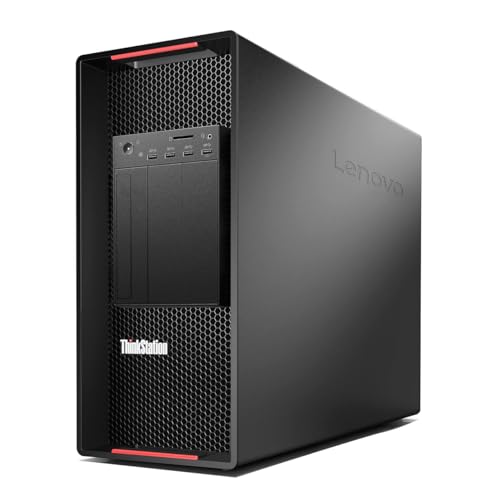
PCSP ThinkStation P920 Tower Workstation Dual Xeon Gold 6148 128GB

SilverStone Technology XE01-1700A 1U Server Workstation Cooler
More Details On Our Top Picks
For office work, coding, spreadsheets, and moderate creative software, this renewed OptiPlex gives you a sensible starting point. Its i7-9700 has eight cores, while 32GB of DDR4 memory helps you keep browsers, documents, and several work applications open together.
The 1TB NVMe SSD, a compact storage drive that connects directly to the motherboard, should make launches and file access feel brisk. You also get Windows 11 Pro, Wi-Fi 6E, nine USB ports, two display outputs, and a wireless keyboard and mouse, although the small-form-factor case leaves less room for large upgrades than a tower.
Strong Points
- Eight-core processing suits multitasking across office and development applications.
- 32GB RAM reduces slowdowns during heavier everyday workloads.
- The 1TB NVMe drive provides useful working space without an immediate storage upgrade.
- Multiple USB connections and dual-display support suit a desk-based workflow.
- The compact chassis fits tighter office areas than the ThinkStation P920.
Things To Consider
- Renewed hardware can show cosmetic variation, so inspect the listing details carefully.
- The SFF enclosure may restrict graphics-card and cooling upgrades.
Key Specs
Who It Suits Best
You’ll get the most from this desktop as a home-office professional, student, developer, or small-business user who needs ready-to-run multitasking.
Consider Something Else When
Choose the Dell Tower Desktop Core Ultra 7-265 instead for newer platform features and a roomier tower layout.
Long rendering sessions and sustained workstation loads call for more than a small stock heatsink. The Pure Rock Pro 3 uses six 6mm copper heat pipes, which carry heat away from the processor into the fin stack, paired with a 120mm PWM fan that adjusts speed through the motherboard.
That layout gives you more thermal headroom than the low-profile Thermalright AXP90 X47, especially in a full-size case. The trade-off is physical height: measure your case, check memory clearance, and expect more involved installation and occasional dust cleaning around the fins.
What We Like
- Six heat pipes spread processor heat across a substantial air-cooling assembly.
- A 120mm PWM fan can balance airflow and noise during changing workloads.
- The black finish suits a restrained workstation interior.
Trade Offs
- Its tower shape needs more case clearance than compact coolers.
- Installation requires careful socket and surrounding-component checks.
- Fin stacks collect dust over time and need access for cleaning.
Feature Snapshot
Made For
You’ll appreciate this cooler most in a full-size workstation handling long exports, code builds, or other sustained processor loads.
Not Your Match When
Reach for the Thermalright AXP90 X47 instead for an ITX build with only 47mm of cooler height available.
Newer desktop hardware makes sense for professionals who want a clean starting point rather than a renewed business machine. Intel Core Ultra 7-265 processing, 32GB of RAM, and a 1TB PCIe NVMe SSD give you a balanced base for office suites, programming, content work, and multi-application days.
Intel UHD Graphics handle display output, while Wi-Fi 6 and Bluetooth reduce cable clutter around a busy desk. Windows 11 Home is less business-focused than the Pro installation on the OptiPlex 7070, and the listing specifies a wired keyboard and mouse, so this setup favors practical stability over extras.
Highlights
- Core Ultra 7-265 belongs to a newer desktop processor generation.
- 32GB memory and 1TB PCIe NVMe storage suit demanding daily productivity.
- Wi-Fi 6 and Bluetooth simplify a modern desk setup.
- The tower format gives you a more flexible starting point than an SFF chassis.
- Support for one 4K display or four FHD displays is available through daisy-chain-capable screens.
Room For Improvement
- Integrated UHD graphics are not intended for graphics-heavy workstation workloads.
- Windows 11 Home may not suit organizations that require Pro-specific administration features.
Technical Sheet
Right Fit For
You’ll find this desktop well suited to professionals building a newer home office, development station, or general-purpose creative workspace.
A Better Fit Elsewhere
Select the PCSP ThinkStation P920 for virtualization, simulation, and highly threaded workloads that can use many CPU cores.
Small ITX cases leave little room above the processor, and that’s exactly where the AXP90 X47 makes sense. Its 47mm height, four 6mm heat pipes, and 92mm slim PWM fan fit compact layouts that cannot accept the taller be quiet! Pure Rock Pro 3.
The all-metal construction and backplate fastener support a secure installation, while the black nickel finish keeps the cooler visually discreet. You may find its limited physical size less suitable for high-wattage sustained workloads, and compact fin spacing deserves regular dust removal.
Upsides
- 47mm total height opens compatibility with many slim and ITX enclosures.
- Four heat pipes provide a direct path for moving CPU heat into the heatsink.
- The included 92mm PWM fan fits the compact platform without a separate fan purchase.
Points To Note
- Small coolers have less thermal surface area than full tower designs.
- Installation in a cramped case can require patience and careful cable routing.
- Dust buildup is harder to remove once the cooler is surrounded by compact hardware.
- Socket support should be matched precisely before installation.
Quick Facts
Best Suited To
You’ll benefit most from this cooler in an ITX workstation, slim office PC, or compact build where every millimeter matters.
Look Elsewhere When
Choose the be quiet! Pure Rock Pro 3 for a spacious tower handling longer, heavier processor loads.
A compact tower cooler can give you more room than a low-profile model without taking over the case. The SE-903-XT V2 uses direct-touch heat pipes, meaning the pipes contact the processor area directly, plus a 100mm PWM fan for adjustable airflow.
Its reinforced fin-lock structure and fan clips are intended to reduce movement during transport, a useful detail for a workstation that moves between rooms. The honest read is that it occupies a middle ground: easier to fit than the Pure Rock Pro 3, yet less suited to extreme sustained loads than a larger six-pipe cooler.
Bright Spots
- The 100mm fan offers more airflow coverage than many very small CPU coolers.
- Direct-touch heat pipes shorten the heat path into the aluminum fin stack.
- Reinforced clips and fin locking may help the assembly stay stable during transport.
- Intel and AMD compatibility makes it useful across several personal build plans.
Small Caveats
- The listing does not provide a cooler height, so case-clearance research remains necessary.
- Direct-touch surfaces need careful seating and suitable thermal paste application.
Feature Rundown
Who Will Love This
You’ll find this option appealing for a compact desktop build that needs a step up from basic cooling without a large tower assembly.
Swap It Out When
Move to the Thermalright AXP90 X47 for a truly low-clearance ITX chassis with a confirmed 47mm limit.
Virtual machines, simulation workloads, and CPU-based rendering can use far more parallel processing than a general office desktop. The ThinkStation P920 pairs two Intel Xeon Gold 6148 processors for 40 cores and 80 threads, with 128GB of DDR4 memory for large multitasking sessions.
You’ll need to supply the storage and operating system because this renewed tower arrives without either. That setup demands more planning than the ready-to-run Dell systems, but the empty drive configuration gives experienced workstation users room to build a storage layout around their own projects.
Plus Points
- 40 cores and 80 threads suit highly parallel professional workloads.
- 128GB DDR4 memory supports multiple virtual machines and large datasets.
- Quadro K620 2GB graphics provides a workstation-oriented display foundation.
- The tower format accommodates a more configurable storage plan than compact desktops.
- Renewed hardware can make sense for experienced administrators building a dedicated lab or server station.
Areas To Watch
- No HDD or operating system means extra setup work before productive use.
- The older dual-processor platform may draw more power and create more heat than the Dell Core Ultra desktop.
- Storage installation and operating-system setup require suitable technical confidence.
Core Details
Whose Shelf It Belongs On
You’ll get the strongest fit as an administrator, virtualization hobbyist, renderer, or technical professional who can configure a tower from the ground up.
Reach For A Different Pick When
Choose the Dell OptiPlex 7070 for a quieter, simpler office setup that already includes Windows, storage, and accessories.
Rack-mounted systems impose a different cooling problem than a desktop tower. The XE01-1700A stands only 28mm tall and uses an active 80mm dual-ball-bearing fan, making it suitable for 1U server or workstation environments with extremely limited vertical clearance.
Its 4-pin PWM connection allows speed control, while the stated 80W thermal design target keeps the intended workload range clear. You may find the high fan speed more noticeable in a quiet office, so this specialist cooler belongs in a rack or compact server environment rather than a living-room workstation.
Best Bits
- 28mm height fits 1U layouts that reject standard desktop coolers.
- LGA1700 and LGA1851 compatibility supports specified Intel platforms.
- The 4-pin PWM connection allows compatible systems to manage fan speed.
- Dual ball bearings suit equipment expected to operate in a server environment.
Honest Caveats
- The listed 80W thermal target limits its fit for higher-output processors.
- Up to 5,500 RPM can produce noticeable fan noise outside a rack enclosure.
- Installation depends on the mounting hardware and clearance of your specific chassis.
At A Glance
Built With In Mind
You’ll find the right fit here as a system builder maintaining an LGA1700 or LGA1851 1U rack server with a strict 28mm cooling limit.
Where A Sibling Pick Shines
Use the ID-COOLING SE-903-XT V2 for a quieter-feeling conventional desktop build with more room around the CPU socket.
How To Choose The Right Cpus For Workstation
Start With The Workload
Your software should guide the processor choice. Office suites, browser-heavy administration, and coding usually benefit from strong general responsiveness, while rendering, simulation, and virtual machines can take advantage of many cores and threads. The PCSP ThinkStation P920 targets that second group, whereas the Dell OptiPlex 7070 and Dell Core Ultra tower suit broader daily workloads.
Graphics needs deserve separate attention. Integrated graphics can handle ordinary displays, but 3D design, GPU rendering, and advanced visual work may require a separate graphics card, which also means checking case space and power connections.
Match Cooling To The Case
CPU cooling is a fitment decision before it becomes a performance decision. A tower cooler such as the be quiet! Pure Rock Pro 3 needs substantial vertical clearance, while the Thermalright AXP90 X47 is built around a 47mm limit. The SilverStone XE01-1700A drops to 28mm for 1U systems, but its 80W target and high-speed fan make its intended environment much narrower.
Measure the distance from the processor surface to the side panel, then check memory and motherboard clearance. Dust access matters too, especially in a workstation that runs daily in a studio, office, or rack cabinet.
Think Beyond The Processor
Memory changes how comfortably you can handle large projects. The 32GB systems cover general professional use, while 128GB on the P920 gives you far more room for virtual machines and large datasets.
Storage affects both capacity and workflow. A 1TB NVMe SSD gives the Dell desktops a ready-to-use foundation, while the P920’s lack of included storage suits technical users who already have a drive plan. Connectivity also counts: dual-display ports, Wi-Fi, Bluetooth, and USB access can save you from adding adapters later.
Things Worth Knowing First
Mistakes Worth Dodging
A common mistake is pairing a tall air cooler with a compact case. Check cooler height, socket support, RAM clearance, and the motherboard mounting arrangement before you place an order. Desktop systems need the same attention, especially renewed units where included accessories, expansion room, and cosmetic condition can differ from new hardware.
Another misstep involves choosing core count without checking software behavior. A 40-core workstation sounds appealing, yet lightly threaded applications may gain more from newer platform responsiveness, fast storage, or stronger single-core behavior.
Where The Extra Money Goes
Higher-tier workstation hardware usually adds memory capacity, newer processor architecture, stronger cooling, broader expansion, or better support for sustained loads. That extra hardware earns its place for daily rendering, virtualization, simulation, and large professional files.
You’ll notice less benefit from an expensive multi-CPU tower for email, documents, browsing, and light coding. In those situations, the Dell Core Ultra tower or OptiPlex 7070 gives you a more balanced ownership experience.
Final Verdict
Your right choice depends on the entire workstation, not the CPU name alone. Choose the Dell Core Ultra tower for newer everyday productivity, the OptiPlex 7070 for a ready-to-use renewed office PC, or the ThinkStation P920 for highly threaded technical work. The be quiet! Pure Rock Pro 3 suits spacious performance builds, while the Thermalright, ID-COOLING, and SilverStone coolers solve progressively tighter clearance problems. Measure first, match the software, and leave room for the way your workload may grow.
