
You want a desktop that can handle 1440p gaming without turning setup into a parts-matching project. This shortlist covers complete systems, a graphics card upgrade, and higher-tier hardware for demanding games, streaming, and creative work. Daily gaming at a 1440p monitor makes graphics memory, processor balance, storage, and cooling more important than a single flashy component. The right choice depends on whether you value a compact upgrade, a ready-to-use desktop, or extra headroom for newer releases.
The Shortlist At A Glance
CyberPowerPC Gamer Xtreme VR Gaming PC i5-13400F RTX 4060 8GB

msi Gaming GeForce GT 1030 4GB DDR4 Graphics Card

ZOTAC Gaming GeForce RTX 4070 Ti Super Trinity OC White Edition
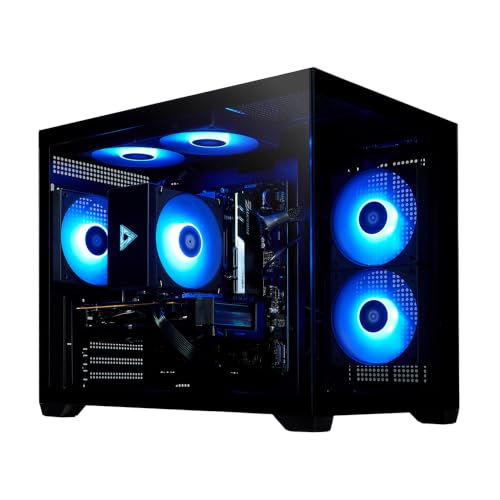
STORMCRAFT Sirius AI Gaming Desktop i5-14400F Arc B570 10GB
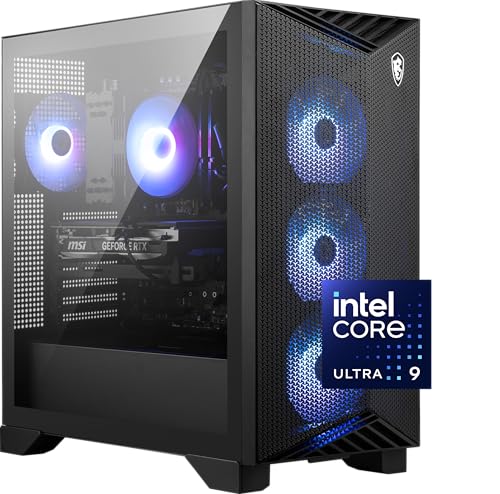
msi Aegis R2 AI Gaming Desktop Core Ultra 9 285 RTX 5070Ti

CyberPowerPC Gaming PC i5-14400F RTX 5060 8GB Gamer Xtreme

ZOTAC MEK Gaming PC Desktop RTX 5050 Ryzen 5 5500
More Details On Your Top Picks
The Core i5-13400F and RTX 4060 create a sensible starting point for a 1440p desk, especially alongside 16GB of DDR5 memory. DDR5 is a newer memory standard that can support responsive multitasking, while the 1TB PCIe Gen4 SSD gives game storage a practical head start.
Daily gaming, video playback, and general desktop work fit this configuration well. You may find the 8GB graphics memory more limiting in demanding settings than the processor, so this suits balanced settings better than long-term ultra-detail ambitions.
Strong Points
- 16GB DDR5 keeps everyday multitasking straightforward.
- The 1TB PCIe Gen4 SSD leaves room for several large games.
- Windows 11 Home and WiFi readiness reduce setup friction.
- Optional protection includes repair parts, labor, and shipping under its plan terms.
Things To Consider
- 8GB of graphics memory can require texture compromises in newer games.
- Owners should keep the case vents clear, since dust buildup can restrict airflow over time.
Key Specs
Who It Suits Best
You get the best fit as a first gaming desktop user seeking a ready-made 1440p setup for everyday play.
Consider Something Else When
Choose the CyberPowerPC Gaming PC i5-14400F RTX 5060 8GB Gamer Xtreme for a newer processor and graphics pairing.
A low-profile graphics card can help refresh an older desktop where case space and power capacity matter more than headline frame rates. The GT 1030 includes 4GB of DDR4 memory, HDCP support, and DisplayPort plus HDMI outputs for flexible monitor connections.
For office displays, media playback, and light gaming, that compact approach makes sense. In your 1440p shortlist, though, this is an upgrade component rather than a complete modern gaming solution, and demanding games may require modest visual settings.
What We Like
- Low-profile design can suit compact desktop cases.
- DisplayPort and HDMI support simplify dual-monitor planning.
- The single-fan layout keeps the card design straightforward.
Trade Offs
- DDR4 graphics memory is less suited to demanding 1440p gaming than the dedicated cards here.
- Check your case clearance and power connections before installation.
- A single fan may collect dust quickly in a tight, poorly ventilated case.
Feature Snapshot
Made For
You benefit most as a desktop owner upgrading an older or compact system for display output and lighter gaming.
Not Your Match When
The ZOTAC Gaming GeForce RTX 4070 Ti Super suits you better for serious 1440p detail and ray-traced gaming.
High-refresh 1440p gaming calls for more graphics headroom, and this ZOTAC card brings 16GB of GDDR6X memory, a 256-bit interface, and a listed 2625MHz boost clock. DLSS 3 is an image-generation and upscaling feature that can raise perceived smoothness in supported games, while full ray tracing handles more realistic lighting effects.
Compared with the RTX 4060 in the first CyberPowerPC, this card is aimed at far more demanding settings. Three 90mm fans and a bundled support stand make the physical installation more involved, so you may want a roomy case and careful cable planning.
Highlights
- 16GB GDDR6X memory gives demanding 1440p games more texture capacity.
- The 256-bit, 21Gbps memory path supports heavy graphics workloads.
- Three fans, fan-stop operation, and active fan control offer flexible cooling behavior.
- A metal backplate and support stand address structure and card positioning.
- White styling and RGB lighting suit a coordinated showcase build.
Minor Gripes
- The large cooling assembly needs suitable case space and airflow.
- More fans mean more areas to keep clear during routine dust cleaning.
Technical Sheet
Right Fit For
You get the strongest match as a 1440p enthusiast with a spacious desktop case and a preference for high visual settings.
Look Elsewhere When
The msi Aegis R2 AI Gaming Desktop suits you more when you need a complete system with a powerful processor, memory, and storage already installed.
The Sirius pairs Intel’s i5-14400F with an Arc B570 carrying 10GB of GDDR6 memory, giving you a newer platform than the RTX 4060 desktop above. Its 16GB of DDR4 memory and 1TB NVMe SSD cover the everyday essentials without pushing the configuration into workstation territory.
That combination suits a new 1440p gaming desk, particularly for someone who wants RGB memory and VR readiness in a complete tower. You may find the DDR4 platform less appealing for a long upgrade cycle than the DDR5 systems, but the current balance is easy to understand.
Upsides
- 10GB of graphics memory gives more room than 8GB designs.
- The i5-14400F offers 10 cores for gaming and background tasks.
- NVMe storage helps keep game launches and file access responsive.
- RGB memory adds visual customization without needing extra components.
Points To Note
- DDR4 memory uses an older standard than the CyberPowerPC i5-14400F system.
- Keep the tower clean and well ventilated during long gaming sessions.
- Confirm your monitor and game settings suit the Arc graphics platform.
Feature Rundown
Best Suited To
You get a good fit as a newer PC gamer who wants a complete 1440p tower with current midrange hardware.
A Better Fit Elsewhere
The CyberPowerPC Gamer Xtreme i5-14400F RTX 5060 offers you a DDR5-based alternative with a familiar mainstream graphics platform.
For demanding gaming plus streaming, editing, or heavy multitasking, the Aegis R2 gives you a much larger reserve than the midrange desktops. The Core Ultra 9 285, RTX 5070Ti, 32GB DDR5, and 2TB M.2 NVMe SSD form a high-capacity combination for a busy desk.
Air cooling keeps the design familiar and serviceable, while USB Type-C adds a useful modern connection. The honest trade-off is that higher-output components place more importance on case airflow and dust care, particularly in a warm room or long gaming session.
Standout Traits
- 32GB DDR5 gives demanding multitasking comfortable breathing room.
- 2TB of M.2 NVMe storage suits large game libraries and creative files.
- RTX 5070Ti graphics target high-detail 1440p play.
- The Core Ultra 9 285 is well matched to streaming and content creation.
- USB Type-C improves connection options for newer peripherals.
- VR readiness expands its use beyond a standard monitor.
Room For Improvement
- Air cooling needs clear vents and regular dust removal in a heavily used room.
At A Glance
Who Will Love This
You get the strongest fit as a streamer, creator, or enthusiast who wants one desktop for gaming and demanding daily work.
Where Another Pick Suits Better
The STORMCRAFT Sirius suits you more for a simpler midrange 1440p system with lower memory capacity and a smaller workload.
The i5-14400F gives this Gamer Xtreme a 10-core processor, while the RTX 5060 supplies 8GB of graphics memory. Together with 16GB DDR5 and a 1TB PCIe 4.0 SSD, the parts make a clear step forward from the earlier RTX 4060 desktop.
For a first tower beside a 1440p monitor, that balance is appealing because you don’t have to assemble a separate graphics card and processor pairing. You may find the 1TB drive fills quickly after several large installs, so storage planning matters for a broad game library.
Bright Spots
- 10 processor cores support gaming and everyday multitasking.
- DDR5 memory gives the system a newer foundation than DDR4 desktops.
- PCIe 4.0 SSD storage supports quick application and game access.
- WiFi readiness helps desks where a wired connection isn’t practical.
Small Caveats
- 8GB graphics memory may call for adjusted textures in demanding releases.
- 1TB can feel tight once a large library and media files accumulate.
- Routine dust cleaning remains important for steady airflow in a gaming tower.
Quick Facts
Whose Shelf It Belongs On
You get the right fit as a first-time desktop gamer seeking a current, ready-to-use midrange system.
Swap It Out When
The msi Aegis R2 suits you better for 32GB memory, 2TB storage, and heavier creator workloads.
The MEK combines a Ryzen 5 5500 processor with an RTX 5050 carrying 8GB of GDDR6 memory. Its 16GB DDR4, 1TB NVMe SSD, 650W 80+ Gold power supply, WiFi 6E, and Windows 11 Home create a useful all-in-one foundation for a casual gaming room.
WiFi 6E is a newer wireless standard with access to an additional band on compatible networks, which helps flexible desk placement. Compared with the CyberPowerPC RTX 5060 system, this ZOTAC uses an older DDR4 platform and a less ambitious processor, so its appeal rests on straightforward daily gaming rather than maximum upgrade headroom.
Plus Points
- 650W power supply capacity gives the complete system a clear electrical foundation.
- 80+ Gold efficiency designation identifies the supplied power class.
- WiFi 6E helps you place the tower away from a wired network point.
- 1TB NVMe storage keeps the initial setup tidy and responsive.
Areas To Watch
- Ryzen 5 5500 and DDR4 memory offer less platform headroom than newer DDR5 systems.
- 8GB graphics memory may limit texture settings in demanding 1440p games.
- Wireless performance depends on your router, room layout, and network congestion.
Core Details
Who Should Grab It
You get a suitable match as a casual gamer setting up a wireless desktop for everyday 1440p play.
Reach For A Different Pick When
The CyberPowerPC Gamer Xtreme i5-14400F RTX 5060 suits you more for newer DDR5 memory and a stronger midrange platform.
How To Choose The Right Cpu Gpu Comboes For 1440p
Match The GPU To Your Monitor
A 1440p display has more pixels than 1080p, so the graphics card carries most of the workload. An RTX 4060 or RTX 5060 desktop suits mainstream settings, while the RTX 4070 Ti Super offers more room for high refresh rates, detailed textures, and ray tracing.
Graphics memory matters too. The 8GB cards in this list can work well for many games, but 10GB or 16GB gives you more room for demanding texture packs and future releases.
Keep The Processor In Balance
The CPU handles game logic, background applications, and tasks such as streaming. A Core i5-13400F or i5-14400F fits a balanced gaming desktop, while the Core Ultra 9 285 makes more sense for heavy multitasking and creator software.
Avoid paying for a much stronger processor while choosing a graphics card that cannot match your monitor. For most gaming desks, a balanced CPU and GPU pairing feels better than a lopsided specification sheet.
Check Memory And Storage
16GB remains a practical starting point for gaming, but 32GB helps streamers, editors, and anyone who keeps several applications open. DDR5 is a newer memory standard than DDR4, although the complete system still matters more than the label alone.
A 1TB SSD gives you a comfortable start, yet large modern games can consume space quickly. The 2TB drive in the msi Aegis R2 makes more sense for a broad library or media archive.
Think About The Whole Desktop
A graphics card upgrade requires physical clearance, suitable power connections, and enough case airflow. Complete desktops remove much of that matching work, but you still need room for the tower and a sensible cleaning routine.
Wireless features also affect placement. WiFi 6E helps on compatible networks, while WiFi readiness is useful for flexible setup, but a wired connection remains preferable for a stable competitive gaming desk.
Things Worth Knowing First
Mistakes Worth Dodging
Don’t judge a 1440p system by the graphics card name alone. Check graphics memory, processor generation, system memory, storage capacity, and whether the item is a complete desktop or only an internal graphics card.
Case fit is another common snag with upgrade cards. Measure available space, inspect power connections, and leave room for airflow before installing a large triple-fan design such as the ZOTAC RTX 4070 Ti Super.
Where The Extra Money Goes
Higher-tier systems cost more because they combine stronger graphics hardware with larger memory pools, faster storage, and processors suited to heavier workloads. The msi Aegis R2 illustrates that approach with 32GB DDR5, 2TB NVMe storage, and the Core Ultra 9 285.
Paying more makes sense for high-refresh 1440p gaming, streaming, editing, or a large game library. Casual gaming at moderate settings usually needs less hardware, making the CyberPowerPC RTX 4060 or RTX 5060 desktops easier to match to your desk.
Final Verdict
Your best match depends on the workload behind your 1440p monitor. Choose the CyberPowerPC RTX 5060 system for balanced everyday gaming, the ZOTAC RTX 4070 Ti Super for demanding graphics, or the msi Aegis R2 for gaming plus serious multitasking. The STORMCRAFT system offers a newer midrange alternative, while the ZOTAC MEK keeps wireless setup straightforward. For an older compact desktop, the GT 1030 is a focused graphics upgrade rather than a full modern gaming platform. Take a careful look at your case, monitor, and game library before choosing.
