
A graphics card upgrade can turn a sluggish desktop into a much more capable gaming, editing, or multi-monitor machine. You need to match the GPU to your case clearance, power supply, monitor connections, and the type of software you use most. Compact systems may suit the ASUS Dual RTX 5060 or MSI GT 1030, while demanding games benefit more from the ASUS TUF RTX 5070. Older desktops still have practical options in the RX 580 and RTX 3050 range. The shortlist below helps you sort modern features, memory capacity, cooling layouts, and real-world fit without getting buried in technical shorthand.
The Shortlist At A Glance

ASUS Dual NVIDIA GeForce RTX 5060 8GB GDDR7 OC Edition

ASUS TUF Gaming NVIDIA GeForce RTX 5070 12GB GDDR7 OC Edition
Kelinx AISURIX RX 580 Graphics Card 2048SP 8GB GDDR5

msi Gaming GeForce GT 1030 4GB DDR4 OC

MOUGOL AMD Radeon RX 580 8GB GDDR5 White
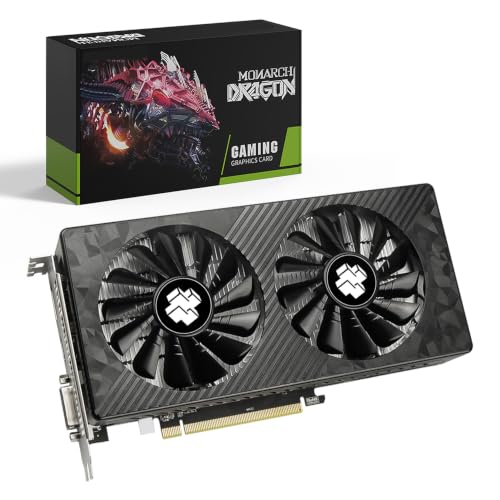
MOUGOL AMD Radeon RX 580 8GB GDDR5 Black

GIGABYTE GeForce RTX 3050 WINDFORCE OC V2 6G
More Details On Our Top Picks
Small gaming cases often force a choice between cooling room and modern graphics features. The ASUS Dual RTX 5060 addresses that tension with a 2.5-slot layout and two Axial-tech fans, a fan design shaped to move air through the heatsink without demanding a much larger enclosure.
For daily gaming at a desk, the 8GB of GDDR7 memory and DLSS 4 support give you a current feature set in a relatively manageable form. You may find the 2.5-slot thickness still needs careful motherboard and case clearance, but this remains a sensible step up for compact builds.
Strong Points
- GDDR7 memory gives newer games a current memory platform rather than an aging GDDR5 design.
- Two Axial-tech fans direct cooling through the heatsink, which suits longer gaming sessions better than a basic single-fan layout.
- The 2.5-slot format leaves you more flexibility than the broader ASUS TUF RTX 5070.
- HDMI 2.1b and DisplayPort 2.1b support modern monitor connections.
- 0dB technology can reduce fan noise during lighter desktop work, depending on the card’s operating conditions.
Things To Consider
- Eight gigabytes of memory gives you less headroom than the ASUS TUF RTX 5070’s 12GB allocation.
- Measure the 2.5-slot area before installation, especially beside a capture card or another expansion card.
Key Specs
Who It Suits Best
You’ll appreciate this card most in a compact gaming desktop that needs current features without a large three-slot cooler.
Consider Something Else When
Choose the GIGABYTE GeForce RTX 3050 WINDFORCE OC V2 6G for a lighter graphics workload and a less demanding upgrade path.
Demanding games and graphics-heavy creative software place more value on memory capacity and cooling than a casual desktop upgrade does. The ASUS TUF RTX 5070 pairs 12GB of GDDR7 with NVIDIA Blackwell architecture, while its 3.125-slot body and Axial-tech fans give the thermal system substantial room to work.
That larger build favors a spacious tower with strong airflow, not a cramped office chassis. In your view of long gaming sessions, the protective PCB coating and military-grade components may offer welcome durability-focused construction, although the physical size can complicate installation.
What We Like
- 12GB of GDDR7 provides more room for demanding textures and larger creative projects than the RTX 5060.
- Blackwell architecture and DLSS 4 bring newer rendering and image-enhancement features to compatible software.
- The 3.125-slot cooler is suited to sustained workloads in a well-ventilated tower.
- Protective PCB coating adds a layer of attention to board construction in dusty desktop environments.
Worth Noting
- Three-plus slots can block neighboring expansion positions, so your motherboard layout matters.
- Large coolers may require extra care during installation and storage, particularly in compact towers.
- The extra capability makes less sense for office work or older games that place little demand on the GPU.
At A Glance
Made For
This card fits you best as a serious desktop gamer or creator with a roomy case and a workload that benefits from 12GB of memory.
Not Your Match When
The ASUS Dual NVIDIA GeForce RTX 5060 suits you more closely for a compact build where a 2.5-slot footprint matters.
Older desktops often need a practical graphics lift rather than the newest platform. The Kelinx AISURIX RX 580 uses 2048 stream processors, meaning parallel units that handle graphics calculations, alongside 8GB of GDDR5 memory and a 256-bit memory bus.
That combination can suit familiar games and general desktop graphics work, especially for someone upgrading an aging PCIe 3.0 system. You may find its older architecture less suitable for newer visual features, and the listing’s Freeze Fan Stop design means dust removal around the fan area still deserves regular attention.
Highlights
- Eight gigabytes of memory gives an older desktop useful capacity for game textures and everyday creative tasks.
- A 256-bit bus provides a broad memory pathway compared with the narrower 64-bit GT 1030 design.
- Two DisplayPort outputs and HDMI support common monitor arrangements.
Trade Offs
- GDDR5 and PCIe 3.0 identify an older platform than the modern RTX choices above.
- Older graphics architecture may limit access to newer rendering features.
Technical Sheet
Right Fit For
You’ll get the most sensible match from this card as an owner of an older desktop seeking 8GB graphics memory for familiar games.
Look Elsewhere When
Pick the GIGABYTE GeForce RTX 3050 WINDFORCE OC V2 6G for newer ray-tracing and AI-assisted graphics features.
Small office desktops and home-theater PCs rarely need a large gaming card. The MSI GT 1030 4GD4 LP OC uses a single-fan design, 4GB of DDR4 memory, and a low-profile format that can make installation easier in a narrow chassis.
DisplayPort and HDMI cover common monitor and television connections, while DirectX 12 support keeps the card aligned with many everyday graphics applications. The honest trade-off is limited graphics headroom, so you may find this option better suited to display output, media playback, and light gaming than demanding new releases.
Upsides
- The low-profile design suits slim desktop cases that cannot accept a full-height graphics card.
- One fan simplifies the cooler layout and leaves less hardware to obstruct nearby components.
- HDMI and DisplayPort accommodate common desk and living-room displays.
Minor Gripes
- DDR4 memory is slower and less spacious than the GDDR5, GDDR6, and GDDR7 choices elsewhere here.
- A single fan may become more noticeable during sustained graphics work.
- Lightweight cooling and capacity make this a poor fit for demanding modern games.
Feature Snapshot
Who Will Love This
This card suits you as a home-office user, media-PC owner, or light-gaming beginner working with a slim desktop.
A Better Fit Elsewhere
The Kelinx AISURIX RX 580 makes more sense for you when gaming capability and 8GB memory matter more than low-profile clearance.
Three displays can transform a desk for spreadsheets, editing timelines, and strategy games, and the white MOUGOL RX 580 is built around that kind of flexible setup. HDMI, DisplayPort, and DVI give you three connector types, while 8GB of GDDR5 memory and a 256-bit bus keep the core hardware familiar to RX 580 upgraders.
The 240 x 135 x 45 mm dimensions make the fit easier to judge before you open your case, though 45 mm of thickness still needs attention beside neighboring slots. Compared with the Kelinx AISURIX RX 580, this version adds a stated dual-fan cooler and a distinct white finish, which may suit a coordinated build.
Bright Spots
- HDMI, DisplayPort, and DVI let you combine newer and older monitors on one card.
- Triple-display support is useful for home offices, charting desks, and editing workspaces.
- The dual-fan cooler is better suited to extended desktop graphics use than a basic single-fan card.
- Stated Windows 11, Windows 10, and Windows 7 support gives older systems a wider compatibility target.
Points To Note
- The 240 mm length and 45 mm thickness can challenge compact cases, so measure internal clearance first.
- GDDR5 and PCIe 3.0 place this behind the newer RTX cards for modern graphics features.
Quick Facts
Best Suited To
This is a practical match for you as a multi-monitor desktop user who wants broad port selection and a white component finish.
Swap It Out When
The MOUGOL AMD Radeon RX 580 8GB GDDR5 Black suits you better when a darker build theme matters more than the white exterior.
For a conventional tower with mixed displays, the black MOUGOL RX 580 keeps the same useful core layout as the white version. You get 8GB of GDDR5, 2048 stream processors, a 256-bit bus, and HDMI, DisplayPort, and DVI outputs in a dual-fan card measuring 240 x 135 x 45 mm.
The black shroud blends into more PC builds, and the three output types help you keep an older DVI monitor in service beside newer screens. Depending on your case airflow, the dual-fan design may need occasional dust cleaning, and the older PCIe 3.0 platform remains a limitation beside the ASUS Dual RTX 5060.
Plus Points
- Triple output types make this a flexible choice for mixed-age monitors.
- Dual fans provide a more substantial cooling arrangement for long desktop sessions.
- The black finish works naturally in understated office and gaming builds.
- 8GB memory gives you more working room than the MSI GT 1030.
- Windows 7, 10, and 11 compatibility supports a broad range of desktop environments.
Room For Improvement
- At 240 mm long and 45 mm thick, the card is not intended for very small cases.
- The RX 580 platform lacks the newer feature set found in RTX 3050, RTX 5060, and RTX 5070 cards.
- Older GDDR5 memory may feel less forward-looking for a brand-new gaming build.
Feature Rundown
Whose Shelf It Belongs On
You’ll find the right fit here as an owner of a standard tower who needs three display connector types and a familiar RX 580 upgrade.
Another Choice May Suit
Choose the ASUS TUF Gaming NVIDIA GeForce RTX 5070 for a spacious high-demand gaming system that benefits from newer architecture and 12GB memory.
Between the older RX 580 cards and the newer RTX 50-series choices sits the GIGABYTE RTX 3050 WINDFORCE OC V2 6G. Its 6GB of GDDR6 memory, 96-bit bus, and two WINDFORCE fans create a straightforward option for entry-level gaming and creative software that benefits from RTX features.
Second-generation RTX architecture brings dedicated ray-tracing cores, which calculate realistic light behavior, while third-generation Tensor cores support AI-focused graphics tasks. You may find the 6GB capacity restrictive in especially demanding games, but the card offers a more current feature direction than the RX 580 without jumping to the larger ASUS TUF design.
Best Bits
- GDDR6 memory is a newer platform than the GDDR5 used by the RX 580 selections.
- Two WINDFORCE fans provide active cooling for gaming and creative workloads.
- Dedicated RT and Tensor cores support ray tracing and AI-assisted applications.
- The 6GB allocation keeps the card positioned for entry-level modern graphics work.
Small Caveats
- Six gigabytes of memory provides less headroom than the 8GB RTX 5060 and 12GB RTX 5070.
- Dual-fan cards need clear airflow and periodic dust removal in a busy desktop environment.
Core Details
Who Should Grab It
This card suits you as a beginner gamer or creative-software user who wants modern RTX features in a midrange desktop upgrade.
Reach For A Different Pick
The ASUS Dual NVIDIA GeForce RTX 5060 offers you more memory and newer GDDR7 support for a compact system with higher graphics demands.
How To Choose The Right Cpu Graphics Cards
Match Graphics Memory To Your Workload
Graphics memory, or VRAM, stores textures, frame data, and other visual assets close to the GPU. More capacity helps demanding games and creative applications keep larger projects available, while a smaller allocation can work for office displays and lighter titles.
The ASUS TUF RTX 5070 provides 12GB of GDDR7, giving you more room than the 8GB RTX 5060 and RX 580 options. The MSI GT 1030’s 4GB DDR4 makes more sense for display output and basic graphics than for current high-detail gaming.
Check Case Space Before You Order
Slot thickness, card length, and fan placement affect installation just as much as the graphics processor. A 3.125-slot card can block expansion positions, while a 240 mm card may not fit behind a short front fan or drive cage.
Measure the open area from the rear bracket to the nearest obstruction. Compact desktops benefit from the MSI low-profile design or ASUS Dual’s 2.5-slot format, while roomy towers give you more freedom with the ASUS TUF cooler.
Match Outputs To Your Monitors
DisplayPort, HDMI, and DVI serve different generations of screens. A newer display may favor DisplayPort or HDMI, while an older office monitor may still rely on DVI.
The MOUGOL RX 580 models offer HDMI, DisplayPort, and DVI, which makes them useful for mixed-monitor desks. The ASUS cards use newer HDMI and DisplayPort standards, a better match for current high-resolution displays.
Consider Architecture And Cooling
A graphics architecture determines which rendering and AI features your software can use. Ray tracing calculates light and reflections more realistically, while Tensor cores are dedicated hardware for certain AI workloads.
Cooling matters during long gaming sessions, too. Dual-fan and larger heatsink designs generally give you more thermal hardware, but they also consume more case space and need clear airflow to keep dust buildup manageable.
Things Worth Knowing First
Mistakes Worth Dodging
A common mistake is choosing memory capacity without checking the case, motherboard space, or display ports. You can avoid that mismatch by measuring the chassis and listing every monitor connector before selecting a card.
Another wrong turn involves expecting an older RX 580 or GT 1030 to provide the same feature set as an RTX 50-series model. Match the card to your actual games and software rather than focusing on memory alone.
Where The Extra Money Goes
Higher-tier cards combine newer architectures, faster memory types, larger capacities, and more elaborate cooling. The ASUS TUF RTX 5070 also uses a 3.125-slot design with protective construction, so part of its appeal comes from sustained-workload hardware rather than a single headline specification.
Spending more makes sense for demanding games, creative applications, or a desktop you plan to keep for several years. Basic displays and office tasks rarely need that level of graphics hardware, making a compact GT 1030 or older RX 580 more proportionate.
Final Verdict
You can choose a compact modern upgrade with the ASUS Dual RTX 5060, step up to the 12GB ASUS TUF RTX 5070 for demanding workloads, or keep an older desktop practical with an RX 580. The MSI GT 1030 remains focused on slim systems and basic graphics, while the GIGABYTE RTX 3050 adds newer RTX features at a lower tier. Check your case clearance, monitor ports, and software needs before choosing, and let those details guide your next desktop upgrade.
