
Pairing an RTX 5070 with the right processor helps you avoid wasted graphics performance, uneven frame delivery, and expensive platform changes later. You’ll find standalone CPUs here for custom builds, plus complete desktops for a simpler setup. The right choice depends on your resolution, streaming habits, existing motherboard, and willingness to adjust memory or cooling. You’ll also see a compact business desktop included as a practical reference point, though it isn’t a suitable match for an RTX 5070 gaming upgrade.
The Shortlist At A Glance
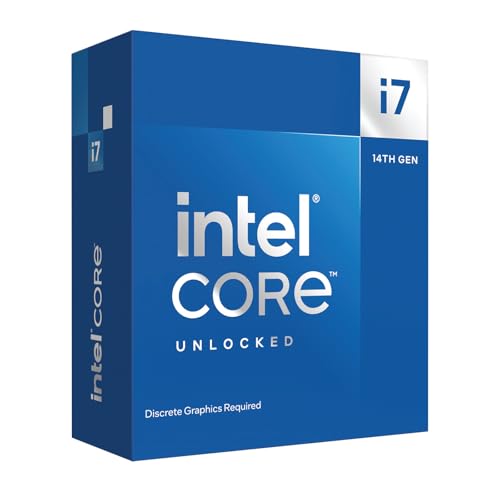
Intel Core i7-14700KF Gaming Desktop Processor

AMD Ryzen 7 8700G Desktop Processor

AMD Ryzen 9 5900XT Desktop Processor

KOTIN Prebuilt Gaming PC RTX 5070 Ryzen 7 9700X

STORMCRAFT Falcon Gaming PC Ryzen 7 7800X3D RTX 5070

VIPRTECH Reaper 3.0 Gaming PC Ryzen 7 8700F RTX 5070

Dell OptiPlex 5070 SFF Desktop Computer
More Details On Our Top Picks
For a custom desktop that handles demanding games alongside editing, compiling, or streaming, the i7-14700KF offers a substantial core layout: 8 performance cores and 12 efficiency cores. That hybrid design assigns demanding work to the faster cores while background tasks use the smaller efficiency cores, a useful arrangement for a busy gaming and productivity machine.
The KF suffix means processor graphics aren’t included, so the RTX 5070 must handle display output. That isn’t a concern in a gaming build, though you’ll need a separate graphics card for troubleshooting. In our view, this is a strong fit for 1440p gaming with serious multitasking, provided your case airflow and CPU cooling are planned carefully.
Strong Points
- 20 total cores give demanding creative software more room than the Ryzen 7 options here.
- Unlocked operation allows advanced desktop users to adjust performance settings.
- Support for DDR4 or DDR5 gives you more flexibility during a platform rebuild.
- PCIe 5.0 and PCIe 4.0 support leaves room for newer storage and expansion hardware.
- Intel 700-series boards are a direct fit, while 600-series boards may need a BIOS update.
Things To Consider
- Without integrated graphics, troubleshooting requires the RTX 5070 or another display-capable card.
- Unlocked processors benefit from a capable cooler, adding installation cost and case-planning work.
Key Specs
Who It Suits Best
Choose it for a custom 1440p gaming workstation where streaming, rendering, and heavy multitasking matter as much as frame rates.
Consider Something Else When
AMD Ryzen 7 7800X3D in the STORMCRAFT Falcon suits you more when gaming is the main task and you prefer a complete cooled system.
The Ryzen 7 8700G makes sense for an AM5 build that may not receive the RTX 5070 immediately. Its eight cores and 16 threads cover gaming, schoolwork, and everyday creation, while the built-in Radeon 780M graphics can provide display output before the discrete card arrives.
That flexibility is handy during staged upgrades, though the integrated graphics matter less after the RTX 5070 is installed. You may find this option especially appealing in a small home office where one machine needs to serve as a work computer before becoming a gaming desktop.
What We Like
- Integrated Radeon 780M graphics lets the system operate without a separate card during setup.
- Eight cores and 16 threads suit general multitasking and moderate content work.
- AM5 and DDR5 support give a new build a current platform foundation.
Worth Noting
- Once the RTX 5070 is installed, the built-in graphics become mostly a backup feature.
- Memory selection matters because integrated graphics share system memory before the discrete card is added.
- Overclocking requires extra tuning and careful attention to cooling and stability.
Feature Snapshot
Made For
It suits first-time AM5 builders who want a working desktop now and an RTX 5070 gaming upgrade later.
Not Your Match When
Intel Core i7-14700KF suits you more for heavily threaded editing and workstation work where integrated graphics are secondary.
Existing AM4 desktop owners get a very different proposition here: 16 cores and 32 threads without moving to a new socket. That makes the Ryzen 9 5900XT attractive for a machine that handles gaming, video work, virtual machines, or large batches of background tasks.
Its DDR4 and PCIe 4.0 support keep the surrounding platform familiar, which can reduce rebuild work. The trade-off appears in long-term upgrade flexibility, since AM4 is an older platform, and the missing cooler means installation planning matters more than it does with a complete desktop.
Highlights
- 16 cores and 32 threads give demanding applications substantial parallel-processing capacity.
- AM4 compatibility helps you refresh an established system without replacing the motherboard and memory.
- 72 MB of cache can help repeated data access in supported workloads.
Trade Offs
- The cooler is not included, so you need compatible cooling before installation.
- DDR4 limits a new build’s memory-generation options compared with the AM5 choices here.
Technical Sheet
Right Fit For
It fits experienced AM4 owners who want more multi-core capacity while keeping an existing DDR4 motherboard platform.
Look Elsewhere When
AMD Ryzen 7 8700G suits you more for a fresh AM5 build that needs temporary graphics before the RTX 5070 arrives.
Custom assembly takes time, and the KOTIN approach bundles the RTX 5070 with a Ryzen 7 9700X, 32GB of DDR5-6000 memory, and a 1TB PCIe 4.0 NVMe SSD. For a new gaming room, that combination removes the usual compatibility puzzle and gives you a substantial starting point for 1440p or 4K play.
The integrated 11.3-inch screen is the unusual detail, showing CPU and GPU temperatures, usage, and weather. It adds useful visibility beside the game, though it also creates another feature to configure and clean around. Depending on your desk, the display may feel helpful or mostly decorative.
Upsides
- RTX 5070 graphics and Ryzen 7 9700X create a well-matched gaming foundation.
- 32GB DDR5-6000 supports modern games, streaming, and heavier multitasking.
- The 1TB NVMe SSD offers quick loading and practical room for a game library.
- The 360mm liquid cooler is suited to a high-performance Ryzen desktop.
- The built-in monitor panel gives you live system information without extra software windows.
Room For Improvement
- A 360mm liquid cooler needs appropriate radiator clearance and occasional dust cleaning around the case.
- The display adds visual flair but may not justify the space for a minimalist desk.
At A Glance
Best Suited To
You’ll appreciate it most as a plug-in desktop for 1440p or 4K gaming, streaming, and creative work without custom assembly.
A Better Fit Elsewhere
STORMCRAFT Falcon suits you more when a gaming-focused Ryzen 7 7800X3D system with 32GB memory is your priority.
High-frame-rate gaming is the clear focus of the STORMCRAFT Falcon, pairing the Ryzen 7 7800X3D with an RTX 5070 and 32GB of DDR5-6000 RGB memory. The eight-core, 16-thread processor is a particularly sensible match for a gaming-first desktop, while the 1TB SSD keeps the initial setup straightforward.
Its B850 motherboard, 360mm AIO cooler, and 850W Gold-rated power supply give the prebuilt a substantial supporting platform. You may find the glass-and-RGB presentation too prominent for an office, but it fits a dedicated gaming space neatly. Dust around the glass panels and radiator still deserves regular attention.
Bright Spots
- The Ryzen 7 7800X3D is aimed squarely at demanding gaming workloads.
- 32GB of DDR5-6000 gives current games and background apps comfortable memory capacity.
- A 360mm AIO cooler supports sustained gaming sessions with a high-performance processor.
- The 1TB SSD provides quick boot and game loading behavior.
Points To Note
- RGB lighting and tempered glass require more visible surface cleaning than a closed office case.
- The gaming-centered processor offers less multi-core capacity than Intel Core i7-14700KF for some workstation tasks.
- Liquid-cooling hardware adds more installation complexity than a basic air cooler.
Feature Rundown
Who Will Love This
It’s built for gaming-focused users who want a ready-made 1440p desktop with strong cooling and visible RGB presentation.
Skip It When
KOTIN’s RTX 5070 desktop suits you more when the integrated system-monitoring screen and broader creative-work balance matter.
For a first gaming desktop, the VIPRTECH Reaper 3.0 keeps the parts list easy to understand: Ryzen 7 8700F, RTX 5070, 16GB DDR5, and a 1TB SSD. The 240mm liquid cooler and RGB case add gaming character without the larger 360mm cooler used by KOTIN and STORMCRAFT.
The 16GB memory capacity is workable for gaming, though demanding streaming setups may benefit from a future memory expansion. Its liquid cooler needs radiator clearance and dust maintenance, while the included Windows 11 Pro installation reduces setup friction. The honest read is that this desktop favors convenience over maximum configuration depth.
Plus Points
- RTX 5070 graphics provide a clear foundation for 1440p play.
- Ryzen 7 8700F offers eight cores and 16 threads for games and daily work.
- A 1TB SSD gives you useful starting storage with quick access to installed applications.
Small Caveats
- 16GB RAM leaves less headroom for heavy streaming, large creative projects, and many open applications.
- The 240mm liquid cooler still requires radiator-space planning and routine dust removal.
- Check internal expansion space before planning major upgrades.
Quick Facts
The Right Fit
You’ll find the strongest fit here as a first gaming PC for 1440p play, especially with a preference for assembled hardware.
Reach For A Different Pick When
KOTIN’s prebuilt suits you more for 32GB memory, a 360mm cooler, and an integrated monitoring display from the start.
The Dell OptiPlex 5070 belongs in this list as a reminder that a model number alone doesn’t make a gaming match. Its small-form-factor chassis, Core i5-9500, 8GB RAM, and 256GB SSD suit office work, web use, video calls, and 4K playback rather than an RTX 5070 gaming build.
WiFi and Bluetooth help keep a compact desk tidy, while Windows 11 Pro supports a business-oriented setup. You may appreciate it as a secondary computer or basic home workstation, but the small chassis can limit graphics-card and cooling choices. Storage capacity is also modest for a modern game library.
Best Bits
- Small-form-factor design takes less room on a crowded desk.
- WiFi and Bluetooth reduce cable clutter for everyday office use.
Areas To Watch
- 8GB RAM provides limited room for demanding multitasking.
- The 256GB SSD fills quickly beside a large game library.
- Compact internal space makes a substantial RTX 5070 upgrade impractical for most setups.
Details At A Glance
Whose Shelf It Belongs On
This compact renewed desktop suits office users, students, and home users who need basic computing rather than RTX 5070 gaming.
Swap It Out When
VIPRTECH Reaper 3.0 suits you more for a complete gaming tower with RTX 5070 graphics and liquid cooling.
How To Choose The Right Cpus To Pair With 5070
Match The CPU To Your Resolution
At 4K, the RTX 5070 usually carries more of the rendering workload, so a sensible midrange or upper-midrange CPU can make more sense than paying for maximum core count. At 1080p and high refresh rates, CPU limits appear sooner, especially in competitive games with very high frame targets. A Ryzen 7 7800X3D system such as STORMCRAFT Falcon fits gaming-first use, while Intel Core i7-14700KF gives you more room for creation work.
Count Cores With Your Workload In Mind
A core is an individual processing unit, while a thread is a stream of instructions the processor can manage. Eight cores and 16 threads cover modern gaming, streaming, and regular multitasking well, but 16 cores and 32 threads can shorten demanding render or encode workloads. More cores also bring greater cooling and platform demands, so you gain value only when your software can use them.
Check The Socket Before Ordering
The CPU socket must match the motherboard. AM4 supports the Ryzen 9 5900XT and DDR4, while AM5 supports the Ryzen 7 8700G and Ryzen 7 9700X with DDR5. Intel’s i7-14700KF works with 700-series boards and some 600-series boards after a BIOS update, so existing parts deserve a careful compatibility check before you commit.
Plan Cooling, Memory, And Power
An unlocked or high-performance CPU needs suitable cooling, clear case airflow, and a power supply that fits the full system. Prebuilt choices simplify that planning, but you still need to check radiator space, memory capacity, and future expansion. For streaming, editing, or heavy multitasking, 32GB memory gives you more breathing room than a 16GB starting point.
Things Worth Knowing First
Mistakes Worth Dodging
A common mistake is pairing an RTX 5070 with a CPU platform that cannot accept the desired memory or motherboard. Confirm the socket, BIOS needs, RAM generation, cooler clearance, and power connections before choosing a standalone processor. You’ll also want enough SSD capacity for the games and applications you use regularly.
Another wrong turn is judging a desktop by its graphics card alone. The Dell OptiPlex 5070 has “5070” in its name, yet its compact business chassis and Core i5-9500 are not comparable to the RTX 5070 prebuilts here.
Where The Extra Money Goes
Higher-tier CPUs generally add cores, threads, cache, newer platform support, or stronger sustained performance. That extra capacity matters for rendering, streaming, software development, and heavy multitasking, not just game launches. For a gaming-only system at 1440p or 4K, spending more on the processor makes sense after you’ve covered cooling, memory, and a suitable motherboard.
Final Verdict
You’ll get the simplest RTX 5070 path from KOTIN or STORMCRAFT because both bundle the processor, graphics card, memory, storage, cooling, and power supply. Intel Core i7-14700KF is the flexible custom-build choice for gaming beside demanding work, while Ryzen 9 5900XT makes the most sense as an AM4 refresh. Ryzen 7 8700G suits a staged AM5 build, and VIPRTECH Reaper 3.0 keeps the first gaming desktop straightforward. Choose around your socket, workload, and cooling plan, and the pairing should feel balanced for years of everyday use.
