
A GeForce RTX 5090-class graphics card needs a processor that keeps demanding games, creative software, and background tasks moving without creating an obvious bottleneck. You’ll find choices here for high-refresh gaming, streaming, editing, and more measured builds. Platform compatibility matters just as much as core count, especially because Intel’s options use LGA1851 and AMD’s choices use AM5. The right match depends on your monitor, workload, cooling setup, and willingness to replace a motherboard.
The Shortlist At A Glance

Intel Core Ultra 9 Processor 285K
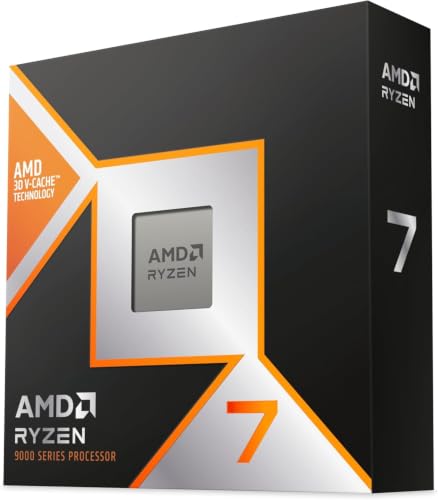
AMD Ryzen 7 9850X3D Desktop Processor

Intel Core Ultra 7 Processor 270K Plus

AMD Ryzen 5 7600X3D Raphael AM5

Intel Core Ultra 5 Processor 250K Plus

Intel Core Ultra 7 Desktop Processor 265

Intel Core Ultra 9 285K Arrow Lake
More Details On Our Top Picks
Large game worlds, live broadcasts, and video exports place very different demands on a desktop. With 24 cores split between 8 performance cores and 16 efficiency cores, this unlocked Core Ultra 9 gives you substantial room for those mixed workloads, while its listed boost ceiling reaches 5.7 GHz.
The LGA1851 socket and Intel 800 Series chipset requirement shape the rest of your build. You may find this a strong fit for a workstation that also handles high-refresh gaming, though a capable cooling setup and compatible DDR5 motherboard belong in the plan from the start.
Strong Points
- Twenty-four cores help separate background work from active game or creation tasks.
- Up to 5.7 GHz suits workloads that respond well to fast individual cores.
- PCIe 5.0 and PCIe 4.0 support gives a current platform room for fast storage and graphics hardware.
- Unlocked operation gives experienced system builders more tuning flexibility.
Things To Consider
- The 125W base power calls for careful cooler and case airflow planning.
- LGA1851 and DDR5 requirements make this a platform purchase rather than a drop-in upgrade for older systems.
Key Specs
Who It Suits Best
You’ll get the most from this processor in an enthusiast gaming and creation desktop with an Intel 800 Series board.
Where Another Pick Suits Better
AMD Ryzen 7 9850X3D suits dedicated high-refresh gaming systems where gaming focus matters more than broad creation workloads.
High-refresh gaming rewards a processor that keeps frame delivery steady while your RTX 5090 handles the heavy graphics work. The Ryzen 7 9850X3D is positioned as a gaming-focused desktop chip, making it a natural choice for competitive play, simulation games, and large open-world titles.
Compared with the 24-core Intel Core Ultra 9 Processor 285K, this AMD option is more specialized. The honest trade-off is narrower versatility for streamers and creators, but that focus may suit a gaming-first build with an AM5 motherboard already in place.
What We Like
- Gaming-centered design aligns well with a flagship graphics card.
- A focused processor choice keeps the build centered on frame-rate consistency.
- AM5 compatibility can make sense for an existing AMD platform.
Worth Noting
- Source details provide limited technical information, so motherboard and memory compatibility deserve careful checking.
- Heavy rendering and frequent encoding may favor a higher-core option.
- AM5 installation requires an appropriate cooler and board rather than an Intel-compatible setup.
Feature Snapshot
Made For
You’ll find the best fit here as a gaming-focused enthusiast using a compatible AM5 motherboard and a high-refresh display.
Consider Something Else When
Intel Core Ultra 9 Processor 285K fits better for creators who stream, render, and game in the same desktop.
The 270K Plus takes the same broad Intel platform approach as the first pick, but its 5.5 GHz ceiling places it a step below the Core Ultra 9 285K on listed boost speed. Its 24-core arrangement, 8 P-cores plus 16 E-cores, still gives you substantial capacity for games, editing, and busy desktop multitasking.
PCIe 5.0, PCIe 4.0, DDR5, and Intel 800 Series chipset support make the platform current for a fresh build. Depending on your case and cooler, the 125W base power may require more planning than the lower-power Core Ultra 7 265.
Highlights
- Twenty-four cores support demanding multitasking without narrowing the system to gaming alone.
- DDR5 and PCIe 5.0 support pair naturally with a modern high-end graphics platform.
- Up to 5.5 GHz keeps everyday apps and many game workloads responsive.
- It offers a sensible middle ground between Intel’s Core Ultra 9 and Core Ultra 5 options.
- The unlocked design gives you extra tuning control.
Trade Offs
- The 125W base rating makes cooler selection and case ventilation important ownership details.
- It needs an LGA1851 motherboard, so older Intel systems won’t provide a straightforward processor swap.
Technical Sheet
Right Fit For
You’ll appreciate this choice in a new Intel desktop that combines high-end gaming with regular content creation.
Not Your Match When
AMD Ryzen 5 7600X3D suits a smaller, gaming-focused AM5 build with less need for heavy multitasking.
Six cores and 12 threads give this AM5 processor a much narrower brief than Intel’s 24-core options. That can be exactly right for a gaming desktop where the RTX 5090 carries the visual workload and you’d rather direct the build toward game performance than workstation throughput.
The listed 4.1 GHz base speed, 96 MB L3 cache, and 6 MB L2 cache describe a gaming-oriented design with substantial on-chip data storage. The catch is practical: the boxed package does not include a heatsink, so cooler selection and installation belong in your build checklist.
Upsides
- Six cores and 12 threads keep the design focused for gaming systems.
- 96 MB of L3 cache can support game workloads that benefit from accessible data.
- Broad AM5 chipset support gives you several motherboard families to consider.
Room For Improvement
- No heatsink is included, adding a separate cooling decision during installation.
- Six cores leave less headroom for frequent rendering, encoding, or heavy multitasking.
- Its 4.1 GHz listed base speed is less aggressive on paper than the Intel alternatives’ boost figures.
Quick Facts
Who Will Love This
You’re a gaming-first builder creating an AM5 system and already have a suitable cooler selected.
Look Elsewhere When
Intel Core Ultra 7 Processor 270K Plus is a better fit for gaming alongside regular creative applications.
For a gaming desktop that also handles office work, photo editing, and occasional streaming, the Core Ultra 5 250K Plus takes a measured middle path. Its 18-core mix, with 6 P-cores and 12 E-cores, gives you more multitasking capacity than a six-core gaming chip without reaching the 24-core tier.
Up to 5.3 GHz, DDR5 support, and PCIe 5.0 connectivity suit a new LGA1851 build. You may find its 125W base power more than you need for a modest system, yet it remains a sensible step for anyone who wants room beyond gaming without moving to the highest tier.
Bright Spots
- Eighteen cores give daily applications and games useful workload separation.
- Up to 5.3 GHz supports responsive general desktop use.
- DDR5 and PCIe 5.0 keep the platform aligned with current high-end components.
- The unlocked format gives experienced builders more control over tuning.
Points To Note
- Its 125W base rating calls for a cooler and case with appropriate capacity.
- LGA1851 compatibility means a new motherboard is needed for older platforms.
Feature Rundown
Built With In Mind
You’ll find this processor well suited to a new Intel gaming desktop used for work, entertainment, and moderate creation.
A Better Fit Elsewhere
Intel Core Ultra 7 Desktop Processor 265 makes more sense for a quieter, lower-power-leaning system with integrated graphics.
A 65W base power rating changes the build conversation. The Core Ultra 7 265 still provides 20 cores and 20 threads, but its lower listed base power may suit a desktop where sensible heat and power planning matter more than unlocked tuning.
Integrated Intel Graphics also gives you a basic display path for setup and troubleshooting, even with a dedicated RTX 5090 installed. Compared with the Core Ultra 5 250K Plus, this option adds cores while stepping away from the unlocked enthusiast approach, which may appeal to productivity-focused home systems.
Plus Points
- Twenty cores and 20 threads support substantial multitasking.
- 65W base power can simplify planning for everyday desktop systems.
- Integrated Intel Graphics helps with initial setup and troubleshooting.
- The included Laminar RM2 cooler reduces the number of separate installation decisions.
Small Caveats
- Non-unlocked positioning gives you less tuning flexibility than the K-series choices.
- High-end sustained workloads may still call for careful case airflow.
- Its 5.3 GHz ceiling matches the Core Ultra 5 250K Plus rather than the higher-tier models.
Core Details
The Right Fit
You’re building a balanced Intel desktop for gaming, office work, and creative applications with a preference for a 65W base design.
Swap It Out When
Intel Core Ultra 9 Processor 285K is better suited to sustained creation workloads and enthusiast tuning.
This listing centers on the same Core Ultra 9 285K family as the first item, with Arrow Lake, 24 cores, and an unlocked desktop design called out directly. Up to 5.7 GHz and 36 MB of L3 cache give you a strong specification set for a flagship gaming workstation.
The important distinction is the listing package and branding, not a different core design. You’ll need an LGA1851 processor socket and Z890-compatible planning, while the 125W rating suggests a capable cooler; for most large builds, that is a manageable trade-off for extra workload headroom.
Reasons To Buy
- Twenty-four cores suit gaming, streaming, editing, and demanding background tasks.
- Up to 5.7 GHz supports fast active workloads.
- 36 MB of L3 cache keeps frequently needed data close to the cores.
- Unlocked operation gives advanced builders additional tuning scope.
Honest Caveats
- The 125W base rating requires deliberate cooler and airflow planning.
- The listing includes an added Mavark pen light, which has little relevance to processor performance.
- Compatibility checks remain essential because LGA1851 and Z890 planning limit motherboard choices.
At A Glance
Whose Shelf It Belongs On
You’re an enthusiast assembling an LGA1851 gaming workstation around a compatible Z890 motherboard.
Reach For A Different Pick When
Intel Core Ultra 7 Desktop Processor 265 better suits a lower-power desktop where integrated graphics and an included cooler matter.
How To Choose The Right Cpus To Pair With 5090
Start With The Workload
Gaming at 4K often shifts more work toward the graphics card, but a fast processor still matters for high refresh rates, simulation titles, competitive settings, and background software. A gaming-only desktop can favor a focused AMD X3D option, while streaming, editing, and software development make additional cores more useful.
Core count describes how many processing units can work at once. Performance cores prioritize demanding active tasks, while efficiency cores handle lighter background work with a different power profile.
Match The Motherboard
Intel Core Ultra choices here use LGA1851 and Intel 800 Series chipsets. AMD Ryzen options use the AM5 platform, with the Ryzen 5 7600X3D listing naming several compatible chipset families.
That socket decision affects memory, firmware support, cooler mounting, and future upgrade paths. Check the motherboard’s processor support before assembling the system, especially for a new-generation chip.
Plan Cooling Around Power
A processor’s base power is a starting design figure, not a complete description of every workload. The 125W Intel K-series models deserve a cooler and case with enough capacity for sustained gaming, rendering, or encoding.
The 65W Core Ultra 7 265 is easier to place in a restrained desktop, and its included Laminar RM2 cooler simplifies installation. The Ryzen 5 7600X3D goes the other direction, with no heatsink included, so you’ll need to choose one separately.
Keep The Build Balanced
A flagship graphics card can expose weak processor choices at high frame rates, but spending more on cores won’t help every game equally. Your monitor resolution, target frame rate, streaming habits, and application mix should guide the decision.
For a broad workstation, the Core Ultra 9 285K or 270K Plus makes sense. Dedicated gaming systems can focus on the Ryzen 7 9850X3D, while the Core Ultra 5 250K Plus and Core Ultra 7 265 offer more measured Intel configurations.
Things Worth Knowing First
Mistakes Worth Dodging
Socket confusion is an expensive error. LGA1851 Intel processors cannot move into an AM5 motherboard, and an AM5 AMD chip cannot use an Intel board, so confirm the socket before planning memory and cooling.
You’ll also want to check the cooler contents. The Ryzen 5 7600X3D listing excludes a heatsink, while the Core Ultra 7 265 context names a Laminar RM2 in the box.
Where The Extra Money Goes
Higher-tier processors generally give you more cores, higher listed boost ceilings, larger cache allocations, or unlocked tuning. Those traits matter most during streaming, rendering, compiling, and other sustained workloads that keep the processor busy.
Gaming-only systems may gain more from a specialized cache design than from a large core count. Paying for the Core Ultra 9 tier makes more sense for a desktop that serves as both a gaming machine and a serious creation workstation.
Final Verdict
You have seven credible directions, but the right choice starts with your workload and motherboard plan rather than the graphics card alone. Choose AMD Ryzen 7 9850X3D for gaming focus, AMD Ryzen 5 7600X3D for a more compact AM5 approach, or an Intel Core Ultra model for broader multitasking. The Core Ultra 7 265 stands apart with 65W base power and integrated graphics, while the 285K models suit demanding enthusiasts. Build around cooling, socket compatibility, and the way you actually use your desktop.
