
Choosing a graphics card for a 3060-focused gaming PC gets tricky once memory capacity, cooling, case clearance, and renewed condition enter the picture. You need an option that fits your display setup and workload without creating avoidable installation headaches. This shortlist covers RTX 3060, RTX 3060 Ti, and RTX 5050 cards for desktop gamers, creators, and practical upgrade projects. You’ll find compact designs, larger multi-fan coolers, and higher-memory options suited to modern games and creative applications.
The Shortlist At A Glance
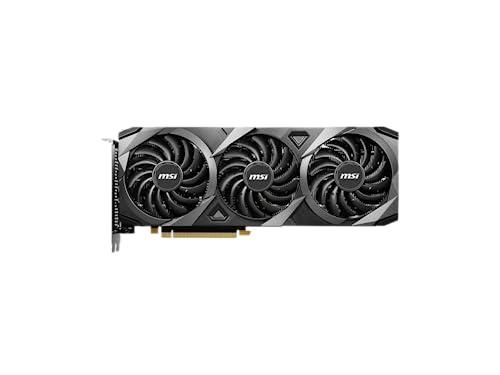
MSI Gaming GeForce RTX 3060 Ti Ventus 3X 8G OC LHR

MSI RTX 3060 Ventus 2X 12G OC Renewed

ASUS Dual RTX 3060 12GB

GIGABYTE RTX 3060 WINDFORCE OC 12G

GIGABYTE RTX 5050 Gaming OC 8G
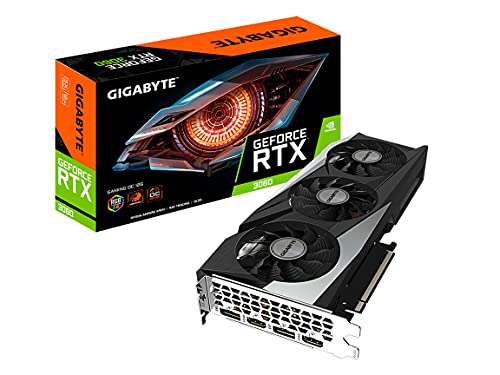
GIGABYTE RTX 3060 Gaming OC 12G Renewed

ASUS Phoenix RTX 3060 V2
More Details On Our Top Picks
The RTX 3060 Ti chipset gives you a step up from the standard RTX 3060, while 8GB of GDDR6 memory keeps the card focused on gaming rather than oversized creative projects. Three Torx fans spread cooling across the card, a sensible layout for a desktop that runs demanding games for several hours.
You may find the larger cooler needs more case space than ASUS Phoenix RTX 3060 V2, but that extra hardware suits a roomy gaming tower. Ray tracing, which renders more realistic lighting, and the Ampere architecture make this a strong match for 1440p play, assuming your power supply and case support the installation.
Strong Points
- RTX 3060 Ti processing gives demanding games more headroom than the RTX 3060 cards here.
- Three fans distribute heat across a full-size desktop card.
- 256-bit memory interface supports the card’s gaming-oriented design.
- Rigid construction should suit a permanent tower installation.
- 1695 MHz boost clock is stated for straightforward system planning.
Things To Consider
- 8GB of memory leaves less room for very large texture packs than the 12GB options.
- The three-fan body can complicate clearance and dust cleaning in smaller cases.
Key Specs
Who It Suits Best
You’ll get the most from this card in a spacious gaming desktop aimed at higher-resolution play and sustained workloads.
Consider Something Else When
Choose MSI RTX 3060 Ventus 2X 12G OC Renewed instead for a 12GB card in a more modest gaming upgrade.
For many 1080p gaming desktops, 12GB of GDDR6 memory matters more than chasing a larger cooler. MSI pairs that capacity with a twin-fan Torx design and an 1807 MHz boost clock, giving you a practical middle path between the compact ASUS Phoenix RTX 3060 V2 and the larger three-fan GIGABYTE card.
The renewed condition changes the ownership equation: you should inspect the listing details and seller terms carefully before installation. A two-fan layout is easier to clean, though long sessions in a warm case may favor a larger cooler.
What We Like
- 12GB memory gives texture-heavy games and creative apps more working room.
- Twin fans suit many standard mid-tower layouts.
- 15 Gbps memory speed is clearly stated for component comparison.
Worth Noting
- Renewed condition makes cosmetic state and prior use worth checking on the listing.
- Its RTX 3060 tier sits below the MSI RTX 3060 Ti in demanding games.
- Dust buildup around two fans still calls for routine case cleaning.
At A Glance
Made For
This card fits desktop gamers and creators who want 12GB capacity while keeping the upgrade cost and cooler size controlled.
Not Your Match When
GIGABYTE RTX 3060 Gaming OC 12G Renewed suits you better when extended gaming sessions call for a three-fan design.
ASUS keeps this RTX 3060 straightforward with two fans, 12GB GDDR6 memory, RGB lighting, and support for ray tracing and DLSS. DLSS uses AI-assisted image reconstruction to help compatible games balance image detail and frame output, which gives you a useful feature set for a mixed gaming and creative desktop.
Its stated boost clock reaches 1867 MHz in OC mode and 1837 MHz in gaming mode. Depending on your case airflow, the dual-fan format may be easier to live with than GIGABYTE RTX 3060 Gaming OC 12G Renewed, although the larger GIGABYTE cooler has more fan hardware for sustained heat management.
Highlights
- 12GB GDDR6 capacity supports demanding game assets.
- Dual-fan construction works well for ordinary desktop layouts.
- RGB lighting adds visual customization to a windowed case.
- PCI Express 4.0 compatibility suits newer desktop platforms.
Trade Offs
- Two fans may offer less cooling reserve than a three-fan design during long sessions.
- RGB adds appearance value but doesn’t improve graphics output.
Technical Sheet
Right Fit For
You’ll appreciate this ASUS card in a customizable gaming desktop that also handles creative applications and display-focused work.
Look Elsewhere When
ASUS Phoenix RTX 3060 V2 is a better fit for you when case space matters more than RGB lighting.
GIGABYTE’s two-fan WINDFORCE system gives this 12GB RTX 3060 a sensible balance for a midrange desktop. Alternate fan rotation is designed to manage airflow between the fans, while the stated 1792 MHz core clock gives you a clear reference for the factory configuration.
The compact size may help in a tighter case, though you still need to confirm slot clearance and power connections before fitting it. Compared with ASUS Dual RTX 3060 12GB, this choice leans more toward cooling design than lighting, which suits a no-nonsense workstation or gaming tower.
Upsides
- 12GB GDDR6 memory gives modern games useful texture capacity.
- WINDFORCE 2X cooling keeps the layout manageable for many cases.
- Alternate fan rotation targets airflow balance between the two fans.
Room For Improvement
- Two fans may need stronger case airflow during extended high-load sessions.
- A compact card still needs careful dust removal around the fan and heatsink area.
- The RTX 3060 platform offers less graphics headroom than the RTX 3060 Ti.
Feature Snapshot
Best Suited To
This card suits you as a practical midrange upgrade for gaming, editing, and general GPU-accelerated desktop work.
A Better Fit Elsewhere
MSI Gaming GeForce RTX 3060 Ti Ventus 3X 8G OC LHR makes more sense for you when higher gaming performance takes priority over 12GB capacity.
The RTX 5050 gives you a newer platform than the RTX 3060 choices here, using NVIDIA Blackwell architecture and DLSS 4. GIGABYTE adds its WINDFORCE cooling system, making this a reasonable direction for a fresh gaming build rather than a direct replacement for every older RTX card.
Its 8GB GDDR6 memory and 128-bit interface are narrower than the 12GB, 192-bit RTX 3060 options. You may prefer the newer feature set for compatible games, while texture-heavy workloads can favor MSI RTX 3060 Ventus 2X 12G OC Renewed.
Standout Traits
- Blackwell architecture gives a newer foundation for a fresh desktop.
- DLSS 4 supports compatible games and applications with AI-assisted rendering features.
- WINDFORCE cooling provides active thermal management in the graphics card.
- PCIe 5.0 compatibility aligns with newer motherboard platforms.
- 8GB GDDR6 keeps the memory package familiar for mainstream gaming.
Points To Note
- 8GB capacity may feel restrictive sooner in very large texture-heavy workloads.
- The 128-bit interface is narrower than every 12GB RTX 3060 option listed here.
Quick Facts
Who Will Love This
You’ll find the strongest fit in a new gaming PC built around newer platform features and compatible AI-assisted rendering.
Another Choice May Suit
GIGABYTE RTX 3060 WINDFORCE OC 12G suits you better for games and applications where 12GB memory capacity matters more than newer architecture.
Three WINDFORCE fans give this renewed GIGABYTE card a cooling-focused profile, while 12GB of GDDR6 memory keeps it useful for demanding games and GPU-assisted creative work. Compared with GIGABYTE RTX 3060 WINDFORCE OC 12G, the extra fan may better suit a roomy case that sees long gaming sessions.
The renewed format makes condition, packaging, and seller details part of your decision. For most large towers, the three-fan design offers a reassuring thermal layout, but you may find installation less convenient in a compact chassis.
Bright Spots
- Three WINDFORCE fans spread cooling across the card.
- 12GB GDDR6 memory supports larger game assets.
- Large-case owners get a design suited to extended graphics workloads.
- Renewed availability can make a previous-generation card worth considering for a planned upgrade.
Small Caveats
- Renewed condition calls for careful review of the listing and seller information.
- Three fans create more clearance and cleaning considerations than ASUS Phoenix RTX 3060 V2.
- The RTX 3060 chipset remains below the RTX 3060 Ti in the lineup.
Core Details
Whose Shelf It Belongs On
This card is aimed at you when a spacious desktop handles long gaming sessions and a renewed item fits your upgrade plan.
Swap It Out When
ASUS Phoenix RTX 3060 V2 is better for you when a small case makes three-fan clearance impractical.
Small-form-factor desktop projects benefit from ASUS Phoenix RTX 3060 V2 because its single Axial-tech fan, protective backplate, and dual-ball fan bearings keep the design focused. You still get 12GB GDDR6 memory, HDMI 2.1, and DisplayPort 1.4a, a useful connection mix for a compact gaming or workstation build.
The single-fan layout saves space but places more responsibility on case airflow, especially during long sessions. Compared with ASUS Dual RTX 3060 12GB, this card gives you easier physical planning and less cooling redundancy, so the compact case profile should guide your choice.
Reasons To Buy
- Single-fan design suits tighter desktop cases.
- 12GB GDDR6 memory supports modern game textures.
- HDMI 2.1 and DisplayPort 1.4a support current display setups.
- Protective backplate adds structure during installation and storage.
Areas To Watch
- One fan may run harder than multi-fan cards during sustained loads.
- Restricted case airflow makes dust removal and cable management especially important.
Feature Rundown
The Right Fit
You’ll benefit most from this card in a compact desktop where 12GB memory and modern display outputs matter.
Reach For A Different Pick When
GIGABYTE RTX 3060 Gaming OC 12G Renewed is a stronger fit for you when your roomy case and long sessions favor three-fan cooling.
How To Choose The Right Cpuses For 3060
Match Memory To Your Workload
Graphics memory, or VRAM, stores textures, visual assets, and data used while a game or creative application runs. The 12GB RTX 3060 cards give you more room for large textures, multiple displays, and some editing workloads, while the 8GB RTX 3060 Ti and RTX 5050 options keep a tighter memory budget.
For 1080p gaming, 8GB can be a sensible target across many setups. Higher-resolution gaming, heavy texture packs, and GPU-assisted creation make 12GB more comfortable, though memory capacity doesn’t tell you the whole performance story.
Compare The GPU Tier
The RTX 3060 Ti generally sits above the RTX 3060 in graphics processing, so you should prioritize it for demanding gaming performance. The trade-off is its 8GB memory capacity, which may matter more than raw processing speed in certain texture-heavy applications.
The RTX 5050 brings Blackwell architecture and DLSS 4 to the shortlist. You may prefer that newer platform for a fresh PC, while an RTX 3060 with 12GB can make more sense for an existing system built around memory-heavy games.
Plan Around Cooling And Space
Two-fan cards usually offer a practical middle ground for standard mid-tower cases. Three-fan cards, such as GIGABYTE RTX 3060 Gaming OC 12G Renewed, need more clearance but spread heat across a larger cooling system.
Compact builds deserve special attention. ASUS Phoenix RTX 3060 V2 uses a single Axial-tech fan, so you should leave enough room for airflow and plan regular dust cleaning around the intake area.
Check Your System Before Installation
Confirm motherboard compatibility, available case clearance, power connections, and display outputs before selecting a card. PCIe 4.0 or PCIe 5.0 labels describe the interface generation, but the rest of your system still determines how easily the card fits into your build.
Your monitor also matters. HDMI 2.1 and DisplayPort 1.4a can influence cable and display planning, while a multi-monitor desk may benefit from a card with the output arrangement that matches your screens.
Things Worth Knowing First
Mistakes Worth Dodging
A common mistake is choosing by chipset name alone. Check VRAM, fan count, physical space, display connections, and whether the item is renewed, because those details affect daily ownership more than a short model label.
You should also avoid assuming every RTX 3060 card has the same cooling behavior. A single-fan compact card, a twin-fan design, and a three-fan layout each place different demands on case airflow and cleaning.
The Upgrade Payoff
Higher-tier cards cost more because you’re paying for changes such as a stronger GPU tier, newer architecture, larger cooling hardware, or higher memory capacity. MSI Gaming GeForce RTX 3060 Ti Ventus 3X 8G OC LHR emphasizes graphics performance, while the 12GB RTX 3060 models emphasize capacity.
Spending more makes sense for a demanding gaming desktop, a new platform, or sustained creative workloads. A standard RTX 3060 can remain the more sensible fit for a 1080p system where 12GB memory and manageable installation matter most.
Final Verdict
You can choose among these cards by starting with your case, display setup, and workload rather than the model name alone. MSI Gaming GeForce RTX 3060 Ti Ventus 3X 8G OC LHR suits higher gaming performance, while the 12GB RTX 3060 cards offer useful capacity for everyday gaming and creative work. GIGABYTE RTX 5050 Gaming OC 8G gives fresh-build shoppers a newer platform, and ASUS Phoenix RTX 3060 V2 keeps compact installations manageable. Match the card to your system, then check the listing details carefully before fitting it.
