
Choosing a workstation setup gets complicated fast, especially when you’re comparing complete PCs with individual parts. This roundup helps you match processing power, memory, graphics support, cooling, and expansion room to real tasks such as music production, office multitasking, 3D work, or data-heavy projects. You’ll find compact business desktops, refurbished tower workstations, a modern mini PC, and two core components for building a custom system. Each option has a different ceiling, footprint, and ownership trade-off, so your workload matters more than a long feature list.
Seven Workstation Options At A Glance

Dell OptiPlex 7070 SFF Desktop Computer PC

Intel Pentium Gold G-6400 Desktop Processor

MSI MAG Coreliquid A13 240 AIO CPU Liquid Cooler

Dell Precision 3620 / T3620 Music Production Workstation PC

Dell Precision T3610 PC Workstation
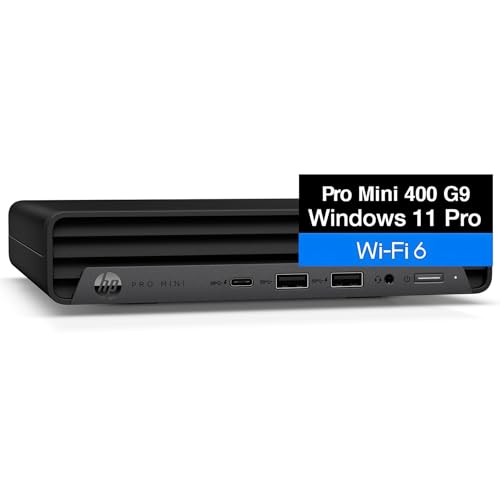
HP 2026 Mini PC Desktop Computers ProDesk 400 G9

ASUS Pro WS WRX90E-SAGE SE EEB Workstation Motherboard
More Details On Our Top Picks
Daily office work, browser-heavy research, spreadsheets, and video calls suit the eight-core Intel i7-9700 well. Its small-form-factor case takes less desk space than the tower-based Dell Precision choices, while 32GB of DDR4 memory helps keep several applications open.
The 1TB NVMe SSD, a fast solid-state drive using the M.2 format, should make application launches and file access feel responsive. You may find the compact chassis less convenient for major hardware expansion, but dual-display support and nine USB ports make it practical for a busy workstation.
Strong Points
- Eight processing cores suit sustained multitasking better than the Pentium-based option.
- 32GB of DDR4 memory gives office software room to run together.
- 1TB NVMe storage provides useful capacity for applications and working files.
- Two display outputs support a broader desktop layout.
- Wireless keyboard and mouse reduce setup clutter.
Things To Consider
- A small-form-factor case can limit later component upgrades and cooling choices.
- Renewed hardware deserves careful inspection of ports, accessories, and internal dust during setup.
Key Specs
Who It Suits Best
You’ll appreciate this choice for home office work, administrative tasks, and multitasking in a space-conscious room.
Consider Something Else When
Choose the HP ProDesk 400 G9 for a newer mini desktop with triple-display support and WiFi 6.
A custom workstation for documents, light browsing, and simple business tools can start with this two-core, four-thread processor. A thread is a processing path that helps a core handle tasks, so this chip suits straightforward workloads rather than heavy rendering or large audio sessions.
The fixed 4.0GHz speed is easy to understand, and 58W can simplify planning for a modest system. The catch is platform age: you need an LGA1200 motherboard built around an Intel 400-series chipset, plus a separate cooling solution.
What We Like
- Four threads help basic multitasking feel smoother than a single-thread design.
- LGA1200 compatibility clearly narrows the motherboard search.
- 58W power rating fits a restrained entry-level build.
Worth Noting
- The box does not include a thermal solution, so cooling must be planned separately.
- Two cores leave less headroom for video editing, complex spreadsheets, or production software.
- Its 400-series platform is less flexible for a new long-term workstation than the HP’s newer platform.
At A Glance
Made For
You’re a beginner assembling a basic desktop for writing, email, light web work, or simple point-of-use tasks.
Not Your Match When
The Dell OptiPlex 7070 suits you better for a ready-to-use workstation with more memory, storage, and processing capacity.
For a custom workstation that spends long sessions rendering, compiling, or processing media, a 240mm all-in-one liquid cooler gives you a more substantial cooling layout than a basic air cooler. Its radiator uses two 120mm PWM fans, while PWM control adjusts fan speed according to thermal demand.
Support for LGA1700, LGA1851, AM4, and AM5 gives this cooler room to move between several current platforms. You may find installation more involved than fitting a conventional heatsink, and radiator clearance inside your case needs attention before assembly.
Highlights
- 240mm radiator area suits higher-load custom workstation processors.
- Dual 120mm ARGB PWM fans combine lighting with adjustable fan control.
- Integrated pump design keeps the cooling assembly consolidated.
- Broad socket support helps preserve upgrade flexibility.
Trade Offs
- Liquid cooling adds tubing, a pump, and more installation points to maintain.
- Case radiator clearance must be checked before assembly.
Technical Sheet
Right Fit For
You’re building a custom workstation around a compatible Intel or AMD processor and expect sustained CPU-heavy workloads.
Look Elsewhere When
The Dell Precision T3610 fits you better when you want a complete tower rather than a cooler that requires a separate build.
Music production benefits from fast project access and enough memory for virtual instruments, effects, and editing software. This Precision 3620 pairs an Intel i7-6700 with 32GB of DDR4 RAM, giving you a more studio-focused starting point than the compact OptiPlex.
A 512GB SSD handles the operating system and frequently used applications, while the 2TB hard drive adds room for sample libraries and recordings. The older Intel HD Graphics 530 is suitable for ordinary display work, though creative users needing modern GPU acceleration may find the platform limiting.
Upsides
- 32GB DDR4 memory supports sizable audio projects and multitasking.
- Separate SSD and HDD storage divides quick boot tasks from larger files.
- HDMI and DisplayPort options simplify monitor setup.
- Windows 11 Pro suits home studios and small business environments.
Minor Gripes
- Older integrated graphics are not aimed at demanding 3D workloads.
- A mechanical hard drive can be noisier and slower than solid-state storage for active projects.
- As renewed hardware, the drive condition and cosmetic state deserve attention at arrival.
Feature Snapshot
Who Will Love This
You’re starting music production, podcast editing, or home-studio work and want substantial storage in a complete tower.
A Better Fit Elsewhere
The Dell OptiPlex 7070 is a better match for you when office responsiveness and a smaller footprint matter more than the extra hard-drive capacity.
Large memory-heavy projects are where this Precision tower makes sense. Its 96GB of registered ECC DDR3 memory, which uses error-checking modules designed for workstation platforms, gives you substantial capacity for virtual machines, technical applications, and extensive multitasking.
The Quadro 4000 provides dedicated graphics rather than the integrated graphics found in the T3620. Depending on your software and plug-in support, that can suit legacy professional workflows, but the older DDR3 platform and 480GB SSD call for realistic expectations about expansion and current-generation speed.
Standout Traits
- 96GB of ECC registered memory supports unusually large working environments.
- Quadro 4000 graphics provide a dedicated display and workstation-oriented foundation.
- Eight-core Xeon processing suits parallel office, technical, and legacy creative tasks.
- 480GB solid-state storage keeps the operating system and applications accessible.
- Tower construction generally offers more internal service room than a mini desktop.
Room For Improvement
- DDR3 memory and an older Xeon platform are less attractive for a new forward-looking build.
- The 480GB SSD may fill quickly with large media libraries.
- Owners of renewed towers should plan internal dust cleaning and a careful port check.
Quick Facts
Built With In Mind
You’re managing memory-intensive technical, scientific, virtual-machine, or legacy workstation applications in a full-size tower.
Skip It When
The ASUS Pro WS WRX90E-SAGE SE suits you better for a new Threadripper Pro build with DDR5 and extensive PCIe expansion.
Desk space disappears quickly in a home office, and the HP ProDesk 400 G9 answers that problem with a mini format and a modern Intel i5-12400T processor. Six cores and 16GB of DDR4 memory give you a sensible balance for documents, meetings, browser tabs, and business applications.
The 512GB SSD keeps the system tidy and responsive, while WiFi 6 and triple-display support suit a multi-screen remote-work station. You may find the smaller chassis less adaptable than the Dell towers, so this is better for organized productivity than frequent internal hardware changes.
Bright Spots
- Six-core processing suits modern office multitasking.
- Mini construction leaves more room for paperwork and accessories.
- Triple-display support helps you separate communication, documents, and dashboards.
- WiFi 6 supports a current wireless workstation setup.
Points To Note
- 16GB RAM is suitable for office use but less generous for demanding creative applications.
- Compact designs usually provide less internal upgrade room than tower workstations.
Core Details
Whose Shelf It Belongs On
You’re a remote professional or small-office user who values a tidy desk, multiple monitors, and current everyday performance.
Swap It Out When
The Dell Precision T3610 suits you better for unusually large memory requirements or dedicated legacy workstation graphics.
A serious custom workstation starts with the motherboard, and this ASUS platform targets Threadripper Pro 7000 WX-series processors. Seven PCIe 5.0 x16 slots, ECC R-DIMM DDR5 support, and multi-GPU capability give you far more expansion potential than any complete desktop in this roundup.
That capacity makes sense for AI development, 3D rendering, animation, and media production, though a large EEB board demands a compatible case, processor, memory kit, graphics cards, and power design. In your view of long-term expansion, the board is compelling; for ordinary office work, its scale would be unnecessary.
Best Bits
- Seven PCIe 5.0 x16 slots create extensive graphics and expansion flexibility.
- ECC R-DIMM DDR5 support suits professional memory-focused systems.
- 10Gb and 2.5Gb LAN provide high-bandwidth wired networking options.
- PCIe 5.0 M.2 support accommodates fast storage hardware.
- Multi-GPU support fits rendering and machine-learning workloads.
Honest Caveats
- EEB sizing can restrict case selection and complicate installation planning.
- You need compatible Threadripper Pro hardware and workstation-grade memory.
- The platform offers more capacity than most office users can use.
Details At A Glance
Who Should Grab It
You’re an experienced system builder creating an AI, rendering, animation, or media workstation with several expansion cards.
Where A Sibling Pick Shines
The HP ProDesk 400 G9 is a better fit for you when compact office productivity and straightforward setup matter more than expansion.
How To Choose The Right Cpuses For Workstations
Match Processing To Your Workload
Start with the software you use most. Office suites and web applications can run comfortably on a modest multi-core processor, while music production, compilation, simulation, and rendering benefit from more cores and stronger sustained processing.
The Pentium Gold G-6400 fits basic systems, whereas the OptiPlex and HP ProDesk offer complete desktops with more practical multitasking headroom. Threadripper Pro belongs in a custom build where your workload can use many cores, graphics cards, and expansion cards.
Treat Memory As Working Room
RAM is short-term workspace for active applications. More capacity helps you keep large projects, browsers, virtual machines, and creative tools open without constantly closing something.
The HP’s 16GB suits office work, while 32GB gives the OptiPlex and T3620 more breathing room for production tasks. A 96GB ECC configuration makes the T3610 attractive for specialized workloads, though older memory technology can reduce its appeal for a fresh build.
Plan Storage Around File Habits
An SSD, or solid-state drive, stores data on flash memory and generally gives faster access than a mechanical hard drive. Capacity still matters, especially for video files, audio libraries, datasets, and archived projects.
A split SSD and HDD layout can keep the operating system responsive while giving you more room for large files. A single 512GB or 480GB SSD keeps a system tidy, but you’ll need external or additional storage as projects grow.
Check Expansion Before Assembly
Complete desktops offer simpler setup, while custom parts demand compatibility checks. Confirm the socket, chipset, memory type, case size, radiator clearance, graphics support, and power requirements before placing components together.
The MSI cooler needs radiator space and a compatible socket. The ASUS board requires a compatible EEB case and Threadripper Pro platform, making it a specialist choice rather than a casual desktop upgrade.
What To Weigh Before You Commit
Mistakes Worth Dodging
A common mistake is treating every workstation as a complete computer. The Pentium processor, MSI cooler, and ASUS motherboard require additional parts, so your total build plan needs to include memory, storage, a case, power delivery, and compatible cooling.
You can also overvalue processor speed while ignoring memory and storage. A fast chip paired with limited RAM may feel cramped during large projects, while a spacious older system may still struggle with modern graphics workloads.
The Upgrade Payoff
Higher-tier workstation hardware costs more because it supports larger memory pools, faster interfaces, more expansion slots, dedicated graphics, or newer processor platforms. Those features matter during rendering, AI workloads, simulation, and professional media work.
For remote office tasks, the HP ProDesk 400 G9 offers a more sensible balance. Spending more makes sense when your applications use multiple GPUs, ECC memory, high-speed networking, or sustained multi-core processing.
The Takeaway
You’ll find the most practical complete desktops in the HP ProDesk 400 G9 and Dell OptiPlex 7070, with the Dell Precision 3620 adding useful storage for entry-level audio work. The Precision T3610 serves specialized memory-heavy tasks, while the Pentium processor and MSI cooler belong in carefully planned custom builds. For advanced expansion, the ASUS motherboard gives you the broadest platform, but it also demands the most component knowledge. Match the platform to your software, desk space, and upgrade plans, and your workstation choice becomes much easier.
