
You can still build, repair, or refresh an older desktop with DDR3-compatible parts, but platform matching matters more than headline speed. A memory module that fits a desktop may still fail to cooperate with your motherboard, while a CPU upgrade can require a specific socket, chipset, and cooling setup. This shortlist covers DDR3 memory, processors, and complete motherboard combinations for home offices, budget gaming systems, media boxes, and repair projects. You’ll find options for expanding capacity, replacing an aging processor, or creating a complete LGA 2011 or LGA 1366 system from compatible parts.
Quick Look At Your Top Picks

Timetec 32GB KIT DDR3L / DDR3 1600MHz

Intel Core i7-2600 Desktop CPU SR00B
A-Tech 8GB DDR3/DDR3L 1600MHz DIMM
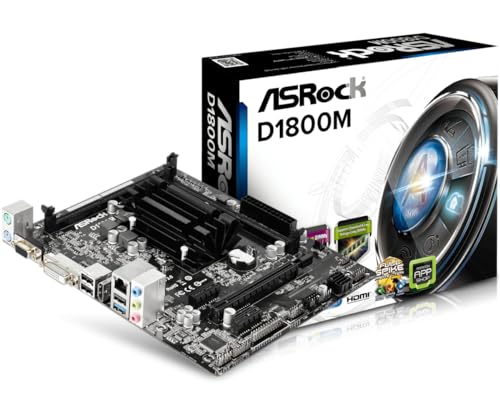
ASRock Micro ATX DDR3 D1800M
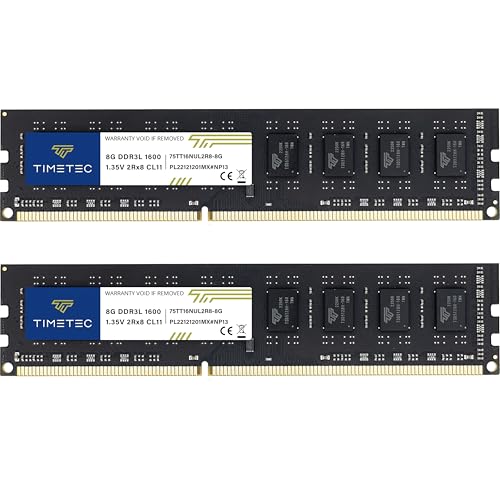
Timetec Premium 16GB KIT DDR3L / DDR3 1600MHz

X5650 CPU Six Core Twelve Threads LGA1366
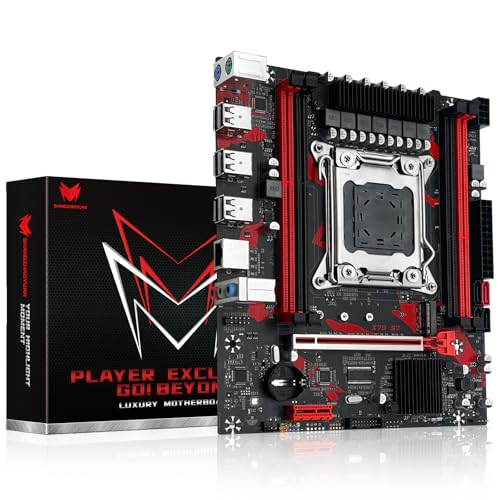
X79 S7 Gaming Motherboard LGA 2011 DDR3
More Details On Your Top Picks
Four 8GB modules give you a 32GB desktop memory setup, a useful ceiling for browser-heavy work, virtual machines, and photo libraries on an older computer. DDR3L means lower-voltage DDR3, while dual-voltage operation at 1.35V or 1.5V broadens motherboard compatibility.
The 240-pin UDIMM format belongs in desktop DIMM slots, not laptop memory bays. You may find four occupied slots leave less room for later expansion, but the matched kit makes sense for a system that already supports 32GB and needs capacity now.
Strong Points
- 32GB capacity suits demanding multitasking on compatible desktops.
- Dual-voltage operation helps older DDR3 systems accept the modules.
- Non-ECC unbuffered design fits many standard consumer desktop boards.
- Four matching modules can support balanced dual-channel configurations.
- Black or green PCB availability doesn’t change the specified function.
Things To Consider
- Four slots become occupied, so installation leaves little memory expansion headroom.
- Compatibility still depends on the motherboard’s maximum capacity and supported density.
Key Specs
Who It Suits Best
You’ll benefit most from this kit on a compatible desktop used for heavy multitasking, local virtual machines, or large creative files.
Consider Something Else When
A-Tech 8GB DDR3/DDR3L 1600MHz DIMM suits you better when your desktop needs one modest module rather than a full four-module capacity upgrade.
Older LGA1155 desktops can gain a practical processor refresh from the Core i7-2600, especially in home-office systems that already use compatible DDR3 memory. Its four-core, eight-thread design gives you more parallel task capacity than many entry-level chips from the same era.
The renewed format keeps this choice focused on replacement value rather than a new-platform experience. For an office tower, media computer, or repair project, that can be sensible; depending on the host board, firmware support and cooler condition deserve attention before installation.
What We Like
- Four cores and eight threads remain useful for everyday desktop workloads.
- Works with the established DDR3 era of LGA1155 systems.
- Replacement-focused format can help extend the life of an existing tower.
Worth Noting
- Socket and motherboard support must match exactly before you remove the existing CPU.
- A renewed processor may arrive with condition details that differ from a factory-new part.
- Older thermal paste and cooler hardware may need cleaning or replacement during installation.
Feature Snapshot
Made For
You’ll get the clearest fit from this processor in a repair-minded desktop owner with an LGA1155 board and a compatible BIOS.
Not Your Match When
ASRock Micro ATX DDR3 D1800M fits you more closely when you need a compact motherboard and processor combination rather than a socket-only replacement.
A single 8GB module gives you a straightforward route to more usable memory in an older desktop. The 240-pin DIMM layout, non-ECC unbuffered design, and 1600MHz rating target ordinary home and office computers rather than server boards.
DDR3L compatibility with 1.35V or 1.5V operation adds flexibility, though your board still needs the right capacity and module arrangement. You may find one module convenient for a quick repair, while a matched pair can offer a better path for a system designed around dual-channel memory.
Highlights
- 8GB adds breathing room for browsers, office software, and light media work.
- Single-module format keeps installation and storage uncomplicated.
- Dual-voltage support suits a range of DDR3 desktop platforms.
- Dual-rank construction may align with older desktop memory layouts.
Trade Offs
- A lone module may not deliver the same memory-channel arrangement as a matched kit.
- Confirm the motherboard manual before mixing it with existing memory.
At A Glance
Right Fit For
You’ll appreciate this module most for a basic desktop refresh where one 8GB stick solves an immediate capacity problem.
Look Elsewhere When
Timetec Premium 16GB KIT DDR3L / DDR3 1600MHz is a better match for you when your board accepts two modules and you want a ready-made 16GB set.
Small case projects need more than a compatible memory type, and the D1800M addresses that by combining a Micro ATX board with an included Intel J1800 dual-core processor. Its 2.41GHz processor specification and DDR3 support make it a focused platform for light desktops, simple media boxes, or compact workshop computers.
Two DDR3 or DDR3L slots support dual-channel operation and up to 16GB, while the board adds SATA2 storage connections, Gigabit networking, and a mix of USB ports. The honest read is narrow scope: you gain a tidy starting point, but the integrated low-power platform isn’t aimed at demanding modern workloads.
Upsides
- Included processor removes the need to source a separate compatible CPU.
- Micro ATX sizing works well in compact desktop cases.
- Two memory slots support a clear upgrade path to 16GB.
- USB 3.0, USB 2.0, SATA2, and Gigabit networking cover practical home-computer duties.
- Low-complexity layout can simplify a small repair or custom build.
Minor Gripes
- DDR3 support is limited to 1066 and 1333 classes, below the 1600MHz memory used by several picks here.
- The included dual-core processor limits demanding multitasking and newer software workloads.
- Compact boards can make cable routing and internal cleaning tighter in small cases.
Technical Sheet
Who Will Love This
You’re the right match for this board when you’re assembling a compact, low-demand desktop and prefer an included CPU over separate component selection.
A Better Fit Elsewhere
Intel Core i7-2600 Desktop CPU SR00B suits you more when an existing LGA1155 system needs stronger general-purpose processing.
Two 8GB modules give you a balanced 16GB capacity for office work, streaming, school software, and moderate multitasking. The 1600MHz DDR3L / DDR3 design supports 1.35V or 1.5V operation, so you get more flexibility than a module locked to one voltage.
Compared with the 32GB Timetec kit, this pair leaves two desktop slots open on a four-slot board and makes installation less crowded. You may find its low-density 4GB description confusing beside the 8GB module size, so your motherboard manual remains the final compatibility check.
Standout Traits
- Two-module 16GB arrangement fits many everyday desktop refreshes.
- Dual-voltage support can accommodate older DDR3 and DDR3L boards.
- Leaving open slots preserves room for a later capacity increase.
- Non-ECC unbuffered construction targets standard consumer desktops.
Points To Note
- Memory mixing can create compatibility problems, especially across different ranks or speeds.
- PCB color can differ between production batches, which matters for appearance-focused builds.
Quick Facts
Best Suited To
You’ll find this kit most useful for an everyday desktop owner seeking 16GB without filling every available memory slot.
Swap It Out When
Timetec 32GB KIT DDR3L / DDR3 1600MHz is better for you when your workload includes virtual machines or unusually heavy multitasking.
Six cores and twelve threads give the X5650 a compelling role in older workstation projects, particularly alongside an X58 or server motherboard. Threads are the processing paths a CPU can handle at once, so this design can suit rendering, virtualization, and several background tasks better than a basic dual-core platform.
The LGA1366 socket is the deciding detail, not the broad DDR3 label. With a 2.66GHz base frequency, 12MB cache, and 95W power specification, you’ll need a suitable board, cooler, and power setup; a used-platform build may also require more hands-on maintenance than the i7-2600 route.
Bright Spots
- Six-core, twelve-thread layout suits parallel workloads on an older workstation.
- 12MB cache supports data access across demanding multitasking sessions.
- Three memory channels can serve compatible LGA1366 platform designs.
- DDR3 support at 800, 1066, and 1333 gives platform-specific flexibility.
- Metal construction fits the practical expectations of a replacement processor.
Room For Improvement
- LGA1366 limits this CPU to a much narrower motherboard pool.
- The 95W specification calls for suitable cooling and clear case airflow.
- Installation in an older workstation may involve cleaning contacts and refreshing thermal material.
Core Details
Built With In Mind
You’ll get the strongest fit from this CPU as an enthusiast restoring an X58 workstation or assembling a low-cost multi-threaded project system.
Where A Sibling Pick Shines
X79 S7 Gaming Motherboard LGA 2011 DDR3 suits you better when you need a broader Xeon E5 platform with much higher stated memory capacity.
For a new DDR3-based project, the X79 S7 gives you a full LGA2011 foundation instead of a processor-only upgrade. The board supports Xeon E5 families, dual-channel DDR3 desktop or ECC/RECC memory, and up to 256GB across four slots, giving you room for a workstation-style build.
NGFF/NVMe M.2 support and SATA 3.0 connections add storage flexibility that the ASRock D1800M lacks. Still, compatibility details deserve careful checking because LGA2011 processor revisions, memory type, case layout, and firmware support all affect installation; in a server project, that extra planning is part of the job.
Reasons To Buy
- LGA2011 support opens access to several Xeon E5 processor families.
- Up to 256GB of DDR3 capacity suits workstation and server-style builds.
- 1066, 1333, and 1600MHz memory support gives you configuration flexibility.
- M.2 and SATA 3.0 storage options support varied drive layouts.
- Dual-channel memory design provides a clear installation plan for four slots.
Areas To Watch
- ECC and RECC memory compatibility should be confirmed against your selected CPU and operating setup.
- LGA2011 builds require careful socket, firmware, and cooler matching.
- Smaller case layouts can make the board, storage drives, and cabling harder to service.
Feature Rundown
Whose Shelf It Belongs On
You’re the right match for this motherboard as a hands-on builder creating a Xeon E5 workstation, server, or high-capacity DDR3 project.
Reach For A Different Pick When
Timetec Premium 16GB KIT DDR3L / DDR3 1600MHz is a better fit for you when your existing desktop only needs a simple memory refresh.
How To Choose The Right Ddr3 Cpus
Start With Socket Compatibility
Your first check should be the motherboard socket, not the processor’s core count. The i7-2600 belongs with an LGA1155 system, the X5650 uses LGA1366, and the X79 S7 is built around LGA2011. Those sockets aren’t interchangeable, so matching the CPU to the board prevents an expensive part mismatch.
You also need to consider firmware support, especially with older boards and different processor revisions. A replacement CPU makes more sense for an existing compatible system, while the ASRock D1800M gives you a board-and-processor combination for a compact build.
Match Memory Type and Capacity
DDR3, DDR3L, ECC, and non-ECC describe more than speed. DDR3L can operate at a lower voltage, while ECC memory adds error-checking intended for certain workstation and server environments. Standard non-ECC unbuffered UDIMMs, such as the Timetec and A-Tech modules, generally target ordinary desktop boards.
Capacity should follow your workload. An 8GB module can refresh a basic office computer, 16GB handles typical multitasking more comfortably, and 32GB makes sense for virtual machines or large project files. Your motherboard manual determines the maximum capacity, slot arrangement, supported density, and whether mixing modules is sensible.
Balance Cores, Threads, and Cooling
Cores are physical processing units, while threads are simultaneous task paths managed by the CPU. More of both can help with rendering, compression, virtualization, and background workloads, but the benefit depends on software and platform age. The six-core X5650 suits parallel work better than the dual-core J1800, while the i7-2600 remains a practical middle ground for everyday desktops.
Cooling and power also belong in your plan. The X5650 carries a 95W specification, so you need suitable cooling, clean contact surfaces, and enough case airflow. A compact integrated board may be easier to assemble, but it gives you less headroom for demanding upgrades.
Think About Storage and Expansion
A memory upgrade is usually the least disruptive route because you keep your current case, drives, and operating setup. A motherboard swap creates more work, including cable routing, operating system configuration, and possible changes to storage connections. The X79 S7 earns consideration for M.2, SATA 3.0, and high-capacity memory support, while the D1800M keeps expansion modest with SATA2 and limited PCI-Express operation.
Things Worth Knowing First
Mistakes Worth Dodging
Many DDR3 errors start with a desktop and laptop format mix-up. UDIMM modules use full-size desktop slots, so check the physical type before focusing on capacity or speed. You also need to avoid assuming that every 1600MHz module will run at that speed on a board designed for 1066MHz or 1333MHz memory.
Processor socket confusion creates a larger installation problem. Compare the exact socket, supported CPU family, firmware requirements, and cooler arrangement before choosing an upgrade. A compatible memory kit cannot make an incompatible processor work.
Where The Extra Money Goes
Higher-tier DDR3 choices usually give you more capacity, more slots, broader platform support, or a more complete foundation rather than modern-generation speed. Timetec’s 32GB kit costs more in system resources than an 8GB module because it delivers four matched sticks, while the X79 S7 supports a much larger memory ceiling and additional storage paths.
Spending up makes sense for a workstation, virtual machine host, or long-term repair project where capacity matters. Basic email, documents, and streaming rarely need a 256GB-capable board, so a smaller memory kit or existing-platform CPU can keep your build more practical.
Closing Remarks
You can choose a sensible DDR3 path by matching the socket, memory format, voltage, capacity, and workload before focusing on brand names. Timetec’s 16GB kit fits everyday desktop refreshes, the 32GB kit serves heavier multitasking, and A-Tech keeps a small upgrade straightforward. The i7-2600 and X5650 make sense as platform-specific processor replacements, while the ASRock and X79 boards support more complete rebuilds. Take a few minutes to verify your motherboard manual, then choose the option that fits your current system rather than chasing unused capacity.
