
Choosing a gaming desktop means balancing frame rates, storage, upgrade room, desk space, and the kind of games you actually play. You may need a compact computer for a dorm room, a capable tower for 1080p gaming, or a high-end system for demanding titles, streaming, and creative work. This shortlist covers those situations with options ranging from an office-style Dell to powerful RTX-equipped desktops. You’ll also find practical notes about memory, graphics hardware, cooling, connectivity, and everyday ownership, so the specifications translate into a choice that fits your setup.
The Shortlist At A Glance

Dell Optiplex 3050 SFF Desktop Computer 256GB SSD

GMKtec K16 Gaming Mini PC Ryzen 7 7735HS 32GB 512GB SSD

iBUYPOWER Element SE Gaming PC Ryzen 5 8400F RTX 3050
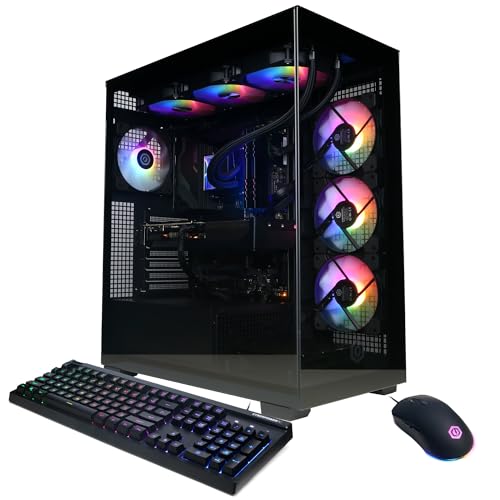
CyberPowerPC Gamer Xtreme VR Gaming PC i9-14900KF RTX 5070

YAWYORE Gaming PC Desktop Ryzen 5 5600GT 16GB 1TB

Thermaltake LCGS Quartz i1460 Gaming Desktop RTX 5060
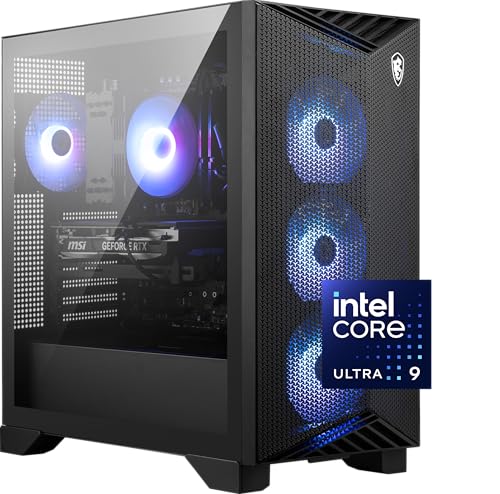
msi Aegis R2 AI Gaming Desktop Core Ultra 9 285 RTX 5070Ti
More Details On Your Top Picks
Desk space matters in a home office, and the small-form-factor OptiPlex 3050 keeps its footprint restrained while pairing a quad-core Intel Core i5-6500 with 16GB of DDR4 memory. Its 256GB solid-state drive, meaning storage without the moving parts of a hard disk, should keep Windows and everyday applications responsive.
DisplayPort, HDMI, WiFi, and stated 4K support make it practical for a monitor-based workstation that also handles older or lighter games. You may find the older processor and business-focused chassis limiting for modern graphics-heavy titles, but the compact renewed format suits students and casual desktop use.
Strong Points
- Small chassis leaves more room for speakers, a monitor stand, or notebooks.
- 16GB memory supports office work, browsing, and modest multitasking.
- Solid-state storage should shorten everyday startup and application loading.
- HDMI, DisplayPort, WiFi, and 4K support simplify a basic desk setup.
Things To Consider
- Older integrated graphics are a poor match for demanding current games.
- Renewed hardware can show cosmetic variation, so inspect the casing and ports after arrival.
Key Specs
Who It Suits Best
Students, home-office users, and casual gamers who value a small renewed desktop over modern gaming graphics.
Where Another Pick Suits Better
Choose the GMKtec K16 Gaming Mini PC for a smaller modern system with stronger integrated graphics and 32GB memory.
Mini-PC buyers often trade expansion room for a cleaner desk, and the K16 makes that exchange more attractive with a Ryzen 7 7735HS, 32GB of LPDDR5 memory, and integrated Radeon 680M graphics. LPDDR5 is a newer, higher-bandwidth memory type, while the 8-core, 16-thread processor gives you useful headroom for games, streaming, and demanding applications.
USB4 and Oculink, a high-speed connection intended for compatible external hardware, add unusual flexibility for a compact computer. Dual 2.5GbE network ports suit a wired home server or fast local network, though the 512GB SSD offers less room for a large game library than the iBUYPOWER Element SE.
What We Like
- 32GB LPDDR5 memory supports heavier multitasking than the Dell OptiPlex.
- Radeon 680M graphics make casual and competitive gaming more practical in a tiny chassis.
- USB4, Oculink, HDMI, and dual 2.5GbE ports broaden setup possibilities.
- Compact storage is easy to position beside a monitor or television.
- Lower internal expansion room is a reasonable trade for the small enclosure.
Worth Noting
- Integrated graphics share system resources and won’t match a dedicated RTX card.
- Mini-PC owners commonly need to keep vents clear because compact enclosures leave less cooling space.
- 512GB can feel tight after several large games and media files.
Feature Snapshot
Made For
Apartment dwellers, LAN users, and casual gamers who need modern processing in a compact enclosure.
Consider Something Else When
The Thermaltake LCGS Quartz i1460 suits you more when a dedicated RTX 5060 GPU matters for visually demanding games.
Dedicated graphics change the conversation, and the Element SE combines an AMD Ryzen 5 8400F with an NVIDIA GeForce RTX 3050 carrying 6GB of graphics memory. That arrangement gives 1080p gamers a more suitable starting point than the integrated graphics in the YAWYORE tower, especially for games that depend heavily on the GPU.
The 1TB NVMe SSD, a compact solid-state drive using a fast PCIe connection, gives you useful room for a Windows installation and a growing game collection. A keyboard and mouse reduce setup friction, although 16GB of DDR5 memory is more modest for simultaneous gaming, streaming, and editing.
Highlights
- RTX 3050 graphics provide a dedicated gaming foundation.
- 1TB NVMe storage reduces the need for immediate storage management.
- DDR5 memory uses a newer platform than the YAWYORE system’s DDR4.
- Included keyboard and mouse help you get a complete desk running sooner.
Trade Offs
- 16GB may feel constrained during heavier streaming or editing sessions.
- RTX 3050 graphics sit well below the RTX 5060, RTX 5070, and RTX 5070 Ti systems here.
At A Glance
Right Fit For
New PC gamers who want dedicated graphics, modern DDR5 memory, and a full keyboard-and-mouse setup.
Look Elsewhere When
Choose the CyberPowerPC Gamer Xtreme for high-resolution gaming, streaming headroom, and substantially stronger graphics hardware.
For demanding games, the hardware moves into a different class with Intel’s 24-core Core i9-14900KF and an RTX 5070 with 12GB of graphics memory. You get 32GB of DDR5 and a 2TB PCIe 4.0 NVMe SSD as well, which makes this tower a strong match for high-resolution gaming, streaming, and large creative projects.
Liquid CPU cooling, a tempered side panel, WiFi 5, Bluetooth 4.2, and a broad USB selection make the system feel ready for a busy desk. The honest trade-off is size, heat, and system complexity compared with the GMKtec K16, so allow generous ventilation and time for cable organization.
Upsides
- 24-core processing gives demanding games and creator applications substantial CPU headroom.
- RTX 5070 graphics with 12GB memory suit high-detail gaming and multiple displays.
- 2TB PCIe 4.0 storage accommodates a broad game library and large files.
- Liquid cooling is suited to sustained processor-heavy workloads.
- Multiple USB-C and USB-A ports simplify peripherals, storage, and accessories.
Minor Gripes
- The larger tower needs more floor or desk space than the mini-PC choices.
- Liquid cooling adds components that require more careful long-term dust and cable maintenance.
Technical Sheet
Who Will Love This
Enthusiasts, streamers, and creative users who want a powerful tower for demanding games and multitasking.
A Better Fit Elsewhere
The msi Aegis R2 AI Gaming Desktop suits you more when RTX 5070 Ti graphics and 2TB storage appeal to your high-resolution setup.
A simple tower can make sense for a family desk, and the YAWYORE pairs a six-core, 12-thread Ryzen 5 5600GT with 16GB of DDR4 memory and a 1TB M.2 NVMe PCIe SSD. Its integrated Radeon Vega graphics keep the design straightforward, making it better suited to everyday games and office work than demanding new releases.
WiFi, Bluetooth, and a stated 550W 80PLUS power supply reduce the number of separate setup decisions. You may find this platform appealing as a starting point, but the absence of a listed dedicated GPU leaves less graphics headroom than the iBUYPOWER Element SE.
Reasons To Buy
- Six CPU cores and 12 threads cover office work, study, and casual gaming.
- 1TB NVMe storage gives useful room for applications and personal files.
- WiFi and Bluetooth suit a clean family-room or home-office installation.
- Integrated graphics avoid the added complexity of a separate graphics card.
Room For Improvement
- Integrated Radeon Vega graphics limit demanding game settings and newer titles.
- DDR4 is an older memory platform than the DDR5 systems in this list.
- Dust buildup around tower ventilation remains a practical maintenance concern over time.
Quick Facts
Built With In Mind
Families, students, and casual gamers who need a practical tower for everyday work and lighter 1080p play.
Swap It Out When
The iBUYPOWER Element SE is a stronger match for you when dedicated RTX graphics matter more than integrated simplicity.
The Quartz i1460 lands between entry-level and enthusiast hardware with an Intel Core i5-14400F, an RTX 5060, 16GB of DDR4 memory, and a 1TB NVMe M.2 drive. That combination should feel well matched for mainstream gaming, while the mesh front panel has a clear practical role, allowing airflow through the case during longer sessions.
RGB memory adds visual flair without changing the core experience, and WiFi helps desks where a wired connection isn’t convenient. Compared with CyberPowerPC’s i9 tower, this Thermaltake asks less from your space and workload, though 16GB DDR4 gives you less multitasking room than 32GB DDR5.
Bright Spots
- RTX 5060 graphics provide a dedicated platform for mainstream gaming.
- Mesh-front airflow is a sensible design choice for sustained play.
- 1TB NVMe storage leaves room for several games and daily applications.
- WiFi simplifies placement away from a router.
- RGB memory gives the case a gaming-focused appearance.
- Intel Core i5-14400F keeps the system balanced for typical game workloads.
Points To Note
- 16GB DDR4 may call for more careful multitasking during streaming.
- RGB components and an open mesh front can make dust cleaning more noticeable.
Feature Rundown
The Right Fit
Mainstream gamers who want a balanced tower with dedicated RTX graphics, WiFi, and visible airflow design.
Where A Sibling Pick Shines
The GMKtec K16 is a better match for you when desk space matters more than dedicated graphics.
MSI’s Aegis R2 takes the high-end route with an Intel Core Ultra 9 285, GeForce RTX 5070 Ti graphics, 32GB of DDR5 memory, and a 2TB M.2 NVMe SSD. Core Ultra identifies Intel’s newer processor family, while the large memory and storage allotments suit high-resolution games, creative applications, and substantial local libraries.
Air cooling keeps the design more straightforward than the liquid-cooled CyberPowerPC, and USB Type-C adds a useful modern port for compatible accessories. Depending on your case placement, you may prefer the simpler cooling system for routine maintenance, though demanding users should still leave clear space around the chassis.
Plus Points
- RTX 5070 Ti graphics target demanding, high-resolution gaming.
- 32GB DDR5 supports gaming with streaming, editing, or many open applications.
- 2TB NVMe storage provides substantial room for large game installations.
- Core Ultra 9 processing suits intensive workloads beyond gaming.
- USB Type-C adds convenient connectivity for newer peripherals.
Small Caveats
- Air cooling may be less appealing than liquid cooling for users focused on extended heavy workloads.
- The powerful component mix makes this more computer than casual gamers need.
- Large desktop hardware deserves careful dust removal and open ventilation around the case.
Core Details
Whose Shelf It Belongs On
Enthusiasts and creators who want a powerful modern desktop for high-resolution play and demanding multitasking.
Another Choice May Suit
The Thermaltake LCGS Quartz i1460 is a better fit for you when mainstream gaming and a smaller workload matter more than maximum graphics capacity.
How To Choose The Right Desktop Cpus For Gaming
Start With The Graphics Card
The graphics processing unit, or GPU, does most of the visual work in a game. Dedicated cards such as the RTX 3050, RTX 5060, RTX 5070, and RTX 5070 Ti generally give you more gaming headroom than integrated graphics found in the Dell, GMKtec, and YAWYORE systems.
Match the GPU to your display. A 1080p monitor places less demand on graphics hardware, while high-resolution or high-refresh gaming benefits from a stronger card and more graphics memory.
Match CPU Cores To Your Routine
CPU cores handle separate streams of work, so a six-core chip can suit mainstream gaming while 24-core designs better fit streaming, editing, and heavy multitasking. You don’t need the Core i9-14900KF or Core Ultra 9 285 for light games and browsing, but the extra processing capacity can matter across a long ownership period.
Also consider memory. 16GB works as a sensible starting point, while 32GB gives you more breathing room with browsers, launchers, voice chat, creative software, and a game running together.
Check Storage And Expansion
NVMe SSDs use PCIe connections to move data quickly, reducing the waiting associated with older storage designs. A 1TB drive offers a practical middle ground, while 2TB makes more sense for large libraries, video files, and multiple creative applications.
Mini-PCs save space but usually offer less internal expansion than towers. A tower may suit you better for future storage, memory, or graphics changes, provided your desk and ventilation can accommodate it.
Don’t Ignore Cooling And Ports
Long gaming sessions place sustained demand on the CPU and GPU. Mesh panels, liquid cooling, or a clear airflow path can help the design manage that workload, but every desktop still benefits from open vents and occasional dust removal.
Count the ports you use rather than assuming more is always better. USB-C, USB-A, HDMI, DisplayPort, WiFi, Bluetooth, and wired LAN each matter in different setups, from a wireless desk to a multi-monitor gaming station.
Things Worth Knowing First
Mistakes Worth Dodging
Don’t choose a desktop from the processor name alone. Gaming performance depends heavily on the GPU, and an attractive CPU paired with integrated graphics may not suit a modern game library.
Storage also disappears faster than expected once large games, recordings, and creative files collect. Check the drive capacity, port selection, and enclosure size before settling on a compact system.
Where The Extra Money Goes
Higher-tier desktops usually combine a stronger GPU with more graphics memory, a faster processor, larger SSD capacity, and more system memory. Those upgrades matter most at higher resolutions, during streaming, or across demanding creative workloads.
Spending more makes sense for you when replacing the computer soon would be inconvenient. Casual gamers may get better value from the YAWYORE or iBUYPOWER, while enthusiasts can make fuller use of the CyberPowerPC or msi systems.
The Takeaway
Your right choice depends on the games you play, the display on your desk, and how much space you have available. The Dell works for compact everyday computing, the GMKtec brings modern capability to a tiny enclosure, and the iBUYPOWER or Thermaltake offer more suitable dedicated graphics for mainstream play. High-demand gaming and creative work point toward the CyberPowerPC or msi Aegis R2. Focus on the GPU first, then confirm memory, storage, cooling, and ports for the way you use your desktop.
