
Choosing among Desktop Computer Processors gets harder once you compare complete desktops, compact systems, and standalone chips in the same search. You need the right match for your desk, workload, upgrade plans, and comfort with installation. This shortlist covers office work, home computing, multi-monitor setups, and gaming builds, so you can spend less time sorting through mismatched hardware.
The Shortlist At A Glance

GMKtec G3S Mini PC Intel N95 Processor 8GB RAM 256GB M.2 SSD

Dell Tower Desktop Intel Core Ultra 7-265 32GB RAM 1TB PCIe NVMe SSD
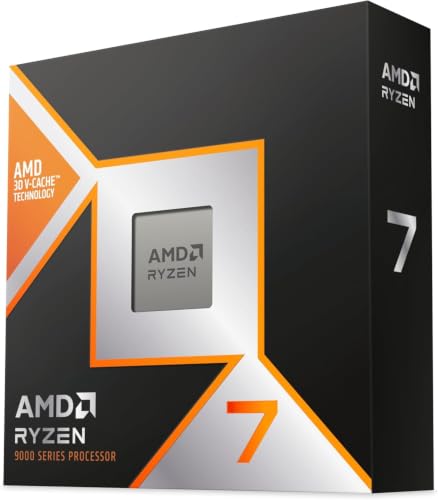
AMD Ryzen 7 9850X3D Desktop Processor

AMD Ryzen 7 5800X3D Desktop Processor
Lenovo IdeaCentre All-in-One Desktop 8GB RAM 512GB SSD 24″ FHD
HP ProDesk Business Mini PC Intel Core i5 8GB RAM 256GB PCIe SSD

Lenovo IdeaCentre 24″ FHD All-in-One Desktop 16GB RAM 512GB SSD
More Details On Our Top Picks
A small desk, a spare monitor, and routine office tasks suit the GMKtec G3S well. Its Intel N95 processor reaches up to 3.4GHz, while the 8GB DDR4 memory and 256GB M.2 solid-state drive keep the setup focused on browsing, documents, streaming, and light home-server duties.
The VESA mount can help you move the computer behind a compatible display, and dual 4K display support gives a tidy multi-screen path. You may find the modest memory and storage restrictive for heavier creative software, but the compact enclosure makes sense for apartments, reception desks, and home theater setups.
Strong Points
- Small form factor suits crowded workspaces.
- VESA mounting can clear room beneath a monitor.
- Dual 4K display support helps split work across screens.
- The M.2 SSD should make everyday file access feel more responsive than older spinning storage.
- Gigabit Ethernet provides a wired networking option for media or office use.
Things To Consider
- 8GB RAM and 256GB storage leave less headroom for demanding applications.
- Compact cases generally leave less room for internal expansion and can collect dust around small vents.
Key Specs
Who It Suits Best
You’ll get the most from this mini PC as a student, home-office user, or media enthusiast with basic computing needs.
Where Another Pick Suits Better
Choose the HP ProDesk Business Mini PC for heavier office multitasking, Windows 11 Pro, and dual-display business connectivity.
For a full desktop rather than a tiny box, Dell’s tower gives you a much wider working margin. The Intel Core Ultra 7-265 pairs with 32GB of memory and a 1TB PCIe NVMe SSD, where NVMe describes a fast storage interface designed for modern solid-state drives.
That combination fits large spreadsheets, many browser windows, office suites, and creative workloads better than the GMKtec G3S. Wi-Fi 6, Bluetooth, and the included wired keyboard and mouse simplify setup, although Intel UHD Graphics points toward productivity rather than a dedicated gaming build.
What We Like
- 32GB RAM supports demanding multitasking with less need to close applications.
- 1TB NVMe storage gives you useful space for documents, media, and software.
- Core Ultra processing suits busy home offices and creative workflows.
- Wireless networking and Bluetooth reduce desk cable clutter.
- The tower format may offer a more serviceable platform than a mini PC.
Worth Noting
- Integrated UHD Graphics is less suitable for graphics-heavy gaming than a system with a dedicated graphics card.
- The larger tower needs more floor or desk space than the compact options here.
- Expect to keep the interior clear of dust for dependable airflow over time.
Feature Snapshot
Made For
This tower suits professionals, creators, and home-office users who keep many applications open at once.
Consider Something Else When
Pick the AMD Ryzen 7 9850X3D Desktop Processor for a custom gaming rig where you already plan to choose the graphics card and cooling hardware.
A standalone processor changes the decision completely: you’re selecting the engine for a custom computer, not a ready-to-use desktop. The Ryzen 7 9850X3D targets gaming enthusiasts who want a current high-end foundation and already understand the need for a compatible motherboard, memory, cooling solution, storage, and graphics card.
Its 3D cache design is intended to keep frequently needed game data closer to the processing cores, which can help gaming-focused builds depending on the title and full system configuration. You may find the platform cost climbs quickly after adding the remaining components, so this choice makes the most sense for a planned build rather than a quick office replacement.
Highlights
- Purpose-built positioning makes it attractive for enthusiast gaming systems.
- 3D cache technology supports a gaming-oriented design approach.
- Buying only the processor lets you tailor the graphics card and cooling to your needs.
Trade Offs
- You need to supply every remaining component and complete the installation.
- Performance depends heavily on the selected graphics card, motherboard, cooling, and memory.
- Standalone chips require more planning than Dell’s ready-built tower.
Core Details
Right Fit For
You’ll appreciate this processor most as an experienced PC builder planning a gaming-first system from individual components.
Not Your Match When
The Dell Tower Desktop suits you better when you need a complete computer with memory, storage, operating system, keyboard, and mouse already included.
The Ryzen 7 5800X3D remains an appealing route for an existing AM4 gaming computer. Its 8 cores, 16 threads, and AMD 3D V-Cache technology give an older platform a focused gaming refresh without forcing you to replace every core component.
Support for DDR4-3200 memory and PCIe 4.0 on compatible X570 and B550 boards helps keep the surrounding build familiar. The honest trade-off is installation: the cooler isn’t included, and your motherboard firmware and cooling setup deserve attention before you begin.
Upsides
- Eight cores and 16 threads provide useful capacity beyond gaming.
- 3D V-Cache targets game performance on the AM4 platform.
- DDR4 support can preserve existing memory during an upgrade.
- Compatible B550 and X570 systems can retain PCIe 4.0 support.
Minor Gripes
- A separate cooler is required, adding installation planning and cost.
- Platform compatibility matters, so check your motherboard before choosing this chip.
At A Glance
Best Suited To
This processor fits you best as an AM4 owner seeking a gaming upgrade without rebuilding the entire computer.
Look Elsewhere When
The AMD Ryzen 7 9850X3D is a stronger direction for you when you’re starting a newer enthusiast build and don’t need to preserve DDR4 hardware.
Desk simplicity matters in a dorm room or shared home office, and Lenovo’s all-in-one design puts the computer behind a 24-inch Full HD screen. The anti-glare IPS panel, Wi-Fi 6, Bluetooth 5.2, 8GB RAM, and 512GB SSD create a straightforward setup for documents, browsing, streaming, and schoolwork.
Compared with the GMKtec G3S, you receive a built-in display rather than a bare mini system that needs a monitor. The Intel four-core platform is aimed at everyday use, so you may find heavier photo work or extensive multitasking less comfortable than on the Dell tower.
Plus Points
- The all-in-one layout reduces cable clutter and installation steps.
- A 24-inch Full HD IPS display gives office tasks more working room.
- Anti-glare treatment can be useful near windows or bright lamps.
- 512GB SSD storage leaves practical space for school files and media.
Room For Improvement
- 8GB RAM is more limiting for large multitasking sessions.
- An all-in-one display and computer share one enclosure, making later component changes less flexible.
- Integrated Intel graphics suit daily visuals rather than demanding games.
Technical Sheet
Who Will Love This
You’ll find this a strong match for students, families, and home-office users who want a tidy display-and-computer package.
A Better Fit Elsewhere
The Lenovo IdeaCentre 24″ FHD All-in-One Desktop with 16GB RAM suits you more when several people share the system or your browser-heavy routine needs extra memory.
Business desks often need two screens and familiar ports more than decorative extras. HP’s ProDesk mini pairs a six-core Intel Core i5 processor with Windows 11 Pro, Wi-Fi, Bluetooth, and DisplayPort plus VGA output, so you can connect newer and older monitors in the same workspace.
The 8GB RAM and 256GB PCIe SSD keep the configuration modest, yet the processor gives it a firmer multitasking base than the GMKtec G3S. Depending on your daily software load, storage may fill quickly, and the small case calls for sensible ventilation and regular dust removal.
Bright Spots
- Six processor cores suit office multitasking and video calls.
- Windows 11 Pro fits business-oriented desktop environments.
- DisplayPort and VGA broaden monitor compatibility.
- The compact chassis preserves desk space while supporting a two-screen layout.
- Wi-Fi and Bluetooth reduce the need for extra adapters.
Points To Note
- 256GB storage can feel tight for large media libraries or many applications.
- 8GB RAM may require restraint with very large browser sessions.
- Legacy VGA is useful for older displays, but modern monitor setups may prefer DisplayPort.
Quick Facts
Built With In Mind
This mini PC suits office staff, reception areas, and home professionals who need compact dual-screen productivity.
Swap It Out When
The Dell Tower Desktop is a better fit for you when large storage, 32GB memory, and a stronger desktop workload matter more than a small footprint.
Lenovo’s second all-in-one keeps the clean 24-inch Full HD format but doubles the memory to 16GB. That change matters during online classes, family scheduling, video calls, document editing, and browser-heavy work, where extra RAM helps you move between tasks with fewer slowdowns.
Wi-Fi 6, Bluetooth 5.2, Intel graphics, and the 512GB SSD create a neatly contained family computer. You may prefer the 8GB IdeaCentre for lighter use and a simpler workload, while this 16GB version makes more sense for shared desks and longer ownership.
Best Bits
- 16GB RAM gives everyday multitasking more room than the 8GB Lenovo model.
- The 24-inch Full HD screen provides comfortable space for school and office tasks.
- Anti-glare display treatment helps in bright home work areas.
- 512GB SSD storage keeps common files and applications in one place.
Small Caveats
- The four-core processor is aimed at everyday computing rather than demanding production work.
- All-in-one construction limits hardware flexibility compared with a tower.
- Shared household use can make display and desk placement more important during installation.
Feature Rundown
Whose Shelf It Belongs On
This all-in-one fits families, students, and home-office users who want extra memory without managing a separate tower and monitor.
Another Choice May Suit
The HP ProDesk Business Mini PC suits you more when dual-display ports and Windows 11 Pro matter more than having a built-in screen.
How To Choose The Right Desktop Computer Processors
Start With The Computer Type
A complete desktop gives you a ready workspace, while a standalone processor belongs inside a custom build. Choose a tower such as the Dell option for stronger general capacity and easier use from day one. Mini PCs save space, but their compact cases can limit storage, memory, and cooling flexibility.
All-in-one systems combine the display and computer, which suits bedrooms, dorms, kitchens, and shared desks. You’ll need less cable management, though future hardware changes are usually less flexible than with a tower.
Match Cores And Memory To Your Routine
Processor cores are individual working units inside the chip. Four cores can cover browsing, documents, streaming, and video calls, while six or more cores give you more room for heavier multitasking and threaded applications.
RAM is short-term working memory. 8GB suits lighter routines, 16GB feels more comfortable for many tabs and shared household use, and 32GB makes the Dell tower a stronger choice for demanding multitasking.
Check Graphics And Display Needs
Integrated graphics are built into the processor or platform, so you don’t need a separate graphics card for standard desktop visuals. That approach works well for office software and streaming, but gaming enthusiasts should consider a dedicated graphics card and a compatible processor.
Display connections matter in real offices. DisplayPort handles modern monitors, while VGA can keep an older business display useful. Dual-display support helps you keep a spreadsheet open beside email or a video call.
Plan Around Compatibility
Standalone chips demand careful matching. Check the socket, motherboard support, memory type, cooling requirements, and power delivery before choosing a processor. The Ryzen 7 5800X3D makes particular sense for compatible AM4 systems with DDR4 memory, while a newer enthusiast build may point toward the Ryzen 7 9850X3D.
Storage also affects daily comfort. A 256GB SSD works for focused office use, but 512GB or 1TB gives you more space for applications, media, and local files without immediate cleanup.
Things Worth Knowing First
Mistakes Worth Dodging
Choosing by processor name alone can leave you with the wrong type of computer. A standalone chip still needs a motherboard, cooler, memory, storage, graphics solution, case, and power supply, while an all-in-one already includes the display.
You’ll also want to avoid ignoring ports and memory. A compact machine with 8GB RAM may feel fine for documents but less comfortable with many browser tabs, and an older monitor may require VGA rather than a modern digital connection.
Where The Extra Money Goes
Higher-tier systems generally give you more memory, larger solid-state storage, stronger processing capacity, or a more specialized architecture. The Dell tower’s 32GB RAM and 1TB SSD address heavy multitasking, while the Ryzen chips focus on custom gaming builds.
Paying more makes sense for sustained workloads, demanding games, or a computer shared by several people. Basic browsing and documents don’t require the same headroom, so a GMKtec mini PC or 8GB Lenovo all-in-one may align better with a lighter routine.
Final Verdict
Your best match depends on the complete setup you need, not just the processor label. Choose the GMKtec G3S for a compact desk, the Dell tower for demanding productivity, the Ryzen chips for custom gaming builds, or a Lenovo all-in-one for simple home computing. The HP ProDesk adds practical business ports and Windows 11 Pro in a small chassis. Start with your workload, display plan, and upgrade comfort, then choose the system that fits your desk and your daily habits.
