
Choosing among I5 Cpus For Gaming gets harder once you compare standalone processors with complete desktops. Your ideal choice depends on the graphics card, motherboard, memory standard, upgrade plans, and the space available beside your monitor. This guide suits you whether you’re replacing an older CPU, assembling a new tower, or looking for a ready-to-use gaming PC for daily play and streaming. Each pick below balances confirmed hardware details with practical ownership considerations, so you can avoid pairing a capable processor with an unsuitable platform.
The Shortlist At A Glance

Intel Core i5-14400F Desktop Processor

Intel Core i5-14600KF New Gaming Desktop Processor

Intel Core i5-14400 Desktop Processor

Thermaltake LCGS Quartz i1460 Gaming Desktop
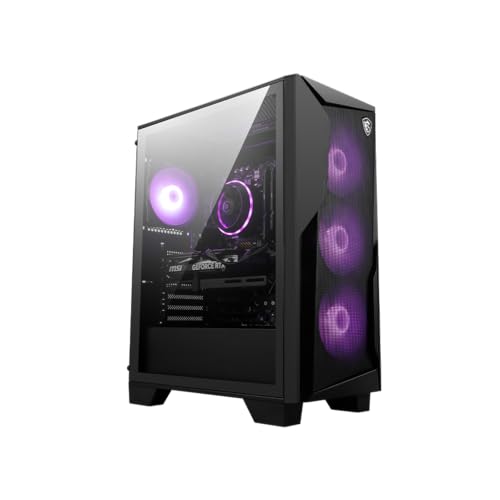
msi Codex R2 Gaming Desktop

Gaming PC, i5 CPU Up to 3.6 GHz

NIMO Gaming Desktop GeForce RTX 5060 8GB Intel i5-14400F
More Details On Our Top Picks
For a new gaming tower built around a separate graphics card, this 14th-generation chip keeps the platform straightforward. Its 10-core layout combines six P-cores, the cores aimed at demanding work, with four E-cores for background tasks, giving you 16 threads for games, browsers, voice chat, and recording.
The 65W base power suits mainstream cooling and the included Laminar RM1 cooler simplifies installation. You get DDR4 or DDR5 memory support and compatibility with Intel 600- and 700-series boards, though the F suffix means no integrated graphics. That makes it a sensible starting point, but your build must include a separate graphics card.
Strong Points
- Six P-cores and four E-cores provide useful gaming and multitasking balance.
- DDR4 and DDR5 support gives you more flexibility during a new build or platform refresh.
- The included cooler reduces the number of parts needed for installation.
- PCIe 5.0 and 4.0 support leaves room for current and later expansion hardware.
Things To Consider
- A separate graphics card is required, so the total system budget extends beyond the processor.
- The bundled cooler keeps setup simple, though a quieter aftermarket cooler may suit a noise-sensitive desk.
Key Specs
Who It Suits Best
Choose it for a first custom gaming PC using a dedicated graphics card and a mainstream 600- or 700-series motherboard.
Where Another Pick Suits Better
Intel Core i5-14400 Desktop Processor suits troubleshooting-focused builders more because its integrated graphics can provide a display output without a separate card.
Extra headroom matters for high-refresh gaming, streaming, and demanding desktop work, which is where the unlocked i5-14600KF earns its place. It carries 14 cores, made up of six P-cores and eight E-cores, with 20 threads to spread heavier workloads across the chip.
Compared with the i5-14400F, its 125W base power points toward stronger cooling and a better-prepared motherboard. The K designation permits tuning, while the F designation still requires a separate graphics card. You may find that feature set excessive for a basic 1080p build, but it makes more sense for a long-lived enthusiast system.
What We Like
- 14 cores and 20 threads provide substantial room for gaming plus creation work.
- Unlocked operation gives experienced builders more control over tuning.
- DDR4 and DDR5 compatibility works with either memory generation.
Trade Offs
- Its higher 125W base power calls for more careful cooler and airflow selection.
- No integrated graphics means troubleshooting requires a discrete graphics card.
- Older 600-series boards may need a BIOS update before installation.
Feature Snapshot
Made For
It fits experienced PC builders who want an unlocked processor for high-refresh gaming and substantial multitasking.
Consider Something Else When
Thermaltake LCGS Quartz i1460 suits you more when you want a complete RTX 5060 desktop rather than a processor-only installation.
A small but meaningful distinction separates this processor from the i5-14400F: Intel UHD Graphics 730 is built in. You still get 10 cores, 16 threads, and a peak clock of 4.7 GHz, but the integrated graphics can help you diagnose a display problem or run a basic desktop before adding a dedicated card.
That flexibility makes the chip appealing for gradual builds and home offices that also host a gaming tower. Its 65W base power and included RM1 cooler keep the installation approachable, while DDR4 and DDR5 support leave room for different budgets. For demanding games, a discrete graphics card remains the sensible path.
Highlights
- Integrated UHD Graphics 730 gives you a useful fallback display connection.
- The 10-core, 16-thread layout handles gaming and general productivity comfortably.
- Dual DDR4 and DDR5 support helps match the processor to an existing parts collection.
- The included cooler makes a first build less complicated.
- PCIe 5.0 and 4.0 support supports modern expansion planning.
Minor Gripes
- Integrated graphics are not a substitute for a dedicated gaming card in demanding titles.
- The stock cooler may not appeal to people prioritizing very quiet operation.
Technical Sheet
Right Fit For
It suits beginners and gradual-build shoppers who want an integrated display option before adding a gaming graphics card.
Not Your Match When
Intel Core i5-14600KF fits you better when heavy streaming, editing, and processor tuning matter more than simple installation.
Standalone CPUs make sense for custom builders, but the Quartz i1460 removes the assembly work by pairing an i5-14400F with an RTX 5060. Its 16GB DDR4-3600 RGB memory, 1TB NVMe M.2 storage, WiFi, and Windows 11 create a coherent starting point for a desk that needs gaming and everyday computing in one box.
The mesh front panel is designed to support airflow during long sessions, while the compact format helps in a crowded room. Compared with the MSI Codex R2, this desktop uses DDR4 rather than DDR5, so the memory platform is less forward-looking. That trade-off may matter less to you than having a ready-made system with storage already installed.
Upsides
- RTX 5060 graphics and the i5-14400F form a ready-to-use gaming foundation.
- 1TB NVMe storage gives your game library more breathing room than a small boot drive.
- WiFi and Windows 11 reduce setup steps after the tower arrives.
- The mesh front panel supports airflow, a useful feature for extended gaming sessions.
Room For Improvement
- DDR4 memory is practical, but DDR5 systems offer a newer upgrade direction.
- As a prebuilt, internal upgrades depend on the supplied case and motherboard layout.
- Regular dust cleaning around the mesh intake remains part of ownership.
At A Glance
Best Suited To
This system suits you when you want a compact, ready-made gaming desktop with an RTX 5060 and no component assembly.
A Better Fit Elsewhere
NIMO Gaming Desktop suits memory-heavy streaming and creative use more because it includes 32GB DDR5 memory.
The Codex R2 takes the same i5-14400F family used by the Thermaltake and pairs it with GeForce RTX 4060 graphics, 16GB DDR5, and a 1TB M.2 NVMe SSD. You also get WiFi, Windows 11 Home, an 80+ Gold power supply, and a keyboard and mouse, which makes this a convenient route into PC gaming for a home office or shared room.
Its DIY-friendly positioning should appeal to you when future tinkering matters, although a prebuilt still limits you to the supplied case and board layout. DDR5 gives it a newer memory base than the Quartz i1460, while the RTX 4060 sits below that desktop’s RTX 5060 in the graphics hierarchy. The honest read is practical: strong convenience, with less graphics headroom than the newer Thermaltake system.
Bright Spots
- DDR5 memory gives the platform a newer foundation than DDR4-based alternatives.
- The 1TB NVMe SSD offers useful space for games, apps, and personal files.
- An 80+ Gold power supply is a meaningful component detail for a complete desktop.
- Keyboard and mouse inclusion helps you reach the desktop without assembling a full accessory set.
Points To Note
- RTX 4060 graphics provide less room for demanding games than the RTX 5060 systems here.
- The bundled keyboard and mouse may eventually be replaced by peripherals matched to your preferences.
- DIY-friendly access does not remove the need for careful internal dust maintenance.
Quick Facts
Who Will Love This
It suits you as a home gamer who wants a complete, upgrade-conscious desktop with included input devices.
Look Elsewhere When
Thermaltake LCGS Quartz i1460 is the better match for you when graphics headroom and an RTX 5060 matter more than DDR5 memory.
A compact desktop with integrated graphics, 8GB RAM, and a 256GB SSD can cover light gaming, schoolwork, and general home use without the cost or space demands of a larger tower. Four RGB fans add airflow hardware and visual flair, while WiFi 6 and Bluetooth 5.3 help connect the system in a wireless setup.
The trade-off appears quickly for a serious game library: 256GB fills sooner than the 1TB drives in the Thermaltake, MSI, and NIMO systems. Integrated graphics also place a clear limit on demanding titles. You may find it useful as a starter PC, though an upgrade plan for memory, storage, or dedicated graphics deserves attention.
Best Bits
- Integrated graphics keep the initial hardware configuration straightforward.
- WiFi 6 and Bluetooth 5.3 support modern wireless accessories and networking.
- Four RGB fans add ventilation hardware to the desktop enclosure.
Small Caveats
- 8GB RAM offers less multitasking space than the 16GB and 32GB desktops here.
- 256GB SSD capacity can become restrictive after several large game installations.
- Integrated graphics make this a lighter gaming option rather than a high-demand gaming rig.
- Fan and dust maintenance still matters, especially in a carpeted or pet-friendly room.
Core Details
Who Should Grab It
This desktop suits students, casual players, and home users who need a compact wireless PC for lighter games.
Another Choice May Suit
msi Codex R2 suits you more for a broader game library because it adds dedicated RTX 4060 graphics, 16GB DDR5, and 1TB storage.
NIMO combines the i5-14400F with GeForce RTX 5060 8GB graphics, 32GB DDR5, a 1TB SSD, a 650W power supply, and four ARGB fans. That combination moves beyond the entry-level limitations of the DeXwtzfn desktop, giving you more memory for streaming, browser-heavy sessions, and creative applications alongside gaming.
For a digital nomad or home creator, the 1TB drive and 32GB memory reduce the immediate need for upgrades. The F-series processor still requires the dedicated RTX card, and the four-fan layout means dust cleaning should stay on your ownership list. In our view, its appeal comes from balance rather than a single flashy component.
Reasons To Buy
- RTX 5060 graphics provide a dedicated rendering platform for gaming and creation.
- 32GB DDR5 gives you noticeably more multitasking room than 8GB or 16GB systems.
- 1TB SSD capacity supports a sizeable starting library of games and applications.
- A 650W power supply is specified for the complete configuration.
- Four ARGB fans add airflow hardware and customizable lighting.
Honest Caveats
- The i5-14400F has no integrated graphics, so display output depends on the RTX 5060.
- Prebuilt upgrade access depends on the included case and motherboard arrangement.
Feature Rundown
Whose Shelf It Belongs On
It suits you as a gamer, streamer, or creator who wants abundant memory and an RTX 5060 in a prebuilt tower.
Swap It Out When
Intel Core i5-14400 Desktop Processor is the better fit for you when you prefer choosing every component yourself.
How To Choose The Right I5 Cpus For Gaming
Match The CPU To Your Graphics Card
Your graphics card usually carries the larger share of game rendering work, especially at higher resolutions. A processor still matters for high-refresh play, simulation-heavy titles, competitive games, and streaming, but pairing an expensive CPU with a modest graphics card can leave the system unbalanced. The i5-14400F and i5-14400 make sense for mainstream dedicated graphics, while the i5-14600KF gives more breathing room for demanding multitasking.
Count Cores, Threads, and Power
A thread is a stream of work a processor can manage, while cores are the physical processing units handling those tasks. More cores and threads help you keep a game open beside recording software, browsers, chat, or editing tools. The 10-core chips are easier to cool at their listed 65W base power, while the 14-core i5-14600KF carries a 125W base figure and deserves stronger cooling planning.
Check Graphics and Motherboard Compatibility
The F models need a separate graphics card, so they aren’t suitable for a display-only troubleshooting setup. The regular i5-14400 includes integrated UHD Graphics 730, which can help you diagnose a graphics card or use the desktop before a later upgrade. Also confirm that your Intel 600- or 700-series motherboard supports the selected processor, since some older boards may require a BIOS update.
Decide Between a Chip and a Complete Desktop
A standalone CPU suits you when you already have compatible memory, a motherboard, storage, a case, and a graphics card. A prebuilt such as the Thermaltake, MSI, or NIMO reduces assembly work and gives you a known starting configuration, but future upgrades depend on the included case and board. For daily gaming with minimal setup, a complete desktop can be the calmer path.
Things Worth Knowing First
Mistakes Worth Dodging
Don’t compare the processor name alone. Check whether the model includes integrated graphics, whether your motherboard supports it, and whether your cooler can handle the power class. A separate graphics card is mandatory for the F-series choices, while the i5-14400 gives you a useful display fallback.
Storage and memory also deserve attention. An 8GB, 256GB system may suit light use, but larger games and multitasking make 16GB or 32GB memory plus a 1TB SSD more comfortable.
Where The Extra Money Goes
Higher-tier choices generally add cores, threads, newer memory, stronger graphics, or more storage. The i5-14600KF targets demanding multitasking and tuning, while NIMO’s 32GB DDR5 and RTX 5060 configuration benefits game streaming and creation work.
Paying more makes sense for a high-refresh monitor, frequent recording, or a large installed library. Casual players may get better balance from the i5-14400F or a complete desktop with the graphics hardware already selected.
Final Verdict
You can choose the i5-14400F for a balanced custom gaming tower, the i5-14600KF for heavier workloads, or the i5-14400 for integrated-graphics flexibility. Thermaltake and NIMO offer RTX 5060 desktops, while MSI provides DDR5 memory and a complete accessory package. The DeXwtzfn system fits lighter use with a smaller storage and memory footprint. Start with your target games, display, upgrade plans, and available space, then select the processor or desktop that fits those needs without paying for hardware you won’t use.
