
Choosing among I5 gaming Cpus gets complicated once you compare raw processor power with the rest of the system. You need a chip that matches your graphics card, memory, motherboard, cooling setup, and the games you actually play. This roundup covers standalone Intel processors for custom builds plus complete desktops for people who want a ready-to-use setup. You’ll find practical options for first-time builders, competitive gaming, multitasking, compact rooms, and modest gaming budgets.
The Shortlist At A Glance

Intel Core i5-14400F Desktop Processor

Intel Core i5-14600KF Gaming Desktop Processor

Intel Core i5-14400 Desktop Processor

Thermaltake LCGS Quartz i1460 Gaming Desktop
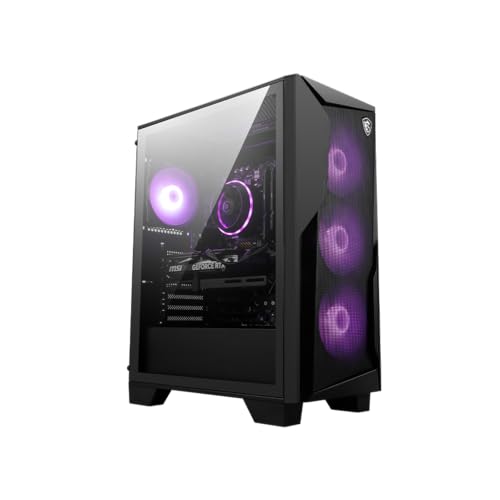
msi Codex R2 Gaming Desktop
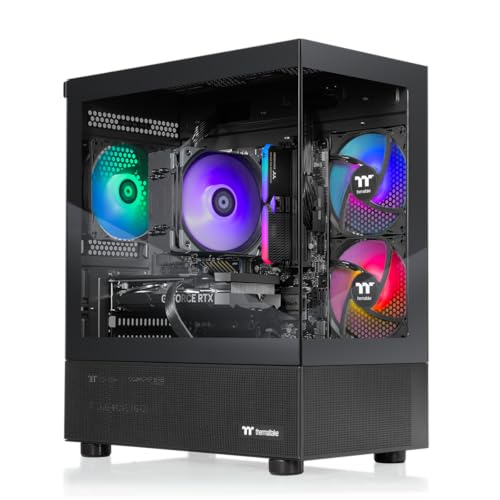
Thermaltake LCGS View i1460-170 Gaming Desktop

Gaming PC, i5 CPU, 256GB SSD, 8GB RAM
More Details On Our Top Picks
For a custom gaming tower, the Core i5-14400F offers a sensible middle ground: six performance cores handle demanding game tasks, while four efficiency cores help with background work. Its 16-thread layout suits gaming, voice chat, browser tabs, and occasional editing without pushing you toward a more demanding platform.
The “F” suffix means you need a separate graphics card, so this chip fits a build centered on dedicated graphics rather than a troubleshooting-friendly office PC. You may find the included Laminar RM1 cooler adequate for a standard setup, though a larger cooler can make sustained workloads quieter. Compared with the i5-14400, this version gives up integrated graphics to focus on a discrete-GPU build.
Strong Points
- Ten cores and 16 threads give gaming and multitasking useful room to breathe.
- 65W base power makes it easier to plan a mainstream cooling setup.
- Support for DDR4 or DDR5 lets you match the chip to an existing platform.
- PCIe 5.0 and 4.0 support leaves room for newer expansion hardware.
- The boxed cooler simplifies installation for a first custom build.
Things To Consider
- No integrated graphics means display output depends on a separate graphics card.
- The supplied cooler may be less appealing for quiet, sustained workloads.
Key Specs
Who It Suits Best
You’ll get the most from this processor as a mainstream PC builder pairing it with a dedicated graphics card for gaming and everyday multitasking.
Where Another Pick Suits Better
Choose the Intel Core i5-14400 Desktop Processor instead for a flexible home PC that needs integrated graphics during setup or troubleshooting.
More threads and eight efficiency cores make the unlocked i5-14600KF the enthusiast option in this group. Unlocked means you can adjust performance settings on compatible hardware, giving experienced builders more control over tuning and cooling. That extra headroom suits high-refresh gaming, streaming, and demanding desktop work.
The trade-off is a 125W base power rating and the need for separate graphics, cooling, and careful motherboard selection. In a warm room or compact case, you may find the cooling plan matters more than the processor label. Compared with the i5-14400F, this model makes more sense for a carefully configured system rather than a quiet, uncomplicated build.
What We Like
- Fourteen cores and 20 threads provide strong multitasking capacity.
- The unlocked design gives experienced builders tuning flexibility.
- DDR4 and DDR5 compatibility supports both budget-conscious and newer builds.
Trade Offs
- A separate graphics card is required for display output.
- Higher base power calls for more deliberate cooler and airflow planning.
- Manual tuning adds setup time and can complicate troubleshooting.
At A Glance
Made For
Experienced builders who want an i5 platform for high-refresh gaming, streaming, and hands-on performance tuning will find the fit strongest.
Consider Something Else When
Reach for the Intel Core i5-14400F Desktop Processor when your priority is a simpler, lower-power custom build with a boxed cooler.
Integrated Intel UHD Graphics 730 gives this i5-14400 a useful advantage during a staged PC build. Integrated graphics means the processor can produce a display without a separate graphics card, which helps you install an operating system, diagnose a graphics issue, or use the desktop while saving for a dedicated card.
Its ten-core, 16-thread design mirrors the i5-14400F, and the 65W base power fits mainstream cooling plans. For gaming, dedicated graphics still matter, so the onboard solution suits light visual work more than demanding modern titles. In most home offices, that flexibility is worth the small distinction, though gaming-focused builders may prefer the F model.
Highlights
- Integrated graphics make first boot and troubleshooting less complicated.
- Ten cores and 16 threads cover gaming, work, and everyday multitasking.
- DDR4 and DDR5 support helps you reuse or modernize a memory platform.
Room For Improvement
- Integrated graphics aren’t a substitute for a dedicated gaming card in demanding titles.
- The included cooler keeps setup straightforward, but quieter systems may call for an upgrade.
Technical Sheet
Right Fit For
Home PC builders, troubleshooters, and gamers planning a dedicated graphics upgrade will appreciate the added flexibility.
Look Elsewhere When
Choose the msi Codex R2 Gaming Desktop for a ready-made gaming system that already includes graphics, memory, storage, and accessories.
Custom-building a gaming PC takes time, while the Quartz i1460 packages the main pieces into one desktop. You get an i5-14400F, RTX 5060 graphics, 16GB of DDR4-3600 memory, a 1TB NVMe M.2 drive, WiFi, and Windows 11, so your setup list is much shorter.
The mesh front panel is a practical choice for a gaming room because airflow has a clear path through the chassis. Dust still needs regular removal, and the 16GB memory capacity may feel limiting beside the View i1460-170’s DDR5 platform during heavier multitasking. For most plug-in gaming setups, though, the Quartz configuration keeps the hardware mix easy to understand.
Upsides
- RTX 5060 graphics complement the i5-14400F for a complete gaming configuration.
- A 1TB NVMe M.2 drive gives games and applications faster storage than a traditional hard drive.
- WiFi and Windows 11 reduce the number of separate setup tasks.
- The mesh front supports airflow during longer gaming sessions.
Worth Noting
- DDR4 memory is less forward-looking than the DDR5 used in Thermaltake’s View model.
- Compact cases can make future maintenance and component access less convenient.
- Dust buildup around a mesh intake remains an ownership task.
Feature Snapshot
Who Will Love This
You’ll likely prefer this desktop for a straightforward gaming room setup without the time, tools, and compatibility checks of a custom build.
A Better Fit Elsewhere
Choose the Thermaltake LCGS View i1460-170 Gaming Desktop for a showcase case and DDR5 memory platform.
The Codex R2 takes a different route from Thermaltake’s RTX 5060 systems, pairing the i5-14400F with GeForce RTX 4060 graphics, 16GB of DDR5 memory, and a 1TB NVMe SSD. That combination suits a first desktop for gaming, schoolwork, and streaming, especially with WiFi, Windows 11 Home, and a keyboard and mouse included.
An 80+ Gold power supply, a designation for a higher-efficiency PSU class, adds useful component detail for a DIY-friendly system. Still, the RTX 4060 places this configuration below the two RTX 5060 desktops in graphics hardware, and the bundled peripherals may not match enthusiast preferences. The honest read is practical convenience rather than maximum expansion ambition.
Bright Spots
- DDR5 memory gives the system a newer memory platform than the Quartz desktop.
- The 1TB NVMe drive provides room for a useful game and application library.
- Keyboard and mouse reduce the extra items needed for a first setup.
- The DIY-friendly design can suit owners who plan gradual upgrades.
Small Caveats
- RTX 4060 graphics are a step below the RTX 5060 configurations in this roundup.
- Bundled keyboard and mouse quality may feel basic beside dedicated gaming peripherals.
- DIY upgrades still require attention to case space, connectors, and cooling.
Quick Facts
Best Suited To
This desktop fits first-time PC owners who want a complete setup with room to learn basic upgrades later.
Not Your Match When
Thermaltake LCGS Quartz i1460 Gaming Desktop suits you better when RTX 5060 graphics and a mesh-front case matter more than bundled accessories.
For a desk where the tower remains visible, the View i1460-170 puts its component layout on display through an edge-to-edge tempered-glass panel. Behind it sit the i5-14400F, RTX 5060, 16GB of DDR5-6000 memory, and a 1TB NVMe M.2 drive, a combination aimed at smooth gaming and quick everyday loading.
Compared with the Quartz i1460, this version trades DDR4 for faster-rated DDR5 and adds a tower ARGB air cooler, while the glass panel asks for more careful cleaning. Fingerprints and dust show more readily on showcase surfaces, so you may find the visual payoff worth the extra upkeep only when the PC has a prominent desk position. WiFi and Windows 11 keep the initial setup familiar.
Reasons To Buy
- RTX 5060 graphics and the i5-14400F form a capable ready-made gaming pairing.
- DDR5-6000 memory gives the system a newer, high-speed memory configuration.
- Tempered glass lets you see the internal lighting and component arrangement.
- The tower ARGB air cooler contributes cooling hardware and visual character.
- 1TB NVMe storage gives useful capacity for games and general software.
- WiFi simplifies placement away from a network cable.
Areas To Watch
- Glass panels need more frequent wiping than a plain opaque side panel.
- Visible lighting and cable routing may not appeal to a low-key office setup.
Feature Rundown
Whose Shelf It Belongs On
You’ll appreciate this desktop most at a visible gaming station where tempered glass, RGB lighting, and newer memory matter alongside performance.
Swap It Out When
Pick the Thermaltake LCGS Quartz i1460 Gaming Desktop for a less display-focused case and DDR4-based configuration.
This DeXwtzfn desktop keeps the specification sheet modest: an i5 processor reaching up to 3.6 GHz, integrated graphics, 8GB of RAM, and a 256GB SSD. That setup can suit schoolwork, web use, older games, and light desktop gaming where a small initial footprint matters more than a large game library.
WiFi 6, Bluetooth 5.3, Windows 11, and four RGB fans add useful convenience, but the limited memory and storage leave less room than every other desktop here. Integrated graphics also place a clear ceiling on demanding games. For a spare-room PC or starter system, you may find the simple layout appealing, provided you keep expansion expectations realistic.
Best Bits
- Integrated graphics allow operation without a separate graphics card.
- WiFi 6 and Bluetooth 5.3 support modern wireless connections.
- Four RGB fans add airflow hardware and a gaming-oriented appearance.
- Windows 11 is included for a ready desktop setup.
Points To Note
- 8GB RAM leaves less multitasking room than the 16GB desktops.
- 256GB SSD capacity can fill quickly after several large game installs.
- Integrated graphics are a compromise for current graphics-heavy games.
- Owners may need to plan storage or memory expansion sooner.
Core Details
Who Should Grab It
This choice suits students and light-gaming households needing a compact Windows desktop for basic play, schoolwork, and browsing.
Reach For A Different Pick When
The msi Codex R2 Gaming Desktop fits you better when you need 16GB memory, 1TB storage, and dedicated graphics from the start.
How To Choose The Right I5 Gaming Cpus
Match The CPU To Your Graphics Card
Gaming performance depends heavily on the graphics card, the component that renders game images. A powerful processor paired with an entry-level card can leave you paying for capacity you won’t use, while a modest CPU may limit a strong card in high-refresh games.
The i5-14400F and i5-14400 suit balanced mainstream builds. The i5-14600KF makes more sense for high-refresh play, streaming, and workloads that keep many threads busy.
Decide Between F-Series and Integrated Graphics
An F-series Intel processor doesn’t include processor graphics, so your custom build needs a separate graphics card. That arrangement works well for gaming towers because a dedicated card handles demanding visuals.
The standard i5-14400 includes Intel UHD Graphics 730. You gain a display output for setup and troubleshooting, but serious gaming still calls for dedicated graphics. That extra flexibility can matter in a staged build.
Check Memory Generation and Capacity
DDR4 and DDR5 are different memory generations, and your motherboard must match the type you choose. The i5-14400F and i5-14400 support both, while complete desktops lock you into the configuration supplied.
For current gaming and everyday multitasking, 16GB gives you more breathing room than 8GB. The DeXwtzfn desktop’s 8GB setup works better for light use, while Thermaltake’s View model adds DDR5-6000 for a newer platform.
Plan Cooling, Power, and Case Access
Processor base power helps you think about cooling demands, but the entire case design matters too. The 65W i5-14400 and i5-14400F are easier to pair with mainstream cooling than the 125W i5-14600KF.
A mesh case can simplify airflow maintenance, while tempered glass prioritizes visibility and needs more cleaning. Complete desktops reduce compatibility work, but custom builders gain more control over future upgrades and component selection.
Things Worth Knowing First
Mistakes Worth Dodging
Don’t choose a processor before confirming motherboard chipset support, memory type, and graphics requirements. The i5-14400F and i5-14600KF both need dedicated graphics, while the i5-14400 can produce a display on its own.
Storage capacity deserves equal attention. A 256GB SSD can fill quickly after a few large games, so 1TB systems offer a more comfortable starting point for a broad library.
Where The Extra Money Goes
Higher-tier options generally add cores, faster memory platforms, stronger graphics, or more complete cooling and case hardware. The i5-14600KF earns consideration for demanding multitasking and tuning, while the Thermaltake View desktop combines DDR5-6000 memory with RTX 5060 graphics.
You don’t need that extra headroom for light gaming or schoolwork. Spend up when high-refresh gaming, streaming, expansion plans, or a visible showcase build genuinely match your routine.
Closing Remarks
Your strongest match depends on the whole system, not just the i5 label. Choose the i5-14400F for a balanced custom tower, the i5-14600KF for extra tuning headroom, or the i5-14400 for integrated-graphics flexibility. Thermaltake and msi provide easier paths into complete gaming desktops, while the DeXwtzfn system keeps basic use compact and straightforward. Match memory, graphics, cooling, and storage to your daily games and workspace, and your final choice should feel practical long after the initial setup.
