
Choosing an i9 gaming setup means matching processing power to your games, graphics card, cooling, and upgrade plans. You might want a portable 18-inch laptop, a ready-to-play desktop, or a standalone CPU for a custom build. The right choice can reduce setup frustration and give you enough headroom for high-refresh gaming, streaming, creation work, or demanding multitasking. The shortlist below covers current desktop chips, older upgrade-friendly options, and complete systems for different spaces and skill levels.
The Shortlist At A Glance

ASUS ROG Strix G18 (2025) Gaming Laptop 18” RTX 5070
Intel Core i9-14900K Desktop Processor

Intel Core Ultra 9 Processor 285K

Intel Core i9-14900KF Gaming Desktop Processor
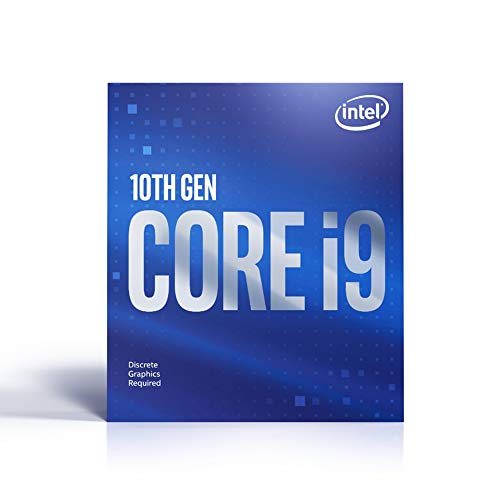
Intel Core i9-10900F Desktop Processor
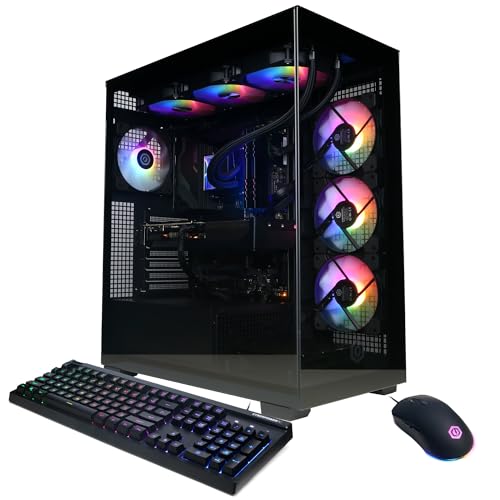
CyberPowerPC Gamer Xtreme VR Gaming PC

suevery Prebuilt Gaming PC Core I9 RTX 5060TI 8G
More Details On Our Top Picks
An 18-inch screen gives you a roomier view than a typical portable gaming machine, while the 16:10 shape adds useful vertical space for menus and productivity. The 144Hz refresh rate describes how often the display updates each second, and the 3ms response figure points to quick pixel transitions, a helpful pairing for fast competitive games.
The RTX 5070 graphics processor, i9-14900HX, 32GB DDR5-5600 memory, and 1TB PCIe Gen 4 solid-state drive create a strong travel setup for gaming, streaming, and large libraries. You may find the large chassis less convenient on crowded desks or frequent flights, but the esports-style keyboard, customizable lighting, Wi-Fi 7, and cooling design suit a permanent desk at home.
Strong Points
- The 18-inch 144Hz display gives fast games more visual room than a compact laptop panel.
- 32GB of DDR5 memory supports gaming beside chat, browsers, and creative applications.
- The 1TB PCIe Gen 4 SSD provides responsive loading and useful local storage.
- Built-in keyboard, audio features, and lighting reduce the accessories needed for a mobile setup.
- Tool-free memory access can make future servicing less involved.
Things To Consider
- The large display and performance hardware make this less convenient for small bags and tight work surfaces.
- Owners commonly find gaming laptops need regular vent cleaning, especially around dusty desks or carpeted rooms.
Key Specs
Who It Suits Best
You get the strongest fit as a gamer who moves between rooms or locations but still wants a large, high-refresh screen.
Where Another Pick Suits Better
CyberPowerPC Gamer Xtreme VR Gaming PC suits you more when you want a stationary setup with a larger 2TB drive and desktop connections.
For a custom tower, the unlocked i9-14900K gives you 24 cores split between eight performance cores and 16 efficiency cores. Performance cores handle demanding foreground work, while efficiency cores help manage background tasks, so streaming, recording, and gaming can share the system more comfortably.
The 6.0GHz maximum frequency and compatibility with 600- and 700-series chipsets make this an appealing choice for an established Intel platform. Compared with the Core Ultra 9 285K, you get a different platform generation, so you need to check your motherboard, cooling arrangement, firmware, and power delivery before installation.
What We Like
- Twenty-four cores and 32 threads give you strong multitasking capacity.
- The unlocked design leaves room for experienced enthusiasts to tune performance.
- Support for Intel 600- and 700-series boards can simplify an upgrade inside an existing compatible build.
- A high maximum frequency suits games that respond well to fast single-threaded work.
Worth Noting
- The 125W base power figure calls for a capable cooler and a well-ventilated case.
- Manual tuning adds setup time and can complicate long-term system stability.
- Motherboard compatibility matters more than the processor name alone.
Technical Sheet
Made For
You benefit most as an enthusiast building a cooled, upgradeable desktop for gaming, streaming, and creation work.
Consider Something Else When
Intel Core i9-10900F suits you more for a modest LGA 1200 refresh where lower platform demands matter more than current-generation performance.
New platform planning gives the Core Ultra 9 285K its clearest appeal. You get 24 cores, with eight performance cores and 16 efficiency cores, plus a maximum frequency of 5.7GHz for demanding games and creation tasks.
PCIe is the connection standard used between the processor, storage, and expansion hardware, and support for PCIe 5.0 and 4.0 leaves room for newer components. The catch is the Intel 800-series motherboard requirement, so you can’t drop this into the 600- or 700-series systems that suit the i9-14900K.
Highlights
- PCIe 5.0 and 4.0 support gives a newer expansion path.
- DDR5 support fits current high-bandwidth memory builds.
- The 24-core layout handles game streaming, editing, and heavy multitasking.
- The newer platform can make sense for a fresh enthusiast desktop intended to last several upgrade cycles.
- A 125W base power rating provides a clear starting point for cooling plans.
- You get an unlocked processor for hands-on performance tuning.
Trade Offs
- You need an Intel 800-series motherboard, which raises the scope of a platform change.
- Depending on your games, the 5.7GHz ceiling may matter less than your graphics card.
At A Glance
Right Fit For
You get the right match as an enthusiast starting a new DDR5 desktop rather than refreshing an older Intel motherboard.
Not Your Match When
Intel Core i9-14900K makes more sense for you when your current build already uses a compatible 600- or 700-series board.
Choose the 14900KF for a graphics-card-led desktop where integrated graphics aren’t needed. This unlocked 24-core, 32-thread processor reaches up to 6.0GHz and supports DDR4 or DDR5 memory, giving you more flexibility than the newer Core Ultra 9 when reusing certain components.
The LGA1700 socket and 600- or 700-series chipset support make compatibility planning essential. You may find the lack of processor graphics inconvenient during troubleshooting, yet a discrete graphics card is already central to a serious gaming tower.
Upsides
- High clock potential and 24 cores suit gaming beside streaming or creation software.
- DDR4 and DDR5 support can help you build around available memory hardware.
- PCIe 5.0 and 4.0 support leaves room for modern expansion devices.
- The unlocked design gives experienced desktop builders more control over tuning.
Minor Gripes
- No integrated graphics means a working discrete graphics card is needed for display output.
- At 125W base power, a basic cooler may not suit sustained heavy workloads.
- Firmware support can vary by board, so check the motherboard listing before assembly.
Feature Snapshot
Best Suited To
You get the strongest fit as a desktop builder with a discrete graphics card and a compatible LGA1700 board.
Look Elsewhere When
Intel Core Ultra 9 Processor 285K suits you more when PCIe 5.0, DDR5, and an Intel 800-series platform are priorities.
An older platform can still make sense for a targeted refresh. The i9-10900F provides 10 cores and 20 threads, reaches up to 5.2GHz, and uses the LGA1200 socket, so it fits a narrow group of existing desktops rather than a new 2026 build.
The 65W rating is easier to plan around than the 125W figures on the newer desktop chips, and the included cooler may simplify installation. You still need a discrete graphics card because this processor has no integrated graphics, while Intel 400-series chipset compatibility limits future platform changes.
Best Bits
- Ten cores and 20 threads remain useful for everyday gaming and multitasking.
- The 65W rating can suit a quieter, less demanding upgrade project.
- An included cooler may reduce the number of parts needed for installation.
Points To Note
- LGA1200 and Intel 400-series support make motherboard matching essential.
- No integrated graphics means you need a separate graphics card.
- Its older platform offers less room for a new-build upgrade path than the 14900K.
- Check cooler mounting and case airflow before replacing an older chip.
Core Details
Who Will Love This
You benefit most as a desktop owner refreshing an Intel 400-series system without replacing the entire platform.
A Better Fit Elsewhere
Intel Core i9-14900KF suits you more when you are building a new discrete-GPU gaming tower and want substantially newer platform support.
Skip component matching and start with a complete tower built around the i9-14900KF. You get an Intel Z790 chipset, 32GB DDR5 memory, a 2TB PCIe 4.0 NVMe drive, RTX 5070 12GB graphics, Windows 11 Home, and liquid CPU cooling in one package.
For a desk-based setup, the connection selection is practical: USB-C, multiple USB-A ports, LAN, Wi-Fi 5, Bluetooth 4.2, HDMI, and three DisplayPort outputs. The honest read is that Wi-Fi 5 and Bluetooth 4.2 are older than the wireless features on the ASUS laptop, but the larger drive and included keyboard and mouse make daily setup easier.
Bright Spots
- The 2TB NVMe SSD gives you more room for large game installations than the 1TB options here.
- RTX 5070 12GB graphics pairs naturally with the 14900KF for high-detail desktop gaming.
- Liquid CPU cooling is already included, reducing component-matching work.
- Multiple display outputs suit multi-monitor desks and flexible layouts.
- Keyboard and mouse are included for a faster path from setup to play.
Room For Improvement
- The tower needs a dedicated desk area and careful cable planning.
- Liquid cooling adds components that deserve periodic visual checks for dust and pump noise.
Feature Rundown
Who Should Grab It
You get the best fit as a desktop gamer who wants a powerful, assembled system with storage, cooling, and basic peripherals already included.
Another Choice May Suit
ASUS ROG Strix G18 (2025) Gaming Laptop 18” RTX 5070 suits you more when portability matters more than desktop expandability.
A prebuilt tower can remove much of the compatibility work, and this suevery system combines a 14th Gen 14900HX with RTX 5060 Ti 8GB graphics, 16GB DDR5 memory, and a 1TB NVMe SSD. That combination gives you a straightforward starting point for gaming, home use, and 4K media tasks.
Compared with the CyberPowerPC tower, you get less memory, less storage, and a lower-tier graphics configuration, so demanding settings may require more restraint. You may find the bundle appealing for a first desktop because the parts arrive together, though checking upgrade access and airflow remains sensible before adding hardware.
Reasons To Buy
- The 24-core, 32-thread processor gives you strong multitasking capacity.
- 16GB DDR5 is a workable starting point for gaming and ordinary desktop use.
- A 1TB NVMe SSD provides quick boot and game-loading behavior.
- The prebuilt format reduces the need to select each internal component separately.
Small Caveats
- RTX 5060 Ti 8GB graphics place this below the RTX 5070 systems for demanding visual settings.
- 16GB memory and 1TB storage may feel restrictive as your game library grows.
- Prebuilt layouts can make future cleaning or upgrades more dependent on the case design.
Quick Facts
Built With In Mind
You get the strongest fit as a first-time desktop gamer who wants a ready-made tower for home gaming and general use.
Reach For A Different Pick When
CyberPowerPC Gamer Xtreme VR Gaming PC suits you more when you want 32GB memory, 2TB storage, and RTX 5070 graphics from the outset.
How To Choose The Right I9 Processors For Gaming
Match The CPU To Your System
A standalone processor only works inside a compatible motherboard, so start with the socket and chipset rather than the processor name. The i9-14900K and i9-14900KF use the LGA1700 platform, while the Core Ultra 9 285K requires an Intel 800-series board and the i9-10900F uses LGA1200 with Intel 400-series chipsets.
Your graphics card still handles most of the visual rendering in modern games. A high-core CPU makes more sense for streaming, recording, compiling, editing, or heavy background use than for a tower paired with an entry-level graphics card.
Understand Cores, Threads, And Clocks
A core is an individual processing unit, while a thread is a stream of work the processor can manage. More cores help you combine gaming with production software, but clock speed can matter strongly in games that depend on quick individual-core response.
The 14900K and 14900KF reach up to 6.0GHz, while the Ultra 9 285K reaches up to 5.7GHz. Those figures describe peak frequency, not a constant operating speed, so your cooling, motherboard power settings, and workload shape the real experience.
Plan Cooling And Power
The 14900K, 14900KF, and Ultra 9 285K each list 125W base power. That figure gives you a baseline for cooler and motherboard planning, not a complete measurement of every gaming workload.
A larger tower gives you more room for airflow and maintenance than a laptop. Laptop owners gain portability but need to keep vents clear, while custom desktop owners need to confirm cooler clearance, case airflow, and mounting support before assembly.
Choose Portability Or Expansion
An ASUS ROG Strix G18 setup suits you when you move between locations and want the screen, keyboard, storage, and graphics hardware together. A prebuilt tower such as the CyberPowerPC Gamer Xtreme reduces assembly decisions and gives you more desktop ports.
Custom CPU builds offer the most control over memory, storage, cooling, and future changes. The trade-off is more installation work, firmware checking, cable management, and component compatibility to handle yourself.
Things Worth Knowing First
Mistakes Worth Dodging
A common mistake is choosing a processor first and checking the motherboard afterward. Match the socket, chipset generation, memory type, cooler, and graphics requirement before you commit to the rest of the system.
You also need to avoid treating the i9 label as a complete gaming forecast. Your graphics card, display resolution, refresh rate, storage, and cooling all shape the experience, especially in a high-resolution setup.
Where The Extra Money Goes
Higher-tier systems often cost more because they combine newer platforms, more memory, larger solid-state drives, stronger graphics hardware, or better cooling. You pay for convenience as well as raw processing capacity when a prebuilt includes Windows, peripherals, and an assembled chassis.
The upgrade makes sense for you when gaming shares the machine with streaming, editing, or other heavy workloads. A more modest or older processor can remain sensible for a targeted platform refresh where replacing the motherboard and memory would add unnecessary work.
Final Verdict
You can choose the ASUS ROG Strix G18 for portable high-refresh gaming, the CyberPowerPC Gamer Xtreme for a complete desktop, or the Intel Core i9-14900K and 14900KF for custom builds with substantial tuning room. The Core Ultra 9 285K suits a newer platform, while the i9-10900F remains a focused option for compatible older systems. Match the processor to your motherboard, graphics card, cooling, and daily routine, then choose the setup that leaves you comfortable with both installation and future upgrades.
