
Choosing among Midrange Cpus gets harder when an older motherboard, a tight upgrade budget, or a compact desktop limits your options. You need to match the processor to the socket, chipset, cooling setup, and the work you actually do, whether that means office software, light gaming, home-server tasks, or routine maintenance. This shortlist also includes a capable air cooler and protective storage trays, since a processor upgrade often involves more than the chip itself. You’ll find straightforward strengths, honest trade-offs, and clear fits for each option.
The Shortlist At A Glance
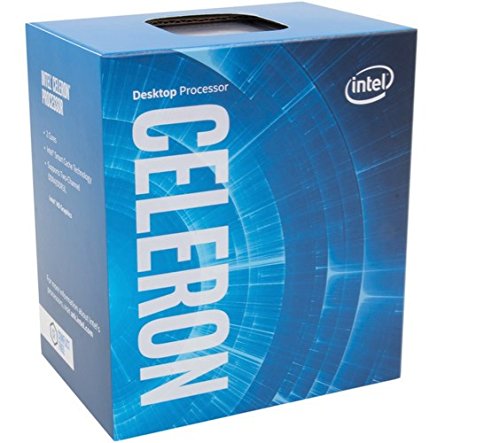
Intel Celeron G3900 Skylake LGA1151

ID-COOLING SE-225-XT Black CPU Air Cooler

Intel Pentium Gold G-6400 Desktop Processor

Intel Core i3-10105F Comet Lake Processor

Intel Celeron G-5900 Desktop Processor

Intel Core i5-4570 Processor OEM (Renewed)
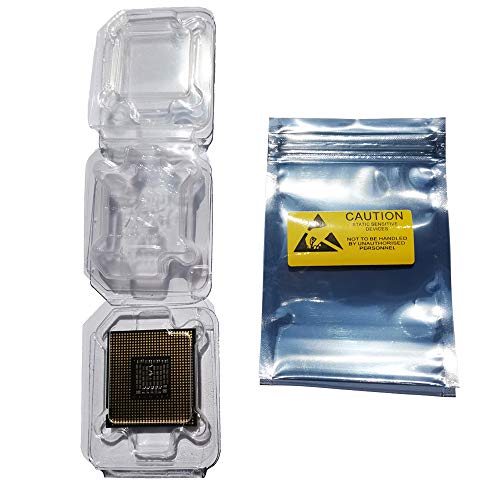
Daarcin CPU Protective Clamshell Case Trays 10pcs
More Details On Our Top Picks
Older office desktops with an LGA1151 socket can gain a straightforward replacement from the two-core, two-thread Celeron G3900. Its 2.8 GHz clock and integrated Intel HD Graphics 510 suit document work, web access, media playback, and basic home-server duties without requiring a separate graphics card.
The 51 W thermal design power, meaning the expected heat target for cooling, keeps the platform relatively easy to cool. You may find the two-thread layout restrictive during heavy multitasking, so this choice makes more sense for a repair or basic workstation than a modern gaming build.
Strong Points
- LGA1151 compatibility helps extend an existing Skylake-era desktop.
- Integrated graphics can simplify a basic office rebuild.
- Low 51 W heat output supports modest cooling hardware.
Things To Consider
- Two cores and two threads leave little headroom for demanding multitasking.
- Legacy socket compatibility limits future platform upgrades.
Key Specs
Who It Suits Best
You’ll get the most practical value from this chip during a basic LGA1151 desktop repair or a light-duty office rebuild.
Consider Something Else When
Choose the Intel Core i5-4570 for an older four-core system needing more multitasking capacity, provided the motherboard uses LGA1150.
A processor upgrade only works well with sensible heat control, and the SE-225-XT approaches that task with five heat pipes and two 120 mm PWM fans. PWM, or pulse-width modulation, lets the motherboard adjust fan speed according to temperature, which can keep ordinary desktop sessions quieter than fixed-speed cooling.
The push-pull fan arrangement moves air through the heatsink from both sides, making it a useful match for sustained workloads. In most mid-tower builds, you may appreciate the stated memory clearance, though installation still deserves care because a large tower cooler occupies more space than a basic stock unit.
What We Like
- Five heat pipes provide multiple paths for transferring CPU heat into the fin stack.
- Dual 120 mm fans suit extended rendering, gaming, and workstation sessions.
- Memory clearance is designed to reduce interference around RAM slots.
- Broad socket support covers LGA1700, LGA1200, LGA115X, AM4, and AM5.
Worth Noting
- The larger heatsink needs case clearance and careful mounting.
- Dust buildup around fins and fans will require routine cleaning.
Feature Snapshot
Made For
This cooler suits desktop builders running sustained workloads who have enough case room for a full tower-style heatsink.
Not Your Match When
The Intel Core i3-10105F is a better fit for a compact gaming build that needs a processor rather than a separate cooling upgrade.
For a basic LGA1200 desktop, the Pentium Gold G-6400 offers a notably high 4.0 GHz base clock across two cores and four threads. That combination works well for schoolwork, office applications, browsing, and light photo tasks, where quick everyday response matters more than heavy parallel processing.
The catch is platform fit: only motherboards using Intel 400-series chipsets are listed as compatible. Its 58 W design target is manageable in a normal desktop, but the box does not include a thermal solution, so you’ll need compatible cooling during installation.
Highlights
- Four threads handle background applications more comfortably than the Celeron G3900.
- A 4.0 GHz base clock keeps routine desktop actions feeling responsive.
- Optane memory support gives compatible systems another storage acceleration path.
Trade Offs
- Two physical cores limit demanding creative and heavily threaded workloads.
- A separate thermal solution is required for installation.
- 400-series chipset compatibility narrows motherboard selection.
At A Glance
Right Fit For
You’ll find this processor most suitable for a home or office desktop assembled around an Intel 400-series motherboard.
Look Elsewhere When
The Intel Core i3-10105F better suits entry-level gaming and heavier multitasking because it provides four cores and eight threads.
Four cores and eight threads give the Core i3-10105F a much wider workload range than the Pentium Gold G-6400. Its 3.7 GHz base speed can rise to 4.4 GHz, making it a sensible foundation for entry-level gaming, everyday editing, and multitasking across several applications.
The letter F matters because this processor lacks integrated graphics. You’ll need a separate graphics card, and that requirement adds cost and another component to troubleshoot, but the arrangement makes sense for a gaming desktop that already includes dedicated graphics.
Upsides
- Four cores and eight threads provide useful room for multitasking.
- Turbo speed up to 4.4 GHz benefits bursty workloads and many games.
- 6 MB cache supports repeated access to frequently used data.
- 65 W thermal design target fits many conventional desktop cooling setups.
- Strong fit for a dedicated-graphics entry-level gaming system.
Room For Improvement
- No integrated graphics means a separate graphics card is mandatory.
- Motherboard compatibility still needs checking across 400-series and selected 500-series boards.
Technical Sheet
Best Suited To
This is the strongest match for a desktop gamer or multitasker already planning to install a separate graphics card.
A Better Fit Elsewhere
The Pentium Gold G-6400 is more suitable for a basic office computer that needs integrated graphics and does not require four-core processing.
Small office towers and simple home PCs can use the Celeron G-5900 as a basic LGA1200 foundation. Its 3.4 GHz speed and integrated desktop platform suit email, documents, browser tabs, and media playback, while the 58 W design target keeps cooling demands moderate.
Compared with the Pentium Gold G-6400, this model drops from four threads to two, so the difference becomes noticeable during updates, file transfers, and multiple open programs. The honest read is that it fits single-user basics well, but the 400-series chipset requirement and absent thermal solution deserve attention during planning.
Plus Points
- 3.4 GHz operation supports ordinary office and home-computing tasks.
- Integrated graphics simplify a basic desktop without a separate display card.
Minor Gripes
- Two cores and two threads provide limited multitasking headroom.
- Cooling hardware is not included, adding an installation step.
- Compatibility is restricted to Intel 400-series chipset motherboards.
Quick Facts
Who Will Love This
You’ll appreciate this choice most in a low-demand home or office PC where basic responsiveness matters more than heavy multitasking.
Swap It Out When
The Intel Pentium Gold G-6400 is a better fit for the same socket family when four threads and a higher clock matter more to your daily routine.
An older LGA1150 desktop can still gain useful life from the Core i5-4570, a four-core processor with a 3.2 GHz speed and 6 MB cache. That makes it more capable for multitasking than the Celeron entries, especially in a family PC handling office software, browsing, and light creative work.
Because this is an OEM renewed item, packaging and included accessories may differ from a retail processor. You may find it worthwhile for an existing LGA1150 system, but a new build benefits more from the newer LGA1200 options and their broader platform path.
Best Bits
- Four physical cores improve sustained multitasking on an older desktop.
- 3.2 GHz speed remains appropriate for routine productivity work.
- 6 MB cache supports repeated everyday operations.
Points To Note
- Older LGA1150 compatibility limits motherboard availability and future expansion.
- OEM renewed condition means you should confirm the included cooling and packaging details.
- Cleaning the existing socket and cooler before installation is sensible during an older-system upgrade.
Details At A Glance
Whose Shelf It Belongs On
This processor suits someone refreshing an older LGA1150 desktop who wants more multitasking ability without replacing the complete system.
Reach For A Different Pick When
The Intel Core i3-10105F is a better fit for a new gaming-oriented build using a separate graphics card and a newer motherboard platform.
Processor storage matters during repairs, upgrades, and parts sorting, and Daarcin’s ten-piece set provides clamshell trays for Intel chips using several older socket families. The package also includes ten antistatic bags and labels, giving a repair bench or parts drawer a more orderly way to separate components.
The trays are storage accessories, not processors, so this pick belongs beside the CPU choices rather than above them. For most home workshops, the protective plastic format should be easier to stack than loose packaging, though careful handling remains important because the set is intended for organization and storage rather than active installation.
Bright Spots
- Ten trays help separate multiple Intel processors during repairs or inventory work.
- Antistatic bags add a layer of handling protection for stored chips.
- Labels make socket types and processor identities easier to track.
- Compatibility includes Intel 775, 1155, 1151, 1150, and 1156 families.
Small Caveats
- The set does not include a CPU.
- Plastic trays need a stable storage location away from crushing pressure.
Feature Rundown
Built With In Mind
This set suits PC repair hobbyists, technicians, and home users who keep several loose Intel processors organized.
Where A Sibling Pick Shines
The ID-COOLING SE-225-XT is the better fit for someone actively assembling a desktop and needing CPU cooling rather than storage.
How To Choose The Right Midrange Cpus
Start With Socket And Chipset
The socket is the physical interface between the processor and motherboard. LGA1151, LGA1150, and LGA1200 are not interchangeable, and a matching socket alone may not settle compatibility because chipset support also matters. The Celeron G3900 points toward LGA1151 systems, the Core i5-4570 uses LGA1150, and the G-5900, G-6400, and i3-10105F belong to LGA1200-era builds.
Check the motherboard model before choosing a chip. A processor that fits the socket can still fail to work with an unsupported chipset or firmware configuration, so platform matching should come before comparing clock speeds.
Match Cores And Threads To Your Day
Cores are physical processing units, while threads are the work streams the processor can manage. Two cores and two threads can handle documents, email, and a single browser-heavy routine, but four cores and eight threads give the i3-10105F more breathing room for gaming, streaming, file compression, and multiple applications.
A high clock speed helps quick, lightly threaded actions, which explains the appeal of the Pentium Gold G-6400 at 4.0 GHz. Core count matters more during sustained multitasking, so home-office use and entry-level gaming can call for different choices.
Account For Graphics And Cooling
Integrated graphics let a desktop display an image without a separate graphics card. The Celeron G3900, Celeron G-5900, and Pentium Gold G-6400 are more convenient for basic systems, while the i3-10105F requires dedicated graphics.
Cooling also deserves a place in the plan. Thermal design power gives you a useful heat target, not a complete cooler recommendation, and the ID-COOLING SE-225-XT suits a larger desktop with enough internal clearance. Older OEM or replacement chips may also need separate cooling hardware, so inspect what your existing system already has.
Think Beyond The First Upgrade
A low-cost processor can make sense for extending an older computer, especially when replacing the motherboard would add complexity. That approach becomes less attractive for a new build if the older socket limits later expansion or modern connectivity.
You’ll usually benefit from spending more on the Core i3-10105F when your desktop needs gaming, editing, or frequent multitasking. For a basic family computer, the Pentium Gold G-6400 may offer a cleaner balance, while the Celeron models remain focused choices for simpler tasks.
What To Weigh Before You Buy
Mistakes Worth Dodging
Socket matching comes first, but chipset compatibility follows close behind. Avoid choosing the G-5900 or G-6400 without confirming an Intel 400-series board, and remember that the i3-10105F needs a separate graphics card because processor graphics aren’t included.
Cooling is another common oversight. The Pentium Gold and Celeron G-5900 descriptions specify that a thermal solution isn’t included, while a large tower cooler such as the SE-225-XT needs physical clearance around the case and memory slots.
The Upgrade Payoff
Higher-tier desktop processors cost more because you’re paying for additional cores, more threads, larger cache, higher boost behavior, or a newer platform. Those attributes matter during compilation, gaming, media work, and heavy multitasking, but they add little value to a computer used mainly for documents and basic browsing.
Paying more makes sense for a system that stays busy for long periods or needs room for several active applications. A simpler chip remains sensible for a low-demand office PC, while the Core i3-10105F offers the clearest step up for a dedicated-graphics desktop.
Closing Remarks
You can narrow this shortlist quickly by starting with your motherboard, then matching cores, graphics, and cooling to your daily workload. The Celeron G3900 and G-5900 suit straightforward systems, the Pentium Gold G-6400 adds a stronger everyday clock, and the Core i3-10105F fits more demanding entry-level desktops. The renewed Core i5-4570 remains relevant for compatible LGA1150 upgrades, while the cooler and storage trays solve separate ownership needs. Choose the option that fits your current platform and leaves your setup easy to maintain.
