
A small desktop can clear valuable space beside your monitor while still handling office work, streaming, school tasks, and light creative workloads. You’ll find modern AMD and Intel systems here, along with refurbished business PCs suited to straightforward daily computing. The right choice depends on your preferred display setup, storage needs, upgrade plans, and tolerance for older hardware. This shortlist helps you match each Mini-Cpu to a home office, shared workspace, media area, or compact gaming setup.
The Shortlist At A Glance

GMKtec M5 Ultra Gaming Mini PC Ryzen 7 7730U

KAMRUI Pinova P1 Mini PC AMD Ryzen R2544
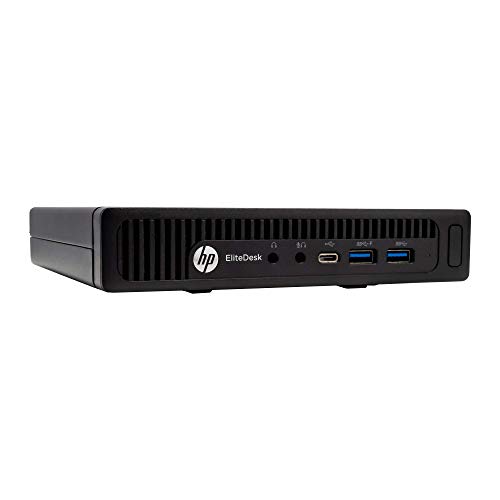
HP EliteDesk 800 G2 Desktop Mini PC i5-6500T

Dell OptiPlex 7050 Micro Computer i5-6500T

GMKtec Mini PC Intel Core i7-1185G7 1TB SSD

GMKtec G3S Mini PC Intel N95 8GB 256GB

GEEKOM IT12 Mini PC Intel i3-12300HE 16GB 512GB
More Details On Our Top Picks
Eight processor cores and 16 threads give this compact GMKtec a clear advantage for heavy multitasking. You can keep spreadsheets, browser tabs, video calls, and development tools open without relying on an oversized tower.
The 32GB of DDR4 memory and 512GB PCIe solid-state drive suit demanding home offices and casual gaming setups. Triple 4K display support, dual network ports, 2.5GbE, WiFi 6E, USB-C, DisplayPort, and HDMI 2.0 create a flexible desk hub, though the higher-performance hardware can make cooling and ventilation more important in a crowded cabinet.
Strong Points
- 32GB memory gives you room for large spreadsheets, virtual machines, and many browser tabs.
- Triple 4K output support works well across a multi-monitor desk.
- 2.5GbE and dual LAN connections suit fast local networks and specialized home-office layouts.
- Ryzen 7 7730U processing provides a stronger fit for gaming and creation than the refurbished systems below.
- WiFi 6E adds access to the newer 6GHz wireless band with compatible networking equipment.
Things To Consider
- The 512GB drive can fill quickly beside a large game library or media archive.
- Owners commonly find that a performance-focused mini desktop needs open airflow rather than a tightly enclosed shelf.
Key Specs
Who It Suits Best
You’ll get the most from this system as a multitasking professional, home gamer, or creator who needs several displays in a compact footprint.
Consider Something Else When
Choose the GEEKOM IT12 Mini PC Intel i3-12300HE 16GB 512GB for a shared office that values a metal enclosure and business-oriented deployment support.
For a home office handling documents, calls, and several browser windows, the Pinova P1 keeps the configuration sensible. Its four-core, eight-thread Ryzen R2544 processor is designed for concurrent work rather than high-end gaming.
With 16GB RAM, a 256GB SSD, Windows 11 Pro, and triple 4K support, you get a tidy workstation without a large case under the desk. You may find the storage restrictive for photos and media, while the smaller memory allocation offers less headroom than the GMKtec M5 Ultra.
What We Like
- 16GB RAM suits typical office software and daily multitasking.
- Windows 11 Pro fits professional and home-office workflows.
- Triple 4K capability supports multiple screens for documents, communication, and reference material.
Worth Noting
- 256GB storage leaves less room for large applications and personal files.
- The four-core processor has a narrower fit for sustained creative work than the higher-tier AMD choices.
- Keep the ventilation openings clear during long, busy work sessions.
Feature Snapshot
Made For
This choice fits home-office users, students, and small-business staff who need several screens and straightforward Windows productivity.
Where Another Pick Suits Better
GMKtec G3S Mini PC Intel N95 8GB 256GB is a better match for basic tasks in a media area where VESA mounting matters more than extra processing capacity.
The HP EliteDesk 800 G2 takes a different route from the newer Mini-Cpus here: established business hardware with a quad-core Intel i5-6500T processor. That makes it a sensible fit for email, document work, browser use, and a basic front-desk station.
Its 16GB DDR4 memory, 240GB SSD, VGA, DisplayPort, and Windows 11 Pro cover the essentials. The honest trade-off is age, so you’ll have less processing flexibility for modern creative tools than with the KAMRUI Pinova P1 or GMKtec models.
Highlights
- 16GB DDR4 supports ordinary office multitasking.
- The SSD should feel more responsive than a mechanical hard drive for startup and file access.
- VGA and DisplayPort help connect with a mix of older and newer monitors.
- The compact business chassis works well in a reception desk or classroom workspace.
Trade Offs
- The older i5-6500T is less suitable for demanding software and current gaming.
- 240GB can disappear quickly after installing several large applications.
Quick Facts
Right Fit For
You’ll suit this renewed HP best as a home-office beginner or organization needing several uncomplicated Windows workstations.
Not Your Match When
GEEKOM IT12 Mini PC Intel i3-12300HE 16GB 512GB offers a newer platform for heavier daily multitasking and larger local files.
Dell’s OptiPlex 7050 Micro stays close to the HP in hardware, pairing the same class of quad-core i5-6500T processor with 16GB DDR4. You can place it behind a monitor or on a compact desk for invoicing, schoolwork, and browser-based services.
The 256GB SSD gives you a little more breathing room than the HP EliteDesk 800 G2, while Windows 11 Pro keeps the software environment familiar. Depending on your workload, the older processor may feel limiting beside the newer GEEKOM IT12, and renewed units can differ in cosmetic condition.
Upsides
- 256GB SSD balances responsive storage with a little extra capacity.
- 16GB DDR4 is suitable for email, documents, and standard business applications.
Minor Gripes
- The older processor is not aimed at demanding editing or modern games.
- Renewed hardware may arrive with cosmetic variation, so your expectations should stay practical.
- Small business chassis vents need regular dust clearing in busy offices.
At A Glance
Best Suited To
This Dell fits practical office users who want a small Windows workstation for documents, web services, and light administrative software.
Look Elsewhere When
GMKtec Mini PC Intel Core i7-1185G7 1TB SSD suits you better for larger files, faster storage, and more demanding everyday workloads.
Storage is the headline here. A 1TB NVMe SSD, meaning a fast solid-state drive using the compact M.2 format, gives you room for work files, photos, applications, and a sizable media collection without immediately reaching for external storage.
The Intel Core i7-1185G7, 16GB DDR4, Iris Xe graphics, USB4, WiFi 6, DisplayPort, HDMI, and 2.5GbE networking create a versatile desk computer. In our view, it makes more sense for office productivity and media work than serious gaming, and its older four-core platform has less headroom than the Ryzen 7 7730U in the M5 Ultra.
Bright Spots
- 1TB NVMe storage reduces the need for immediate external drives.
- 2.5GbE supports faster compatible wired networks.
- Iris Xe graphics suit everyday visual work and media playback.
- USB4 adds a flexible high-speed connection for compatible accessories.
- 16GB DDR4 fits office work, browsing, and moderate creative applications.
Points To Note
- The four-core processor is less appealing for heavily threaded workloads than the Ryzen 7 option.
- Compact vents can collect dust over time, especially on an open desk near fabric or carpet.
Technical Sheet
Who Will Love This
You’ll appreciate this GMKtec most for office work, photo storage, media organization, and a clean desk setup with fast network access.
A Better Fit Elsewhere
GMKtec M5 Ultra Gaming Mini PC Ryzen 7 7730U is a stronger choice for you when multitasking intensity and gaming matter more than the larger drive.
A VESA mount lets you attach the G3S behind a compatible monitor, which can reclaim a surprisingly useful amount of desk space. The Intel N95 has four cores and four threads, making this a straightforward option for web browsing, word processing, streaming, and home entertainment.
Dual 4K display output, WiFi 5, gigabit Ethernet, 8GB RAM, and a 256GB M.2 SSD keep the setup focused. You may find the memory and storage limiting for heavier multitasking, but the smaller footprint and Proxmox support make it attractive for a compact home server experiment or HTPC.
Reasons To Buy
- VESA mounting clears space around a monitor or television.
- Dual 4K output suits a two-screen office arrangement.
- Gigabit Ethernet provides dependable wired connectivity for home use.
- The 256GB M.2 SSD gives responsive everyday storage.
Room For Improvement
- 8GB RAM leaves less room for many simultaneous applications.
- WiFi 5 is an older wireless standard than the WiFi 6E used by the M5 Ultra.
- Large media collections will likely need external storage.
Details At A Glance
Built With In Mind
This model suits you as a student, light office user, or home-entertainment enthusiast working with limited desk or cabinet space.
Reach For A Different Pick When
KAMRUI Pinova P1 Mini PC AMD Ryzen R2544 is a better fit for you when office multitasking and Windows 11 Pro matter more than mounting flexibility.
Shared offices place different demands on a desktop than a personal gaming corner, and the IT12 is shaped around that setting. Its Intel i3-12300HE, 16GB RAM, 512GB SSD, USB4, and 8K UHD support give you a current-feeling foundation for productivity and high-resolution displays.
The full metal chassis should suit a busy workspace better than a lightweight plastic enclosure, while the listed three-year coverage adds reassurance for longer deployments. That extra structure and support can matter for a small office, though home users focused purely on raw multitasking may prefer the Ryzen 7 power of GMKtec M5 Ultra.
Plus Points
- 16GB RAM and a 512GB SSD form a sensible office configuration.
- The metal chassis suits shared desks and repeated daily handling.
- USB4 supports compatible high-speed peripherals and docking accessories.
- 8K UHD output gives you room for a high-resolution display setup.
- Upgradable design leaves more scope for future configuration changes.
Small Caveats
- Business-oriented features may be unnecessary for a basic streaming station.
- A metal enclosure can show fingerprints more readily than a textured plastic case.
- Confirm your monitor and accessory compatibility before depending on USB4 or 8K output.
Feature Rundown
Whose Shelf It Belongs On
This GEEKOM fits you best as a small-business manager, office administrator, or shared-workspace user planning several consistent desktop deployments.
Swap It Out When
GMKtec Mini PC Intel Core i7-1185G7 1TB SSD suits you better for a personal media library and larger local storage needs.
How To Choose The Right Mini-Cpus
Match Processing Power To Your Routine
Start with the software you use each day. Email, documents, streaming, and web applications work comfortably on entry-level systems such as the GMKtec G3S, while video work, software development, and extensive multitasking call for the higher core and thread count found in the GMKtec M5 Ultra.
A core handles instructions, while a thread represents a stream of work the processor can manage. More of both generally helps you keep demanding applications open, though cooling and software optimization still influence the experience.
Treat Memory And Storage Separately
RAM is short-term working space, so 8GB suits lighter use and 16GB gives you more flexibility. Systems with 32GB, such as the M5 Ultra, make more sense for virtual machines, large spreadsheets, and creative workflows.
Storage holds your applications and files. A 256GB SSD works for a lean office setup, but a 512GB or 1TB drive better suits photo libraries, games, and downloaded media. SSD storage also uses flash memory, which generally provides quicker access than a mechanical drive.
Check Displays And Network Ports
Count your monitors before choosing. Triple 4K support on the M5 Ultra and KAMRUI Pinova P1 helps multi-screen users, while the G3S focuses on two 4K displays.
Network hardware matters in home offices and small businesses. Gigabit Ethernet handles ordinary internet service, while 2.5GbE becomes useful for fast local file transfers with compatible network equipment. WiFi 6 and WiFi 6E offer newer wireless capabilities than WiFi 5, but your router also needs to support those standards.
Plan The Physical Setup
A VESA mount can hide a Mini-Cpu behind a monitor, which helps in a narrow study or media cabinet. Full metal construction, as seen on the GEEKOM IT12, may suit shared work areas, while refurbished business systems offer familiar compact chassis designs at the cost of older processor platforms.
Leave ventilation room around any compact computer, keep dust from the openings, and confirm the included ports match your monitor cables before settling on a desk layout.
What To Weigh Before You Commit
Mistakes Worth Dodging
Don’t choose by processor name alone. A newer-sounding chip with 8GB RAM and a small drive may feel less convenient for your workflow than an older system with 16GB memory and adequate storage.
Port assumptions also cause trouble. Count your displays, check VGA or DisplayPort needs, and confirm whether your router supports the listed wireless or wired networking standard.
Where The Extra Money Goes
Higher-tier Mini-Cpus typically combine stronger processors with more RAM, larger SSDs, faster networking, and broader display support. Those additions matter during long office sessions, local media work, software development, or multi-monitor use.
Spending more makes sense for you when replacing a cramped drive or limited memory later would disrupt your routine. Basic browsing and streaming rarely require the same headroom.
Final Verdict
You can choose the GMKtec M5 Ultra for demanding multitasking, the GEEKOM IT12 for shared business spaces, or the GMKtec G3S for a mountable everyday setup. The KAMRUI Pinova P1 sits comfortably between basic and demanding office work, while the HP and Dell suit simpler renewed-PC deployments. GMKtec’s i7 model adds generous storage for work and media files. Focus on your displays, memory, storage, and ventilation first, then choose the smallest system that genuinely matches your routine.
