
Your gaming setup can lose its smooth feel through an aging processor, weak graphics, or a crowded wireless connection. This roundup covers compact desktops and internal upgrade cards, so you can match the hardware to your space, game library, and network. You’ll find stronger integrated graphics in the Ryzen mini PCs, a dedicated GTX graphics card in the DeXwtzfn tower, and wired or wireless upgrades for desktop systems. Daily players, students, streamers, and home-office users can all find a practical route to better play without choosing hardware that outgrows the rest of the setup.
The Shortlist At A Glance
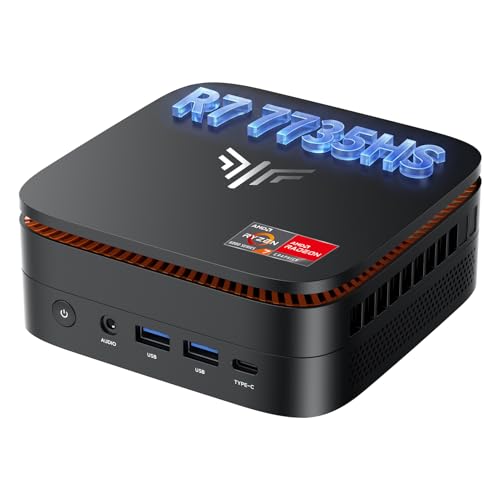
KAMRUI Hyper H1 Mini Gaming PC Ryzen 7 7735HS 24GB 1TB

WiFi 6E PCIe Card Intel AX210 5400Mbps
FIREBAT Mini Gaming PC Ryzen7 7735HS A6 16GB 512GB

GLOTRENDS BE8774 WiFi 7 PCIe Card Intel BE200
Trycoo Gaming Mini PC Ryzen 5 5600H 8GB 256GB

Gaming PC Desktop i7 GTX 1660 Super 16GB 512GB

2.5G Ethernet PCIe Card RTL8125
More Details On Our Top Picks
Small desks benefit from the Hyper H1’s eight-core, 16-thread Ryzen 7 7735HS processor. Cores handle separate streams of work, while threads help the chip juggle demanding games, voice chat, browsers, and background tasks. You get 24GB of LPDDR5 memory and a 1TB M.2 NVMe SSD, so a compact setup has useful headroom for a game library and everyday files.
Integrated Radeon graphics keep the enclosure small, and triple 4K display support suits a work-and-play desk. You may find the graphics ceiling less suitable for demanding new releases than the dedicated GTX 1660 Super in the DeXwtzfn desktop, but the KAMRUI is easier to place beside a monitor. Its WiFi 6 and Bluetooth 5.2 support also reduce cable clutter during ordinary home use.
Strong Points
- Ryzen 7 processing gives multitaskers room for gaming, streaming, and office apps.
- 24GB LPDDR5 memory supports a busy desktop without relying on constant storage swapping.
- The 1TB NVMe SSD provides quick application access and practical game storage.
- Three 4K display outputs fit a compact workstation with several screens.
- WiFi 6 and Bluetooth 5.2 suit wireless peripherals and home networks.
Things To Consider
- Integrated Radeon graphics share the system’s memory, so demanding games may require modest settings.
- LPDDR5 memory is built into the compact design, limiting later memory changes.
Key Specs
Who It Suits Best
You’ll get the most from this mini desktop as a space-conscious gamer who also needs strong daily multitasking.
Where Another Pick Suits Better
Choose the DeXwtzfn Gaming PC Desktop for a traditional tower and dedicated graphics card aimed at 1080p play.
A desktop sitting far from the router can feel slower than its processor deserves. The BZIZU card uses Intel’s AX210 chip and tri-band WiFi 6E, which adds the 6GHz band to the familiar 5GHz and 2.4GHz ranges. That extra band can help a compatible router and nearby desktop avoid some congestion during multiplayer sessions or large downloads.
The advertised 5400Mbps figure describes a combined wireless link capability rather than a guaranteed internet result, so your router, plan, and room layout still matter. Installation calls for an open PCIe slot and suitable drivers, making this more practical for a desktop upgrade than a mini PC. Compared with the wired DERAPID card, it gives you placement freedom but depends more heavily on local network conditions.
What We Like
- Tri-band operation gives compatible networks an additional 6GHz connection path.
- The AX210 platform targets stable wireless performance for gaming and file transfers.
- Wireless connectivity avoids running a long Ethernet cable across a room.
Worth Noting
- Your router must support the newer 6GHz band to benefit from WiFi 6E.
- Opening the case and installing drivers adds work compared with using an existing wired port.
- Antennas and the card need clear placement for the strongest connection in a crowded room.
Feature Snapshot
Made For
This card suits desktop gamers who need wireless access and already have a compatible WiFi 6E router.
Consider Something Else When
The DERAPID 2.5G Ethernet PCIe Card fits better for a desktop beside a router, NAS, or wired switch.
For a study desk that doubles as a gaming station, the FIREBAT combines the same Ryzen 7 7735HS class of processor as the KAMRUI with a smaller 16GB memory allocation and 512GB PCIe SSD. Its Radeon 680M integrated graphics are suitable for compact systems, while the USB-C port supports 4K at 60Hz and 10Gbps data. That combination makes one port useful for both a modern monitor and fast accessories.
Connectivity is the real attraction here. You get USB-A ports, DisplayPort 1.4, HDMI 2.0, a 2.5G LAN port, WiFi 6, and Bluetooth 5.2, which helps a classroom, home office, or entertainment desk stay tidy. The honest trade-off is fixed LPDDR5 memory, and you may find 512GB fills quickly beside the KAMRUI’s 1TB drive.
Highlights
- Ryzen 7 7735HS processing suits gaming alongside school or office workloads.
- Radeon 680M graphics keep the system compact without dropping integrated visual capability.
- USB-C supports 4K display output and 10Gbps data for newer peripherals.
- Dual M.2 interfaces provide a path toward larger SSD storage.
- 2.5G LAN, WiFi 6, and Bluetooth 5.2 cover wired and wireless setups.
Trade Offs
- The installed 16GB LPDDR5 memory cannot be expanded.
- The 512GB drive offers less game storage than KAMRUI Hyper H1’s 1TB SSD.
Technical Sheet
Right Fit For
Students and home-office gamers who need abundant ports in a compact shared-room computer will appreciate this layout.
Not Your Match When
KAMRUI Hyper H1 suits you more when larger built-in storage and 24GB memory matter more than extra expansion flexibility.
Newer Intel desktop systems can gain a forward-looking wireless upgrade from the BE8774. Its Intel BE200 controller supports WiFi 7 and Bluetooth 5.4, while backward support for earlier WiFi generations helps it remain useful during a gradual network upgrade. WiFi 7 features such as 320MHz channels and 4K-QAM can raise the ceiling on compatible equipment, though actual results depend on the router and surrounding network.
The compatibility note deserves attention before installation: this card requires Windows 11 version 24H2 or later and doesn’t support AMD motherboards. Regular and low-profile brackets help it fit full-size or slim desktop cases, which is handy for a mixed household of machines. In most gaming rooms, that makes it a more specialized choice than the BZIZU AX210.
Upsides
- WiFi 7 support gives compatible routers access to newer wireless capacity.
- Bluetooth 5.4 handles current wireless accessories.
- Backward compatibility helps the card work across earlier WiFi environments.
- Two bracket sizes support standard and slim desktop cases.
Room For Improvement
- AMD motherboard owners need a different network card.
- Windows 11 24H2 or later is required, narrowing system compatibility.
- Benefits from WiFi 7 hardware can be limited with an older router.
Quick Facts
Who Will Love This
This card fits Windows 11 24H2 users with Intel-based desktops and a WiFi 7 router nearby.
Look Elsewhere When
BZIZU WiFi 6E PCIe Card is a better fit for AMD systems or networks that currently use WiFi 6E hardware.
The Trycoo takes a simpler route with a Ryzen 5 5600H, 8GB of DDR4 memory, and a 256GB SSD. DDR4 is an older memory generation than the LPDDR5 used by KAMRUI and FIREBAT, but its main advantage here is upgrade access: the listing supports memory expansion up to 64GB. That makes this a sensible starting point for a home-office desk where the first workload is light and later needs may grow.
Dual LAN, WiFi 6, Bluetooth 5.2, USB-C, HDMI, and DisplayPort provide useful flexibility for a multi-screen workspace. The modest drive can feel cramped after several large games, and integrated graphics remain more suited to lighter play than the dedicated DeXwtzfn card. You may find the upgrade path more valuable than the out-of-box capacity.
Reasons To Buy
- Memory expansion up to 64GB gives the mini desktop a longer upgrade path.
- Dual LAN supports setups that need two wired network connections.
- Triple 4K display support works well for office and entertainment screens.
Points To Note
- 8GB memory is a narrow starting point for modern multitasking.
- 256GB storage leaves limited room for a large game collection.
- Its Ryzen 5 platform sits below the Ryzen 7 systems in processing headroom.
- Opening the enclosure for memory or storage work requires careful installation.
At A Glance
Who Should Grab It
This mini PC suits students and casual gamers who want a small starting system with room to expand memory.
A Better Fit Elsewhere
FIREBAT Mini Gaming PC is better for you when 2.5G LAN, more USB ports, and stronger starting memory matter immediately.
Dedicated graphics change the shape of this roundup. The DeXwtzfn desktop pairs an i7 processor reaching 4.0GHz with a GTX 1660 Super carrying 6GB of GDDR6 graphics memory, giving you a more direct route to 1080p gaming than the integrated Radeon options. Sixteen gigabytes of RAM and a 512GB SSD also create a familiar desktop starting point for games, browsers, and general work.
The tower format leaves more physical room than KAMRUI Hyper H1 or Trycoo, while four ARGB fans add visible lighting and airflow hardware. That larger case needs a dedicated desk position and regular dust cleaning around the fan openings, so it isn’t the quietest or smallest route. For most 1080p players, though, the dedicated GPU is the main reason to accept that footprint.
Bright Spots
- GTX 1660 Super graphics provide dedicated 6GB GDDR6 memory for 1080p play.
- The i7 processor suits gaming, streaming, and everyday desktop workloads.
- 16GB RAM supports common multitasking without an immediate memory upgrade.
- Four ARGB fans add airflow hardware and customizable case lighting.
Small Caveats
- The tower needs more desk and floor space than each mini PC here.
- 512GB can fill quickly with several large modern games.
- Fan openings and lighting hardware add more areas to keep clear of dust.
Core Details
Built With In Mind
This desktop is aimed at 1080p gamers who have room for a conventional tower and prefer dedicated graphics.
Swap It Out When
KAMRUI Hyper H1 is a better match for you when desk space, low cable clutter, and a mini PC format come first.
Wired networking remains a sensible choice for a desktop near the router or a home server handling large transfers. The DERAPID card uses the RTL8125 controller and supports 2.5Gbps Ethernet, which is 2.5 times the link speed of standard gigabit networking under suitable network conditions. That can help game downloads, local file movement, and NAS access feel less constrained.
Full-height and low-profile brackets cover conventional towers and small-form-factor cases, while the card fits PCIe x1, x4, x8, and x16 slots. You still need compatible cabling and network hardware to reach the higher link rate, so the improvement depends on the whole connection path. Compared with BZIZU WiFi 6E, this choice gives up room-to-room flexibility in exchange for a steadier physical connection.
Plus Points
- 2.5Gbps Ethernet raises the wired connection ceiling beyond standard gigabit.
- Multiple PCIe slot sizes broaden desktop installation options.
- Full-height and low-profile brackets suit towers, SFF PCs, and home servers.
- Wired networking avoids wireless congestion during local transfers and online play.
- Windows and Linux support suits mixed computer environments.
Areas To Watch
- Your router, switch, and cable must also support the higher connection rate.
- Installation requires an open PCIe slot and a case with suitable clearance.
Details At A Glance
Whose Shelf It Belongs On
This card is for you when a gaming PC, NAS, or compact server has an open slot near suitable wired networking equipment.
Another Choice May Suit
BZIZU WiFi 6E PCIe Card is more suitable for you when the desktop sits away from the router and cable-free placement matters.
How To Choose The Right Pc Chips For Gaming
Start With The Hardware Type
The phrase “PC chip” can describe very different upgrades in this list. A mini desktop such as KAMRUI Hyper H1 or FIREBAT combines a processor, memory, storage, graphics, and connectivity in one enclosure. A PCIe card, meaning an internal expansion board that plugs into a motherboard slot, changes only networking.
Match the category to the problem on your desk. A slow game-loading system needs stronger storage or a fuller computer, while wireless dropouts call for BZIZU or GLOTRENDS. A desktop that already runs games well may need only the DERAPID wired adapter.
Compare Processing And Graphics
Processor cores handle separate work streams, and threads help the chip manage simultaneous tasks. Ryzen 7 7735HS systems offer eight cores and 16 threads, while the Trycoo Ryzen 5 5600H provides six cores and 12 threads. For gaming alongside streaming, browser tabs, or school software, the Ryzen 7 options provide more breathing room.
Integrated graphics share system resources, keeping mini PCs compact but limiting the graphics ceiling. The DeXwtzfn tower’s GTX 1660 Super has dedicated GDDR6 graphics memory, making it the clearer fit for 1080p gaming. You’ll need more desk space, yet that trade-off may feel worthwhile for games that lean heavily on the GPU.
Check Memory And Storage Headroom
Sixteen gigabytes is a practical starting point for many gaming desktops, while 24GB gives KAMRUI extra multitasking space. Trycoo begins at 8GB but supports expansion up to 64GB, so you’re choosing between immediate capacity and a later upgrade path.
Storage affects both installation space and loading behavior. NVMe SSDs use a fast internal connection, helping applications open promptly, but 256GB or 512GB can disappear quickly beside large game installs. A 1TB drive gives KAMRUI the most room in this group.
Treat Network Claims As A System Question
Wireless and Ethernet figures describe the adapter’s capability, not a guaranteed internet result. Router support, cable quality, distance, interference, and your internet service all influence the final experience.
WiFi 6E adds 6GHz support, while WiFi 7 moves to newer channel and modulation features. The GLOTRENDS card requires Windows 11 24H2 or later and an Intel motherboard, so compatibility comes before speed. For a stable desk beside a suitable switch, DERAPID’s 2.5Gbps wired connection may be the cleaner solution.
Things Worth Knowing First
Mistakes Worth Dodging
Many shoppers choose a network card by its headline speed and overlook the router, motherboard, operating system, or available PCIe space. Check those details before you commit, especially with GLOTRENDS, which excludes AMD motherboards, and with WiFi 6E, which needs a compatible 6GHz router to show its value.
Mini PC shoppers often focus on the small enclosure and forget upgrade limits. KAMRUI and FIREBAT use memory that cannot be expanded, while Trycoo leaves more room for a later memory change. Storage deserves the same attention, since a compact computer with a 256GB drive may need an additional storage plan sooner.
Where The Extra Money Goes
Higher-tier hardware usually pays for a stronger processor, more memory, faster storage, dedicated graphics, or a newer network standard. KAMRUI’s 24GB memory and 1TB SSD address multitasking and capacity, while DeXwtzfn’s GTX 1660 Super gives you dedicated graphics rather than relying on an integrated chip.
The upgrade makes sense for your actual workload, not for a specification sheet alone. Casual play and office work can suit Trycoo, while demanding 1080p gaming favors DeXwtzfn. A WiFi 7 card makes more sense with a matching router and compatible Intel desktop than as an isolated upgrade.
Final Verdict
You can choose a compact Ryzen system for a tidy desk, a tower with dedicated graphics for stronger 1080p play, or a PCIe card to solve a specific network bottleneck. KAMRUI gives you the most generous mini PC memory and storage combination, FIREBAT offers broad connectivity, and Trycoo leaves room for memory expansion. BZIZU and DERAPID suit different network layouts, while GLOTRENDS targets newer Intel systems. Start with your actual limitation, then choose the hardware that addresses it without adding features you won’t use.
