
Choosing a laptop processor means matching speed, memory, storage, and screen size to your actual routine. You may need a compact school computer, a large desktop replacement for spreadsheets, or enough headroom for demanding multitasking. The options below cover lightweight everyday laptops through a spacious HP model with an Intel Core i7 processor. You’ll find clear trade-offs, ownership considerations, and practical guidance for studying, office work, streaming, and travel.
The Shortlist At A Glance

HP 14″ Laptop 2026 Edition, Intel Processor, 8GB RAM, 128GB Storage

HP Latest Stream 14″ HD Laptop, Intel Celeron Processor, 4GB Memory, 64GB eMMC Storage
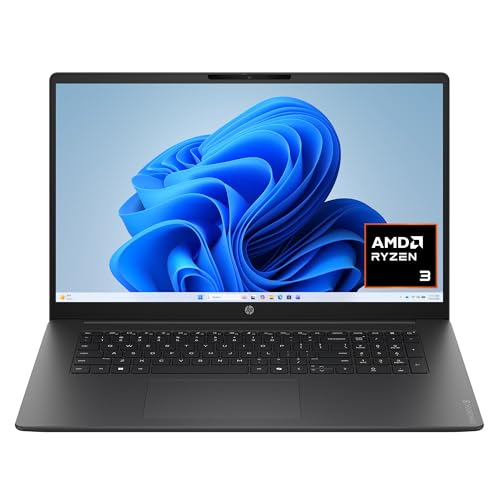
HP OmniBook 3 17.3-inch Laptop PC, Ryzen 3, 512GB SSD

HP Essential 2026 Laptop, Office 365, Copilot AI, 8GB RAM, Intel Processor

HP 14″ Willow Green Laptop, Intel N150 Processor, 4GB RAM, 128GB SSD
HP 17 Laptop, 17.3″ HD+ Touchscreen, Intel Core i7-1255U, 32GB RAM, 1TB SSD

HP 14″ Laptop, Intel Processor N150, 8GB RAM, 128GB UFS
More Details On Our Top Picks
The 14-inch format keeps this HP easy to carry between classrooms, kitchen counters, and home-office desks. Its Intel N150 processor uses four cores and can reach 3.6GHz, giving you a sensible platform for documents, browsing, video calls, and streaming rather than demanding creative software.
Compared with the 4GB models below, 8GB of RAM gives everyday multitasking more breathing room. You also get 128GB of storage, Copilot AI, Microsoft 365, Windows 11, and a listed weight of 3.11 pounds, though the HD screen and modest storage may feel limiting for large media libraries.
Strong Points
- Four-core Intel N150 processing suits schoolwork, office documents, and regular web use.
- 8GB RAM helps you keep several browser tabs and productivity apps open.
- The 3.11-pound design works well for daily commuting.
- Microsoft 365 and Copilot support a ready-to-use office setup.
- Integrated Intel UHD Graphics handles standard video playback and light visual tasks.
Things To Consider
- 128GB fills faster than the 512GB drive in the OmniBook 3.
- HD resolution gives you less desktop space than a Full HD panel.
Key Specs
Who It Suits Best
You’ll get the most from this choice as a student or home-office user who values portability, bundled software, and steady everyday speed.
Where Another Pick Suits Better
Choose the HP OmniBook 3 17.3-inch Laptop PC for a larger work surface, Full HD viewing, and 512GB SSD storage.
Light schoolwork and quick trips suit the HP Stream’s compact 14-inch design. The Intel Celeron N4120 is a four-core, four-thread processor, meaning it can manage basic apps but has less room for heavy multitasking than the N150 models with 8GB RAM.
The HD anti-glare display, HDMI output, fast-charge feature, and listed battery claim of up to 11 hours make it practical for a lecture hall or short work session. The honest trade-off is the 4GB memory and 64GB eMMC storage, so you’ll need to keep installed software and local files modest.
What We Like
- Four processing cores support browsing, email, and document work.
- HDMI makes connection to a larger monitor or classroom display straightforward.
- Fast charging helps restore mobility between short study sessions.
Worth Noting
- 4GB RAM can feel restrictive with many browser tabs open.
- 64GB eMMC storage leaves less room for apps and offline files.
- Depending on your workload, the Celeron platform may feel slow beside the N150 choices.
Feature Snapshot
Made For
You’ll suit this HP best as a beginner, student, or traveler handling web apps, email, video playback, and short documents.
Consider Something Else When
Reach for the HP Essential 2026 Laptop when 8GB RAM matters more than compact storage capacity.
A 17.3-inch Full HD display changes the working posture: spreadsheets, timelines, and two windows get more breathing room than they do on the 14-inch HP laptops. The AMD Ryzen 3 processor, 8GB RAM, and 512GB SSD create a better-balanced setup for home offices, video calls, streaming, and everyday file storage.
You may find the larger chassis comfortable on a desk but less appealing for a daily train commute. AMD Radeon 610M graphics support ordinary visual work, while the honest limitation is that this remains an everyday laptop rather than a specialized machine for demanding graphics workloads.
Highlights
- 17.3-inch Full HD viewing gives you more usable workspace.
- 512GB SSD storage leaves room for documents, media, and installed programs.
- 8GB RAM supports practical multitasking for home and office routines.
- AMD Radeon 610M graphics suit regular display and productivity tasks.
Trade Offs
- The large screen and chassis are less convenient for frequent carrying.
- A full-size display may need a deeper desk than a compact 14-inch model.
Technical Sheet
Right Fit For
This model suits you as a desk-based home-office user who values a large Full HD workspace over travel-friendly dimensions.
Not Your Match When
The HP 14″ Laptop 2026 Edition fits better for students who carry a computer between classes and need a lighter body.
For email, online classes, word processing, and casual streaming, this HP Essential configuration keeps the focus on useful basics. Its Intel Celeron N4500 is a dual-core processor, while 8GB DDR4 RAM gives you a more comfortable multitasking buffer than the HP Stream’s 4GB.
The listed 14-inch HD display keeps the laptop approachable for everyday indoor use, and Office 365 plus Copilot AI add useful software features. One thing worth considering is the 64GB eMMC storage, which may require cloud storage or external file management as your schoolwork grows.
Upsides
- 8GB DDR4 RAM helps with common school and office applications.
- Copilot AI and Office 365 create a ready productivity environment.
- The 14-inch size balances desk use with occasional carrying.
Minor Gripes
- The dual-core processor is aimed at basic tasks, not demanding workloads.
- 64GB eMMC storage calls for careful file organization.
- HD resolution provides less workspace than the OmniBook 3 panel.
Quick Facts
Best Suited To
You’ll find the strongest fit here as a student or home user whose daily routine centers on web-based tasks, documents, and email.
A Better Fit Elsewhere
Choose the HP 14″ Laptop, Intel Processor N150, 8GB RAM, 128GB UFS for newer wireless connectivity and more storage capacity.
The Willow Green finish gives this 14-inch HP a more individual look than the pink 2026 Edition, while the Intel N150 brings the same four-core, up-to-3.6GHz class of everyday processing. A 128GB SSD, meaning solid-state storage with quicker access than traditional spinning storage, suits documents and routine applications.
Its 4GB RAM is the main compromise, so you may find the system more comfortable with a focused set of browser tabs rather than a crowded multitasking session. The 1TB cloud-storage listing adds useful online capacity, but local storage and cloud space behave differently, especially during travel without reliable internet access.
Bright Spots
- Intel N150 processing suits ordinary school and office routines.
- 128GB SSD storage offers a practical local starting point.
- Wi-Fi 6 and Bluetooth 5.4 support newer wireless setups.
- Microsoft 365 and Copilot AI add useful productivity tools.
- The 14-inch format is convenient for mobile study.
Room For Improvement
- 4GB RAM limits demanding multitasking.
- The listed 1TB cloud capacity depends on online file access and account setup.
- The non-backlit keyboard may be less convenient in dim rooms.
Feature Rundown
Who Will Love This
This HP suits you as a mobile student who wants a distinctive finish, current wireless features, and a manageable 14-inch footprint.
Swap It Out When
The HP 14″ Laptop 2026 Edition is a better fit for heavier multitasking because it pairs the N150 with 8GB RAM.
Thirty-two gigabytes of RAM and a 1TB PCIe NVMe SSD put this HP in a different class from the entry-level choices. RAM is short-term working memory, while the SSD stores your files, and that combination gives you useful room for many browser tabs, large projects, and several active applications.
The 12th-generation Intel Core i7-1255U reaches up to 4.7GHz and includes 10 cores, making it the sensible choice for demanding office workflows and heavier multitasking. You may find the 17.3-inch touchscreen and backlit keyboard comfortable at a permanent desk, but the large body is a poor match for frequent commuting.
Reasons To Buy
- 32GB RAM supports extensive multitasking and large working sessions.
- 1TB SSD provides substantial local file space and quick system access.
- The Intel Core i7-1255U offers considerably more processing headroom than the N150 and Celeron options.
- Touch input, a backlit keyboard, HDMI, and a webcam support flexible office use.
Points To Note
- The HD+ 1600 x 900 panel is less sharp than a Full HD display.
- The 17.3-inch body takes more desk and storage space.
- High-capacity hardware may be unnecessary for email and basic documents.
Core Details
Whose Shelf It Belongs On
You’ll benefit most as a desk-based professional, creator, or power user who needs substantial memory and storage for demanding daily multitasking.
Look Elsewhere When
The HP OmniBook 3 17.3-inch Laptop PC makes more sense for you when a large screen matters but your workload remains lighter.
This 14-inch HP takes the N150 platform and pairs it with 8GB RAM, 128GB UFS storage, Copilot AI, Windows 11, and a one-year Microsoft 365 subscription. UFS is compact flash storage designed for mobile-style efficiency, so the configuration targets students, travelers, and office users who want a straightforward portable setup.
Wi-Fi 6 adds a modern connection standard for compatible networks, while the title also positions this laptop for creator, business, gaming, and college use. In most everyday routines, it should suit documents and web applications well, but the available details don’t establish dedicated gaming hardware, so demanding games remain a cautious fit.
Best Bits
- Intel N150 processing and 8GB RAM create a balanced basic-work setup.
- Wi-Fi 6 suits newer home, campus, and office networks.
- Microsoft 365 and Copilot AI support school and business tasks.
- 128GB UFS storage keeps the portable configuration compact.
Small Caveats
- 128GB is modest for large media collections or extensive software libraries.
- The listed configuration does not establish dedicated graphics for demanding games.
Details At A Glance
The Right Fit
This option suits you as a college student or traveling office user who wants current wireless support and bundled productivity software.
Where A Sibling Pick Shines
Choose the HP 17 Laptop for your heavier multitasking needs, large local files, and desk-based workflow.
How To Choose The Right Processors For A Laptop
Match Processor Class To Your Routine
Start with the software you use most. Email, documents, school portals, and streaming fit entry-level Intel Celeron or N-series processors, especially with a focused number of open tabs. The Intel N150 models here offer four cores and up to 3.6GHz, giving you more everyday headroom than the dual-core Celeron N4500.
An Intel Core i7-1255U changes the conversation with 10 cores, 12 threads, and speeds reaching 4.7GHz. That extra capacity matters for large spreadsheets, extensive research, creative applications, and sustained multitasking, but it adds more hardware than you need for occasional email.
Treat RAM And Storage As Separate Decisions
RAM controls how comfortably you can keep applications active at the same time. Four gigabytes suits light use, 8GB is a more flexible baseline for school and office work, and 32GB makes sense for demanding multitasking or large projects.
Storage determines how many files and programs stay on the laptop. A 64GB eMMC drive requires discipline, 128GB works for essentials, and 512GB or 1TB gives you a much easier local file routine. Cloud storage can extend capacity, but offline access still depends on the physical drive.
Choose Screen Size Around Your Workspace
A 14-inch laptop makes sense for commuting, campus use, and compact desks. A 17.3-inch model gives spreadsheets and side-by-side windows more room, though you’ll trade away portability and require more storage space.
Resolution also matters. HD and HD+ panels support basic tasks, while Full HD produces sharper text and more usable workspace. Touch input and a backlit keyboard can improve comfort in specific settings, but neither replaces a processor matched to your applications.
Things Worth Knowing First
Mistakes Worth Dodging
A common mistake is choosing a processor by its name alone. Pair the processor with RAM and storage, because a capable chip can still feel constrained by 4GB memory or a nearly full 64GB drive.
You can also overestimate a laptop’s gaming or creative suitability from broad listing language. Dedicated graphics, memory capacity, display resolution, and application requirements deserve a closer look before you settle on an everyday configuration.
Where The Extra Money Goes
Higher-tier laptops usually charge for stronger processors, more RAM, faster solid-state storage, larger capacity, better displays, and convenience features such as touch input or a backlit keyboard. The HP 17 model shows how those upgrades support heavier multitasking and larger local projects.
Spending more makes sense for professional software, extensive browser sessions, or long-term file storage. Basic schoolwork rarely needs 32GB RAM and 1TB SSD capacity, so a balanced 8GB configuration may serve you better.
The Takeaway
Your right choice depends on the workload sitting in front of you every day. The HP Stream handles light basics, while the N150 models offer a more comfortable middle ground for school and office use. The OmniBook 3 favors a large desk workspace, and the HP 17 reserves its 32GB RAM, 1TB SSD, and Core i7 processor for demanding multitasking. Start with your software, storage habits, and carrying routine, then select the configuration that fits without paying for capacity you won’t use.
