
Building a mining rig in 2026 means sorting through a mix of motherboards, frames, ASIC units, and CPUs that each serve a distinct purpose. Your goal is maximizing hash rate while keeping power draw and heat manageable. Whether you are assembling a multi-GPU stack from scratch or dropping a compact ASIC on your desk for solo Bitcoin mining, the right hardware dictates your daily efficiency. This roundup covers the components that matter most for getting a rig online and keeping it running.
The Shortlist At A Glance

ASRock H110 Pro BTC+ 13GPU Mining Motherboard

Kingwin Miner Rig Case Frame 12 GPU

AMD Ryzen 9 5900XT 16-Core Processor
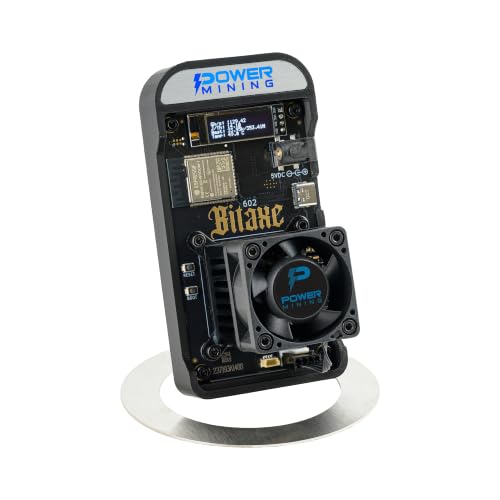
Bitaxe Gamma 602 ASIC Bitcoin Miner

Bitaxe Gamma 602 1.2TH/s Bitcoin Miner

601 Bitcoin Miner Black Home Crypto Miner
More Details On Our Top Picks
Scaling a GPU farm requires a board that can actually feed thirteen graphics cards without choking. ASRock built this board around the Intel H110 chipset, supporting 6th and 7th generation Core, Pentium, and Celeron processors. That keeps your base compute cost low since you can pair it with a cheap Celeron chip instead of a high-end CPU. The real draw is the slot layout: one PCIe 3.0 x16 slot for your primary card and twelve PCIe 2.0 x1 slots for the rest of your array.
In a farm environment, that x1 bandwidth is plenty for mining workloads where throughput matters more than latency. You also get four SATA3 ports and one M.2 slot, giving you flexibility on storage. Depending on your riser setup, you may need to source additional PCIe extension cables separately.
Strong Points
- Supports up to 13 GPUs for large-scale mining operations
- DDR4 2400/2133 support keeps memory costs reasonable
- Compatible with budget 6th and 7th gen Intel CPUs
- ASRock Super Alloy components add durability for continuous operation
Things To Consider
- Older chipset means limited upgrade path beyond 7th gen Intel
- Boards commonly reported as arriving with minimal packaging
Key Specs
Who It Suits Best
Operators planning a high-density GPU farm who need maximum card count per board will benefit most here.
Where A Sibling Pick Shines
Shoppers building a smaller rig should consider the Kingwin Miner Rig Case Frame, which handles up to 12 GPUs in a physical enclosure built for airflow.
Bolting twelve graphics cards to a wooden shelf works for a weekend, but a purpose-built frame keeps your investment secure and cool. Kingwin’s aluminum enclosure supports up to a dozen GPUs and functions as an open-air test bench. The open design lets heat dissipate freely, which matters when cards run at full load for days on end. Unlike the ASRock board’s raw slot count, this frame solves the physical mounting problem.
Aluminum keeps the structure light enough to reposition solo while resisting the corrosion that steel frames face in humid environments. The stackable design means you can vertically expand your farm without doubling your floor footprint. Assembly requires basic tool handling, and you may want to pick up extra standoffs depending on your card widths.
Highlights
- Stackable frame lets you scale upward without wasting floor space
- Aluminum construction resists rust and stays lightweight
- Open-air design maximizes passive airflow across all mounted cards
- Accommodates up to 12 GPUs for high-density builds
- Doubles as a general test bench for component diagnostics
Worth Noting
- Open frame offers no dust protection for components
- Hardware kit included may lack enough screws for every riser setup
Made For
Custom rig builders who need a sturdy, ventilated frame for a dozen cards will find this fits their workflow.
Consider Something Else When
Solo Bitcoin miners who skip GPUs entirely will find the Bitaxe Gamma 602 ASIC a more direct, plug-and-mining solution.
Not every mining workload leans on GPUs or ASICs. CPU-mineable coins still exist, and a processor with sixteen cores and thirty-two threads handles those algorithms while doubling as a capable workstation chip. Based on AMD’s Zen 3 architecture, the 5900XT boosts up to 4.8 GHz and ships unlocked for overclocking. Its 72 MB of combined cache gives it serious throughput for parallel tasks.
On the AM4 platform, you get PCIe 4.0 support and DDR4-3200 memory compatibility. That keeps motherboard costs reasonable compared to newer platforms. The catch is that no cooler ships in the box, so you need to factor an aftermarket thermal solution into your build. For a dual-purpose rig that mines at night and edits video during the day, that trade-off makes sense.
Upsides
- 16 cores and 32 threads handle parallel mining algorithms efficiently
- Unlocked multiplier allows manual overclocking for extra headroom
- PCIe 4.0 support on AM4 keeps platform costs in check
- 72 MB cache reduces memory latency on data-heavy workloads
Trade Offs
- No included cooler requires a separate thermal solution purchase
- AM4 socket has a shorter upgrade path than current-gen platforms
- High core count draws notable power under full sustained load
Feature Snapshot
Right Fit For
Users running a dual-purpose system for CPU mining and content creation will get the most value from this chip.
Look Elsewhere When
Shoppers focused purely on Bitcoin mining should skip the CPU route and grab the Bitaxe Gamma 602 ASIC for dedicated hash power.
Stepping away from multi-GPU frames, the Bitaxe Gamma 602 packs a single BM1370 ASIC chip into a desktop unit small enough to sit beside your monitor. That BM1370 silicon is the same chip found in the Antminer S21 Pro, which means you are getting professional-grade hashing architecture in a compact footprint. It delivers 1.1 TH/s (terahashes per second, a measure of mining speed) while drawing just 18 watts. That efficiency makes it viable for home use without tripping a standard 15-amp circuit.
Built in Europe with an open-source firmware called AxeOS, the unit allows customization that closed-source miners do not. Wi-Fi connectivity and USB-C power input mean setup takes minutes, not hours. The included stand and power supply round out the package. You may find the solo mining nature means hit-or-miss block rewards compared to pool mining.
Plus Points
- 18W power draw keeps electricity costs negligible for home mining
- Uses the BM1370 chip from the Antminer S21 Pro for serious hash density
- Open-source AxeOS firmware allows deep configuration tweaks
- Wi-Fi and USB-C connectivity simplify placement and power
Softer Spots
- Solo mining yields inconsistent rewards compared to pool participation
Who Will Love This
Home solo miners who want a quiet, efficient desk unit will appreciate the footprint and open-source flexibility.
Not Your Match When
Shoppers needing higher throughput should look at the DTV Bitaxe Gamma 602 variant, which pushes the hash rate to 1.2 TH/s.
DTV’s take on the Bitaxe Gamma 602 shares the same BM1370 ASIC architecture as the Power Mining version but pushes the hash rate to 1.2 TH/s. That extra 0.1 TH/s gives you a slight edge in solo mining probability over time. The fully open-source design lets you modify both hardware and software, making it a favorite for tinkerers who want control over every parameter. It targets solo Bitcoin mining directly, skipping pool infrastructure entirely.
Compared to the Power Mining Gamma 602, this variant offers a marginally higher throughput ceiling. The trade-off is that solo mining remains a lottery-style endeavor, and the extra hash rate does not guarantee faster rewards. For most home setups, the difference is academic, but enthusiasts who want to squeeze out every terahash will appreciate the bump.
Reasons To Buy
- 1.2 TH/s hash rate offers a slight edge over the 1.1 TH/s variant
- Fully open-source design enables deep hardware and software tuning
- BM1370 chip provides proven SHA-256 mining performance
Small Caveats
- Solo mining variance means payouts are unpredictable and infrequent
- Configuration requires technical familiarity with mining software
Best Suited To
Tinkerers who want to squeeze extra throughput and customize firmware will find this variant rewarding.
Skip It When
Beginners wanting the simplest start should reach for the yysluping 601 Bitcoin Miner, which targets newcomers with a straightforward setup.
Not everyone needs a thirteen-GPU motherboard or a high-end desktop processor to start mining. The yysluping 601 targets beginners and blockchain hobbyists who want to experiment with solo mining without industrial-grade equipment. It runs the same BM1370 ASIC chip optimized for SHA-256 hashing as the Bitaxe units, meaning you get comparable architecture in a different shell. The compact, open-source design keeps the barrier to entry low.
Think of it as a learning tool that also hashes. The power consumption stays manageable for home use, and the setup does not require a full rig frame like the Kingwin enclosure. You may find the documentation sparse, so some self-directed research helps during initial configuration.
Bright Spots
- BM1370 ASIC chip delivers proven SHA-256 mining capability
- Compact form factor fits on a desk without dedicated rig infrastructure
- Open-source design encourages learning and modification
- Low power draw suits home environments without dedicated circuits
Points To Note
- Documentation commonly reported as sparse for first-time builders
- Solo mining rewards are statistically infrequent at entry-level hash rates
- Build quality may feel less refined than the European-made Bitaxe variants
Whose Shelf It Belongs On
Blockchain beginners and tinkerers who want a low-cost entry into solo Bitcoin mining will find this approachable.
A Better Fit Elsewhere
Shoppers wanting a more polished unit with included accessories should consider the Power Mining Bitaxe Gamma 602 ASIC, which ships with a stand and power supply.
What Matters Most Before Choosing Processors For Mining
Match Your Hardware To Your Mining Algorithm
Different coins demand different hardware. Bitcoin mining runs almost exclusively on ASIC chips designed specifically for the SHA-256 algorithm. GPU mining, by contrast, targets coins like Ravencoin or Ethereum Classic, where graphics cards handle the parallel computation. CPU mining suits niche coins like Monero, where processor threads do the heavy lifting. Picking the wrong hardware class for your target coin means wasted power and zero output. Identify your algorithm first, then select a component that actually hashes efficiently for it.
Power Draw And Heat Management
Every mining component draws power and generates heat proportional to its workload. A single ASIC unit pulling 18 watts is negligible on a household circuit. A twelve-GPU rig running full tilt can pull over 2000 watts, which requires dedicated wiring and serious airflow planning. You need to account for both the cost of electricity and the physical cooling strategy before buying. Open-air frames like the Kingwin help with passive dissipation, but dense setups still benefit from active ventilation to keep card temperatures in a safe range.
Platform Longevity And Upgrade Paths
Mining hardware ages quickly as network difficulty rises. Motherboards like the ASRock H110 lock you into older Intel generations, which limits resale value if you ever pivot. AM4-based CPUs like the Ryzen 9 5900XT have a shorter upgrade window compared to newer platforms, though the lower entry cost offsets that for many builders. ASIC units have no upgrade path at all; they hash one algorithm until they become unprofitable. Factor in how long you expect to run the hardware before the network difficulty outpaces your returns.
A Quick Reality Check
Traps First Timers Fall Into
New miners often buy a high-end motherboard and forget that riser cables, power supplies, and cooling cost just as much. Another common slip is grabbing a CPU that is overpowered for a pure mining rig, wasting money that could go toward another GPU. Beginners also underestimate how loud a dense rig gets, which makes bedroom or apartment setups unpleasant without planning for sound isolation.
The Upgrade Payoff
Spending more on a proven ASIC chip like the BM1370 buys better efficiency measured in joules per terahash. Premium frames with aluminum construction resist corrosion and last through multiple rebuild cycles. Open-source firmware options add long-term value by letting you tweak settings as network conditions shift. Paying more upfront for refined build quality and community-supported software pays off when you run hardware continuously for months.
Frequently Asked Questions
Can you mine Bitcoin with a regular CPU?
Mining Bitcoin with a standard CPU is no longer practical because network difficulty far exceeds what general-purpose processors can handle. ASIC chips designed specifically for SHA-256 hashing are the only viable hardware for Bitcoin mining today.
What is the difference between solo mining and pool mining?
Solo mining means you attempt to find blocks independently and keep the full reward, which is highly unpredictable. Pool mining combines your hash power with others and splits rewards proportionally, offering smaller but more consistent payouts.
How many GPUs can the ASRock H110 Pro BTC+ support?
The board physically supports up to thirteen graphics cards using its one PCIe 3.0 x16 slot and twelve PCIe 2.0 x1 slots. You will need powered riser cables to supply adequate electricity to every card.
Does the Bitaxe Gamma 602 come with a power supply?
The Power Mining variant includes a power supply and stand in the box. Other variants may ship differently, so confirm what is included before purchasing.
Is open-air mining safe for components?
Open-air frames are safe as long as you manage dust accumulation and keep the rig away from liquids and physical interference. Proper airflow actually keeps components cooler than enclosed cases, which extends hardware lifespan.
Final Verdict
Choosing the right mining hardware comes down to matching your component to your target coin and power budget. GPU builders need dense motherboards and sturdy frames, while solo Bitcoin miners benefit from compact ASIC units. The picks here cover both ends of that spectrum. Start with your algorithm, calculate your electricity cost, and pick the hardware that fits your space and technical comfort level.
