
Keeping an older Intel platform alive takes patience and the right spare parts. Socket 775 motherboards still serve in retro gaming rigs, lightweight home servers, and office machines that just need to run. Finding a compatible processor or mounting hardware can feel like searching for a needle in a digital haystack. This guide rounds up the chips, cooler kits, and protective covers worth your attention.
The Shortlist At A Glance

InLine Mounting Kit for Intel Socket 775
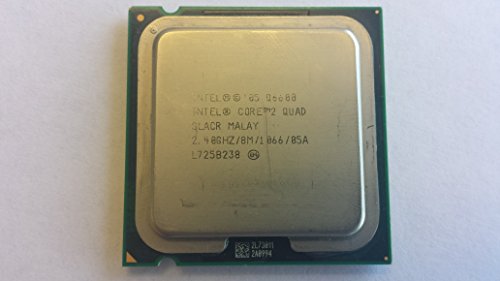
Intel Core 2 Quad Q6600 SLACR Socket 775 CPU
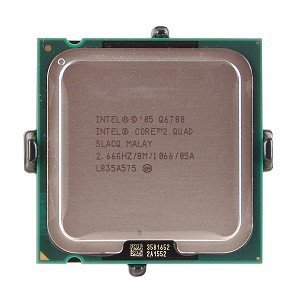
Intel Core 2 Quad Q6700 Socket 775 CPU

ZZHXSM 10Pcs LGA 775 Cooler Mount Pins
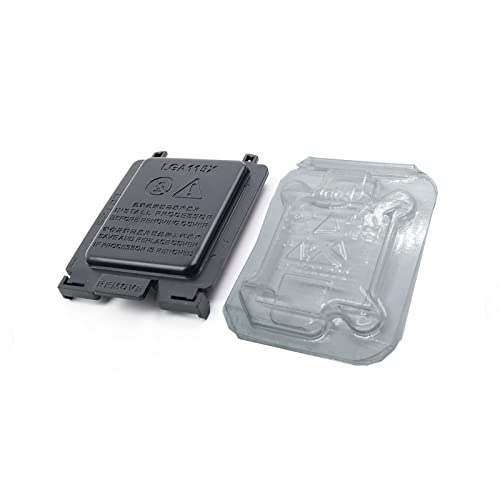
YEGAFE CPU Cover and Socket Cover Set

Intel Core 2 Duo E8500 Socket 775 CPU
More Details On Our Top Picks
Stock LGA 775 push-pins get brittle and snap after years of heat cycling. This InLine kit gives you a fresh set of plastic retention parts so your cooler sits flush against the integrated heat spreader again. Proper mounting pressure matters more than people think, as a loose heatsink causes thermal throttling and random shutdowns during long sessions. You might find these clips useful when rebuilding an aging office machine that still handles daily tasks well enough.
Unlike the ZZHXSM multipack later in this list, InLine ships a focused four-piece set rather than a bulk bag. The German-origin construction feels precise, and the compact dimensions keep storage simple. For a single repair job, that specific count is just right.
Reasons To Buy
- Restores firm cooler contact to prevent overheating
- Compact package fits easily in a small toolbox
- Four-piece count matches a standard single cooler install
Room For Improvement
- Plastic parts can still fatigue over repeated removals
- International origin may complicate returns for some shoppers
Quick Facts
Built With In Mind
Tinkerers refurbishing a single Socket 775 tower for light home or office duty get the most value here.
Reach For A Different Pick When
You need to repair multiple stock coolers at once, making the ZZHXSM 10Pcs pin set a better bulk value.
The Q6600 earned its reputation as the workhorse of the Core 2 Quad era. Four cores running at 2.4 GHz with an 8 MB L2 cache give this chip genuine multitasking legs for a legacy platform. The SLACR stepping marks a later revision that generally runs cooler than early batches, which helps with aging thermal paste and stock coolers. In a retro gaming build or a home server handling file storage and light media streaming, this processor still pulls its weight.
Compared to the E8500 reviewed later, the Q6600 trades raw clock speed for core count. That makes it more suitable for background tasks and multi-threaded workloads rather than single-thread-sensitive applications.
Plus Points
- Four physical cores handle multitasking without stuttering
- SLACR stepping keeps thermals manageable in older cases
- 8 MB L2 cache (shared memory built into the chip) boosts repeated task efficiency
- Widely compatible with mature 775 motherboards
- Strong community knowledge for BIOS troubleshooting
Points To Note
- 105W TDP demands a capable heatsink, not a lightweight stock unit
- 1066 MHz front side bus limits memory bandwidth by modern measures
- Availability fluctuates, so matching a specific stepping is not guaranteed
Feature Snapshot
Who Will Love This
Retro gamers and home server builders wanting four cores on a stable 775 board fit this chip perfectly.
Where A Sibling Pick Shines
Shoppers building a light-duty web browsing machine may prefer the Intel Core 2 Duo E8500 for its higher clock and lower heat output.
Stepping up from the Q6600, the Q6700 pushes the base clock to 2.66 GHz with a bus-to-core ratio of 10. That extra frequency translates to snappier window switching and less waiting on single-threaded tasks. You still get the same 8 MB L2 cache and 1066 MHz front side bus, so the architecture stays familiar. The 105W thermal design power matches the Q6600, meaning your existing heatsink should transfer over without a new bracket.
The honest read is that the gain over the Q6600 sits around 10 percent in clock-bound workloads. For someone already running the Q6600, the upgrade feels marginal. Coming from a dual-core, though, the jump is noticeable.
Highlights
- 2.66 GHz clock gives a measurable single-thread bump over the Q6600
- Shares the 105W TDP envelope for easy cooler reuse
- 8 MB L2 cache handles large working sets efficiently
- Drop-in replacement on most boards supporting the Q6600
Trade Offs
- Diminishing returns over the Q6600 for the added cost
- 105W output warms small cases noticeably during sustained loads
Right Fit For
Upgraders moving from a Core 2 Duo who want quad-core headroom without changing motherboards suit this chip best.
Consider Something Else When
You already own the Intel Core 2 Quad Q6600 SLACR, as the small clock increase rarely justifies the expense of a swap.
Bulk replacement pins solve a common headache: you remove a stock cooler and one push-pin snaps off. The ZZHXSM pack gives you ten black and white plastic fasteners that fit LGA 775 boards. Having spares means you can re-seat a cooler multiple times without hunting for single replacements. The plastic build matches standard Intel push-pin dimensions, so installation follows the familiar twist-and-press motion.
Where the InLine kit covers one repair cleanly, this multipack suits a workshop bench with several aging machines waiting for attention. The pins also list compatibility with sockets 1155 and 1156, adding flexibility for mixed fleets.
Best Bits
- Ten-piece count covers multiple repairs or mistakes
- Black and white color coding helps match original board aesthetics
- Simple push-pin design needs no tools to install
- Cross-socket fit adds value for multi-platform repair benches
Small Caveats
- Plastic durability varies with repeated heat exposure
- Only pins are included, so no springs or brackets come in the bag
Who Should Grab It
Repair technicians and hobbyists maintaining several legacy Intel towers benefit from keeping this bag on the shelf.
Skip It When
You only need to fix a single cooler, making the InLine Mounting Kit a more focused and precise choice.
Bare motherboard pins bend easily during transport or storage. This YEGAFE set includes five socket protector covers and five CPU protection boxes, giving you enough shields for a small bench or inventory. The covers fit LGA 1150, 1151, 1155, 1156, and 1200 sockets, covering a broad range of post-775 Intel platforms. While not Socket 775 specific, many shoppers maintaining older systems also handle newer boards in the same workspace.
The honest read is that these covers serve a preventive role rather than a performance one. Keeping five of each means you can protect boards pulled from decommissioned machines until you sell or reuse them.
Positives
- Five-pair quantity protects multiple boards in storage
- Broad LGA115X and 1200 fit covers several generations
- Rigid plastic shell guards against pin damage during transit
Areas To Watch
- Not compatible with Socket 775, so check your board first
- Plastic clips can loosen after dozens of removal cycles
- Extra pieces sit unused for shoppers with only one board
Whose Shelf It Belongs On
Workshop technicians managing multiple motherboard repairs and resellers storing pulled boards get the most from this multipack.
Not Your Match When
You strictly maintain Socket 775 boards, making the InLine Mounting Kit a more directly relevant purchase for your repairs.
Two cores running at 3.16 GHz with a 1333 MHz front side bus make the E8500 a snappy chip for single-threaded tasks. The 6 MB L2 cache keeps fed data close, which helps with responsive web browsing and office applications. Enhanced Intel Speedstep Technology scales voltage and frequency dynamically, so the chip idles cool and ramps up only under load. For a basic desktop checking email and streaming video, this dual-core holds its own.
Unlike the Q6600 reviewed earlier, the E8500 runs a lower thermal envelope, making it easier to cool in compact cases. The trade-off is core count, so heavy multitasking will feel the difference.
Bright Spots
- 3.16 GHz clock keeps single-threaded apps responsive
- 1333 MHz bus moves data faster than 1066 MHz quad-cores
- Speedstep Technology lowers idle power draw and heat
- 6 MB L2 cache handles moderate multitasking smoothly
Softer Spots
- Dual-core design struggles with modern multi-threaded workloads
- 0.85V to 1.3625V VID range needs BIOS tuning for stable undervolting
Spec Overview
Perfect Match For
Shoppers assembling a basic desktop for web browsing, document editing, and media playback match this processor well.
Look Elsewhere When
Your workload involves heavy multitasking or file serving, where the Intel Core 2 Quad Q6700 handles parallel tasks more smoothly.
What Matters Most Before Choosing Socket 775 Processors
Match the Chip to Your Board’s BIOS
Socket 775 boards span several chipset generations, and not every motherboard accepts every processor. Check your board’s supported CPU list before committing to a chip like the Q6700 or E8500. A BIOS update may unlock compatibility, but flashing an older board carries its own risks. Confirm the chipset supports the front side bus speed your chosen processor needs, as 1333 MHz parts will not run on boards capped at 1066 MHz.
Thermal Design Power and Cooling
TDP, measured in watts, describes the heat a chip produces under typical load. The Core 2 Quad models draw 105W, while the E8500 stays lower. Your heatsink needs to match that output, and aged thermal paste reduces cooling efficiency over time. Replacing mounting hardware, like the InLine or ZZHXSM pins, ensures the cooler makes full contact with the processor’s heat spreader.
Core Count Versus Clock Speed
Four cores help with multitasking and multi-threaded applications. Two cores at a higher clock keep single-threaded tasks snappy. Your use case determines which matters more: a retro gaming rig benefits from clock speed, while a home server prefers core count.
Things Worth Knowing First
Traps First Timers Fall Into
Assuming any Socket 775 chip works in any 775 board is the most common mistake. Chipset limitations and BIOS support lists restrict compatibility, so verify before buying. Another frequent slip is reusing old thermal paste or broken push-pins, which causes poor heat transfer and instability. Fresh mounting hardware and thermal compound cost little but prevent expensive failures.
When Paying More Pays Off
Spending more on a Q6700 over a Q6600 buys a higher base clock without changing your platform. The extra frequency helps single-threaded tasks feel marginally snappier, though the real-world gap stays modest. For shoppers coming from a dual-core, paying for a quad-core delivers a much more noticeable jump in multitasking headroom.
Frequently Asked Questions
Are Socket 775 processors still viable for daily use?
They handle web browsing, document editing, and retro gaming adequately. Heavy multitasking or modern software will feel sluggish compared to current hardware.
What is the difference between the Q6600 and Q6700?
The Q6700 runs at 2.66 GHz versus the Q6600’s 2.40 GHz, giving roughly a 10 percent clock advantage. Both share the same 8 MB cache and 105W thermal output.
Do I need to update my BIOS for a new Socket 775 CPU?
Some boards require a BIOS flash to recognize newer processor steppings. Check your motherboard manufacturer’s support list for the specific chip before installing.
Can I use a Socket 775 cooler on newer Intel sockets?
The mounting hole spacing differs between 775 and newer sockets like 1155 or 1200. Push-pins listed as cross-compatible may fit, but verify dimensions first.
What does L2 cache do for performance?
L2 cache stores frequently accessed data close to the processing cores, reducing the time needed to fetch instructions. Larger caches improve responsiveness in repeated or multi-threaded tasks.
Bottom Line
Keeping a Socket 775 system running comes down to matching the right chip to your board and ensuring your cooling hardware is intact. The Q6600 and Q6700 cover quad-core needs, while the E8500 serves lighter tasks with speed. Mounting kits and protective covers round out the essentials for a clean build. Choose based on what your machine actually does day to day, and your legacy rig will keep delivering.
