
Video editing demands serious silicon. Whether you’re cutting 4K footage in DaVinci Resolve or working through multicam timelines in Premiere Pro, your CPU shoulders the heaviest load during timeline playback, rendering, and export. A weak processor turns a thirty-minute export into a three-hour wait. This roundup covers six options spanning budget-friendly renewed towers to brand-new twenty-core powerhouses. The goal: help you match your editing workload to the right hardware without overspending on cores you’ll never fully exploit.
The Shortlist At A Glance

Dell Optiplex 7050 SFF Desktop PC Intel i7-7700 (Renewed)

Intel Boxed Core I7-6700 3.40GHz LGA 1151

HP ProDesk 600G4 Tower Desktop Intel i7-8700 (Renewed)
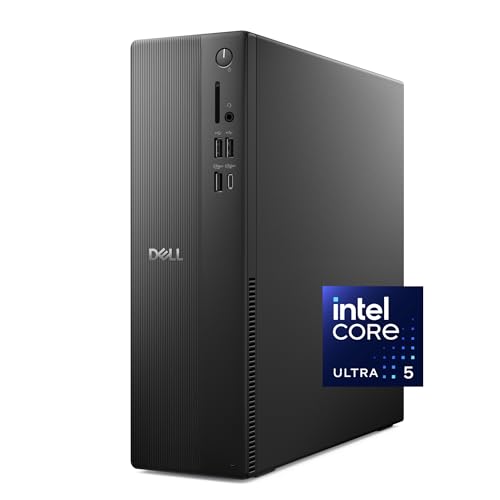
Dell Slim Desktop Intel Core Ultra 5-225 16GB DDR5

Intel Core 2 Duo E7500 Processor 2.93GHz LGA775

Dell Pro Tower Plus Core Ultra 7 32GB DDR5 1TB SSD
More Details On Our Top Picks
Not every editing station needs to dominate a desk. This compact small-form-factor machine packs a seventh-generation Intel quad-core i7 running at 3.60GHz, paired with 32GB of DDR4 memory and a 1TB solid-state drive. For someone cutting 1080p footage or managing light 4K proxy workflows, that combination handles timeline scrubbing and export queues without complaint. The renewed status keeps the entry cost approachable for a bedroom studio setup.
You’ll appreciate the built-in WiFi and Bluetooth connectivity, along with dual-monitor support through HDMI for spreading your timeline across two displays. Compared to the HP ProDesk later in this list, the Optiplex trades a couple of cores for a smaller physical footprint. The honest read is that this generation of i7 will start showing its age on heavier effects-laden sequences.
Strong Points
- 32GB DDR4 RAM handles multiple browser tabs alongside editing software without stuttering
- 1TB SSD loads project files and assets noticeably faster than a spinning hard drive
- Small-form-factor chassis fits on a shelf or cramped editing desk
- Dual HDMI output supports a two-monitor timeline layout out of the box
Things To Consider
- Renewed units may show cosmetic wear from prior office use
- Seventh-gen i7 lacks the core count of newer Coffee Lake chips for heavy multi-threaded renders
Key Specs
Right Fit For
Beginner to intermediate editors working primarily with 1080p footage who need a compact, ready-to-go workstation.
A Better Fit Elsewhere
Editors stepping into 4K multicam timelines should consider the HP ProDesk 600G4 for its six-core i7-8700 processor.
Sometimes the smartest move is breathing life into an existing motherboard rather than buying a whole new system. This boxed sixth-generation i7 fits LGA 1151 sockets and runs four cores at 3.40GHz with an 8MB cache. For editors sitting on a compatible older board, dropping this chip in place of a Pentium or i3 can transform a sluggish machine into a serviceable editing rig. The 14nm Skylake architecture brings hardware-accelerated video encoding through Intel Quick Sync.
That Quick Sync technology leverages a dedicated media engine on the die, meaning certain H.264 and H.265 exports finish far faster than raw CPU clocks suggest. Unlike the renewed Dell Optiplex above, this purchase is the processor only, so you’ll need compatible memory, cooling, and a motherboard already in hand. One thing worth considering: LGA 1151 boards have a finite upgrade ceiling beyond this generation.
Highlights
- Intel Quick Sync hardware acceleration speeds up H.264 and H.265 video exports significantly
- Boxed retail packaging includes the stock cooler, saving a separate purchase
- 65W TDP runs cool and quiet in compact or older cases
Trade Offs
- Installing a bare CPU requires thermal paste application and proper cooler mounting
- Sixth-gen quad-core lacks the thread count for modern 4K proxy workflows
- Socket compatibility requires verifying your motherboard BIOS supports Skylake chips
Made For
Tinkerers upgrading a compatible LGA 1151 desktop from a weaker chip for light 1080p editing duty.
Look Elsewhere When
Shoppers needing a complete plug-and-play system should skip ahead to the Dell Optiplex 7050 SFF for its prebuilt convenience.
Stepping up from the Optiplex’s quad-core, this tower brings a sixth-generation Coffee Lake i7-8700 to the table. That means six physical cores and twelve threads, a configuration that noticeably shortens render times on 1080p projects and handles 4K proxy editing with more headroom. The 32GB DDR4 configuration matches the Dell’s memory capacity, but the full tower chassis allows easier internal access for swapping storage or adding a dedicated GPU later.
Built-in Wi-Fi 5G and Bluetooth cover wireless connectivity without occupying a PCIe slot. For a home office editing desk, the tower form factor sits comfortably under or beside a workstation. You may find the integrated graphics limit real-time playback on heavier color-grade sequences until a dedicated card is added.
Reasons To Buy
- Six-core twelve-thread i7-8700 cuts 1080p export times roughly in half versus the Optiplex’s quad-core
- Full tower case provides room for adding a dedicated graphics card for GPU-accelerated effects
- 32GB RAM supports running DaVinci Resolve alongside Photoshop and multiple browser tabs
- 1TB SSD stores hundreds of hours of raw 1080p footage without juggling external drives
Worth Noting
- Tower dimensions require more desk or floor space than the Optiplex SFF chassis
- Renewed condition means internal components may have varying wear histories
- Integrated graphics alone will struggle with 4K timeline playback without proxy media
At A Glance
Who Will Love This
Intermediate editors handling mixed 1080p and light 4K proxy workflows who value internal expandability.
Consider Something Else When
Professionals working native 4K multicam projects should reach for the Dell Pro Tower Plus Core Ultra 7 for its twenty-core architecture.
Intel’s Core Ultra Series 2 marks a genuine architecture shift, bringing an on-die neural processing unit alongside a new performance-core layout. This slim Dell pairs the Core Ultra 5-225 with 16GB of DDR5 memory, the faster next-generation RAM standard that nearly doubles data throughput per clock cycle compared to DDR4. For editing workflows, that means smoother timeline scrubbing on large project files. The 512GB SSD is modest by editing standards but adequate for active project storage with external archival.
Wi-Fi 6 brings faster wireless transfer speeds when pulling footage from network-attached storage. Unlike the HP ProDesk’s full tower, this slim chassis prioritizes a clean desk aesthetic over internal expandability. The integrated UHD graphics handle basic playback but won’t drive GPU-accelerated effects without a dedicated card.
Bright Spots
- DDR5 memory provides significantly higher bandwidth for scrubbing through high-resolution timelines
- Core Ultra architecture includes an NPU for AI-assisted editing features in supported software
- Wi-Fi 6 connectivity handles large raw footage transfers from wireless sources efficiently
- Slim profile fits neatly on a desk beside dual monitors
Small Caveats
- 512GB SSD fills quickly with raw 4K footage and large cache files
- Slim chassis limits future internal GPU upgrades for hardware-accelerated rendering
Perfect Match For
Content creators doing light 1080p editing who value modern architecture and a space-saving desk setup.
Swap It Out When
Editors needing substantial internal storage should consider the Dell Pro Tower Plus Core Ultra 7 with its 1TB NVMe drive.
A dual-core chip from the 45nm era has no business tackling modern 4K timelines. That said, the E7500 still serves a narrow but real purpose for editors maintaining legacy capture stations or offloading archival machines that run older software versions. Running at 2.93GHz on a 1066MHz front side bus with 3MB of L2 cache, this processor handles basic 720p or standard-definition transcoding tasks. Think of it as a spare part for keeping a retro ingest workstation alive rather than a primary editing engine.
The LGA775 socket is long retired, so compatibility comes down to matching your existing motherboard’s chipset support list. Compared to every other pick here, this is the only standalone processor aimed squarely at repair rather than upgrade.
Plus Points
- 45nm architecture runs efficiently and cool in older cases with limited airflow
- 3MB L2 cache provides enough buffer for basic standard-definition media processing
Points To Note
- Dual-core design cannot handle modern video editing software minimum requirements
- LGA775 motherboards and DDR2 memory are increasingly difficult to source for repairs
- Thermal paste on bare processors this old often needs cleaning and reapplication before installation
Whose Shelf It Belongs On
IT technicians maintaining legacy capture or ingest stations running older editing software versions.
Reach For A Different Pick When
Anyone building a functional editing workstation should grab the Intel Boxed Core I7-6700 for a meaningful performance baseline.
Twenty cores running up to 5.3GHz changes the editing conversation entirely. This Dell Pro Tower Plus houses Intel’s Core Ultra 7 265, splitting its count between performance and efficiency cores to distribute rendering threads intelligently. The 13 TOPS NPU (neural processing unit) handles AI-accelerated tasks like auto-rotoscoping and background removal in supported software, offloading work from the main cores. With 32GB of DDR5 and a 1TB NVMe SSD, this configuration targets professional editors who bill clients by the project.
Three DisplayPort 1.4a outputs drive triple 4K monitors simultaneously, letting you spread timelines, preview windows, and scopes across a full editing wall. The front and rear USB-C ports handle fast footage transfers from modern cameras. Unlike the Slim Desktop’s compact chassis, this tower assumes you have the desk infrastructure for a serious workstation.
Standout Traits
- 20-core architecture distributes rendering threads across performance and efficiency cores for faster export times
- 13 TOPS NPU accelerates AI-assisted editing features in compatible applications
- Triple 4K DisplayPort output supports a full three-monitor professional editing layout
- 32GB DDR5 RAM handles heavy 4K multicam timelines with substantial memory headroom
- 1TB NVMe SSD provides rapid scratch-disk performance for large cache files
Room For Improvement
- Full tower size demands considerable desk or floor space allocation
- Integrated graphics may still bottleneck GPU-heavy color grading without a dedicated card
Feature Snapshot
Built With In Mind
Professional editors working native 4K multicam timelines who need AI acceleration and multi-monitor output.
Skip It When
Editors sticking to 1080p projects will find the HP ProDesk 600G4 delivers sufficient performance at a lower tier.
What Matters Most Before Choosing Video Editing Cpus
Core Count And Clock Speed Balance
Video editing software spreads rendering tasks across available cores, so more threads generally mean faster exports. However, timeline playback responsiveness often depends on single-core clock speed. A six-core chip running at 3.4GHz can feel snappier during scrubbing than an eight-core chip at 2.8GHz. Prioritize balanced processors that maintain boost clocks above 4.0GHz for at least single-core bursts.
Memory Type And Capacity
DDR4 remains serviceable, but DDR5 nearly doubles bandwidth per clock cycle. For editing, 16GB is the functional minimum for 1080p work. 32GB provides comfortable headroom for 4K proxy workflows, and 64GB suits heavy multicam timelines. Faster RAM helps the CPU access cached frames without stalling playback.
Integrated Graphics Versus Dedicated GPU
Many editing programs like Premiere Pro and DaVinci Resolve support GPU acceleration for effects and color grading. Integrated graphics handle basic playback but bottleneck on heavy color nodes or multiple adjustment layers. Towers with PCIe slots allow adding a dedicated card later, while slim and small-form-factor chassis limit that path.
Storage Speed For Scratch Disks
NVMe SSDs read and write at multiples of SATA SSD speeds. A 1TB NVMe drive serves as both system disk and scratch space, keeping render cache fast. 512GB drives fill quickly with raw footage and cache files, so plan for external archival storage.
Before You Click Buy
Traps First Timers Fall Into
Shoppers often chase core counts without checking single-core boost clocks. A sixteen-core processor at 2.0GHz will lag during timeline scrubbing compared to an eight-core at 4.5GHz. Another common misstep is buying a slim chassis for future GPU upgrades. Slim cases rarely accommodate full-height graphics cards, locking you into integrated graphics performance.
Where The Extra Money Goes
Higher-tier processors add efficiency cores alongside performance cores, distributing background tasks without slowing active timeline work. DDR5 memory and PCIe NVMe storage further reduce bottlenecks during heavy cache operations. The premium also buys NPU acceleration for AI-assisted features in supported editing software, which can automate tasks like rotoscoping and audio ducking.
Frequently Asked Questions
How many cores do you need for 4K video editing?
Eight or more cores provide comfortable headroom for 4K proxy editing and export tasks. Six cores can handle 4K with proxy media, but native 4K timelines benefit from twelve or more threads for smooth playback.
Is DDR5 memory worth it for video editing?
DDR5 offers nearly double the bandwidth of DDR4, which helps during heavy timeline scrubbing and large cache operations. For 1080p editing the difference is modest, but 4K workflows benefit noticeably from the faster data throughput.
Can integrated graphics handle video editing?
Integrated graphics manage basic 1080p playback and simple cuts. Effects-heavy timelines, color grading, and 4K work require a dedicated GPU for real-time preview without dropping frames during scrubbing.
What is an NPU and does it help with editing?
A neural processing unit handles AI-accelerated tasks like auto-rotoscoping, background removal, and audio cleanup in supported software. It offloads these specific operations from the main CPU cores, freeing them for timeline processing.
Should you buy a renewed desktop for video editing?
Renewed workstations offer strong value when they include adequate RAM and SSD storage. Verify the processor generation supports your editing software’s minimum requirements and check return policies for hardware wear coverage.
Final Verdict
Your editing workload should dictate your processor choice, not the other way around. For 1080p timelines, the Dell Optiplex 7050 and HP ProDesk 600G4 deliver capable renewed performance without stretching your budget. Editors moving into 4K territory will find the Dell Pro Tower Plus Core Ultra 7 worth the investment for its twenty-core architecture and AI acceleration. Match the chip to your footage resolution, leave room for a dedicated GPU where possible, and your render queue will thank you.
