
Running live sound means juggling gain levels, monitor mixes, and effects in real time. A capable digital console puts all of that control at your fingertips, replacing racks of outboard gear with a single surface. Small bands, church teams, and podcasters benefit most from the 16-channel class, which offers enough inputs for a full drum kit plus vocals without overwhelming a volunteer operator. The picks below span tablet-controlled units, personal monitor stations, and traditional desktop boards.
The Shortlist At A Glance
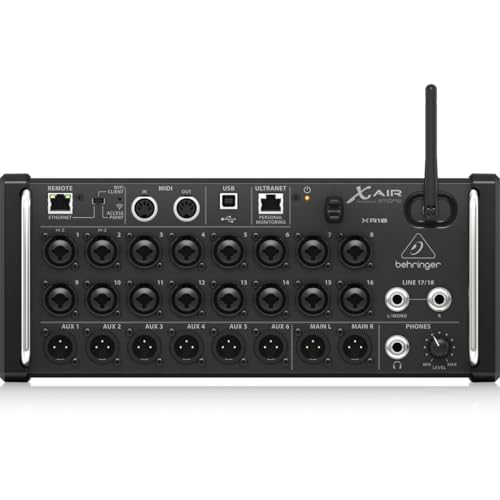
Behringer X AIR XR18 18-Channel Digital Mixer

Behringer POWERPLAY P16-M Digital Personal Mixer

Phenyx Pro PTX-15 4-Channel Audio Mixer

Zoom LiveTrak L-12 Mixer/Recorder

Yamaha MG16XU 16-Input Mixer with Effects
More Details On Our Top Picks
Rack-mountable digital consoles that ditch physical faders for tablet control are a different breed, and the XR18 leans hard into that concept. Instead of a bulky surface, the whole unit lives in a 1U or 2U rack space, letting an iPad or Android tablet handle every mixing decision over Wi-Fi. Sixteen MIDAS-designed preamps, known in the industry for clean gain and low noise, feed 12 mix buses, giving a full band plenty of routing flexibility. For bands playing small-to-mid venues where stage space is tight, that footprint-to-channel ratio is a serious advantage.
The trade-off is purely operational. No physical faders means your mix depends on a touchscreen, which can frustrate engineers used to grabbing a knob mid-song. The built-in Wi-Fi router simplifies setup in most rehearsal rooms, though crowded venue networks may cause occasional latency hiccups. Still, the multi-channel USB audio interface turns the unit into a capable studio front-end when not on live duty.
Strong Points
- Sixteen programmable MIDAS preamps deliver studio-grade gain for vocals and instruments alike
- Tri-mode Wi-Fi router eliminates the need for a separate wireless access point at rehearsals
- Multi-channel USB interface routes every input straight to a DAW for multitrack recording
- Tablet control lets the sound engineer walk the room and adjust mixes from the audience perspective
- Compact rack format frees up valuable stage real estate
Things To Consider
- Touchscreen latency on tablets can feel sluggish during fast live adjustments compared to physical faders
- Wi-Fi reliability dips in venues saturated with other wireless traffic, potentially requiring a hardwired backup
- Initial firmware updates and network configuration require patience before first gig use
Quick Facts
Who It Suits Best
Bands and engineers comfortable with tablet-based control who need maximum channel count in a compact rack format.
Where Another Pick Suits Better
Engineers who insist on physical faders and knobs for tactile live mixing will prefer the Yamaha MG16XU’s traditional analog surface.
This unit solves a completely different problem than the XR18. Rather than front-of-house mixing, the P16-M sits on stage and gives each musician control over their own monitor mix. Sixteen channels feed into a compact desktop box, letting a drummer dial up more kick drum without gesturing at the sound engineer between songs. In-ear monitor users benefit most, since the unit connects into a distribution system that routes audio from the main board to individual performers.
The concept is powerful, but it depends on existing infrastructure. The P16-M functions only as part of a broader distribution network, meaning it is not a standalone mixer. Bands already invested in compatible hardware will find it indispensable for reducing stage volume. Those starting from scratch, however, face additional cabling and system costs.
Highlights
- Gives every musician independent control over their own 16-channel monitor mix, eliminating “more me” requests
- Compact footprint fits easily on a mic stand, drum hardware, or keyboard rig
- Simple button-per-channel layout requires zero technical training to operate
- Reduces overall stage volume by enabling in-ear monitoring instead of wedge monitors
Worth Noting
- Requires a compatible distribution system to function, adding cost and setup complexity for first-time users
- Cat-5e cabling runs from the stage box to each unit can tangle and wear over time if not routed carefully
- No built-in effects or EQ, so monitor mixes stay dry unless processed upstream
Right Fit For
Bands using in-ear monitors who want to eliminate stage volume and hand mix control directly to performers.
Consider Something Else When
An engineer needing a front-of-house console for mixing the whole room should look at the Zoom LiveTrak L-12 instead.
Not every gig needs eighteen channels. The PTX-15 from Phenyx Pro targets the entry tier with a compact four-channel board that still packs sixteen DSP (digital signal processing) effects into a portable frame. Four combo XLR and line inputs accept microphones, instruments, or line-level sources, making it suitable for small karaoke setups, solo acoustic acts, or speaking engagements. The USB audio interface handles basic stereo recording to a laptop.
Compared to the XR18’s deep digital routing, this board is refreshingly analog in its workflow. Physical knobs for EQ and effects let a beginner learn signal flow without navigating menus. The honest read is that four channels limits the unit to solo or duo performances, so full bands need not apply.
Plus Points
- Sixteen built-in DSP effects cover reverb, delay, and modulation without external processing
- Combo XLR and line inputs simplify connection for mixed microphone and instrument sources
- Stereo equalizer on the main output shapes the overall room tone quickly
- USB interface handles basic stereo recording for rehearsal archives or podcast capture
Trade Offs
- Four input channels restrict the unit to solo, duo, or small karaoke setups
- Plastic chassis flexes under pressure and may not survive rough road handling
- USB interface is stereo-only, so multitrack recording is not possible
Feature Snapshot
Who Will Love This
Karaoke hosts, solo acoustic performers, and small speaking-event operators who need effects and simple USB capture on a budget.
A Better Fit Elsewhere
Bands needing multi-track recording and more than four inputs should step up to the Zoom LiveTrak L-12.
Recording a live show and mixing it well usually takes two separate devices. The LiveTrak L-12 merges both functions, offering twelve inputs across fourteen channels while simultaneously recording up to fourteen discrete tracks to an SD card at 24-bit/96kHz resolution. That means a band can capture a full multitrack performance live, then mix it later in a DAW without bleed between microphones. Five individual headphone outputs let every musician monitor their own custom mix during the session.
Unlike the XR18’s tablet-only control, the L-12 keeps physical faders on the surface. That tactile feedback matters when adjusting levels mid-performance. The trade-off is a larger footprint and a higher learning curve to master the recording routing. For podcasters and bands who want live sound and post-production flexibility in one box, nothing else on this list matches its recording depth.
Reasons To Buy
- Records up to 14 tracks simultaneously at 24-bit/96kHz to an SD card for studio-quality live captures
- Five dedicated headphone outputs with individual mix controls keep every performer happy during tracking
- Physical faders provide immediate tactile response for live adjustments
- USB audio interface mode routes all twelve inputs to a computer for DAW integration
- Combines live mixing and multitrack recording in a single portable console
Points To Note
- Navigating the recording menus on the small screen can slow down session setup
- SD card write speeds must be fast enough to handle 14 simultaneous tracks, requiring a quality card
- Larger and heavier than tablet-controlled alternatives like the XR18
At A Glance
Built With In Mind
Podcasters and performing bands who want studio-grade multitrack recording alongside capable live mixing in one unit.
Swap It Out When
Engineers who prioritize wireless tablet control and maximum preamp count over onboard recording should grab the Behringer X AIR XR18 instead.
Some engineers just want physical faders, durable knobs, and a board that works without a firmware update. The MG16XU delivers exactly that, packing sixteen inputs and six buses into a traditional analog console with built-in SPX digital effects. Yamaha’s MG series carries a long reputation for rugged construction and clean preamps, making this a familiar sight in small venues and rehearsal spaces. The built-in effects cover reverb, delay, and modulation, reducing the need for outboard processing.
Unlike the XR18’s wireless tablet workflow, every adjustment here happens on the physical surface. That means no Wi-Fi dropouts, no app updates, and no touchscreen latency. The trade-off is weight and size, since the board takes up considerably more real estate than a rack-mounted unit. For a permanent install in a small venue or church, that heft reads as durability.
Bright Spots
- Sixteen inputs with six buses provide ample routing for a full band or small worship team
- Built-in SPX effects library eliminates the need for external reverb or delay units
- Rugged metal chassis withstands the bumps of regular gig transport
- Traditional analog workflow means zero learning curve for engineers moving from older boards
Minor Gripes
- No multi-track USB recording capability, only stereo output to a computer
- Large footprint demands significant desk or console real estate
- Faders can accumulate dust in dusty environments, requiring occasional contact cleaner maintenance
The Right Fit
Venue installers and engineers who value analog reliability, physical faders, and straightforward operation over digital flexibility.
Reach For A Different Pick When
Those needing multitrack recording and portable operation should look at the Zoom LiveTrak L-12 instead.
What Matters Most Before Choosing 16 Channel Digital Mixers
Channel Count And Routing Flexibility
The number of physical inputs dictates how many microphones and instruments connect simultaneously. A full drum kit typically consumes five to eight channels, leaving the rest for vocals and direct instruments. Mix buses, the internal routing paths that send audio to monitors or main outputs, determine how many separate mixes an engineer can create. More buses mean every musician can hear a personalized monitor feed.
Control Surface Preferences
Digital mixers split into two camps: physical fader boards and tablet-controlled units. Fader-based consoles offer tactile, immediate response for live adjustments. Tablet-controlled models save space and let engineers walk the room while mixing. Choosing between them comes down to workflow comfort and whether the venue supports stable Wi-Fi.
Recording Integration
Many modern boards double as USB audio interfaces, but the depth varies. Some send only a stereo mix to a computer, while others route every channel discretely for multitrack studio work. Bands planning to capture live recordings for later mixing should verify multi-channel USB capability before committing. Onboard SD card recording, as found on higher-tier units, adds another layer of capture redundancy.
Durability And Transport
Plastic chassis suits stationary home use, while metal enclosures survive the road. Rack-mountable units save space in mobile rigs but require compatible cases. Consider the weight of the board relative to how often it travels between venues.
Before You Click Buy
Traps First Timers Fall Into
Assuming every digital mixer works the same way out of the box is a common misstep. Tablet-controlled units often need firmware updates and network configuration before the first gig. Skipping that prep leads to Wi-Fi dropouts mid-performance. Another frequent error is buying a board with too few inputs, forcing channel sharing that complicates the signal chain.
When Paying More Pays Off
Stepping up in price generally buys better preamp quality, more mix buses, and deeper recording capability. Premium units include onboard multi-track recording, individual headphone mixes, and rugged metal construction. For working bands and podcasters who record regularly, that investment prevents the need to upgrade later and separates a basic live board from a versatile production tool.
Frequently Asked Questions
What is the difference between a mix bus and an input channel?
An input channel receives audio from a single microphone or instrument. A mix bus routes multiple input channels to a shared destination, such as a monitor speaker or main output. More buses allow more separate mixes for performers.
Can a 16-channel digital mixer record to a computer?
Many models include a USB audio interface for computer recording, but the capability varies. Some units send only a stereo mix, while others route every channel discretely for multitrack production. Check the USB specification before purchasing.
Do tablet-controlled mixers work without Wi-Fi?
Tablet-controlled units typically require a wireless connection, though most include a built-in router. The built-in router creates a direct connection between the tablet and the mixer, eliminating dependence on venue Wi-Fi. A hardwired Ethernet backup is sometimes available for crowded environments.
What are DSP effects in a digital mixer?
DSP stands for digital signal processing, which handles effects like reverb, delay, and compression internally. Built-in DSP effects eliminate the need for external processing hardware. The quality and quantity of effects vary by model and price tier.
Is an analog mixer better than a digital mixer for live sound?
Analog mixers offer tactile control and straightforward operation without firmware updates. Digital mixers provide more routing flexibility, scene recall, and built-in effects. Neither is universally better; the choice depends on the engineer’s workflow and the venue’s needs.
Bottom Line
Choosing the right 16-channel mixer comes down to workflow and use case. Tablet-controlled units like the XR18 excel in compact, wireless setups. Traditional boards like the MG16XU offer analog reliability. Recording-focused options like the LiveTrak L-12 bridge live sound and studio work. Match the feature set to your regular performance scenario, and the right console becomes obvious.
