
A recording-studio computer handles demanding sessions, but a dedicated control surface can make software operation faster and less disruptive. The six Elgato options below are not computers themselves; they are control surfaces designed to manage recording, streaming, presentation, and production software with tactile buttons, dials, and displays. I compare their layouts, app support, and practical fit for different studio routines.
The Lineup, Simplified
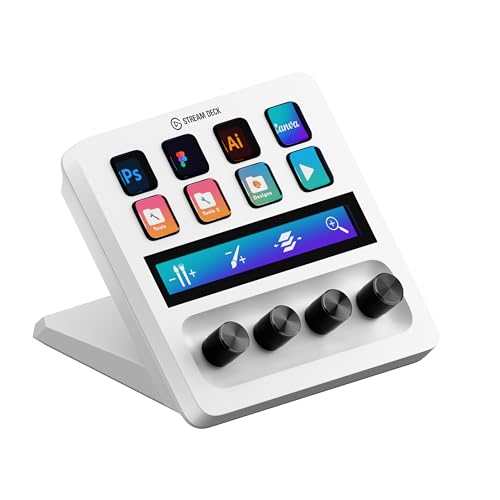
Elgato Stream Deck + White

Elgato Stream Deck +

Elgato Stream Deck Neo

Elgato Stream Deck + XL
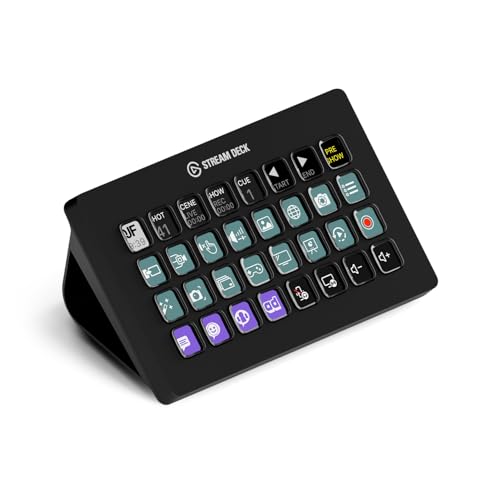
Elgato Stream Deck XL

Elgato Stream Deck MK.2
More On The Choices That Made The List
The white finish gives a recording desk a cleaner, less equipment-heavy appearance without sacrificing tactile control. Its liquid crystal display keys, touch strip, and rotary dials can manage audio, video, lighting, and presentation functions from one surface. I find that combination especially useful during a live session, where moving the mouse away from a recording timeline creates unnecessary distraction.
This model works well for creators whose studio doubles as an office or streaming space. Unlike the more production-oriented Elgato Stream Deck + XL, it feels suited to a mixed workload involving calls, presentations, music, and occasional recording. The white housing may not match every setup, but it works especially well with pale desks and light-colored studio accessories.
Noteworthy Benefits
- LCD keys provide visible confirmation that each command has been activated.
- Touch controls and dials support quick changes to audio, lighting, and video functions.
- Named integrations cover Zoom, Teams, Microsoft Office, Google Workspace, Adobe apps, and Spotify.
- Sequenced or precisely timed multi-actions reduce repetitive production steps.
Soft Spots
- The app and multi-action system requires setup time before the controls become efficient.
- The number of visible keys may feel limited for large live-production workflows compared with the 36-key Elgato Stream Deck + XL.
Quick Facts
Who It Suits Best
It suits hybrid creators handling calls, presentations, streaming software, and small recording sessions from a visually tidy desk.
Another Choice May Suit
The Elgato Stream Deck + XL serves producers who need more keys, dials, profiles, and live production controls.
Elgato Stream Deck + treats the control surface as a configurable bridge between a recording computer and the software around it. LCD keys, a touch strip, and dials support audio mixing, production control, and app automation from a single unit. That flexibility feels more useful in a working studio than a collection of unrelated shortcut devices.
Smart profiles are the practical distinction here. The system can change its interface configuration for different applications, which helps during sessions that move between recording, editing, and communication tools. Compared with Elgato Stream Deck + White, this model places greater emphasis on production plugins such as Wave Link, Camera Hub, Control Center, OBS, Discord, Spotify, and Philips Hue.
Benefits That Matter
- Smart profiles adapt the control layout to separate applications and stages of a production.
- Multi-actions can run several commands together or in a timed sequence.
- Plugin support connects mixing, cameras, streaming, lighting, music, and collaboration tools.
Practical Considerations
- Extensive integration support creates a meaningful initial configuration task.
- Profiles and icons only become effective after the layout matches the actual session workflow.
- Its software-centered flexibility may be more involved than a simple eight-button arrangement.
Made For
Recording and streaming professionals benefit most, particularly those who switch among cameras, mixers, communication apps, and live-production software.
Look Elsewhere When
The Elgato Stream Deck Neo is a better fit for a compact desk where eight shortcut keys and two touch points provide ample control.
Eight shortcut keys make Elgato Stream Deck Neo easy to introduce into a recording routine without occupying a large portion of the desk. The drag-and-drop setup keeps routine actions accessible, including commands assigned to Microsoft Office, Adobe Creative Cloud applications, Zoom, Teams, and Spotify. Two touch points add a little room for gestures or additional controls.
For a small home studio, this is likely the most approachable unit in the group. It can also operate smart lights, connected plugs, and audio equipment, so its value extends beyond a DAW, meaning digital audio workstation, or recording application. I would still choose a larger Elgato Stream Deck XL for a busy production desk that needs many visible commands.
What Works In Its Favor
- Eight keys cover the most frequently used commands without a crowded layout.
- Drag-and-drop configuration makes custom actions manageable for newcomers.
- Two touch points expand the options beyond the physical shortcut keys.
- Broad app support covers calls, presentations, creative work, and music.
- Control over lights, plugs, audio, and other Neo products extends its utility.
Small Caveats
- Eight keys offer less visible control than the larger XL models during complex sessions.
Feature Snapshot
Right Fit For
It fits creators with limited desk space, occasional live sessions, and a manageable list of recurring commands.
Consider Something Else When
The Elgato Stream Deck XL Advanced Studio Controller is better for operators who need 32 dedicated macro keys.
Elgato Stream Deck + XL turns a studio desk into a fuller production console. Thirty-six macro keys sit alongside six multifunction dials and a touch strip, giving the operator a mix of broad command access and precise adjustment. That variety suits a control room where the recording computer runs visual effects, switching software, cameras, audio, and lighting at once.
The touch strip can display important information in real time and reveal additional action pages through swiping. Custom profiles allow separate layouts for different projects or team members, which matters more in a shared production environment than in a simple home setup. Compared with the 32-key Elgato Stream Deck XL, this model adds more granular controls and profile-focused flexibility.
Points In Its Favor
- Thirty-six macro keys expose a large collection of commands without opening software menus.
- Six dials provide precise changes for levels, settings, and multi-function tools.
- The touch strip shows live information and reveals extra action pages.
- Custom profiles organize controls for individual projects, workflows, or team members.
Honest Caveats
- The dense control layout takes planning to avoid assigning overlapping actions.
- Customization depth can feel excessive for a small set of repetitive tasks.
- DAW and video-switcher integrations still depend on the software and accessories present in the studio.
Core Details
Built With In Mind
It suits studio owners and production teams managing layered workflows across creative software, cameras, switchers, and connected equipment.
Reach For A Different Pick When
The Elgato Stream Deck MK.2 Studio Controller offers a simpler and more compact option for a small or mobile recording setup.
Thirty-two customizable LCD keys make Elgato Stream Deck XL a focused macro controller for demanding live-production desks. Its layout can trigger actions in OBS Studio, XSplit, Streamlabs, Twitch, and YouTube, while the Stream Deck SDK supports custom integrations. For a studio that already depends on established streaming software, that familiar application support is more useful than a large collection of decorative buttons.
The measured footprint is 182 by 112 by 34 millimeters, giving the controller a clear role as a permanent command center. Compared with Elgato Stream Deck + XL, its emphasis stays on keys rather than dials, a touch strip, and extensive profile management. I see it as a sensible middle ground for a production desk that needs many visible commands.
What Earns Its Place
- Thirty-two LCD keys provide an extensive set of visible production commands.
- Direct support for major streaming applications supports common broadcast workflows.
- The SDK allows development of custom actions for specialized studio systems.
Potential Drawbacks
- The key-focused layout offers fewer visible adjustment controls than the newer Elgato Stream Deck + XL.
- An optional protection plan must be acquired with the device or within 30 days of purchase, and pre-existing conditions are excluded.
Whose Shelf It Belongs On
It belongs on a permanent live-production desk where streaming shortcuts, scene changes, and show controls need direct access.
Where Another Pick Shines
The Elgato Stream Deck + XL is the stronger fit for operators who need precision dials, a live information display, and custom user profiles.
Elgato Stream Deck MK.2 brings fifteen customizable LCD keys to a compact 118 by 84 by 25 millimeter body. That makes it a sensible fit for an apartment studio, editing desk, or mobile production kit where every centimeter matters. The keys can launch social posts, adjust audio, play sound effects, and activate lights, giving a small setup more tactile control.
Compared with Elgato Stream Deck Neo, this model presents more commands at once, but it offers less room for workflow expansion. I favor it for a focused recording station with a defined set of actions. The separate protection plan includes accidental-damage and breakdown coverage, though eligibility requires purchase with the device or within 30 days.
Reasons It Performs
- Fifteen LCD keys provide a generous command set for a compact studio surface.
- The small dimensions simplify transport between a desk and mobile recording location.
Trade Offs To Consider
- Fifteen keys may not provide enough visible control for a complex live show.
- Custom icons, plugins, tracks, and effects add setup work before a session.
- The protection plan has an eligibility window and excludes conditions that existed before coverage.
- Older workflow requirements may call for the broader control layout of Elgato Stream Deck XL.
At A Glance
The Right Fit
It fits home-studio owners, podcasters, and mobile creators who want more tactile control than a keyboard shortcut provides.
Not My Match When
The Elgato Stream Deck + XL fits professionals who require more keys, dedicated dials, real-time display information, and detailed profile control.
Matching A Control Surface To The Studio Workflow
Count The Commands That Matter
I start with the actions repeated during a typical session. Recording software, communication apps, lighting, playback, and streaming controls may justify 15 keys, while a complex live production may need several dozen. The physical button count is only the starting point, since multi-actions can combine several commands behind one press.
Check Software Compatibility First
Every chosen device relies on the Stream Deck app and compatible software integrations. I check the required applications against the actual recording setup, including DAWs, video switchers, creative suites, or meeting platforms. A polished layout has little value when the central application cannot connect to the controller.
Match The Physical Layout
Compact models work well for home desks, portable kits, and shared spaces. Larger control platforms suit fixed production consoles where many commands must remain visible. Dimensions matter because a roomy controller can also force the mouse or keyboard farther away.
Decide Between Keys And Dials
Keys suit commands such as launching, toggling, and switching. Dials suit continuous adjustments involving audio levels, effects, or other changing values. The touch strip adds another route for live information, and my preference depends on how much fine adjustment the studio workflow actually requires.
Practical Notes Before The First Session
Common Shopping Slip Ups
I would avoid counting buttons alone, because an unused key adds clutter while a missing function interrupts the session. I also compare the required applications with the controller’s integration list before arranging anything. For a small desk, physical dimensions deserve as much attention as software support.
What The Higher Tier Buys
A larger control platform provides more visible commands, precision dials, real-time information, and separate profiles. That expansion helps shared or complex productions, while a compact unit remains more sensible for a defined set of actions. I pay for additional control only when the studio workflow genuinely fills those controls.
Frequently Asked Questions
Are These Devices Computers For Recording Studios?
No. These Elgato products are control surfaces that operate software on a recording computer. They add tactile commands, app automation, audio control, and production profiles without replacing the computer itself.
Which Elgato Stream Deck Fits A Small Studio?
Elgato Stream Deck Neo offers eight keys and two touch points for a compact setup. Elgato Stream Deck MK.2 provides 15 LCD keys in a similarly compact form and fits a larger set of visible commands.
Is A 32-Key Controller Better For Live Production?
It may suit live production better when the operator routinely switches scenes, launches effects, changes streams, and triggers recording actions. Elgato Stream Deck + XL adds dials, a touch strip, and detailed profiles for more advanced control.
Do I Need The Largest Model For Audio Recording?
A large control surface becomes useful when audio mixing sits alongside cameras, lighting, communication, and streaming tools. For a focused recording workflow, Elgato Stream Deck + White may already cover the necessary commands without adding desk complexity.
How Do I Choose Between The Stream Deck Models?
I count recurring commands, check supported applications, and compare the physical desk area. The choice moves from the compact Neo and MK.2 models toward the 32-key XL and 36-key + XL as complexity and production scale increase.
Final Verdict
I would start with the number of actions used during a normal session rather than the largest available control surface. Compact studios favor Elgato Stream Deck Neo or MK.2, while busy production desks benefit from the 32-key Elgato Stream Deck XL or the more adjustable Elgato Stream Deck + XL. A smaller model remains a practical studio tool when every visible control has a clear job.
