
A remote-work setup lives or dies on the daily rhythm of calls, documents, and shared screens. I compare six practical options here, from a straightforward all-in-one desktop to portable workstations and accessories that solve specific problems without adding unnecessary complexity.
The Shortlist At A Glance
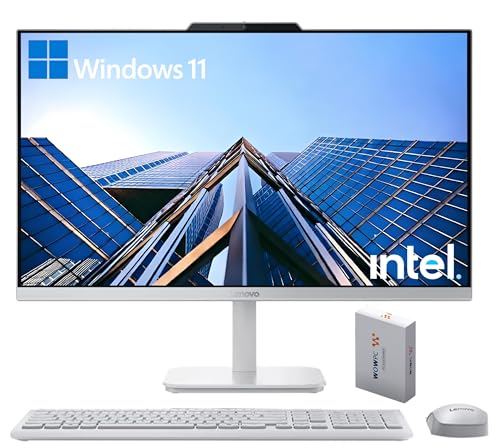
Lenovo 24 FHD All-in-One Desktop, Intel N100, 8GB RAM, 512GB Storage, Win 11 Pro
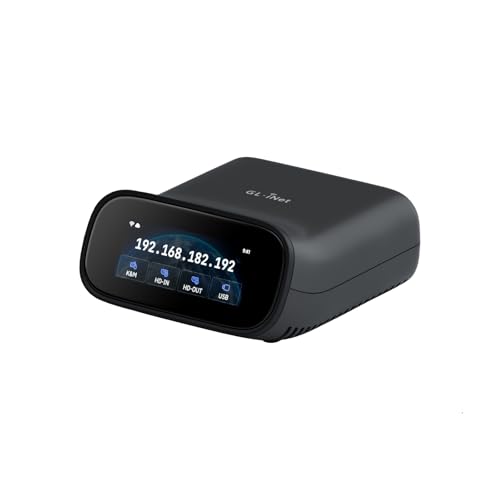
GL.iNet Comet Pro Remote KVM

DinoFire USB-C Wireless Presentation Remote with Red Pointer
GEEKOM AX8 Max Silent Mini PC

GEEKOM IT13 MAX AI Mini PC

NIMO Copilot+ PC 17.3, Ryzen AI 9 HX 370, Radeon 890M, 64GB DDR5, 1TB SSD
More On The Choices That Made The List
The Lenovo 24 FHD All-in-One is built for a permanent desk where fewer separate components create less clutter. Its 23.8-inch anti-glare IPS panel measures 1920 by 1080 pixels, a practical size for spreadsheets, browser tabs, and video calls without demanding a large desk.
For routine administrative work, the four-core Intel N100 and 8GB of DDR4 memory form a sensible baseline. Compared with the portable NIMO Copilot+ PC, this model stays tethered to one workspace, but it also includes a keyboard and mouse for a more complete setup.
What Makes Sense
- The all-in-one design reduces cable clutter and leaves the desk available for notebooks and documents.
- Anti-glare screen treatment helps during long daytime sessions under typical office lighting.
- Wi-Fi 6, Bluetooth 5.2, Ethernet, and several USB ports support flexible wired and wireless setups.
- Storage combines a 128GB PCIe SSD with a 512GB external drive, separating active files from secondary data.
Practical Considerations
- The 8GB memory configuration offers limited headroom for heavy multitasking and many browser-based applications.
- A fixed desktop suits home routines better than frequent travel or changing workspaces.
Quick Facts
Made For
This desktop suits remote workers handling email, documents, spreadsheets, and scheduled calls from a fixed home office.
A Better Fit Elsewhere
Remote workers who need mobility and a large memory allowance will find the NIMO Copilot+ PC 17.3 better suited to hybrid schedules.
The GL.iNet Comet Pro Remote KVM serves a different remote-work problem: controlling a computer located elsewhere while still using a local display, keyboard, and mouse. KVM means keyboard, video, and mouse, allowing those desk accessories to be redirected to another machine.
Unlike the Lenovo 24 FHD All-in-One, which is itself the workplace computer, this device adds remote access around the workstation. Its 4K at 30 fps video passthrough preserves screen detail for interfaces that contain small text or multiple windows.
Features That Help
- Dual-band Wi-Fi 6 supports connections across both 2.4GHz and 5GHz networks.
- Two-way audio allows communication alongside the transmitted display image.
- Wireless access reduces the need to sit directly beside the controlled computer.
- 4K passthrough suits detailed administrative work and software interfaces.
Points To Keep In Mind
- This is an access device rather than a complete workstation, so a separate computer and monitor remain necessary.
- The 30 fps video rate may be less suitable for visually demanding, motion-heavy tasks.
Feature Snapshot
Right Fit For
Technical remote workers and home offices managing an off-site or centrally positioned computer fit this device well.
Consider Something Else When
Standard office work requires a complete local system, making the GEEKOM AX8 Max Silent Mini PC the more straightforward choice.
The DinoFire USB-C Wireless Presentation Remote removes the need to remain beside a laptop during a remote meeting. I see its value most clearly in webinar sessions, client presentations, and classroom-style calls where moving between slides from a distance matters.
The combined USB-A and USB-C receiver broadens device compatibility, covering both older and newer computers. Compared with the GL.iNet Comet Pro Remote KVM, this accessory handles slide navigation and pointing rather than controlling a complete remote desktop.
Everyday Perks
- Slide forward and backward controls keep the main presentation actions within reach.
- Volume adjustment adds useful control without returning to the computer.
- The red laser pointer helps direct attention to precise parts of a shared slide.
- USB-A and USB-C support simplify connections to mixed-device workspaces.
Small Caveats
- The device is most useful during presentations and offers little value for routine document editing.
- Full-screen, window-switching, and hyperlink functions depend on compatibility with the presentation software in use.
Who Will Love This
Trainers, sales professionals, educators, and frequent presenters will appreciate the freedom to move while controlling slides.
Another Choice May Suit
Remote workers managing several off-site computers will get more value from the GL.iNet Comet Pro Remote KVM and its full remote-screen access.
The GEEKOM AX8 Max Silent Mini PC occupies very little desk space while providing the Ryzen 7 8745HS, 16GB of DDR5 memory, and a 1TB SSD. That combination makes it a practical centerpiece for a compact home office where a full-size tower would intrude on the working area.
The Ryzen 7 8745HS provides eight cores with speeds up to 4.9GHz, giving it more headroom for office multitasking, creative applications, and CAD-oriented software than the Lenovo 24 FHD All-in-One’s N100 baseline.
Notable Upsides
- The compact enclosure preserves usable desk area in compact rooms.
- 16GB of DDR5 memory supports several active applications more comfortably than an 8GB configuration.
- A 1TB SSD provides generous room for project files, applications, and local backups.
- The eight-core processor offers useful capacity for demanding multitasking.
Less-Strong Areas
- A separate monitor, keyboard, and mouse are needed to turn the mini PC into a complete workstation.
- The 16GB memory limit is less generous than the NIMO Copilot+ PC 17.3’s 64GB configuration.
Core Details
Built With In Mind
Compact-office workers running mixed office and creative software benefit from the processor, memory, and storage balance.
Where A Sibling Pick Shines
Compute-intensive professionals needing more memory and processing capacity may prefer the GEEKOM IT13 MAX AI Mini PC.
The GEEKOM IT13 MAX AI Mini PC targets work that demands more processing capacity than a typical office desktop offers. Its Intel Core Ultra 9 185H has 16 cores and reaches up to 5.1GHz, making it relevant to software development, media production, simulation, and other compute-heavy routines.
The 24GB of LPDDR5 memory gives it more room for active projects than the AX8 Max, though its 500GB SSD stores less than that model’s 1TB drive. Compared with the NIMO Copilot+ PC 17.3, this machine trades a large integrated display for a compact permanent workstation.
Positive Takeaways
- The 16-core processor provides substantial capacity for parallel work and demanding applications.
- 24GB of LPDDR5 memory gives professional workflows more room for active data.
- The compact chassis fits easily beside a large monitor in a permanent workstation.
Possible Compromises
- The 500GB SSD may be modest for large media libraries, project archives, and local virtual machines.
- A display and input devices must be added separately.
- The higher processor specification offers limited value for basic office tasks.
Whose Shelf It Belongs On
Developers, media professionals, and technical specialists running compute-heavy applications suit this compact workstation well.
Reach For A Different Pick When
Remote workers prioritizing storage capacity over peak processing power may find the GEEKOM AX8 Max Silent Mini PC more practical.
The NIMO Copilot+ PC 17.3 brings workstation-level specifications into a portable form. Its 17.3-inch display provides room for side-by-side documents, video calls, and development windows, which makes it a strong companion for hybrid schedules and frequent travel.
The Ryzen AI 9 HX 370 includes an NPU rated at 50 TOPS, a dedicated processor for AI-related workloads. Its 64GB DDR5 memory and 1TB SSD also surpass the memory and storage figures of both GEEKOM mini PCs, though the larger body remains less desk-friendly.
What Helps Most
- The large display reduces the need to alternate between a laptop screen and a separate monitor.
- 64GB of DDR5 memory comfortably supports heavy multitasking and sizable project sets.
- The 1TB SSD provides useful local capacity for applications, media, and project files.
- 100W USB-C charging simplifies routine power setup at a desk or on the move.
- The 144Hz screen also suits motion-oriented creative work and gaming.
Things To Weigh
- The 17.3-inch footprint is less convenient than a mini PC on a compact desk.
- High-refresh display support may offer little practical value in standard office applications.
Technical Highlights
The Right Fit
Mobile professionals, programmers, and creators needing a large display and substantial memory benefit from this laptop configuration.
Swap It Out When
Remote workers who never travel and prefer a small permanent desktop will find the GEEKOM AX8 Max Silent Mini PC easier to organize.
What Matters Most in a Remote-Work Computer
Start with the ordinary workday
I would start by listing the applications that run every day, the number of browser tabs that remain open, and the file types handled most often. A standard office workload may suit the Lenovo 24 FHD All-in-One, while heavier multitasking rewards the 16GB or 24GB memory configurations.
Match the machine to the workspace
A permanent desk favors an all-in-one computer or mini PC because both reduce visual and physical clutter. The NIMO Copilot+ PC 17.3 makes more sense for hybrid workers who regularly move between locations and value a built-in display.
Give remote access a separate role
Remote KVM equipment and presentation remotes solve focused problems rather than replacing a primary computer. The GL.iNet Comet Pro Remote KVM suits access to an off-site machine, while the DinoFire remote controls slides and pointing during presentations.
A Practical Look at Remote-Work Choices
Common Shopping Slip Ups
I would avoid judging a computer by processor naming alone, since memory, storage, display quality, and connectivity shape daily work just as much. A large specification sheet also does not guarantee that peripherals will connect, so I would check USB, video, network, and power requirements before ordering.
What The Higher Tier Buys
More money generally buys higher core counts, additional memory, faster components, or a better display. That matters for demanding software and heavy multitasking, while everyday documents, calls, and browsing often require less than the most advanced configuration.
Frequently Asked Questions
Is a desktop or laptop better for remote work?
A desktop usually offers greater expandability and a cleaner permanent workstation, while a laptop provides mobility and a built-in display. The better choice depends on how often the workspace changes.
How much memory is enough for remote work?
Eight gigabytes supports common office tasks, though 16GB provides more room for browser-heavy sessions and several applications. Memory-intensive creative or technical work benefits from still more capacity.
Can a mini PC handle video calls?
A mini PC can handle standard remote calls when paired with a suitable monitor, camera, microphone, and network connection. Display quality and the camera setup may matter more than the computer’s form factor.
Is Wi-Fi 6 sufficient for a home office?
Wi-Fi 6 supports modern wireless networks and works well for typical office traffic. Large file transfers, multiple connected devices, and wired network requirements still deserve a closer look.
Should a remote-work computer include a touchscreen?
A touchscreen can help with direct navigation and certain creative applications, but most office work remains efficient with a mouse and keyboard. A non-touch display can also reduce complexity and cost.
Final Verdict
I would choose the Lenovo 24 FHD All-in-One for a fixed, everyday desk, the GEEKOM AX8 Max for a compact and capable workspace, and the NIMO Copilot+ PC 17.3 for mobile professionals. The GEEKOM IT13 MAX serves compute-heavy specialists, while the GL.iNet and DinoFire devices solve specific remote-access and presentation needs. The right setup is the one that matches the actual workday without adding features that will sit unused.
