
A Sims 4 machine should feel responsive during busy household schedules, long building sessions, and mod-heavy saves. I focus on processor capability, memory, graphics, and storage so the final choice fits a real desk rather than looking impressive on a spec sheet. My shortlist also recognizes that some entries are game software rather than complete computers, a distinction that matters before checkout.
A Fast Comparison Of The Options


GEEKOM IT15 AI Mini PC, Intel Ultra 9 285H, 32GB DDR5, 1TB SSD
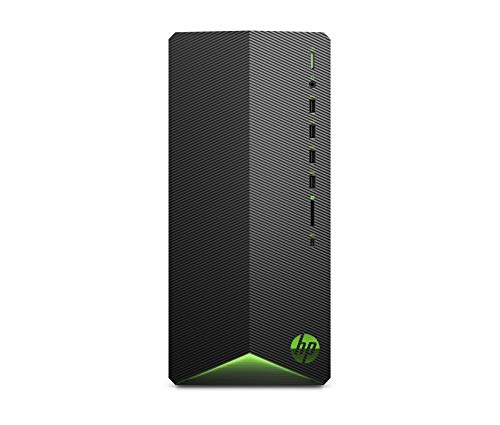
HP Pavilion Gaming Desktop, Ryzen 5 3500, 8GB RAM, 512GB SSD
GEEKOM AX8 Max 16GB Mini PC

GEEKOM IT13 MAX Mini PC 24GB

GEEKOM IT13 MAX 2026 Mini PC
A Deeper Look At The Lineup
I see The Sims 3 PC as a game purchase rather than a computer for Sims 4. Its open neighborhood gives Sims room to travel, visit nearby homes, and meet other characters without separating exploration from everyday life. For someone nostalgic for that style of play, the freedom feels more substantial than a simple checklist of household tasks.
Create-a-Sim tools and extensive customization also support players who enjoy designing distinctive homes, appearances, and routines. The personality system adds variety because each Sim behaves somewhat differently. My honest read is that this entry serves a specific fan, not someone trying to find hardware for a Sims 4 setup.
The Value In It
- The open neighborhood makes travel and social visits central to play.
- Character creation supports a wide range of household styles.
- Distinct personalities can make routines feel less repetitive.
- Broad customization keeps visual decisions within the player’s hands.
Practical Considerations
- This is The Sims 3, not a complete computer or a Sims 4 edition.
- Existing Sims 4 saves and custom content do not belong in this older game entry.
Feature Snapshot
Made For
This fits fans of The Sims 3 who value neighborhood exploration and character-driven household stories.
A Better Fit Elsewhere
The GEEKOM IT13 MAX 2026 Mini PC suits someone actively building a computer setup for Sims 4 rather than purchasing the older game.
The GEEKOM IT15 AI Mini PC brings unusually dense specifications into a compact desktop. Its Intel Core Ultra 9 285H central processing unit, or CPU, has 16 cores and reaches up to 5.4 GHz, giving Sims 4 and demanding background applications considerable headroom. I would consider it for a workstation-style desk where gaming, streaming, and heavy multitasking share the same machine.
Unlike The Sims 3 PC, this is actual hardware with 32GB of DDR5 memory and a 1TB solid-state drive, or SSD. Quad 8K or 4K display support and Intel Arc 140T graphics make it relevant beyond a single gaming monitor. The trade-off is that this level of capability is likely excessive for a dedicated Sims 4 station, depending on how many applications run alongside the game.
What Pays Off
- 16 CPU cores support gaming, creation, and multitasking together.
- 32GB of DDR5 memory offers useful headroom for busy workflows.
- The 1TB SSD provides room for games, media, and substantial project files.
- Multi-display support suits a professional desk arrangement.
Things To Weigh
- Performance this substantial may be more than a Sims 4-only setup needs.
- The mini-PC format still requires consideration of monitor, keyboard, mouse, and connection placement.
Built With In Mind
This is built for a shared workstation that handles gaming, creative software, and several active desktop tasks.
Where A Sibling Pick Shines
The HP Pavilion Gaming Desktop TG01-0040 offers a more conventional gaming route with dedicated Radeon graphics and easier internal expansion.
The HP Pavilion Gaming Desktop feels purpose-built for a gaming desk, and its hardware reflects that practical direction. The Ryzen 5 3500 has six cores and 12 processing threads, while the Radeon RX 5500 provides a dedicated graphics processor, or GPU, with 4GB of its own video memory. That combination gives The Sims 4 a conventional home alongside more demanding games.
Compared with the GEEKOM IT15 AI Mini PC, this desktop trades compactness for a chassis that offers more obvious room for internal expansion. The 512GB SSD supports fast game loading, and Windows 10 Home provides a ready starting point. I would prioritize this route for a dedicated gaming computer rather than a tiny office or media corner.
Key Advantages
- Six CPU cores handle Sims 4 alongside common background applications.
- Dedicated Radeon graphics suit a wider range of gaming demands.
- The desktop chassis creates a practical path for future internal expansion.
- A 512GB SSD gives game libraries a fast storage foundation.
Small Caveats
- 8GB of RAM leaves limited room for heavy multitasking and background memory use.
- The 4GB Radeon RX 5500 is a modest starting point for newer demanding titles.
Technical Highlights
Right Fit For
This suits a dedicated gaming desk where dedicated graphics and physical expansion matter more than a minimal footprint.
Consider Something Else When
The GEEKOM AX8 Max 16GB Mini PC fits a compact desk that needs 32GB-class multitasking headroom and a Ryzen 7 processor.
The GEEKOM AX8 Max 16GB Mini PC makes sense on a desk where a full tower would feel intrusive. Its Ryzen 7 8745HS processor has eight cores and reaches up to 4.9 GHz, giving a Sims 4 session plenty of processing room for household simulations. I also appreciate the emphasis on quiet operation for a shared room or late-night play.
Unlike the HP Pavilion Gaming Desktop, this model pairs a Ryzen 7 chip with 16GB of DDR5 memory and a roomy 1TB SSD while preserving a much smaller footprint. The dedicated Radeon RX 5500 in the HP may matter for broader gaming, but the AX8 Max balances general computing and compact storage more neatly. For a Sims 4-led setup, that balance can be more valuable.
Notable Gains
- The Ryzen 7 8745HS offers eight cores for responsive multitasking.
- 16GB of DDR5 memory provides more breathing room than 8GB configurations.
- A 1TB SSD reduces pressure on the limited space of a compact enclosure.
- Quiet operation suits a living room, bedroom, or shared workspace.
Details To Watch
- The listing emphasizes general and creative workloads more than dedicated gaming hardware.
- A compact mini PC needs compatible display and input connections before it fits the desk.
Quick Facts
Who It Suits Best
This fits a small-space setup that values quiet operation, modern processing power, and compact storage.
Look Elsewhere When
The GEEKOM IT15 AI Mini PC suits a multi-display workstation that needs 32GB memory and a larger storage allocation.
The GEEKOM IT13 MAX Mini PC 24GB feels like a bridge between a gaming computer and a compact creation station. Its Intel Core Ultra 9 185H CPU has 16 cores and 22 threads, reaching up to 5.1 GHz. That processing capacity suits a household running Sims 4 alongside video editing, 3D design, coding, or several communication applications.
The Intel Arc integrated graphics and AI Boost neural processing unit, or NPU, add support for creative and AI-assisted workloads. Compared with the GEEKOM AX8 Max 16GB Mini PC, this model carries more memory and a newer Intel platform, but its 500GB SSD is smaller. I would favor it for a mixed creative-and-games desk, especially one that may need storage expansion later.
A Strong Showing
- 16 CPU cores and 22 threads support demanding multitasking.
- 24GB of memory gives Sims and creative applications room to coexist.
- The NPU supports modern AI-assisted and creative workflows.
- Compact dimensions suit a desk shared between work and play.
Trade Offs
- The 500GB SSD may become crowded once games and creative files accumulate.
- Integrated graphics do not offer the same dedicated hardware path as the HP Pavilion.
Built With In Mind
This fits a creative workstation that alternates between Sims 4, content work, and busy multitasking.
Another Choice May Suit
The GEEKOM IT15 AI Mini PC suits a multi-monitor desk that prioritizes 32GB memory and 1TB storage over upgrade flexibility.
The GEEKOM IT13 MAX 2026 Mini PC pairs the same Intel Core Ultra 9 185H platform as the earlier IT13 MAX configuration with 24GB of LPDDR5 memory. The 16-core, 22-thread processor reaches up to 5.1 GHz, giving Sims 4 and professional applications a responsive shared foundation. I see this version as the more compact deployment option, while the neighboring GEEKOM IT13 MAX Mini PC 24GB provides a 500GB upgradeable SSD.
That storage distinction matters in everyday ownership. A fixed 500GB drive can be sufficient for a focused game library, but a 1TB alternative leaves more space for media, work files, and game collections. The IT15 also carries 32GB and 1TB, yet its workstation positioning and multi-display emphasis make it the less restrained choice for a simple Sims 4 desk.
Features That Help
- The 16-core processor handles complex household simulations and concurrent work.
- 24GB of LPDDR5 memory supports multitasking and compact deployment.
- Intel Arc graphics and the NPU cover general creation and AI-assisted tasks.
- The small enclosure preserves desk space in a home office.
Some Limits To Know
- A 500GB SSD leaves less room for large game and media libraries.
- The compact form calls for a deliberate check of display and peripheral connections.
Core Details
Who Will Love This
This appeals to a home-office user who wants compact power for Sims 4 and professional multitasking.
Not Your Match When
The GEEKOM AX8 Max 16GB Mini PC offers a larger 1TB SSD and a Ryzen 7 configuration for a different compact-build balance.
What Matters Before Buying A Sims 4 PC
Processor Headroom Keeps The Household Moving
The processor, or CPU, handles the calculations behind every Sim, object, animation, and household routine. A modern multi-core chip gives a Sims 4 machine comfortable breathing room, particularly when many Sims live in one save or creative mods add complexity. Single-core speed also matters for everyday responsiveness, so I would avoid judging a machine by core count alone.
Memory Makes Multitasking Possible
RAM is the short-term working memory used by open applications. Eight gigabytes may cover a focused gaming session, but 16GB or more gives streaming software, browsers, creative tools, and the game itself more room. For a long-term family computer, higher memory capacity often creates a more comfortable experience than spending the same allowance on a larger SSD.
Graphics And Storage Shape Daily Use
A dedicated GPU, or graphics processor, provides a clearer path for demanding games than integrated graphics. The HP Pavilion Gaming Desktop makes that distinction concrete with the Radeon RX 5500, although 4GB of video memory is modest for modern titles. Storage matters just as much: a 512GB SSD fills quickly, while 1TB gives game libraries, media, and work files more breathing room.
Small Choices With Big Effects
Mistakes Worth Dodging
Buying a large computer without checking monitor support can create an awkward setup. I would also avoid assuming a high core count compensates for limited RAM or too little storage. A full-system specification check is more useful than focusing on one impressive component.
When Paying More Pays Off
The higher tier adds memory, storage, display capability, or a newer processor. That extra capability matters when Sims 4 shares the computer with editing, streaming, or serious multitasking. A dedicated gaming setup remains a sensible alternative when graphics performance matters more than desk space.
Frequently Asked Questions
What processor is good for Sims 4?
A modern multi-core processor provides comfortable performance for Sims 4 and leaves room for background applications. The Ryzen 5 3500 and Ryzen 7 8745HS represent reasonable midrange starting points for this category.
Does Sims 4 need a dedicated graphics card?
A dedicated graphics card is more useful for a broad gaming library, while the game itself does not make that feature the only sensible choice. The HP Pavilion Gaming Desktop suits that dedicated-GPU route, while compact mini PCs work for focused play and general computing.
How much RAM should a Sims 4 computer have?
I favor 16GB for regular multitasking and 24GB or 32GB for heavier creative or professional use. Eight gigabytes is more modest and leaves less room for several demanding applications.
Is a 512GB SSD enough for Sims 4?
A 512GB SSD is sufficient for a focused collection of games and essential files, but larger libraries and creative media can fill it quickly. A 1TB configuration offers more convenient room for long-term use.
Are mini PCs good for Sims 4?
Mini PCs can handle Sims 4 well because the game is not dependent on a large tower chassis. I would check memory, storage, processor capability, and monitor connections before making the compact choice.
Final Verdict
For a straightforward gaming computer, the HP Pavilion Gaming Desktop offers the clearest dedicated-graphics route, while the GEEKOM AX8 Max 16GB Mini PC suits a smaller and quieter desk. The GEEKOM IT15 AI Mini PC and IT13 MAX 2026 Mini PC make more sense for demanding multitasking or professional work alongside Sims 4. The Sims 3 PC remains a game purchase for its own fan base, not a hardware solution. My best advice is to match the machine to the rest of the workday, not just the game.
