
A small-business computer often has to handle invoicing, customer calls, online storefronts, and the occasional presentation before lunch. I focus on compact PCs that save desk space while providing enough memory, storage, connectivity, and display support for a busy solo office or home-based team.
The Picks In Brief
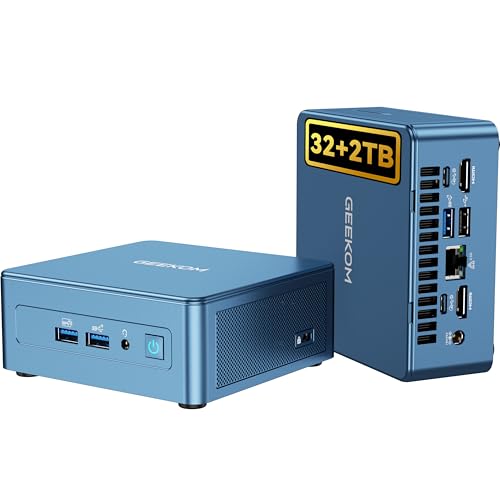
GEEKOM IT13 Mini PC 32GB 2TB

BMAX B6 Mini PC i3-8109U 12GB 256GB SSD

KAMRUI P1 Mini PC Ryzen R2544 8GB 256GB SSD
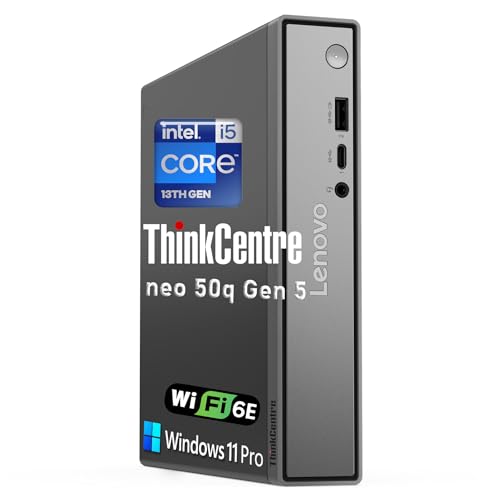
Lenovo ThinkCentre neo 50q Gen 5 i5-13420H

Lenovo ThinkCentre neo 50q Gen 5 i5-13420H 16GB 512GB

Lenovo ThinkCentre neo 50q Gen 5 1L Core 5 210H
Why These Options Stand Out
The GEEKOM IT13 brings together the processing power, memory, and storage headroom I want for a business desktop that may also become a home workstation. Its 13th-generation Intel Core i9-13900H provides 14 cores and 20 threads, making it better suited to heavy multitasking than the BMAX B6 reviewed later.
At 32GB, it comfortably supports a browser full of business tabs, communications software, spreadsheets, and a light media workflow. The 2TB NVMe drive, which uses a fast storage interface, reduces the need for a separate drive in many everyday offices.
What Makes Sense
- I get room for 32GB RAM, expandable to 64GB, without replacing the memory modules.
- The 2TB PCIe Gen4 NVMe drive supports fast file access and plenty of local project storage.
- Two USB4 ports and two HDMI 2.0 ports can drive as many as four displays.
- Tri-Band Wi-Fi 6E and 2.5G Ethernet give me modern wired and wireless options.
- The machined metal mid-frame feels more appropriate for a permanent desk than a plastic enclosure.
Trade Offs
- The 64GB memory ceiling may eventually limit very large virtual machines or unusually heavy multitasking.
- Intel Iris Xe integrated graphics remain less appropriate for demanding 3D rendering than a dedicated graphics card.
Feature Snapshot
Made For In Mind
I favor this model for consultants, developers, and owners who routinely run many applications or need substantial upgrade room.
A Better Fit Elsewhere
The Lenovo ThinkCentre neo 50q Gen 5 i5-13420H 16GB 512GB suits owners who prioritize a compact Lenovo setup over maximum internal expandability.
The BMAX B6 makes sense for basic office work in a small home or reception area where desk space is limited. At 4.9 by 4.4 by 1.3 inches, it takes up less room than most traditional desktop towers, and VESA mounting makes it practical to place behind a monitor.
Its dual-core Intel Core i3-8109U handles documents, browsing, email, study materials, and light multitasking, although the GEEKOM IT13 offers considerably more processing headroom. The preinstalled Windows 11 Pro environment reduces setup work for a new business computer.
The Value In It
- I find the compact enclosure useful in cramped home offices and shared workspaces.
- Two display outputs support a document window alongside a spreadsheet or customer call.
- Dual M.2 slots allow the included 256GB drive to be expanded with additional storage.
- The 35dB cooling design suits a quiet office better than a loud full-size machine.
- Windows 11 Pro is included, along with compatibility for Linux and Ubuntu.
Points To Note
- The 12GB onboard memory places a ceiling on future memory upgrades.
- Two processor cores may become restrictive during heavy spreadsheets, large databases, or video editing.
- Wi-Fi 5 is adequate for many offices, though a compatible Wi-Fi 6 router offers a newer connection standard.
Quick Facts
Right Fit
This PC fits administrative work, remote study, light research, and reception tasks where basic productivity matters more than intensive software.
Swap It Out When
The GEEKOM IT13 Mini PC 32GB 2TB is the better choice for heavy multitasking, large files, and more demanding business applications.
The KAMRUI P1 stands out for its display and port arrangement rather than sheer storage. Its Ryzen Embedded R2544 has four cores, eight threads, and boost speeds up to 3.7GHz, giving it more parallel processing than the dual-core BMAX B6.
I can see this mini PC serving as a three-screen command center, a shared media hub, or a compact workstation beside several business devices. Six USB 3.2 ports, Gigabit Ethernet, and USB-C video output provide useful flexibility for peripherals and equipment.
Advantages To Know
- Three independent 4K displays at 60Hz suit dashboards, reference material, and communication windows.
- Six 5Gbps USB 3.2 ports make it easier to connect storage, scanners, and office equipment.
- The USB-C port carries data and DisplayPort 1.4 video.
- A 28W TDP indicates a modest processor design target, which can suit a compact workstation.
- The included VESA mount and HDMI cable simplify a mounted or multi-screen setup.
Honest Caveats
- The initial 8GB of DDR4 memory can feel limited once several browser-based business tools are open.
- Storage expansion is possible, but the included 256GB drive remains modest for large media libraries.
Built For In Mind
I recommend this model for owners running multiple screens, connecting numerous peripherals, or building a small shared office hub.
Where Another Pick Shines
The BMAX B6 Mini PC i3-8109U 12GB 256GB SSD offers a more conventional dual-screen setup for owners who need less connectivity.
The Lenovo ThinkCentre neo 50q Gen 5 i5-13420H fits neatly behind a monitor or beneath a desk, measuring 7.05 by 7.20 by 1.42 inches. That physical restraint is useful in a small office where every inch of the work surface matters.
The 13th-generation Core i5 provides eight cores, 12 threads, speeds up to 4.6GHz, and a 12MB cache. That combination feels more appropriate for regular business applications than the BMAX B6, although the GEEKOM IT13 remains stronger for intensive multitasking.
A Few Highlights
- I appreciate the 1.42-inch thickness for mounting behind larger displays or under a desk.
- Eight cores and 12 threads provide useful headroom for office applications and communication software.
- The 12MB cache helps the processor keep frequently used working data close at hand.
- Lenovo’s ThinkCentre line carries a business-oriented design rather than a decorative entertainment style.
Practical Considerations
- A compact computer still requires planning for a keyboard, mouse, monitor, and cable connections.
- The processor remains important, but the final configuration should be checked against the required applications and peripherals.
The Main Details
Made With In Mind
This model suits office operators who want a discreet Lenovo desktop with enough processing capacity for daily administrative work.
Another Choice May Suit
The Lenovo ThinkCentre neo 50q Gen 5 i5-13420H 16GB 512GB serves owners who want a more clearly defined memory and storage configuration.
This Lenovo configuration feels like the most straightforward office option in the group because its core components are clearly stated. The 16GB of DDR5 memory provides room for several applications, while the 512GB PCIe SSD gives important files and frequent projects a fast local home.
Its i5-13420H processor retains eight cores, 12 threads, a 4.6GHz maximum speed, and a 12MB cache. The machine also measures 7.05 by 7.20 by 1.42 inches, so it fits the same compact ThinkCentre footprint as the previous model.
A Strong Showing
- I find 16GB of DDR5 well matched to a mixed office workload with browser and communication tools.
- The 512GB PCIe SSD offers a useful balance of capacity and fast access.
- Windows 11 Pro provides a business-oriented starting point for common productivity tasks.
- Wi-Fi 6 supports modern routers and reduces the need for a wired network connection.
- The compact ThinkCentre enclosure saves desk space without adopting a novelty design.
Where It May Fall Short
- Local storage can become crowded with large customer files, product media, or archived projects.
- Wi-Fi 6 performance depends on a compatible router and network coverage.
Whose Shelf It Belongs On
This PC belongs with owners who need a conventional Windows office system, modern wireless support, and a balanced amount of memory and storage.
Reach For A Different Pick When
The GEEKOM IT13 Mini PC 32GB 2TB is the stronger fit for owners managing extensive local files and substantially heavier multitasking.
The 1-liter Lenovo ThinkCentre neo 50q Gen 5 1L Core 5 210H brings a newer hybrid processor design into the same compact business format. Four performance cores handle demanding tasks, while four efficiency cores assist with lighter background work, all within an 8-core, 12-thread arrangement.
For a daily office system, that combination appears sensible for calls, correspondence, reporting, and parallel browser use. Maximum processor speed reaches 4.8GHz, while 12MB of Intel Smart Cache provides a useful working-data buffer, though actual responsiveness still depends on memory, storage, and the applications in use.
Noteworthy Benefits
- I appreciate the mix of performance and efficiency cores for varied business workloads.
- Eight cores and 12 threads provide a modern platform for parallel productivity tasks.
- The 4.8GHz maximum speed benefits short, processor-intensive bursts of work.
- The one-liter class keeps the machine appropriate for small desks and mounted locations.
Possible Compromises
- A one-liter enclosure limits room for expansion compared with larger desktop cases.
- Core count alone does not determine every application, so specific software requirements still deserve attention.
Essential Details
Best Suited To
This model fits owners seeking a current processor platform in a compact chassis for communication, administration, and routine multitasking.
Consider Something Else When
The KAMRUI P1 Mini PC Ryzen R2544 8GB 256GB SSD is a better fit for a three-screen setup with numerous connected devices.
What Matters Before Setting Up a Business PC
Start With the Workload
I begin with the software and number of simultaneous tasks, not the processor label. A small office using email, spreadsheets, browser-based tools, and video calls can work well with a compact Core i3 or i5, while development, large media projects, and intensive data work justify more processing and memory.
Match Memory and Storage
Memory supports active applications, while storage holds files. I recommend at least 16GB for a busy Windows office and 32GB for heavier multitasking. NVMe and PCIe SSDs are useful for system responsiveness, but local capacity still depends on customer documents, product media, and project archives.
Plan the Physical and Display Setup
Mini PCs solve desk-space problems, yet they may require external monitors, input devices, and careful cable placement. I confirm the dimensions, mounting support, display outputs, and available desk space before buying, especially for a three-monitor office or a wall-mounted installation.
Check Network and Expansion Needs
Wi-Fi 6 or Wi-Fi 6E requires a compatible router, while Ethernet remains useful for large transfers and stable calls. I also check RAM and storage expansion because a model with ample specifications today may need more room for a growing catalog, staff files, or a larger project pipeline.
Avoiding Costly Setup Mistakes
Common Shopping Slip Ups
I would avoid choosing by processor speed alone, since display support, memory, storage, and network needs can matter more in daily office work. Checking only the physical size also risks overlooking cable placement, peripheral connections, and whether the installed software suits the available memory.
When Paying More Pays Off
Additional money can buy a faster processor, greater memory, larger storage, newer connectivity, and a more substantial enclosure. That spending makes sense for sustained multitasking, large project files, multiple screens, and growth over several years, while routine administrative work may not need every upgrade.
Frequently Asked Questions
Is a mini PC suitable for a small business office?
A mini PC suits many offices because it handles everyday productivity tasks while occupying little desk space. I consider the processor, memory, storage, display outputs, and network requirements before making that choice.
How much RAM does a small business computer need?
I usually recommend 16GB for a busy office running Windows and several browser-based applications. Heavy multitasking, large datasets, and demanding business software justify 32GB or more.
Do mini PCs support multiple monitors?
Several models support two displays, and some support three or four. I check the output format, maximum resolution, refresh rate, and adapter requirements before planning a multi-screen arrangement.
Should a business computer use Wi-Fi or Ethernet?
Wi-Fi 6 or Wi-Fi 6E works well for flexible offices with compatible routers, while Ethernet provides a stable wired connection. I favor Ethernet for large file transfers, conferencing reliability, and fixed workstations.
Is more internal storage necessary?
More storage becomes useful for customer records, product media, archived projects, and local backups. I select enough capacity for the working set and confirm whether additional drives are supported before choosing the configuration.
Final Thoughts
I favor the GEEKOM IT13 for owners who need processing strength, memory, and expansion room, while the Lenovo ThinkCentre neo 50q models cover more conventional office setups. The BMAX B6 serves lighter daily work, and the KAMRUI P1 stands apart for multi-screen connectivity. Matching the machine to the actual workload and desk makes the decision much simpler.
