
A teenager’s first laptop has to handle homework, video calls, games, and the occasional rushed essay without becoming another family headache. I’ve focused on the details that shape daily ownership: screen quality, memory, storage, portability, keyboard layout, and the software each teen actually needs.
For browsers and Google-based schoolwork, a Chromebook offers the simplest path. Students running creative software, coding tools, or demanding coursework will find more room in a Windows laptop, while the two HP 17.3-inch models show how memory and storage affect that decision.
The Leading Options At A Glance

HP Chromebook 14-inch HD Laptop with 576GB Storage

HP Chromebook 14-inch 180-Degree Hinge Laptop
HP 17.3-inch AI Laptop, Core Ultra 5, 512GB SSD

HP 17.3-inch AI Laptop, Core Ultra 5, 256GB SSD
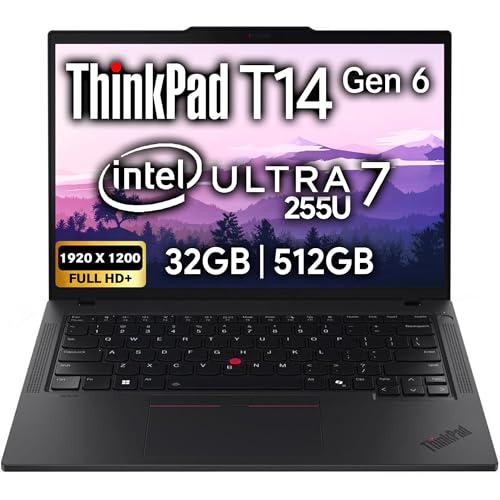
Lenovo ThinkPad T14 Gen 6, Core Ultra 7, 512GB SSD

HP Chromebook 11-inch Laptop, MediaTek MT8183
Taking A Closer Look At The Options
This Chromebook feels like a sensible school-laptop compromise because it pairs a familiar 14-inch format with unusually generous storage for the category. The 576GB figure combines 64GB of built-in eMMC memory with a 512GB dock, plus a 32GB microSD card, giving a teen room for downloaded lessons, music, videos, and project files.
Chrome OS keeps daily work centered on the browser, and the 3.35-pound body is easier to carry than the full-size HP models later in the list. I see it as a practical fit for homework, research, and communication, although 4GB of memory leaves less breathing room for many heavy apps.
Why It Works Well
- The dock, microSD card, and cables make storage expansion part of the package.
- USB-A, USB-C, HDMI, and a headphone jack cover common accessories.
- The 720p camera supports classes and video calls.
- WiFi 5, Bluetooth, and stereo speakers suit ordinary daily use.
Things To Consider
- 4GB of RAM may feel constrained once several demanding browser tabs and creative apps overlap.
- The dock becomes important for reaching the advertised storage, so its cable and connector setup deserve attention before checkout.
Feature Snapshot
Made For
This model suits a teen whose schoolwork centers on web-based tools, documents, and communication rather than intensive creative software.
Another Choice May Suit
The HP 17.3-inch AI Laptop, Core Ultra 5, 256GB SSD suits students who need Windows applications and a larger screen for multitasking.
The 180-degree hinge gives this Chromebook a practical trick: the screen can turn into a tablet-like surface for shared worksheets, drawings, or a lesson viewed across a table. That flexibility is more useful than a fashionable hinge, especially in a shared home or classroom setting.
Unlike the storage-heavy HP Chromebook 14-inch with 576GB Storage, this model keeps the design simple with 32GB of eMMC memory. The 14-inch full HD display, dual speakers, and stated battery life of up to 8 hours and 30 minutes make it a comfortable fit for browsing, notes, and presentations.
Reasons It Performs
- The 1920 x 1080 antiglare IPS panel offers more screen detail than the HD display on the first Chromebook.
- Rotating the display to 180 degrees supports tablet-style use and shared viewing.
- B&O-tuned dual speakers add useful output for videos and group study.
- The 3.40-pound chassis remains easy to carry for a 14-inch laptop.
Trade Offs
- Only 32GB of internal storage requires careful management of downloaded media and offline files.
- The fixed 4GB of DDR4 memory offers little room for memory-heavy multitasking.
Who It Suits Best
I would favor this Chromebook for a teen who watches lessons at home, shares projects with family, and mainly relies on cloud-based applications.
Where Another Pick Shines
The HP Chromebook 14-inch HD Laptop with 576GB Storage is the better fit for a teen who keeps larger files locally and values the included storage dock.
For a teen moving beyond homework in a browser, this 17.3-inch Windows laptop provides the more flexible foundation. The Core Ultra 5 225U processor has 12 cores and 14 threads, while 16GB of DDR5 memory gives heavy browser sessions, creative applications, and several open documents more room to coexist.
Its 512GB PCIe NVMe SSD is the key reason this configuration outranks the smaller-storage sibling for my attention. The 1600 x 900 antiglare display, full-size keyboard, and numeric keypad also work well for long writing sessions, although the larger chassis is less convenient for a crowded backpack.
Benefits That Matter
- 16GB of DDR5 memory supports more demanding multitasking than either Chromebook.
- The 512GB SSD provides practical room for creative assets, game libraries, and large project folders.
- WiFi 6 and two USB-A ports support common school accessories.
- USB-C power delivery, DisplayPort output, and HDMI expand display options.
- The numeric keypad speeds up spreadsheets and data entry.
Points To Note
- The 17.3-inch footprint takes more bag space than the 14-inch alternatives.
- The 1600 x 900 panel is roomy but not as finely detailed as a 1080p screen.
Technical Sheet
Built With In Mind
This configuration fits a teen learning video editing, programming, digital art, or other subjects that need Windows software and substantial local storage.
Reach For A Different Pick When
The HP Chromebook 11-inch Laptop, MediaTek MT8183 is easier to carry for a teen whose coursework remains light and primarily browser-based.
This 256GB version keeps the same 17.3-inch screen, 16GB of DDR5 memory, and Core Ultra 5 225U processor as the 512GB model, but offers half the local storage. That distinction matters most for a teen who streams school materials, edits moderate projects, and relies on cloud storage for larger files.
For a busy kitchen table or shared study space, the wide display, stereo-capable full-size keyboard, and numeric keypad create a comfortable workstation. The 720p camera includes a physical privacy shutter, while the USB-C port supports charging and external-display connections.
Where It Helps
- Windows 11 Home provides access to a broad range of school and creative applications.
- 16GB of memory supports several open applications without requiring a Chromebook’s stricter web-centered workflow.
- The privacy shutter gives students control over the camera during online lessons.
- Fast charging adds practical flexibility during a long school day.
Practical Considerations
- 256GB leaves less room for large game installs, video footage, and archived projects than the 512GB configuration.
- The large chassis is less discreet during travel than a compact 11-inch or 14-inch device.
- A student needing a numeric keypad for intensive data entry may prefer a separate accessory.
The Right Fit
I see this laptop as a balanced fit for a teen moving from school browsing into Windows-based coursework without routinely handling large media files.
Consider Something Else When
The HP 17.3-inch AI Laptop, Core Ultra 5, 512GB SSD is the stronger choice for video projects, large game libraries, or extensive local file storage.
Among these options, the ThinkPad T14 Gen 6 makes the strongest case for a teen who is already serious about coding, engineering, design, or a demanding college course. The Core Ultra 7 255U processor, 32GB of DDR5 memory, and 512GB SSD form a generous platform for development environments and large project folders.
The 14-inch FHD+ IPS display keeps the chassis more manageable than the 17.3-inch HP models, while a backlit keyboard, fingerprint reader, 5MP camera, WiFi 6E, and two Thunderbolt 4 ports support long study days and connected work. It is the most business-oriented option here, and the added hardware carries a corresponding higher cost.
Positive Points
- 32GB of memory provides abundant room for coding tools, virtual environments, and multitasking.
- Two Thunderbolt 4 ports support high-speed accessories and external displays.
- The fingerprint reader adds a convenient hardware-based security measure.
- The backlit keyboard helps during evening study sessions.
Factors To Consider
- This configuration may cost more than a typical family Chromebook.
- A power-hungry student may prefer the simpler setup of a 4GB-memory Chromebook.
Key Product Details
Who Should Grab It
This ThinkPad suits a teen pursuing programming, engineering, technical school, or advanced creative work on a portable 14-inch computer.
Skip It When
The HP Chromebook 14-inch 180-Degree Hinge Laptop is the more economical fit for a teen centered on school browsing, streaming, and shared lessons.
For a teen who carries a laptop between classes, takes it on family trips, or works in tight spaces, the 11.6-inch Chromebook makes portability the central feature. Chrome OS handles browser-based research, Google Workspace, video calls, and Android apps with less complexity than a full Windows installation.
The MediaTek MT8183 processor, 4GB of memory, and 32GB of eMMC storage are modest by current standards, but they suit light web-based lessons. I would keep larger assignments in cloud storage and treat this model as the small laptop for school, not a workstation for video editing or advanced programming.
Useful Highlights
- The 11.6-inch display reduces bulk in a backpack or shared study area.
- Chrome OS provides a familiar, low-friction environment for web-based classes.
- The full-size keyboard makes typing practical despite the compact chassis.
- Mobile-oriented MediaTek hardware suits lightweight everyday tasks.
Where It May Fall Short
- Only 32GB of eMMC storage leaves little room for offline media or large project files.
- 4GB of memory is a tighter fit for numerous browser tabs and demanding applications.
- The 2020 model designation reflects an older platform design.
Quick Facts
Who Will Love This
This Chromebook fits a teen who values a small, inexpensive machine for online lessons, writing, and communication away from a desk.
A Better Fit Elsewhere
The HP 17.3-inch AI Laptop, Core Ultra 5, 512GB SSD is the better fit for advanced coursework, larger files, and creative applications.
What Matters Before Buying A Teen Laptop
Start With The Schoolwork
A teen who mainly uses web-based classes, documents, and messaging can often manage with a Chromebook. I would start by listing the applications and browser-based tools required for each class, because a familiar word processor and web platform place fewer demands on a laptop than video editing, programming environments, or design software.
Memory Matters More Than Storage
Storage determines how many files can live on the device, while memory affects how many applications can remain open at once. For general school use, 4GB can be sufficient, though 16GB gives a student more room for browser tabs, creative applications, and background processes.
Screen Size And Weight Pull In Opposite Directions
The 11.6-inch Chromebook is easy to carry, while the 17.3-inch HP laptops provide a broader canvas for documents, spreadsheets, and side-by-side research. The 14-inch options occupy the useful middle ground, although screen resolution and hinge design can matter more than a fraction of an inch.
Check The Accessories And Software
Ports determine which chargers, monitors, headphones, and storage devices will work smoothly. I would also confirm that the required school software runs on the operating system, since Chrome OS supports many web and Android applications, while Windows handles a wider range of desktop programs.
Making The Right Call Between Laptop Tiers
Common Shopping Slip Ups
Choosing a laptop only from its screen size or processor label can lead to an awkward fit. Memory, storage, operating system, and accessory needs deserve equal attention. A teen who owns several games, edits videos, or installs specialist software needs a different machine from someone whose work stays inside a browser.
What The Higher Tier Buys
Higher-tier models add memory, faster processors, larger storage, richer displays, and more capable ports. Those improvements matter when a teen runs intensive applications or keeps large project files locally. For ordinary browsing and school documents, spending more may add hardware the student will rarely notice.
Frequently Asked Questions
Is A Chromebook Good Enough For A Teen?
Yes, a Chromebook handles web-based lessons, writing, research, video calls, and Google Workspace smoothly. It is less suitable for specialist Windows software, intensive video editing, and demanding programming projects.
How Much RAM Does A Teen Laptop Need?
Four gigabytes works for lightweight browsing and document-based schoolwork, while 16GB is more comfortable for many tabs, creative applications, and multitasking. Memory becomes especially relevant when the laptop must handle several demanding programs at once.
Should A Teen Laptop Have A 512GB SSD?
A 512GB SSD provides more room for games, videos, coursework, and project files without constant cleanup. A 256GB drive can still be sufficient for a browser-focused teen who stores most large materials in cloud services.
Is A 17.3-Inch Laptop Too Large For School?
The larger screen helps with spreadsheets, reading, and multitasking, but it takes more space in a backpack. A student who carries the laptop between classes may prefer a 14-inch model, while a 17.3-inch screen makes sense for regular desk-based work.
Is A 11-Inch Chromebook Good For Online Learning?
An 11-inch Chromebook works well for online lessons, notes, browsing, and communication because of its compact size and simple Chrome OS interface. Its limited memory and storage make it better suited to light coursework than large creative projects.
Final Verdict
The HP Chromebook 14-inch HD Laptop with 576GB Storage offers the most balanced package for ordinary schoolwork, while the 180-degree hinge adds useful flexibility to another 14-inch Chromebook. The two 17.3-inch HP models suit students moving into heavier Windows applications, with 512GB providing the more comfortable storage margin.
For advanced technical work, the Lenovo ThinkPad T14 Gen 6 has the strongest performance hardware, and the compact HP Chromebook 11-inch serves light mobile use. The best choice comes down to the software, storage, and screen size a teen will actually need each day.
