
A trading desk can look powerful and still struggle with a crowded chart, delayed data, and several applications competing for memory. I prioritize a processor with enough core count, fast internal storage, stable networking, and screen support that matches the number of charts in daily use. The mini PCs below cover different needs, from a compact business workstation to a high-performance model with room for expansion.
A Snapshot Of The Selections
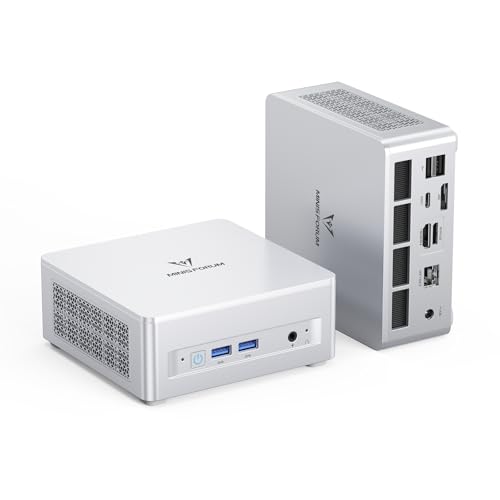
MINISFORUM UM880 Plus Mini PC Ryzen 7 8845HS 32GB DDR5 1TB SSD Radeon 780M OCuLink

Lenovo ThinkCentre Tiny M70q i5-14400T 16GB DDR5 256GB NVMe SSD Win 11 Pro
Lenovo ThinkCentre Tiny M70q i5-14400T 32GB DDR5 1TB NVMe SSD Win 11 Pro
Lenovo ThinkCentre Tiny M70q i5-14400T 16GB DDR5 512GB NVMe SSD Win 11 Pro

BOSGAME E5 Ryzen 3 16GB
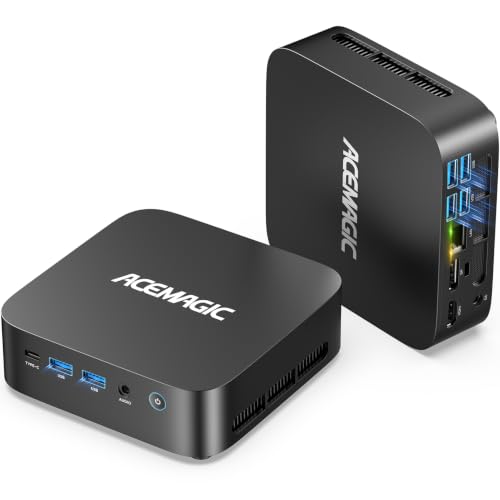
ACEMAGIC K1 Mini PC 16GB 512GB
A Deeper Look At The Lineup
The UM880 Plus makes the most sense for a trading desk that needs several charts, substantial memory, and a path toward stronger graphics. Its Ryzen 7 8845HS has 8 cores and 16 threads, while 32GB of DDR5 memory gives demanding browser and analysis applications room to coexist.
For a multi-monitor office, the HDMI, DisplayPort, and USB4 outputs are particularly useful. I would look closely at external graphics plans though, because the OCuLink connection depends on one M.2 storage slot and is not hot-swappable.
What Pays Off
- Eight processor cores support heavy multitasking and chart analysis.
- 32GB DDR5 memory suits many simultaneous applications.
- Three display outputs enable separate trading workspaces.
- 2.5G Ethernet supports fast wired data transfers.
- OCuLink offers a route to external graphics.
Practical Considerations
- OCuLink use occupies one of the two M.2 storage slots.
- The port cannot be changed while the system is running.
Feature Snapshot
Built With In Mind
Active traders running charts, data tools, and several screens will appreciate the processing and expansion options.
A Better Fit Elsewhere
The Lenovo ThinkCentre Tiny M70q 32GB configuration suits traders who prefer a business desktop without needing external graphics expansion.
This M70q configuration fits a trader who wants a compact, familiar business desktop for research, charting, and routine analysis. The 10-core Intel i5-14400T provides a practical base for browser-heavy workloads, while DDR5 memory keeps the system responsive during a busy session.
The main limitation is storage. A 256GB NVMe drive can fill quickly once market histories, chart data, and other large files accumulate, so I would treat this as a light-storage configuration rather than a long-term archive.
Good Reasons To Consider
- Ten cores provide useful multitasking capacity.
- 16GB of DDR5 handles typical office applications.
- NVMe storage supports quick file access.
- DisplayPort, HDMI, and RJ-45 suit organized desks.
- Windows 11 Pro supports professional workflows.
Worth Noting
- The 256GB drive has limited room for large datasets.
- 16GB is less comfortable for heavy virtual machines or many large datasets.
Made For
Traders with light storage needs and a preference for a compact business desktop will find this configuration straightforward.
Swap It Out When
The Lenovo ThinkCentre Tiny M70q 32GB model is a better fit for traders who keep larger charts, files, and research collections locally.
Compared with the 256GB M70q, this version carries enough memory and storage for a fuller trading workspace. The 32GB RAM configuration is especially useful when charts, tickers, messaging tools, research documents, and browser tabs remain open together throughout the day.
Its 1TB NVMe drive reduces the need to keep large files elsewhere. For an active desktop, that feels more balanced than the smaller model, although the i5-14400T remains a business processor rather than a specialized graphics workstation.
Why It Works Well
- 32GB memory gives demanding workflows more headroom.
- The 1TB SSD accommodates larger local collections.
- Ten-core processing supports parallel applications.
- Wired Ethernet supports stable desk connections.
Small Caveats
- Integrated graphics are less suitable for intensive graphics workloads.
- Adding a dedicated GPU may require a different chassis.
Quick Facts
Right Fit For
Data-heavy traders who value storage capacity in a compact business desktop will find this configuration more practical.
Another Choice May Suit
The MINISFORUM UM880 Plus is the stronger option for traders adding an external graphics card through OCuLink.
The 512GB M70q strikes a more practical middle ground than the 256GB version without moving into the 32GB memory tier. It suits a trader who runs charts and standard business tools, keeps a moderate amount of research data locally, and values a compact ThinkCentre enclosure.
For multiple full trading platforms or memory-heavy analysis tools, 16GB may eventually feel restrictive. I also see this as a dual-screen desktop rather than a three-screen solution, so the display layout deserves attention before purchase.
Positive Takeaways
- 512GB provides more useful local capacity.
- 16GB DDR5 suits everyday analysis.
- The ten-core processor handles routine multitasking.
- Windows 11 Pro comes ready for business use.
Trade-Offs To Consider
- Heavy datasets can consume 512GB quickly.
- The 16GB memory tier is below the 32GB option.
Who It Suits Best
Traders with a moderate data workload and a two-screen desk will find the capacity balance sensible.
Look Elsewhere When
The ACEMAGIC K1 is a better fit for traders wanting a more compact general-purpose system with a 512GB drive.
The E5 is built around the Ryzen 3 5300U, a four-core, eight-thread processor designed more for routine productivity than intensive trading analysis. In a home office, it should handle a focused set of charts, research pages, spreadsheets, and communication tools without taking up much desk space.
Its 16GB of DDR4 and 512GB NVMe drive provide a workable baseline. Compared with the i5-14400T ThinkCentre models, the processor offers less parallel capacity, so the E5 makes more sense for one or two screens than a dense multi-monitor setup.
Standout Benefits
- 16GB handles standard research and office tasks.
- The NVMe drive supports quick application access.
- The compact chassis suits limited desk space.
Possible Compromises
- Four cores offer less multitasking capacity.
- Heavy chart suites may benefit from more processing power.
Feature Breakdown
Who Will Love This
Occasional traders working from a small home office will appreciate the straightforward combination of memory, storage, and size.
Where A Sibling Pick Shines
The Lenovo ThinkCentre Tiny M70q 512GB model suits traders needing more CPU capacity for several demanding applications.
The K1 fits a mixed trading and office setup where the computer must handle charts, browsing, document work, and communication in a small enclosure. Its Ryzen 5 configuration places it above the entry-level E5, while 16GB of RAM remains suitable for a moderate number of active applications.
The 512GB SSD gives it enough local space for regular trading files without reaching the storage level of the 1TB ThinkCentre. I would expect the K1 to work best on one or two displays, and I would verify the available display connectors before arranging a multi-screen desk.
Well-Handled Touches
- Ryzen 5 processing suits mixed workloads.
- 16GB RAM supports regular multitasking.
- Windows 11 Pro supports business applications.
Points To Keep In Mind
- The storage tier may suit moderate datasets.
- Multi-screen arrangements require connector checks.
Core Details
Best Suited To
Traders combining chart analysis with administrative work in a compact office will find the K1 appropriately focused.
Reach For A Different Pick When
The MINISFORUM UM880 Plus is a better fit for traders who need more memory, three outputs, and external graphics expansion.
What Actually Matters In A Trading PC
Processor Capacity
A modern chart platform, a data terminal, several browser tabs, and a messaging application can all compete for the same processing resources. I look for a processor with enough cores to keep those tasks responsive, particularly during periods of heavy data movement. The i5-14400T and Ryzen 7 8845HS offer stronger multitasking foundations than the four-core E5.
Memory And Local Storage
RAM determines how comfortably several open applications coexist, while storage affects how much chart history and research material can remain on the machine. A 32GB configuration offers more breathing room for demanding workflows, and 1TB reduces the pressure caused by large local collections. Lower tiers can still work well, provided the expected workload remains modest.
Displays And Connections
Display support must match the planned desk. Two screens are common for active analysis, while three independent outputs may suit traders separating charts, news, and order tools. I would also check DisplayPort, HDMI, USB4, wired Ethernet, and the number of available USB ports before moving a compact computer into an established workstation.
Practical Lessons For A Trading Setup
Mistakes Worth Dodging
Choosing a computer by core count alone can leave storage or display needs unresolved. I would map the actual software, number of charts, and expected file collection first, then match those demands to memory, storage, and video outputs. A compact size also matters only after the required connections and expansion plans are clear.
What The Higher Tier Buys
Higher-tier configurations typically add memory, storage, processing capacity, or graphics flexibility. The 32GB ThinkCentre serves a heavier local workload than the 16GB version, while the UM880 Plus adds three-display support and OCuLink expansion. That extra capability is useful when several trading tools run together, though a lighter desk may not need it.
Frequently Asked Questions
How Much RAM Is Enough For Trading?
16GB handles many standard chart, browser, and messaging applications. I favor 32GB for heavier multitask use, large local datasets, or virtualized trading environments.
Is A Mini PC Suitable For Trading?
A mini PC can suit trading when its processor, memory, storage, networking, and display support match the workstation. I would choose it for a focused one- or two-screen setup and favor a larger system for specialized graphics expansion.
Do Trading Computers Need Dedicated Graphics?
Integrated Radeon graphics can handle standard chart interfaces and business software. A dedicated card becomes more relevant for heavy visual analysis, AI workloads, or multiple high-resolution displays.
Is NVMe Storage Important For Trading?
NVMe reduces the delay involved in opening files and loading applications. I would consider it preferable for frequently refreshed charts, large research collections, and data stored locally.
How Many Monitors Can These Mini PCs Support?
The MINISFORUM UM880 Plus lists support for three independent displays through HDMI, DisplayPort, and USB4. The ThinkCentre M70q and ACEMAGIC K1 listings provide DisplayPort and HDMI, so screen count and resolution should be confirmed before setup.
Final Verdict
I would choose the MINISFORUM UM880 Plus for an expandable, multi-screen trading desk, the 32GB ThinkCentre Tiny M70q for a balanced business workspace, and the 512GB M70q for lighter analysis. The ACEMAGIC K1 serves mixed office use, while the BOSGAME E5 fits a focused home setup. The right choice depends more on the software and screen workload than on the trading label alone.
