
A VR setup can mean wearing a self-contained headset for active games or connecting a powerful PC to a display and headset. I compare both approaches here, focusing on storage, graphics hardware, wireless connectivity, and the practical needs of commuters, home gamers, and shared-space households.
The Main Contenders

Meta Quest 3S 128GB Gorilla Tag
Meta Quest 3S 256GB Gorilla Tag

ASUS TUF Gaming FX505GT-AB73 15.6-inch 144Hz Core i7

Meta Quest 3S 512GB Gorilla Tag
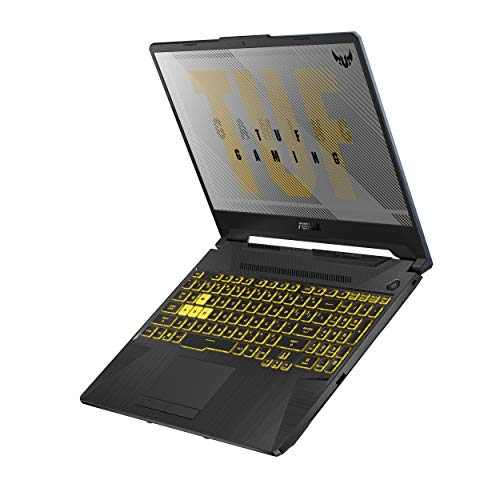
ASUS TUF A15 TUF506IU-ES74 Ryzen 7 4800H GTX 1660 Ti 16GB 512GB Laptop

Skytech Archangel Ryzen 5 3600 GTX 1660 6GB Gaming Desktop
A Breakdown Of The Leading Choices
For active VR sessions without a separate computer, this Meta Quest 3S configuration keeps the setup refreshingly simple. “Standalone” means the headset handles the virtual environment without relying on a tethered gaming PC, which makes it easier to move from a living room to a desk in shared homes.
The Gorilla Tag bundle adds a space-program suit, helmet, and 2,000 shiny rocks to the headset. I see the 128GB version as a sensible entry point for a first standalone setup, particularly for a household that will mostly try a handful of games rather than maintain an extensive library.
What Earns Its Place
- Cordless operation removes the need for a separate gaming computer during ordinary VR use.
- The themed suit, helmet, and virtual rocks give Gorilla Tag fans a more complete themed package.
- Setup support is available around the clock for configuration, connection, and troubleshooting questions.
- The listed protection plan includes covered repairs, parts, labor, and shipping without an added charge.
Practical Considerations
- The 128GB capacity is the smallest among the three Quest 3S choices reviewed here.
- The protection plan must accompany the product or be added within 30 days, and pre-existing conditions are excluded.
- Standalone operation does not provide the same flexibility as a PC-based setup for demanding tethered applications.
Quick Facts
Made For
This version suits first-time VR users, Gorilla Tag players, and shared-space households that value cordless play over maximum storage.
A Better Fit Elsewhere
Meta Quest 3S 256GB Gorilla Tag suits players who expect a larger game library but still prefer a self-contained headset.
The 256GB Meta Quest 3S addresses the storage compromise in the smaller configuration while preserving the same standalone design. I favor this middle option for regular players who expect several active games and a few extras but do not need the largest available library.
Compared with Meta Quest 3S 128GB Gorilla Tag, the added room reduces the pressure to delete or replace content as the collection grows. It still avoids the desk footprint and cable management associated with a dedicated gaming PC, making the setup practical for a bedroom, dormitory, or shared living area.
Advantages To Know
- Standalone hardware lets supported VR experiences run without a separate computer.
- Double the 128GB configuration’s capacity gives regular players more room for games and accessories.
- The Gorilla Tag package includes a suit, helmet, and 2,000 shiny rocks for themed play.
Worth Noting
- The 512GB Meta Quest 3S remains the roomier choice for large collections.
- Tethered PC applications still require separate computing hardware, even though ordinary standalone play does not.
The Right Fit
This headset suits regular standalone players, students in small rooms, and households that want a moderate game library without a full desktop setup.
Where A Sibling Pick Shines
Meta Quest 3S 512GB Gorilla Tag better serves collectors and multiplayer households that expect extensive storage use.
For PC-based VR that travels with me, the ASUS TUF FX505GT-AB73 combines a 15.6-inch display, a 144Hz refresh rate, and an Intel Core i7-9750H processor in a conventional gaming laptop. That makes it more practical than a desktop for VR sessions in different rooms, provided the headset supports the chosen connection method.
Its IPS-type panel is designed to offer broad viewing angles, while Gigabit Wi-Fi 5 handles everyday network traffic. I see the FX505GT-AB73 as a mobile platform for conventional games and compatible tethered VR rather than the most current high-end gaming platform.
Bright Spots
- The 144Hz full HD display provides a fluid surface for competitive games and PC-based VR.
- Intel Core i7-9750H processing supplies a familiar platform for demanding applications and multitasking.
- The 15.6-inch format makes the laptop easier to move between a home office and shared gaming space.
- Gigabit Wi-Fi 5 supports everyday streaming, downloads, and online multiplayer sessions.
- Windows 10 Home provides the listed operating system for conventional PC applications.
Trade Offs
- The 10th-generation Intel processor and GTX 16-series graphics represent an older computing platform.
- A 144Hz laptop display does not translate directly into headset resolution or headset refresh performance.
- The protection plan carries a 30-day purchase window and excludes pre-existing conditions.
Feature Snapshot
Built With In Mind
This laptop suits travelers, students, and home gamers who need one portable system for PC VR, conventional games, and everyday computing.
Another Choice May Suit
ASUS TUF A15 TUF506IU-ES74 suits users who prefer Ryzen 7 processing, 16GB memory, and a 512GB PCIe solid-state drive for a broader mobile gaming setup.
The largest storage configuration makes sense for a household where one headset serves several players or a dedicated VR library sits alongside ordinary games. Meta Quest 3S 512GB Gorilla Tag combines that room with the same cordless approach as the smaller models.
For my purposes, the capacity is the decisive feature. It leaves more space for future content and reduces how often storage management interrupts play, while the bundled suit, helmet, and 2,000 shiny rocks make the Gorilla Tag package feel complete from the start.
Noteworthy Benefits
- 512GB provides the most storage among the Quest 3S options in this roundup.
- Standalone operation keeps supported experiences independent from a separate gaming computer.
- The Gorilla Tag bundle includes a themed suit and helmet alongside 2,000 shiny rocks.
- Round-the-clock support covers setup, connectivity, and troubleshooting assistance.
Small Caveats
- Its cordless design still cannot provide the broader application flexibility of a PC-based VR setup.
Who Will Love This
This configuration suits multiplayer households, dedicated VR players, and collectors who want room for a large game library in one headset.
Consider Something Else When
Meta Quest 3S 128GB Gorilla Tag better serves a light VR user who mainly plays a few games and prefers the smallest storage option.
The ASUS TUF A15 TUF506IU-ES74 brings a more clearly specified gaming foundation to the mobile PC category. Its Ryzen 7 4800H processor, GeForce GTX 1660 Ti graphics, 16GB DDR4 memory, and 512GB PCIe solid-state drive cover the core needs of PC VR and conventional gaming in a 15.6-inch chassis.
Unlike the standalone Quest models, this laptop can also handle everyday productivity and a wider selection of PC applications. I find it especially useful for a shared household where one portable machine needs to serve gaming sessions, work, and media between them.
Points In Its Favor
- The Ryzen 7 4800H processor and GTX 1660 Ti provide a recognizable gaming configuration.
- Sixteen gigabytes of DDR4 memory supports multitasking between games, VR applications, and background tasks.
- A 512GB PCIe solid-state drive provides fast local storage in a compact laptop form.
Possible Compromises
- The GTX 1660 Ti includes 6GB of dedicated graphics memory, which may limit some modern VR workloads.
- The listed Wi-Fi 5 connection is dated for a setup where a newer wireless standard would be preferable.
Technical Reference
Best Suited To
This laptop suits mobile gamers and students who want one system for connected VR, everyday schoolwork, and conventional PC gaming.
Reach For A Different Pick When
Meta Quest 3S 256GB Gorilla Tag suits households wanting completely cordless VR without carrying a full laptop between sessions.
A fixed desk setup has room for a full-size tower, dedicated graphics, and included peripherals without adding to a backpack. The Skytech Archangel pairs a Ryzen 5 3600 processor with a GTX 1660 6GB graphics card, while the package includes a keyboard and mouse for a more complete home-computer setup.
I would treat it as a conventional gaming desktop that may support compatible PC-based VR, rather than assuming every headset will work smoothly with its GTX 1660 hardware. Checking the headset’s graphics and connection requirements before choosing remains essential.
Notable Upsides
- Ryzen 5 3600 processing provides a six-core foundation for gaming and general desktop work.
- The GTX 1660 includes 6GB of GDDR5 graphics memory for an older dedicated graphics platform.
- A 500GB solid-state drive supports fast game loading and local application storage.
- The bundle includes an RGB-lit case, keyboard, mouse, Wi-Fi, and Windows 10 Home 64-bit.
Details To Watch
- Eight gigabytes of DDR4 memory is modest for current multitasking, streaming, and newer VR applications.
- The GTX 1660 is an older graphics generation, so demanding modern VR titles may need careful configuration.
- Compatibility depends on the specific headset, linking method, and applications involved.
Core Details
Whose Shelf It Belongs On
This desktop suits home gamers with a permanent gaming corner and enough space for a full-size tower and display setup.
Swap It Out When
ASUS TUF Gaming FX505GT-AB73 better serves VR users who need a portable system for sessions in different locations.
What Matters Before Committing to a VR Computer
Standalone or PC-Powered
Standalone headsets handle supported experiences without a separate computer, which suits small rooms, shared spaces, and spontaneous play. PC-based systems make more sense for conventional gaming, productivity, and tethered VR applications, but they require careful display and headset compatibility checks.
Graphics and Connection Details
For tethered VR, the graphics card matters more than a laptop’s advertised refresh rate. I check whether the headset supports the intended connection method and whether the computer’s display outputs can drive the required equipment. Wireless standards also matter for online gaming and a desk setup that cannot use Ethernet.
Storage and Everyday Setup
Storage needs depend on how many games and applications need to remain installed. A compact headset appeals to light users, while 256GB or 512GB reduces ongoing file management for regular players. Battery-powered laptops offer mobility, whereas desktops trade that portability for a fixed, expandable workspace.
Avoiding Common VR Computer Mistakes
Mistakes Worth Dodging
A high laptop refresh rate does not automatically translate into better headset performance. I also avoid buying a PC before confirming the headset’s connection method, display requirements, and compatible software.
Where The Extra Money Goes
Higher storage tiers mainly add room for games, while PC-based upgrades tend to affect graphics, memory, and processing capability. I pay for the component that removes a real limitation rather than assuming the largest configuration is needed.
Frequently Asked Questions for Computer For Vr
Do I need a computer for VR?
Standalone headsets do not need a separate computer for supported experiences. PC-based systems are necessary for tethered VR applications and can also handle conventional games.
Which Meta Quest 3S capacity is best?
The 128GB version suits a small library, 256GB gives regular players more flexibility, and 512GB best serves collectors or multiplayer households. Storage needs depend on how much content remains installed.
Is a gaming laptop better than a desktop for VR?
A gaming laptop offers portability for VR sessions in different locations. A desktop provides a fixed setup with more room for components, displays, and peripherals.
Does a 144Hz display improve VR performance?
A 144Hz display improves motion presentation for compatible PC games, but it does not determine headset resolution or refresh rate. Headset specifications and graphics performance remain separate considerations.
Can the Skytech Archangel handle VR?
The Archangel may support compatible PC-based VR applications, but the GTX 1660 and 8GB memory require a careful fit check. I would confirm the headset’s connection and graphics requirements before selecting it.
Final Verdict
I find Meta Quest 3S 256GB Gorilla Tag the most balanced standalone option, while the 128GB and 512GB versions serve lighter and larger collections. For PC-based VR, the ASUS TUF laptops provide portable hardware, and the Skytech Archangel suits a permanent desk setup. The best fit comes down to connection method, storage habits, and where the equipment will be used.
