
A busy editing day can expose the weak point in a computer quickly. I have seen photographers scroll through high-resolution images that stutter on import, while video editors hesitate to stack multiple 4K effects on a timeline because the machine feels crowded. The six systems below cover different needs, from large desktop workspaces to portable creative setups.
For dedicated editing, I prioritize memory, storage, display quality, and the processor’s ability to sustain multitasking. Raw camera files, layered timelines, and communication apps can all compete for resources, so a generous specification helps prevent the desktop from becoming the bottleneck. My top recommendations cover desktop and laptop formats, Apple and Windows workflows, and several different screen sizes.
The Picks In Brief

DELL 2022 Inspiron 7700 All-in-One Desktop, 27-inch FHD Touch Display, 32GB RAM

Apple 2024 iMac M4 All-in-One, 24-inch Retina Display, 16GB, 512GB

Apple 2026 MacBook Neo 13-inch, A18 Pro, 8GB, 512GB, Touch ID, Indigo
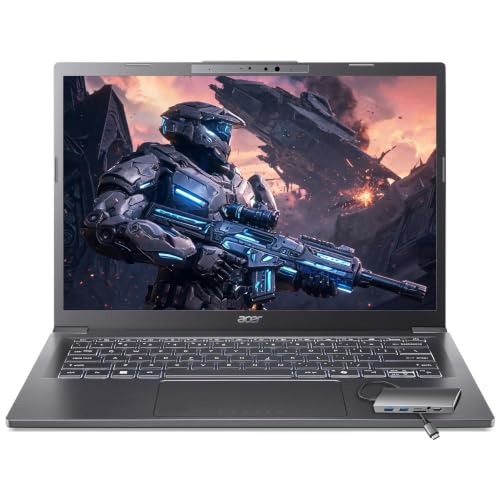
Acer Aspire 2026, Ultra 7 258V

NIMO 15.6 Laptop, R7-8745HS, 32GB
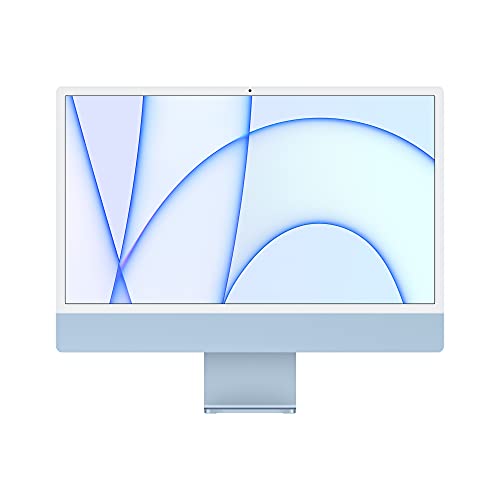
Apple 2021 iMac M1 All-in-One, 24-inch Retina, 8GB, 256GB SSD, Blue
Taking A Closer Look At The Options
The Inspiron 7700 puts a large editing surface directly on the desk without requiring a separate tower. Its 27-inch full HD touch display gives me room to arrange a timeline, image library, and preview window in one view. The all-in-one format also keeps the main components together, which suits a home studio with a single work surface.
Inside, 32GB of RAM gives editing applications room to coexist, while the 1TB SSD provides useful capacity for media files and project caches. The 11th-generation Core i7 and Iris Xe graphics make this a sensible Windows configuration for general creative work. Compared with the smaller Apple systems later in the list, it offers a much larger touch-oriented canvas.
A Few Highlights
- The 27-inch touch display supports direct on-screen control and a spacious editing layout.
- 32GB of RAM is well suited to photo libraries, multiple apps, and demanding timelines.
- The 1TB SSD gives large media collections a practical local home.
- Wi-Fi 6 supports a modern wireless connection for transferring files and collaborating online.
Trade Offs
- The 27-inch display occupies meaningful desk space, so smaller rooms need careful placement.
- Full HD resolution lacks some of the finer detail available on a higher-resolution Retina display.
Feature Snapshot
Made For
I recommend this model to Windows-focused photo editors and video creators who value a large touch display and generous memory in a home studio.
Consider Something Else When
Apple 2024 iMac M4 All-in-One fits creators who prefer a sharper 24-inch Retina display and a newer-generation desktop platform.
The 24-inch Retina display makes this iMac particularly convincing for photo work, where color detail and a clean screen matter. Unlike the Dell’s larger touchscreen, the Apple design centers on a sharp display paired with a compact desktop body. It feels like a natural fit for a dedicated editing corner rather than a shared office desk.
The M4 chip combines a 10-core CPU with a 10-core GPU, giving the system dedicated silicon for graphics and general computing. Its 16GB of unified memory, meaning memory shared by the processor and graphics system, helps smooth application switching, while 512GB of SSD storage offers room for active projects. I favor it for a polished Apple-based workflow, though the memory is less generous than the Dell’s 32GB.
Everyday Advantages
- The Retina display adds useful detail for photographic cropping and color evaluation.
- The integrated desktop reduces cable clutter around the main workstation.
- 512GB of storage gives active media a practical local workspace.
Small Caveats
- 16GB of unified memory is less generous than the 32GB offered by the Dell, Acer, and NIMO configurations.
Quick Facts
Who It Suits Best
I see this iMac as the strongest fit for Mac-based creators who value display detail, quiet integration, and a compact all-in-one workspace.
A Better Fit Elsewhere
DELL 2022 Inspiron 7700 All-in-One suits Windows creators who prefer a larger touch interface and twice the installed memory.
Editing away from a studio changes the shape of the decision, and this 13-inch MacBook makes portability the main attraction. The aluminum enclosure and claimed battery life of up to 16 hours suit travel days, client meetings, and fieldwork where a desktop remains at home. I can picture it handling photo review, presentation preparation, and lighter video cuts between destinations.
The A18 Pro chip handles everyday computing and the system’s Apple Intelligence features, while 512GB of SSD storage is ample for a portable project collection. Touch ID provides fingerprint access without a typed password. Compared with the 2024 iMac’s 16GB, however, this model’s 8GB of unified memory is the less convincing part of the specification for intensive editing.
What Works In Its Favor
- The compact aluminum body travels more easily than any desktop in the list.
- A 512GB SSD gives mobile project work a generous local foundation.
Trade Offs
- The 8GB unified memory is restrictive for large photo libraries and complex timelines.
- The 13-inch screen offers less workspace than the Dell and larger desktop displays.
- Maximum battery life depends on workload and power settings, so heavy exports may shorten a session.
Built With In Mind
I recommend the MacBook Neo to mobile-first creators whose workflow centers on photo selection, client presentations, and moderate video editing away from a permanent desk.
Where Another Pick Suits Better
Apple 2024 iMac M4 All-in-One suits creators whose heavier timelines benefit from 16GB of memory and a larger stationary workspace.
The Aspire combines a touchscreen with 32GB of memory and a 1TB SSD, creating a flexible Windows laptop for mixed creative work. That combination feels more substantial for editing than the MacBook Neo’s 8GB configuration. The touchscreen can be useful for positioning shots, reviewing images, or operating software that benefits from direct input.
Its Intel Core Ultra 7 258V processor includes a dedicated neural processing unit, or NPU, a component designed to handle AI-related computation. The stated 47 TOPS figure represents trillions of operations per second and indicates substantial parallel processing capacity. I find the overall balance useful for photo editing, video effects, background blur, and other locally handled creative tasks.
Useful Highlights
- 32GB of RAM supports several demanding applications and large working sets.
- The 1TB SSD provides space for footage, photographs, and project files.
- The touchscreen adds direct control for compatible creative applications.
- Local AI processing can support effects without sending every task to a cloud service.
- The NPU adds dedicated processing capacity for supported workflows.
Practical Considerations
- Touch controls depend on application support, so not every editing tool gains from the panel.
- The 32GB and 1TB combination is substantial, but large media libraries still require active file management.
Key Product Details
The Right Fit
I see this Acer as a strong match for Windows creators balancing photo editing, video effects, and a portable touchscreen workflow.
Another Choice May Suit
NIMO 15.6 Laptop, R7-8745HS, 32GB suits creators who also value gaming and prefer a larger 15.6-inch FHD screen.
The NIMO takes a different creative angle by combining a 15.6-inch FHD display, 32GB of fast DDR5 memory, and a Ryzen 7 processor. I like that combination for creators who also play games or run technical applications, since one machine can cover editing, rendering, and entertainment. The larger screen also gives timeline controls and image panels more room than the compact MacBook Neo.
The Ryzen 7 8745HS is a 45-watt processor with eight cores and 16 threads, meaning it can divide many software tasks across multiple processing threads. Integrated Radeon 780M graphics use the system’s main memory rather than a separate graphics card with dedicated video memory. That distinction matters: the NIMO has plenty of general creative capacity, but it is not the same architecture as a workstation with a discrete GPU.
Useful Strengths
- 32GB of 5600MHz DDR5 RAM provides a strong foundation for multitasking.
- The 15.6-inch FHD panel offers a practical balance of screen space and portability.
- The eight-core Ryzen 7 is positioned for demanding multitasking, 4K video work, and code-based workflows.
Less-Strong Areas
- Integrated Radeon graphics may not satisfy workflows that depend on dedicated graphics memory or specialized GPU acceleration.
Who Will Love This
I recommend the NIMO to editors and developers who want 32GB of memory, Ryzen processing, and gaming capability in one portable system.
Swap It Out When
Acer Aspire 2026, Ultra 7 258V is a better fit for creators who prioritize a touchscreen, local AI acceleration, and a Windows-focused mobile setup.
This blue iMac delivers the familiar benefits of an Apple all-in-one at a simpler specification than the M4 version. The 24-inch Retina display remains a compelling center for photo review, and matching accessories help the system fit neatly into a creative workspace. It also works with iPhone and iPad, which can be convenient for moving images and continuing lightweight mobile tasks.
Inside, the M1 chip provides an eight-core CPU and eight-core GPU, capable of handling the core demands of a personal editing setup. The meaningful trade-off is 8GB of memory and 256GB of storage. Compared with the 2024 iMac’s 16GB and 512GB, this model suits lighter projects more comfortably, especially once a large camera library and several editing applications are open.
Positive Points
- The 24-inch Retina display provides fine detail for photography and video review.
- The M1 chip includes both CPU and GPU cores in a compact package.
- The 256GB SSD supports fast local storage for active media.
- Apple ecosystem integration supports workflows involving iPhone and iPad.
Factors To Consider
- 8GB of unified memory can become restrictive with large libraries and complex timelines.
- 256GB of storage leaves less room for camera files, caches, and archived projects.
- The older M1 generation lacks the newer M4 platform’s processor and memory headroom.
At A Glance
Best Suited To
I favor this iMac for personal creators with modest project sizes who value a Retina display, a simple desktop, and tight Apple device integration.
Reach For A Different Pick When
Apple 2024 iMac M4 All-in-One fits established professionals who need 16GB of memory and 512GB of storage for more demanding work.
What Creative Workloads Demand From Your Computer
Memory Keeps Creative Software Responsive
I start with RAM because editing software becomes difficult to ignore when several applications, large image libraries, and preview caches compete for memory. Sixteen gigabytes can support many personal projects, while 32GB offers more breathing room for complex timelines and multitasking. The Dell, Acer, and NIMO models include 32GB, making them sensible choices for sustained creative work.
Storage Affects Media Workflows
Fast SSD storage improves project loading, but capacity also determines how many camera files can remain local. I keep finished footage, active projects, and application files separate when storage runs tight. The 1TB configurations in the Dell, Acer, and NIMO give large collections more breathing room than the 256GB iMac or 512GB Apple desktops.
The Display Shapes Photo Decisions
A photo editor benefits from resolution, color detail, and enough screen area for multiple panels. The Dell offers a large 27-inch touchscreen, the NIMO uses a 15.6-inch FHD panel, and both Apple desktops have 24-inch Retina displays. I would prioritize a larger, sharper display for detailed retouching and a lighter laptop panel for mobile work.
Processor Choice Depends on the Workload
General photo correction, web-oriented video, and communication do not place identical demands on a processor. Multi-core chips help with rendering, exports, code, and background tasks, while integrated graphics still require careful consideration for demanding 3D or GPU-heavy editing. I avoid choosing by processor generation alone and match the hardware to the software and workload.
Two Decisions That Shape the Right Setup
Mistakes Worth Dodging
A large screen does not automatically mean a better editing computer, and high core count does not tell the whole performance story. I would check memory, graphics architecture, storage capacity, and application compatibility together. Buying based on one dramatic number can leave another important resource overlooked.
Where The Extra Money Goes
Additional spending may buy more memory, storage capacity, display resolution, or a newer processor. Those upgrades matter most when the current machine struggles with active timelines or cannot hold the required media. I consider the upgrade justified when it removes a recurring editing constraint, not simply because a model carries a more recent chip.
Frequently Asked Questions
How Much RAM Is Best for Video and Photo Editing?
I recommend at least 16GB for many personal creative workflows, while 32GB provides more room for complex timelines, large photo libraries, and multitasking. The useful amount depends on project size, open applications, and editing software.
Can an 8GB Computer Handle Photo Editing?
An 8GB system can handle basic photo correction and lighter video projects, though large RAW libraries and complex timelines may feel constrained. I would use it with fewer background applications and consider more memory for sustained professional work.
Is 512GB of Storage Enough for Creative Work?
It depends on the size of the camera library and how many projects remain on the computer. I keep one active project local and archive finished media, while 1TB offers greater flexibility for extensive collections.
Should I Choose a Desktop or Laptop for Editing?
I choose a desktop for a permanent workstation and a laptop for mobile, client-facing, or location-based work. The best fit depends on portability requirements rather than desktop versus laptop status alone.
Is a Touchscreen Useful for Creative Software?
A touchscreen can help with direct positioning, image review, and compatible software controls, but it is not essential for every editing workflow. I consider it a useful addition rather than a substitute for memory, storage, and suitable graphics.
Final Verdict
I would choose the Dell Inspiron 7700 for a large Windows editing workspace, the M4 iMac for a refined Apple desktop, and the MacBook Neo for portable photo-focused work. The Acer Aspire stands out for its 32GB, touchscreen, and local AI capabilities, while the NIMO suits creators who want editing and gaming together. The older M1 iMac remains a straightforward choice for lighter Apple-centered projects.
