
A Monday morning can expose the difference between a computer that merely starts and one that keeps pace with email, spreadsheets, video calls, and a dozen browser tabs. I focus on the display, memory, processor, portability, and connectivity that matter during a real workday, from a shared home desk to a corporate office. The six choices here cover laptops, an all-in-one desktop, and compact mini PCs for different kinds of work.
A Quick View Of The Lineup

Apple MacBook Air 15-inch M3 with 8GB Memory and 512GB SSD, Starlight

NIMO 15.6-inch IPS FHD Student Laptop with 8GB RAM and 256GB SSD

Apple iMac 24-inch with M4 Chip, 16GB Memory, 512GB SSD, Silver
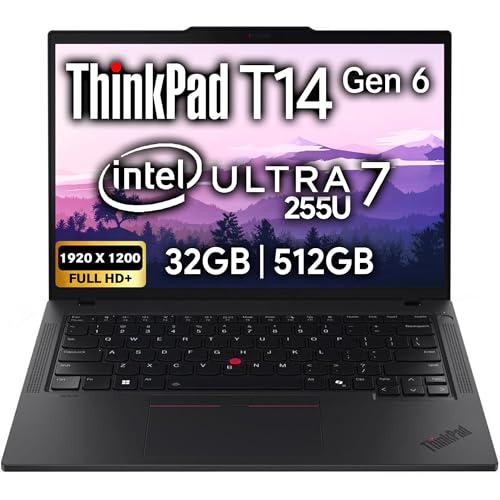
Lenovo ThinkPad T14 Gen 6, 32GB DDR5, 512GB SSD, 14-inch FHD+
GEEKOM AX8 Max Ryzen 7 Mini PC

GEEKOM IT13 MAX 2026 Mini PC
A Breakdown Of The Leading Choices
The large screen catches my attention first because it changes how I handle spreadsheets, presentations, and split-screen work without making the laptop feel cumbersome. The M3 version combines an eight-core processor with an option for a 10-core graphics processor, so it suits general office work, light creative applications, and the occasional demanding task.
For daily commuters, the battery rating of up to 18 hours and slim body remove much of the anxiety associated with finding an outlet. I see the Apple MacBook Air 15-inch M3 as the most balanced portable option, though 8GB of unified memory is modest beside the 32GB Lenovo ThinkPad T14 Gen 6.
Advantages To Know
- The 15.3-inch Liquid Retina display provides ample room for detailed documents and multitasked calls.
- Up to 18 hours of stated battery life supports a full workday away from a charger.
- Two Thunderbolt ports, MagSafe charging, Wi-Fi 6E, and Bluetooth 5.3 cover common desk and travel connections.
- Apple silicon supports common Microsoft 365 and Adobe Creative Cloud applications.
- Support for two external displays with the lid closed helps create a larger workstation.
Points To Note
- Eight gigabytes of unified memory is less generous for heavy multitasking than the ThinkPad T14 Gen 6’s 32GB.
- The 15-inch footprint is easier to carry than a desktop but less convenient than a compact 14-inch notebook.
At A Glance
Made For
Hybrid workers, commuters, and Apple-focused professionals who value a large display and long battery life.
Where Another Pick Suits Better
The Lenovo ThinkPad T14 Gen 6 suits business users who need 32GB of memory and a more compact chassis.
Budget-conscious work setups often need a familiar 15.6-inch screen, a practical keyboard, and enough memory for browsing, documents, and online classes. The NIMO 15.6-inch IPS FHD Student Laptop brings those fundamentals together, with an IPS panel that generally offers more consistent viewing angles than a basic glossy TN display.
I would place it with students, junior staff, and shared household computers where everyday tasks come first. The fingerprint reader, backlit keyboard, Wi-Fi 6, and Bluetooth 5.2 add convenience, although the exact configuration deserves a careful check before checkout.
Key Advantages
- The 15.6-inch Full HD IPS display offers a practical work area for writing, spreadsheets, and classes.
- The backlit keyboard supports late study sessions and low-light office work.
- Fingerprint login provides a convenient alternative to repeatedly entering a password.
- Wi-Fi 6 and Bluetooth 5.2 cover current everyday wireless connections.
Small Caveats
- Memory and storage are more limited than the 32GB and 1TB configurations found among the mini PCs.
- Shoppers should confirm the RAM and SSD configuration shown for the selected offer before purchasing.
- Unlike the MacBook Air and ThinkPad T14, this listing does not establish the same level of premium portability or business connectivity.
Best Suited To
Students, entry-level workers, and households seeking a capable general-purpose laptop at a restrained configuration.
Consider Something Else When
The Apple MacBook Air 15-inch M3 fits commuters better because it combines a larger display with a stated 18-hour battery life.
A fixed office desk can make the 24-inch iMac feel less like another box on the floor and more like a complete workstation. The integrated Retina display and slim enclosure keep the setup visually tidy, while the M4 chip’s 10-core CPU and 10-core GPU provide the processing muscle for creative applications and demanding multitasking.
I think this model makes sense for designers, editors, and home-office workers who favor a large display over portability. Compared with the MacBook Air, it stays anchored to the desk but offers 16GB rather than 8GB of unified memory.
Positive Takeaways
- The 24-inch Retina display creates an expansive canvas for media, design, and document work.
- Ten CPU cores and 10 GPU cores support demanding applications and parallel work.
- Sixteen gigabytes of unified memory gives the iMac more breathing room than the 8GB MacBook Air configuration.
- The thin all-in-one design reduces cable clutter around the main display.
- Seven available colors make the desktop feel more personal than a conventional office tower.
Where It May Fall Short
- The all-in-one form is tied to a desk and cannot be carried between meetings like a notebook.
- A 512GB SSD matches the storage offered by several portable picks, but the 1TB GEEKOM AX8 Max has more room.
Core Details
Who Will Love This
Creative professionals and home-office workers who want a large, polished display and a permanently connected desktop setup.
A Better Fit Elsewhere
The MacBook Air 15-inch M3 suits mobile workers who need the same Apple ecosystem in a laptop that travels easily.
Corporate work tends to reward practical details, and the ThinkPad T14 Gen 6 brings several of them together. The 14-inch Full HD Plus IPS display fits comfortably on most office desks, while the Intel Core Ultra 7 255U and 32GB of DDR5 memory handle large spreadsheets, many browser tabs, and business applications without relying on the 8GB memory found in the MacBook Air.
For managed offices and frequent travelers, two Thunderbolt 4 ports, Wi-Fi 6E, Ethernet, a 5MP webcam, fingerprint reader, and backlit keyboard make this a convincing workday machine. I like the 14-inch size, though some creative work may feel more comfortable on the larger iMac display.
Noteworthy Benefits
- Thirty-two gigabytes of DDR5 memory provides ample capacity for multitasking and heavier business software.
- Two Thunderbolt 4 ports support modern accessories and external equipment.
- Wi-Fi 6E, Ethernet, and a 5MP webcam cover practical office and call requirements.
- The anti-glare FHD Plus IPS panel remains useful under typical office lighting.
- A fingerprint reader and backlit keyboard add everyday convenience.
Points To Keep In Mind
- The 512GB SSD offers less space than the 1TB GEEKOM AX8 Max.
- The 14-inch screen is less expansive than the iMac’s 24-inch Retina display for sustained visual work.
Technical Sheet
Built With In Mind
IT departments, consultants, and mobile office staff who prioritize memory, ports, and conventional business connectivity.
Another Choice May Suit
The GEEKOM AX8 Max fits shared workspaces better because its small enclosure leaves more room for a multi-monitor desk.
Desk space is often the overlooked constraint in an office, and the GEEKOM AX8 Max answers with a compact enclosure rather than a conventional tower. Its Ryzen 7 8745HS processor has eight cores and can reach 4.9GHz, giving it enough capability for business applications, technical work, and multi-screen setups.
I see this mini PC as a sensible shared-workstation option for creative studios, technical offices, or a home desk with multiple monitors. The 1TB SSD provides more storage than the other compact option here, while 16GB of DDR5 memory is a sensible middle ground.
Notable Upsides
- The eight-core Ryzen 7 8745HS processor supports demanding productivity and technical workloads.
- One terabyte of SSD storage holds larger project libraries and local backups.
- Sixteen gigabytes of DDR5 memory handles typical office multitasking.
- The compact enclosure preserves desk space and supports a clean multi-monitor arrangement.
- The silent mini PC format suits shared offices and home workspaces where fan noise would be distracting.
Details To Watch
- A monitor, keyboard, and mouse remain separate parts of the working setup.
- The 16GB memory configuration is less generous than the 24GB in the GEEKOM IT13 MAX.
The Right Fit
Technical teams, studios, and shared offices that want a compact central computer for displays and business applications.
Reach For A Different Pick When
The Apple iMac 24-inch with M4 Chip suits a single-purpose home studio that benefits from an integrated display and fewer separate components.
The GEEKOM IT13 MAX brings workstation-style processor density to a compact computer, which makes it interesting for technical studios and compute-heavy office tasks. Its Intel Core Ultra 9 185H has 16 cores and reaches up to 5.1GHz, while 24GB of LPDDR5 memory handles substantial concurrent work without moving data to a separate drive.
For engineers, editors, and specialists running demanding desktop software, that combination is the central attraction. Compared with the Ryzen 7-based AX8 Max, this model has more memory, but the AX8 Max doubles the listed SSD capacity at 1TB.
The Value In It
- Sixteen processor cores support compute-intensive applications and technical workloads.
- Twenty-four gigabytes of LPDDR5 memory provides comfortable room for advanced multitasking.
- The compact enclosure can serve as a central workstation beneath multiple displays.
- Up to 5.1GHz processor speed gives the system headroom for demanding desktop software.
Some Limits To Know
- The 500GB SSD provides half the storage of the GEEKOM AX8 Max.
- Separate monitors and input devices make the initial setup more involved than an all-in-one system.
Feature Snapshot
Whose Shelf It Belongs On
Technical specialists and creative studios that need high core counts in a compact central workstation.
Where A Sibling Pick Shines
The GEEKOM AX8 Max serves users who prioritize a 1TB SSD over the IT13 MAX’s larger 24GB memory allocation.
What Matters Most In A Work Computer
Processor And Memory For Daily Workload
A processor with several cores handles multitasking more comfortably, while memory determines how many applications remain active without slowing down. I would give an office professional 16GB or more, particularly with frequent browser use, large spreadsheets, or creative software. The Apple iMac and Lenovo ThinkPad provide 16GB and 32GB respectively, making both more flexible for sustained workloads than the 8GB MacBook Air configuration.
Portability Versus Desk Space
A laptop becomes easier to use across meetings, client visits, and shared workspaces when the body and display remain manageable. The MacBook Air weighs little and offers long stated battery life, while the 14-inch ThinkPad provides a more compact business format. Desktop users gain fewer cables with the iMac, and mini-PC owners can free substantial desk space but need separate displays and input devices.
Display, Ports, And Daily Comfort
A larger, sharper screen reduces the need to move between document and communication windows. IPS panels also tend to be easier to view from different positions than basic TN panels, which helps in shared offices. For connections, I pay close attention to USB-C video support, Thunderbolt ports, Ethernet, and wireless standards. The ThinkPad’s two Thunderbolt 4 ports and the MacBook Air’s dual Thunderbolt arrangement make both sensible choices for peripheral-heavy desks.
Common Mistakes Worth Avoiding
Mistakes Worth Dodging
Choosing solely by processor speed misses memory, storage, and connectivity constraints. A powerful chip cannot compensate for too little RAM or an awkward desk, so I recommend checking the complete work setup before deciding. Another common error is assuming a mini PC includes a display; that purchase requires separate monitors, input devices, and possibly additional cables.
Why Top Tier Costs More
Higher-cost configurations commonly add memory, storage, premium displays, and more capable processors. Those additions matter most for multitasking, large project files, intensive software, and multi-monitor work. A basic model remains sensible for browser-centered office tasks, while professional workloads usually benefit from the extra capacity more than a faster specification alone.
Frequently Asked Questions
Is a laptop better than a desktop for work?
A laptop offers better portability, while a desktop usually provides a more permanent desk setup. The MacBook Air fits mobile schedules, while the iMac suits fixed workspaces. I choose based on how often the computer must leave the desk.
How much memory does a work computer need?
Sixteen gigabytes suits many office workloads and heavier multitasking. The Lenovo ThinkPad T14’s 32GB offers more room for intensive applications and large project sets. Lower-memory configurations work best with a focused mix of applications.
Is a mini PC suitable for everyday office work?
A mini PC can handle standard productivity applications, browsing, and document work. It is especially useful with multiple displays or a crowded desk, though separate peripherals must be included in the setup budget. The GEEKOM AX8 Max offers the strongest storage configuration here.
Should a work laptop have a Retina display?
A high-resolution display improves text clarity and visual detail, particularly for design and media work. It also costs more and may reduce flexibility on smaller screens. The 14-inch ThinkPad remains sensible for standard business use, while the 15.3-inch MacBook Air prioritizes visual space.
Is 512GB of storage enough for work?
512GB is sufficient for many office users who keep active files locally and maintain separate backups. Designers, video editors, and teams with large archives benefit from more capacity. The 1TB GEEKOM AX8 Max provides extra room within the compact format.
Final Verdict
I find the MacBook Air 15-inch M3 most convincing for mobile work, the iMac for a polished fixed desk, and the ThinkPad T14 for demanding business setups. The two GEEKOM mini PCs suit people who value a compact central workstation more than a portable or integrated package. Matching the form factor to the actual workspace matters more than chasing a single specification.
