
A keyboard and mouse can transform a cramped desk into a much better place to work. I focus on six cordless and gaming-focused combinations for people who type for hours, manage spreadsheets, play competitively, or simply want a coordinated setup that feels less cluttered.
The Shortlist At A Glance
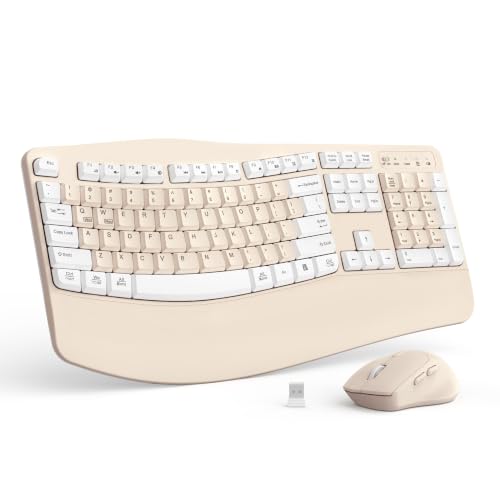
Faadar Keyboard-Mouse, Latte-A

Faadar Keyboard-Mouse, Avocado-Green

Faadar Keyboard-Mouse, Purple-B

Logitech G502 HERO Wired Mouse and G213 RGB Keyboard with 11 Buttons

Faadar Keyboard-Mouse, Black

Faadar Keyboard-Mouse, Blue
The Picks, Examined More Closely
The Faadar Keyboard-Mouse, Latte-A puts comfort before gaming features. Its wave-shaped key rows rise and dip to follow the fingers, while a 2.8-inch palm rest gives the hands somewhere to settle during long documents. For a commuter checking email between trains or a home office worker entering data all day, that layout feels more purposeful than a flat membrane keyboard.
The full-size design also makes this a practical alternative to the compact gaming set included later. A 104-key layout supplies function keys, arrow controls, and a numeric keypad, and a recessed shelf keeps a phone or tablet within sight. The cordless connection removes cable clutter, although the included features make better sense for productivity than competitive gaming.
Bright Spots
- The wave profile and 2.8-inch palm rest support a more natural hand position during extended typing.
- The 104-key layout includes dedicated function keys, arrow keys, and a numeric keypad for spreadsheet work.
- Three pointer sensitivity settings, measured in DPI, let me adjust the mouse for browsing or detailed work.
- Forward and backward mouse buttons speed up movement through webpages and document menus.
- A built-in device recess keeps a phone or tablet visible without adding another stand.
Things To Consider
- The full-size body and numeric keypad need more desk area than a compact keyboard.
- The 2.4 GHz connection requires an available USB port for its receiver.
- Keyboard and mouse each require one AA battery, and those batteries are not included.
Feature Snapshot
Made For Long Typing Days
I favor this set for spreadsheet workers, writers, and students who spend extended periods at one desk.
Where a Sibling Pick Shines
I would point PC gamers toward the Logitech G502 HERO Wired Mouse and G213 RGB Keyboard with 11 Buttons for configurable controls.
The Faadar Keyboard-Mouse, Avocado-Green shares the practical foundation of the Latte-A model but gives a workspace a brighter personality. The green finish feels less formal than black and less loud than RGB lighting, which can be pleasant in a home studio or creative workspace. It remains a work-first set rather than a disguised gaming peripheral.
Its wave-shaped keys, curved mouse, and 2.8-inch palm rest carry over from the Latte-A version, so the main decision is appearance and working style. I would still choose based on desk fit and layout needs, not color alone. The 104-key format favors people who use the numeric keypad regularly.
Useful Strengths
- The avocado-green finish adds character without relying on animated lighting.
- A contoured mouse and wave-profile keyboard give the set an office-friendly ergonomic angle.
- The full-size layout includes a number pad for accounting, inventory, and data entry.
- Low-noise operation suits shared rooms and late-night work sessions.
Trade Offs
- The numeric keypad and integrated device shelf occupy a generous amount of desk space.
- Two AA batteries are needed, with the batteries not included in the package.
Key Product Details
Who Will Love This
I recommend this version for style-conscious people who want a colorful desk without programmable gaming hardware.
Another Choice May Suit
The Faadar Keyboard-Mouse, Black is a quieter visual fit for a conservative office or shared workspace.
Compared with the Avocado-Green version, the Faadar Keyboard-Mouse, Purple-B changes the desk color rather than the core layout. Its purple finish gives a creative workspace or bedroom office a noticeable focal point, while the cordless pair keeps the surface open. That makes it a sensible fit for students and creators who like coordinated peripherals.
The underlying features remain strongly productivity-focused. A wave-shaped keyboard, 2.8-inch palm rest, and palm-curved mouse support long sessions, while the 104-key arrangement includes a numeric keypad. I would choose it over a gaming set for writing, browsing, and general office work because customization takes priority over programmable controls here.
A Few Highlights
- The purple finish makes the setup visually distinct without constant RGB effects.
- Three adjustable DPI settings provide useful control for everyday pointer movement.
- The integrated device recess gives a phone or tablet a dedicated resting place.
- Automatic sleep modes reduce unnecessary power use after inactivity.
Points To Note
- The bold finish may feel less restrained in a traditional corporate setting.
- A full-size keyboard with a number pad takes more room than a compact layout.
Right Fit For
I favor this set for students and creative professionals who want a colorful, comfortable full-size pairing.
Consider Something Else When
The Logitech G502 HERO Wired Mouse and G213 RGB Keyboard with 11 Buttons suits competitive players who need adjustable weights and programmable mouse commands.
The Logitech G502 HERO Wired Mouse and G213 RGB Keyboard with 11 Buttons is the clear choice here for game-focused control. Unlike the cordless Faadar sets, it uses a wired connection and concentrates on adjustable mouse handling, programmable commands, and coordinated RGB lighting. I see it as a practical fit for a permanent gaming desk rather than a mobile setup.
The HERO sensor reaches 25,600 maximum DPI, which measures pointer sensitivity, and its 1:1 tracking maps physical movement directly to input. Five 3.6-gram weights let me alter the mouse mass and balance, while 11 programmable buttons provide extra actions. The G213 keyboard adds tactile keys, dedicated media controls, a slim body, and spill-resistant construction.
Features That Help
- Eleven programmable mouse buttons support custom commands and common shortcuts.
- Five removable weights allow the mouse balance to be adjusted to my grip.
- RGB lighting across the keyboard and mouse creates a coordinated gaming setup.
- The wide DPI range supports both fast movement and more precise aiming.
- Tactile keyboard keys provide physical feedback without the bulk of a mechanical gaming board.
- Dedicated media keys handle common playback controls away from the home row.
Possible Compromises
- The wired connection adds cables across the desk and reduces portability.
- Eleven mouse buttons may take time to learn and can be excessive for basic office work.
- The G213 keyboard is slimmer and less wave-shaped than the Faadar ergonomic models.
Technical Highlights
Built With In Mind
I recommend this set for PC gamers who value programmable controls, adjustable mouse weight, and coordinated lighting.
Look Elsewhere When
The Faadar Keyboard-Mouse, Latte-A is a better cordless fit for a shared office where a gaming-style wired set would feel out of place.
The Faadar Keyboard-Mouse, Black suits an office, study desk, or shared room where visual restraint matters. Its wave-shaped keyboard and 2.8-inch palm rest give the set a comfort-focused character, while the palm-curved mouse provides a more natural resting shape than a flat basic mouse. The black finish also keeps the pair visually simple beside a monitor and monitor stand.
Connection comes through a 2.4 GHz USB receiver, which removes the main keyboard and mouse cables from the work area. The listed protection also covers accidental damage such as drops and spills, plus breakdowns, although coverage varies by plan. I would check those terms before making a purchase, particularly for a frequently shared computer.
Key Advantages
- The wave profile and 2.8-inch palm rest favor comfortable extended typing.
- A palm-curved mouse offers a more relaxed resting angle.
- The 2.4 GHz receiver creates a cordless desktop with less cable clutter.
- Listed accidental-damage coverage includes drops, spills, broken parts, and breakdowns.
Practical Considerations
- The protection terms vary by plan, so I would confirm the details and any exclusions.
- A full-size ergonomic keyboard may occupy more space than a compact office model.
The Right Fit
I favor this set for people building a restrained home office or shared workspace around comfortable wireless peripherals.
Where Another Pick Suits Better
The Faadar Keyboard-Mouse, Blue is a more colorful option for a personal desk where black hardware would feel overly formal.
The Faadar Keyboard-Mouse, Blue takes the same understated ergonomic approach as the Black version and adds a more noticeable desk color. I would see it in a creative studio, bedroom office, or casual home setup, where blue feels relaxed rather than overly technical. The pairing avoids the visual intensity of a full RGB gaming keyboard.
Comfort comes from the wave-shaped key layout, 2.8-inch palm rest, and curved mouse shape. A 2.4 GHz receiver keeps the desktop cable-free, while listed protection covers accidental drops, spills, broken parts, and breakdowns under varying plan terms. Compared with the Black model, the hardware is familiar, so the blue finish is the main visual distinction I would use when choosing between them.
Where It Delivers
- The blue finish adds personality while retaining a simple, coordinated appearance.
- The wave-shaped keyboard and 2.8-inch palm rest support long typing sessions.
- A palm-curved mouse and 2.4 GHz receiver combine comfort with a cordless desk setup.
Worth Noting
- I would review the varying protection-plan terms before relying on the listed accidental-damage coverage.
Details At A Glance
Whose Shelf It Belongs On
I recommend this set for people creating a comfortable, colorful personal workspace that is not centered on gaming controls.
Reach For A Different Pick When
The Logitech G502 HERO Wired Mouse and G213 RGB Keyboard with 11 Buttons fits competitive PC gaming with programmable commands and adjustable mouse weight.
What Matters Most in a Keyboard and Mouse Pairing
Connection and Desk Placement
I start with the connection because it determines how the setup feels in daily use. A 2.4 GHz USB receiver supports a cordless desk, while a wired gaming set provides a consistent cable path for a stationary computer. USB port availability and acceptable desk cable management deserve a check before the color or key layout becomes the deciding factor.
Comfort and Full-Size Layout
A wave-shaped keyboard and integrated palm rest may feel more natural during long typing sessions, particularly for writers, students, and data-entry workers. Full-size layouts also provide arrow keys, function keys, and a numeric keypad. The corresponding trade-off is desk space, so smaller workspaces may prefer to sacrifice the number pad for a more compact arrangement.
Controls for the Intended Task
Basic mouse sensitivity handles routine pointing and clicking, while programmable buttons and adjustable weights serve more specialized gaming setups. I would not pay for extra controls simply because they are available. A cleaner ergonomic model makes more sense for office work, while a gaming-focused pair earns its place for repeated commands, adjustable handling, and synchronized lighting.
Smart Checks Before Making the Switch
Common Shopping Slip Ups
I would avoid judging a keyboard by appearance alone, because the mouse shape, key layout, and connection often matter more after a full workday. A full-size model also needs more room than its photographs suggest. Checking desk dimensions, operating-system compatibility, and port requirements prevents a few avoidable surprises.
What The Higher Tier Buys
Higher-tier sets tend to allocate more attention to programmable controls, wider mouse sensitivity, adjustable weight, and synchronized lighting. Those additions suit competitive gaming, while standard ergonomic combinations cover writing and office tasks more directly. I would consider the upgrade mainly when repeated controls or personalized mouse handling solve a real problem.
Frequently Asked Questions
Are These Keyboard and Mouse Combos Compatible With Laptops?
The listed Faadar combinations support laptops, desktops, Windows, macOS, and ChromeOS systems. I would still check the connector requirements and operating-system layout before setting up a new workstation.
Does the Faadar Keyboard Include a Numeric Keypad?
Yes, the Latte-A, Avocado-Green, and Purple-B versions have 104-key layouts with a numeric keypad. That makes them useful for accounting and spreadsheet tasks, though it also increases their desk footprint.
Which Mouse Is Better for Gaming?
The Logitech G502 HERO mouse is the more gaming-focused option because it has 11 programmable buttons, adjustable weights, and a wide DPI range. The Faadar mice are designed primarily for everyday navigation, document work, and adjustable pointer sensitivity.
Can a Phone Rest on the Faadar Keyboard?
The Latte-A, Avocado-Green, and Purple-B keyboards include a recessed area for a phone or tablet. Device dimensions vary, so I would compare the available space with the size of the device before relying on the shelf.
Are AA Batteries Included With the Faadar Combos?
The Latte-A, Avocado-Green, and Purple-B versions each require one AA battery for the keyboard and one for the mouse, and batteries are not included. Keeping a spare pair nearby helps prevent an interruption during a workday.
Wrap Up
I would choose the Faadar Keyboard-Mouse, Latte-A for comfortable everyday productivity, the Purple-B or Blue versions for more colorful desks, and the Logitech G502 HERO and G213 pairing for programmable gaming controls. The practical choice comes down to connection style, desk space, and the amount of customization the routine actually needs. A comfortable, well-matched setup matters more than whichever model looks most impressive from across the room.
