
A compact laptop can make spreadsheet work feel awkward, especially when a numeric keypad is missing. A computer numeric keypad is a separate block of number, calculation, and navigation keys that restores faster entry without requiring a full external keyboard. I focus on layout, key construction, desk footprint, charging method, and device compatibility. The six options below cover everything from slim aluminum models to compact wireless keypads for Mac, Windows, iPad, and Android.
The Lineup, Simplified

Macally Bluetooth Number Pad for Laptop 22-Key Wireless Numeric Keypad Silver
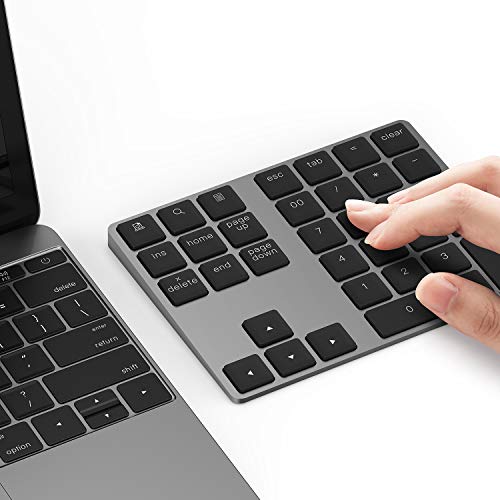
Lekvey Rechargeable Aluminum Bluetooth Number Pad

Macally Rechargeable 18-Key Bluetooth Numeric Keypad for Mac, PC, iPad and Tablet

Macally Slim Aluminum 35-Key Rechargeable Bluetooth Numeric Keypad for Mac and PC

Macally Rechargeable 35-Key Bluetooth Numeric Keypad for Mac, PC, iPad and Windows

Macally 22-Key Wireless Bluetooth Numeric Keypad for MacBook, iPad, iPhone, PC and Android
More Details On Our Top Picks
The Macally Bluetooth Number Pad for Laptop 22-Key Wireless Numeric Keypad Silver puts familiar full-size keys within easy reach of a compact keyboard. Its 22-key arrangement adds directional controls, giving spreadsheet and accounting work more room than a bare ten-digit block. The silver finish also gives the device a coordinated look beside a MacBook or other metallic computer.
Scissor switches, which use a low-profile mechanism beneath each key, combine with quiet keycaps for shared offices and evening work. Unlike the aluminum-bodied Lekvey Rechargeable Aluminum Bluetooth Number Pad, this model emphasizes a complete, familiar layout and driver-free Bluetooth pairing. That balance seems especially useful for a bookkeeper or analyst moving between a desk, couch, and shared workspace.
Positive Points
- Twenty-two full-size keys reduce the learning curve for traditional keypad users.
- Directional keys support spreadsheet navigation without a full keyboard.
- Quiet keycaps suit shared and late-day work environments.
- No required drivers or software simplify the initial setup.
Things To Consider
- The 22-key layout offers fewer controls than the 35-key Macally models.
- Bluetooth operation requires a compatible device with an available wireless connection.
Key Specs
Who It Suits Best
This model suits spreadsheet-heavy professionals who want familiar keys, quiet operation, and broad Mac, Windows, iOS, and Android support.
Where Another Pick Suits Better
The Lekvey Rechargeable Aluminum Bluetooth Number Pad better fits minimalist desks where aluminum construction and a slim 0.46-pound body matter most.
The Lekvey Rechargeable Aluminum Bluetooth Number Pad is built for desks where appearance and footprint matter nearly as much as functionality. Its aluminum body measures 5.7 by 4.4 by 0.47 inches and weighs just 0.46 pound, so it can sit beside a laptop without looking or feeling like a full desktop peripheral. The angled body adds a more settled hand position during extended number entry.
Bluetooth 5.0 provides the wireless link, while the rechargeable battery removes a disposable-battery routine. Compared with the Macally Rechargeable 18-Key Bluetooth Numeric Keypad for Mac, PC, iPad and Tablet, this model foregrounds the aluminum enclosure rather than a large set of full-size quiet keys. In my view, it has the strongest visual fit for a minimalist Mac-based workspace.
A Strong Showing
- The slim aluminum enclosure coordinates well with premium laptops.
- At 0.46 pound, it remains easy to carry between workspaces.
- The rechargeable design supports repeated cordless use.
Small Caveats
- The rechargeable battery still needs a charging routine between extended workdays.
Made For
This keypad suits design-conscious professionals who work on Mac laptops or desktop computers and prefer a slim aluminum desk accessory.
A Better Fit Elsewhere
The Macally Rechargeable 18-Key Bluetooth Numeric Keypad for Mac, PC, iPad and Tablet fits travelers who prioritize full-size quiet keys and a tilted layout over aluminum styling.
The Macally Rechargeable 18-Key Bluetooth Numeric Keypad for Mac, PC, iPad and Tablet keeps the working surface focused by using 18 full-size quiet keys. That smaller count distinguishes it from the broader 35-key layouts, making it a practical consideration for narrow desks and frequent travel. The tilted shape places the number rows at a familiar angle without adding a full-height housing.
Bluetooth pairing requires no drivers, and the rechargeable construction suits repeated use with a laptop or tablet. Unlike the Lekvey Rechargeable Aluminum Bluetooth Number Pad, which centers its appeal on a slim metal case, this Macally prioritizes quiet full-size keys and broad device support. I would favor it for a compact morning setup where every centimeter of the desk matters.
Good Reasons To Consider
- Eighteen keys create a more compact numeric workspace.
- Full-size quiet keys remain familiar despite the smaller layout.
- The tilted profile suits spreadsheet and inventory work.
- Bluetooth setup avoids extra software.
- Rechargeable operation supports regular cordless use.
Points To Keep In Mind
- The 18-key arrangement lacks the broader navigation set found on 35-key models.
- Wireless use depends on compatible Bluetooth connectivity.
- The rechargeable design requires access to its charging method during extended travel.
Feature Snapshot
Right Fit For
This model suits travelers, students, and spreadsheet users who want full-size quiet keys in a compact wireless layout.
Consider Something Else When
The Macally Slim Aluminum 35-Key Rechargeable Bluetooth Numeric Keypad for Mac and PC suits professionals who need more navigation and function keys in a fixed workstation.
The Macally Slim Aluminum 35-Key Rechargeable Bluetooth Numeric Keypad for Mac and PC gives numeric work a more complete layout. Thirty-five scissor-switch keys offer a larger selection of number, calculation, and navigation controls than the 18-key Macally model. The slim aluminum body keeps that expanded functionality from looking bulky beside a laptop or monitor.
This arrangement makes sense for accountants, administrators, and anyone entering long numeric sequences into spreadsheets or grade books. The rechargeable battery and wireless connection suit a permanent desk, while the compatible Mac and PC platforms cover common office setups. Compared with the Macally Rechargeable 35-Key Bluetooth Numeric Keypad for Mac, PC, iPad and Windows, this model adds an aluminum enclosure and scissor-switch construction.
Useful Strengths
- Thirty-five keys provide a broader control layout for spreadsheet navigation.
- Scissor switches preserve a slim profile.
- The aluminum body suits a fixed professional workstation.
Room For Improvement
- The larger key set takes more visual and physical space than the 18-key option.
- Recharging remains part of the routine for extended daily use.
Technical Sheet
Built With In Mind
This keypad suits office professionals who spend much of the workday entering figures into spreadsheets, accounting programs, and grade books.
Reach For A Different Pick When
The Macally Rechargeable 18-Key Bluetooth Numeric Keypad for Mac, PC, iPad and Tablet makes more sense for a compact desk where fewer physical keys are preferred.
The Macally Rechargeable 35-Key Bluetooth Numeric Keypad for Mac, PC, iPad and Windows is built for a desk that changes devices often. Its compatibility list spans Mac, Windows, iOS, and Android, while Bluetooth pairing removes the need for a cable between the keypad and the active computer. That flexibility is useful in offices where a desk can become a MacBook station, Windows workstation, or tablet-supported workspace.
The rechargeable 35-key layout provides ample room for number strings, accounting entries, and grade-book work. Compared with the Macally Slim Aluminum 35-Key Rechargeable Bluetooth Numeric Keypad for Mac and PC, the key count and charging approach remain similar, but this model foregrounds cross-platform support while the other highlights aluminum construction. I see it as the more practical option for a mixed-device office.
A Few Highlights
- Compatibility covers Mac, Windows, iOS, and Android devices.
- Thirty-five keys accommodate detailed numeric workflows.
- Rechargeable power supports regular cordless operation.
- Wireless pairing suits desks shared by different computers.
Factors To Consider
- The 35-key layout is less compact than the 18-key Macally model.
- Charging access matters for long travel sessions.
- Broad device support still requires Bluetooth pairing on each active device.
The Right Fit
This keypad suits finance staff, educators, and mobile professionals who alternate between several computer platforms.
Where A Sibling Pick Shines
The Macally Slim Aluminum 35-Key Rechargeable Bluetooth Numeric Keypad for Mac and PC fits a fixed workstation where metal construction matters more than mobile operating systems.
The Macally 22-Key Wireless Bluetooth Numeric Keypad for MacBook, iPad, iPhone, PC and Android centers on a familiar set of 22 full-size keys. Scissor switches and quiet keycaps give the layout a low-profile, restrained feel, while left, right, up, and down arrow keys make spreadsheet navigation more convenient. Driver-free Bluetooth pairing keeps the setup short for a MacBook or other compatible device.
This model overlaps heavily with the Macally Bluetooth Number Pad for Laptop 22-Key Wireless Numeric Keypad Silver, including the 22-key scissor-switch layout and broad device support. The silver model adds an explicitly listed finish, while this version places greater emphasis on MacBook, iPhone, and mobile-device use. For focused number entry in a quiet room, the core layout feels suitably restrained.
The Upside
- Full-size quiet keys support comfortable, familiar data entry.
- Directional keys make spreadsheet navigation less dependent on the main keyboard.
What To Weigh
- The 22-key set offers fewer controls than the expanded 35-key alternatives.
Feature Facts
Whose Shelf It Belongs On
This keypad suits a quiet home office where familiar full-size keys and mobile-device compatibility matter most.
Another Choice May Suit
The Macally Bluetooth Number Pad for Laptop 22-Key Wireless Numeric Keypad Silver suits the same workflow when a coordinated silver finish is the deciding detail.
Key Details That Shape a Numeric Keypad Choice
Key Count and Navigation
I start with the number of keys because a larger layout can support more spreadsheet navigation without repeated movement to the main keyboard. The 18-key Macally model favors a compact surface, while the 22-key versions add directional controls and the 35-key versions provide the broadest selection. A ten-digit block may handle basic calculations, but frequent spreadsheet work benefits from more accessible navigation keys.
Desk Footprint and Construction
Aluminum gives the Lekvey and Macally 35-key model a slim, coordinated appearance, while the Macally 18-key option suits a tighter working area. Key construction also affects the feel and height. Scissor switches sit relatively low beneath the keycaps, which helps a separate numeric pad blend into a laptop-centered desk instead of standing like a full keyboard.
Connection and Platform Fit
Bluetooth removes the cable between the numeric pad and the active computer, making pairing and repositioning straightforward. Compatibility still matters: Mac, Windows, iOS, and Android support gives a mixed-device office more flexibility. A rechargeable model suits regular use, although charging access deserves consideration during long travel or uninterrupted workday sessions.
Small Decisions That Prevent Regret
Mistakes Worth Dodging
The common mistake is focusing on key count alone. A larger layout may feel crowded on a small desk, while a compact model may lack the navigation controls needed for spreadsheets. I also check platform compatibility before ordering, since a familiar Bluetooth menu does not guarantee that every listed keypad supports every device. Matching the keypad’s size to the available desk area prevents a practical shortcut from becoming a daily annoyance.
The Upgrade Payoff
A higher-tier model may spend more on aluminum construction, rechargeable power, scissor switches, or a larger key set. That extra capability is worthwhile for accountants, educators, and heavy spreadsheet users who benefit from more controls and a refined desk setup. A compact 18-key or 22-key model makes more sense when portability and limited space guide the decision.
Frequently Asked Questions
Can a computer numeric keypad work with a laptop?
Most of these keypads use Bluetooth and add numeric entry to a laptop with a compact keyboard. Compatibility still depends on the operating system and device listed for each model.
Are Bluetooth numeric keypads easy to set up?
Several models pair through Bluetooth without drivers or additional software. Enabling Bluetooth and following the device’s pairing prompt completes the basic connection.
Which layout works best for spreadsheets?
A 35-key model offers the most navigation options, while a 22-key layout adds directional keys in a more compact format. The 18-key version prioritizes a smaller surface over extra controls.
Is a rechargeable keypad useful for daily work?
Rechargeable power is convenient for regular desk use because it avoids disposable batteries. Keeping its charging method accessible matters during long travel sessions.
Are 35-key number pads harder to use?
The additional keys can feel crowded on a small desk, but they provide shortcuts for repeated spreadsheet navigation. A 22-key or 18-key model offers a simpler alternative.
A Better Desk Starts With the Right Layout
I would choose the Lekvey Rechargeable Aluminum Bluetooth Number Pad for a minimalist, metal-themed setup, the Macally 18-key model for compact travel, and the 35-key Macally options for heavy spreadsheet work. Between the two closely related 22-key models, the silver finish can decide the fit. The most useful choice is the one whose layout, size, and platform support match the actual desk routine.
