
A failed laptop memory module can bring an otherwise healthy notebook to a halt, while a new desktop starts with a much longer compatibility checklist. I focus on the details that shape those decisions, including memory format, board size, socket support, cooling, storage, and the small parts that are easy to overlook.
These computer parts cover very different needs, from replacing DDR3 laptop memory to assembling a Ryzen-based desktop or restoring the feet on a wireless keyboard. My aim is to help my fellow hobbyists, technicians, and everyday computer users match each part to a specific job without paying for unnecessary complexity.
The Choices Worth Comparing
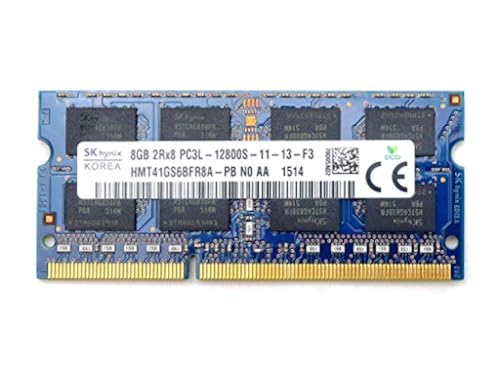
SK Hynix HMT41GS6BFR8A-PB 8GB 2Rx8 DDR3-1600 PC3-12800 SO-DIMM

Newegg B550-PLUS ATX Ryzen 5 5500 NV5000 1TB SSD Combo
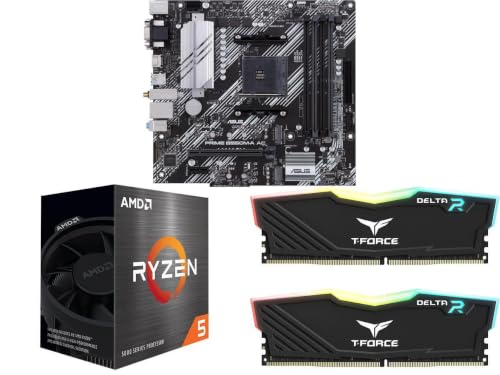
Newegg B550M-A Micro ATX Ryzen 5 5500 16GB DDR4-3200 Combo

Thermalright Frozen Prism 240 Black ARGB CPU Liquid Cooler PWM Fans

Newegg B550M PRO-VDH WiFi Ryzen 5 5500 T-Force RGB 16GB Combo
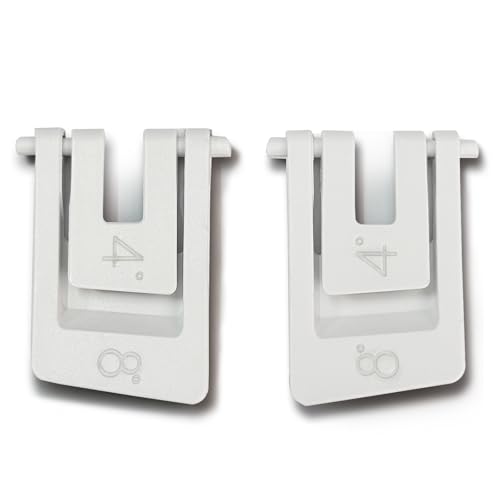
Logitech MK850 Replacement Keyboard Feet, 2 Pack
Inside Each Recommended Option
A failed laptop memory module can stop a notebook from reaching its login screen, and this one targets that specific repair. I find the exact Hynix model reference useful because a laptop memory upgrade depends on matching the original part closely rather than simply matching the storage capacity.
The module supplies 8GB of DDR3-1600 memory in the SO-DIMM form factor used by many laptops. For a compatible notebook, it offers a straightforward replacement for a damaged or inadequate module without changing the rest of the system.
The Practical Payoff
- The specified Hynix HMT41GS6BFR8A-PB model number makes compatibility checking more precise.
- Its 8GB capacity and 1600MHz speed suit older DDR3 laptop repair and upgrade tasks.
Trade Offs
- This is a narrow replacement part and will not fit desktop DDR3 DIMM slots or newer DDR4 laptops.
- The 204-pin, non-ECC, unbuffered configuration must match the laptop’s supported memory layout.
Core Details
Who It Suits Best
A technician or experienced hobbyist restoring a compatible DDR3 laptop benefits most from this module.
Where Another Pick Suits Better
The Newegg B550M-A Ryzen 5 5500 combo suits a DDR4 desktop build rather than this DDR3 laptop repair.
A full-size desktop build often starts with the painful task of choosing a motherboard, processor, and storage drive separately. This bundle places the B550-PLUS ATX board, Ryzen 5 5500 processor, and 1TB NV5000 M.2 SSD together, giving my build-planning process a much cleaner center.
ATX means this board uses the standard full-size format, so case clearance matters. The Ryzen 5 5500 supplies six cores at a listed 3.6GHz, while the 2280 M.2 drive offers a compact storage format for the operating system and everyday applications.
Well-Handled Touches
- Combining the board, processor, and SSD reduces the number of separate compatibility decisions.
- The AM4 motherboard supports the Ryzen 5000 family and other listed AM4 processors.
- PCIe 4.0 support provides a modern expansion path for compatible cards and storage devices.
- The 1TB NV5000 SSD gives a new desktop immediate storage without another drive purchase.
Practical Considerations
- The full-size ATX board requires a case designed to accept that footprint.
- System memory and a CPU cooler are not included in the listed bundle.
Quick Facts
The Right Fit
A desktop hobbyist building in a full-size ATX case benefits from this combination of core components and storage.
Look Elsewhere When
The Newegg B550M-A Ryzen 5 5500 combo better serves a smaller microATX case than this ATX bundle.
Desktop cases come in smaller sizes, and the B550M-A bundle makes sense when physical space matters more than expansion room. MicroATX is a reduced motherboard format that fits many compact cases, although case dimensions still deserve a careful check before assembly.
Unlike the preceding ATX bundle, this package includes 16GB of DDR4-3200 memory as a matched pair of 8GB modules. The Ryzen 5 5500, AM4 socket, dual M.2 support, and built-in wireless connectivity create a well-rounded foundation for a compact daily computer.
Real Benefits
- The included 2 x 8GB DDR4-3200 kit removes the need to select a separate desktop memory pair.
- Dual M.2 slots and PCIe 4.0 support allow more flexible storage choices in a compact system.
- Built-in 802.11ac Wi-Fi can reduce cable clutter in a home or shared workspace.
- Aura Sync RGB lighting adds visible coordination with compatible desktop components.
Points To Note
- The motherboard requires a case with microATX clearance and compatible mounting space.
- No storage drive is included, so a system drive must be added separately.
- Wireless setup may require drivers and network configuration after the desktop is assembled.
Made For
A hobbyist assembling a compact daily-use desktop benefits from the included processor, memory, wireless support, and storage expansion options.
A Better Fit Elsewhere
The Newegg B550-PLUS Ryzen 5 5500 combo better serves a full-size ATX case that can accommodate a 1TB SSD.
A transparent-sided desktop gains visual character from liquid cooling, and the Frozen Prism 240 places that feature in a 240mm radiator package. I see it as a styling-focused choice for builders who want the pump, tubing, and fan lighting to become part of the finished system rather than disappear beneath a metal heatsink.
Two PWM-controlled fans sit on the radiator, with PWM referring to pulse-width modulation, a method that adjusts fan speed through changing electrical pulses. The black housing and ARGB lighting, which can display individually addressable colors, reinforce the visual intent.
The Value In It
- The 240mm radiator offers a practical liquid-cooling format for many desktop cases.
- Two TL-E12 PWM fans give the radiator a matched cooling pair.
- ARGB lighting supports coordinated color effects in a visible custom build.
- The listed pump speed reaches 3300RPM for adjustable cooling performance.
- AM4, AM5, and several listed Intel sockets broaden desktop compatibility.
Room For Improvement
- Radiator placement and tubing routing require more planning than a basic air cooler.
- The mounting hardware and listed socket coverage should be checked against the chosen processor.
Technical Highlights
Built With In Mind
A custom desktop hobbyist who values visible RGB components benefits from this 240mm liquid cooler.
Another Choice May Suit
The Newegg B550M-A Ryzen 5 5500 combo suits a compact microATX build, while this cooler serves a desktop adding dedicated liquid cooling.
Wireless freedom and coordinated lighting can make a compact desktop feel finished before the operating system is even installed. The B550M PRO-VDH WiFi bundle brings those details together with a Ryzen 5 5500 processor and 16GB of RGB T-Force Delta memory.
Compared with the Newegg B550M-A combo, this package leans more visibly into a styled build while retaining a microATX footprint. The DDR4-3200 memory operates at 3200MHz, and the board also supports higher memory speeds through A-XMP overclocking profiles when the processor and board permit them.
Bright Spots
- Integrated Wi-Fi supports a cleaner desk setup without a wired network connection.
- The T-Force Delta 2 x 8GB kit supplies 16GB of DDR4-3200 memory with RGB lighting.
- The AM4 platform and Ryzen 5 5500 pairing cover the processor, motherboard, and memory in one package.
Small Caveats
- The microATX motherboard still needs a case with adequate clearance and mounting support.
- Processor upgrades remain constrained by the AM4 socket and the motherboard’s available BIOS support.
Whose Shelf It Belongs On
A compact gaming hobbyist who values wireless connectivity and RGB memory benefits from this coordinated bundle.
Where A Sibling Pick Shines
The Newegg B550-PLUS ATX combo better serves a full-size case and adds a 1TB M.2 SSD to the core bundle.
Missing keyboard feet can make a perfectly serviceable wireless keyboard sit awkwardly on a desk, and this pair restores the original stance for a compatible model. I appreciate the narrowness of the fix: it replaces a small worn component without requiring a whole new keyboard.
The feet are molded from ABS plastic, a lightweight material commonly used in keyboard housings. A two-piece set covers both ends of the keyboard, and the listed fit includes the Logitech MK850 Performance along with several K-series models.
Useful Touches
- Two replacement feet restore support at both ends of a compatible keyboard.
- The model-specific shape offers a more practical repair than a generic stand.
Details To Watch
- The fit is limited to the listed models, so the keyboard’s underside label deserves a close check before ordering.
Key Product Details
Who Will Love This
A Logitech MK850 owner with missing or damaged feet appreciates this targeted two-piece repair.
Reach For A Different Pick When
The SK Hynix HMT41GS6BFR8A-PB module serves a compatible DDR3 laptop repair, while these feet address a narrow MK850 hardware issue.
Match the Parts to the Build
Start with the existing platform
I begin with the device already in hand, especially for repairs. A DDR3 laptop needs a compatible 204-pin SO-DIMM, while desktop memory uses a longer DIMM form factor and is commonly DDR4 on these AM4 boards. Matching the memory type, capacity, speed, voltage, and physical layout prevents a part that appears similar from becoming an expensive shelf ornament.
Match the case to the board
Board size determines much of the physical layout. ATX provides a larger standard format, while microATX is designed for smaller cases and may reduce expansion options. I also check radiator length, graphics-card clearance, drive bays, and the positions of power and data connectors before purchasing parts for a new build.
Think beyond the headline bundle
A bundle can simplify the main shopping list, but it rarely covers an entire computer. Memory, cooling, storage, graphics, and the case may still require separate decisions. I make a parts inventory first, then compare each bundle against that list to avoid discovering a missing requirement after the case is open.
Compatibility Comes Before Cosmetics
Mistakes Worth Dodging
The most common error is matching capacity while overlooking the platform. I check socket type, memory generation, board dimensions, and case clearance before considering lighting or other finishing details. Storage interface and graphics-card clearance deserve the same early attention.
When Paying More Pays Off
Extra spending can be worthwhile when it removes a compatibility risk or supplies a feature the build genuinely needs. Wi-Fi, matched RGB memory, or liquid cooling make sense for a defined purpose, while adding components merely for appearance can strain both the budget and the available space.
Frequently Asked Questions
Which computer parts bundle is best for a first desktop build?
The Newegg B550-PLUS combo is the most complete starting point because it combines a motherboard, Ryzen 5 5500 processor, and 1TB M.2 SSD. It still requires compatible memory, storage or graphics additions as needed, a CPU cooler, a case, and other basic build components.
Is the SK Hynix module suitable for a modern gaming laptop?
It is intended for older laptops that use the matching HMT41GS6BFR8A-PB DDR3 SO-DIMM configuration. A modern gaming laptop can use a different memory generation, layout, voltage, or capacity, so the original module markings remain the safest compatibility reference.
Does the Thermalright Frozen Prism 240 fit common Ryzen builds?
Its listed socket coverage includes AMD AM4 and AM5, along with several Intel socket types. The radiator still needs room in the case, and the mounting hardware must match the chosen processor socket.
What is the main difference between the two Newegg microATX bundles?
The B550M-A bundle includes 16GB of DDR4-3200 memory and provides dual M.2 connectivity, while the B550M PRO-VDH WiFi bundle pairs the Ryzen 5 5500 with T-Force Delta RGB memory and built-in wireless networking. The preferred choice depends on storage, wireless, and lighting priorities.
Are replacement keyboard feet difficult to install?
They are generally simple to fit because they slot into the molded positions at the keyboard’s ends. The main precaution is checking that the exact keyboard model appears in the compatibility list before installation.
Final Verdict
I would choose the Newegg B550-PLUS combo for a straightforward full-size build, the B550M-A package for a smaller desktop, and the B550M PRO-VDH WiFi bundle when wireless access and RGB memory matter. The SK Hynix module and Logitech MK850 feet are better understood as focused repairs, while the Thermalright Frozen Prism 240 adds visual character to a compatible custom desktop. The right part is the one that fits the existing platform and the job at hand.
