
A CoreXY printer moves the print head with two motors working together, which can support quick travel and controlled motion. I focus on six machines for beginners, multi-color makers, and small workshops, paying close attention to tool changing, chamber control, build volume, and setup complexity.
Some entries favor a streamlined first project, while others target mixed materials and faster production. The right fit depends less on headline speed than on how often colors change, how much space the machine needs, and whether enclosed printing matters for the planned materials.
The Essentials At A Glance

Hephi3d TINA2 Plus Assembled 3D Printer

Bambu Lab P1S Combo with AMS
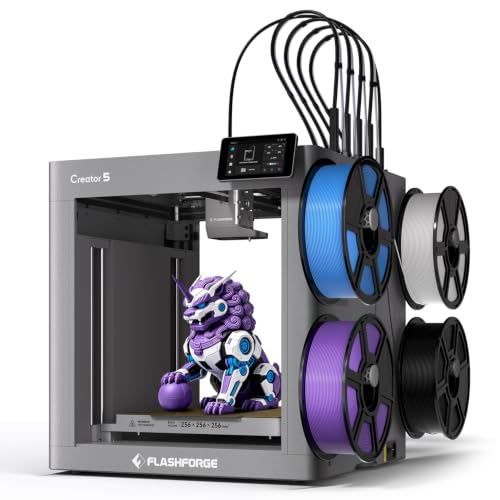
FLASHFORGE Creator 5 CoreXY 4-Toolhead 600mm/s Multi-Color Printer

FLASHFORGE Creator 5 Pro 65°C CoreXY 4-Toolhead Multi-Material Printer

FLASHFORGE AD5X 4-Color CoreXY 600mm/s Multi-Material Auto-Leveling Printer

FLASHFORGE AD5M CoreXY 600mm/s Direct-Drive 3-Second Quick-Swap Printer
More Details On Our Top Picks
The TINA2 Plus removes much of the assembly and calibration work that can make a first printer feel intimidating. Its compact format suits a bedroom desk, classroom, or shared work area, while automatic bed leveling helps establish a consistent starting point.
For creative phone-based workflows, Wi-Fi access through the Poloprint Cloud app and a library of more than 3,000 models make it approachable. Compared with the enclosed and tool-changing machines in this roundup, its priority is a simple first print rather than advanced CoreXY performance.
What Earns Its Place
- Arrives fully assembled, reducing the first setup barrier.
- Compact housing fits more easily on a small desk.
- Automatic leveling supports a steadier initial layer.
- Phone workflow includes ready-made and generated models.
Small Caveats
- A CoreXY-focused workflow would favor one of the FLASHFORGE models with that motion architecture.
Feature Snapshot
Made For
The TINA2 Plus best suits a beginner, teen, or parent seeking a compact first printer with minimal assembly.
Another Choice May Suit
The FLASHFORGE AD5M suits a maker who prioritizes a stated CoreXY platform, high travel speed, and a 220 mm cube build volume.
The P1S Combo brings together an enclosed printer and the AMS, an automatic material unit that supports multi-color and multi-material jobs. That pairing suits a home studio where decorative objects, labeled parts, or layered colors matter more than rapid tool swapping.
The enclosed body offers a more controlled setting for many materials, while a listed top speed of 500 mm/s and acceleration of 20,000 mm/s² support efficient motion. The main ownership consideration is bulk: the AMS adds hardware, and it must be connected for the advertised color capabilities.
Notable Gains
- AMS supports up to 16 colors in a single workflow.
- Enclosure creates a more controlled printing environment.
- High speed and acceleration suit quick production cycles.
- Multi-material capability reduces manual filament swapping.
Trade Offs
- The AMS connection is required for the advertised color functions.
- The combined printer and material unit needs more room than a compact single-color machine.
Who Will Love This
The P1S Combo fits a home maker who wants colorful prints and an enclosed body without managing four individual toolheads.
Consider Something Else When
The FLASHFORGE Creator 5 Pro suits a workshop that prioritizes rapid toolhead exchange, mixed materials, and active chamber heating.
Creator 5 is built around quick material changes, with four toolheads and a stated seven-second toolchanger cycle. For a busy desk, that approach can keep several colors or materials ready without repeatedly loading and purging a single extruder.
The CoreXY platform carries a 600 mm/s maximum speed, while the near-zero-waste system targets the material left behind during color transitions. Compared with the TINA2 Plus, this is a considerably more specialized machine for creators who regularly produce multi-color objects.
What Stands Out
- Four toolheads support distinct colors or materials.
- Seven-second changes shorten color-switching pauses.
- CoreXY motion reaches a listed 600 mm/s.
- Near-zero-waste design reduces transition leftovers.
- Automatic bed leveling simplifies preparation.
Points To Note
- Four toolheads require more hardware and filament management than a single-extruder setup.
- The toolchanger is most valuable for recurring multi-color work.
- The 600 mm/s figure is a maximum rather than a guaranteed result for every model and material.
Core Details
Right Fit For
Creator 5 suits a creative professional or small workshop that changes colors and materials regularly.
A Better Fit Elsewhere
The Bambu Lab P1S Combo better fits a home studio that wants enclosed multi-color printing with less toolhead hardware.
Creator 5 Pro adds active chamber heating to the four-toolhead approach found in Creator 5. A chamber temperature of 65°C can help control the environment around demanding prints, while the enclosed CoreXY body is better suited to engineering workflows than an open desktop machine.
Each of the four toolheads is preloaded and preheated, so a material change is primarily a toolhead swap. For workshops, that can simplify mixed-material scheduling, though the machine’s size and complexity exceed the needs of a first-time hobbyist.
What Helps Most
- Active chamber heating reaches 65°C.
- Enclosed CoreXY structure supports controlled workflows.
- Four preloaded toolheads retain separate materials.
- Preheated toolheads simplify mixed-material changes.
Practical Considerations
- Active chamber control adds complexity beyond a basic printer.
- Four toolheads call for adequate filament storage and staging space.
Technical Highlights
Built With In Mind
Creator 5 Pro fits an engineering-focused workshop that regularly mixes materials and needs a heated chamber.
Not Your Match When
The FLASHFORGE AD5M better fits a maker who values one direct-drive extruder, a 220 mm cube, and simpler single-color operation.
The AD5X balances rapid production with automatic color handling. It supports four-color printing through the IFS material system, reaches a listed 600 mm/s, and includes filament backup so a four-color workflow has some resilience during extended jobs.
Automatic calibration checks multiple points across the bed, reducing the need for repeated manual setup. Compared with Creator 5’s four physical toolheads, the AD5X takes a different route to color variety, making it a practical choice for regular multi-color work rather than broad mixed-material engineering.
Positive Points
- Four-color support serves decorative and practical jobs.
- Filament backup supports longer unattended workflows.
- CoreXY speed reaches a listed 600 mm/s.
Less Ideal Details
- Color variety is concentrated in four channels rather than a larger stated range.
- Automatic calibration still leaves profile selection to the operator.
- The multi-material system requires more setup attention than a single-color machine.
Best Suited To
The AD5X fits a maker producing frequent four-color objects without needing a heated engineering chamber.
Where A Sibling Pick Shines
The FLASHFORGE Creator 5 Pro shines for mixed-material workshops that need four preloaded toolheads and active chamber heating.
AD5M keeps the workflow focused on one material at a time, which can make it easier to manage than a multi-tool system. A high-temperature direct-drive extruder places the filament path close to the nozzle, reducing travel distance within the hot end assembly.
The pressure-sensor leveling system supports a one-click bed calibration routine, while the three-second nozzle swap shortens changes between compatible nozzles. Its 220 × 220 × 220 mm cube gives a useful balance for prototypes, though the Creator 5 options make more sense for recurring color changes.
A Strong Showing
- CoreXY motion reaches a listed 600 mm/s.
- Acceleration is listed at 20,000 mm/s².
- Pressure-sensor leveling automates bed setup.
- Direct-drive design supports a high-temperature extruder.
- Nozzle changes are stated to take three seconds.
Factors To Consider
- Single-color operation lacks the automatic color variety of the AD5X.
- The cubic build volume may restrict larger assemblies.
Quick Facts
The Right Fit
AD5M suits a prototyping hobbyist who wants a clear, fast single-color workflow with manageable setup.
Reach For A Different Pick When
The TINA2 Plus is a better fit for a first-time hobbyist who values full assembly, phone-based controls, and a compact footprint.
Corexy 3d Printer Buying Guide: Decisions That Matter
Motion Architecture And Travel Speed
CoreXY uses two motors to coordinate the print head, helping the head move quickly in both axes. A listed 600 mm/s figure represents a machine capability, not a guaranteed operating speed for every model, filament, or layer height, so I treat it as one factor rather than the deciding feature.
Multi-Color And Material Handling
Color systems differ in physical design. The Bambu Lab P1S Combo relies on a connected AMS, while the FLASHFORGE AD5X manages four colors through IFS and the Creator 5 models use individual toolheads. I compare how many colors are needed, how often changes occur, and how much filament storage the setup requires.
Enclosure And Chamber Temperature
An enclosed body helps limit outside airflow during a print. Active chamber heating goes further by controlling the surrounding temperature, which matters for demanding materials and mixed-material engineering. A home hobbyist can gain useful results from an enclosed multi-color machine without paying for heated-chamber complexity.
Size, Calibration, And Build Volume
Compact cases simplify storage, but a small footprint may also mean a smaller build area. Automatic leveling reduces setup work, while direct-drive and quick-swap components can simplify maintenance. I check the available workspace, the largest object planned for printing, and the amount of hands-on involvement the machine actually requires.
Practical Lessons Before Choosing
Mistakes Worth Dodging
A peak speed figure does not tell me how quickly a finished model will appear. Tool-changing capability also does not mean every print needs multiple materials. I compare the normal workflow with the feature, then account for filament storage, machine size, and required accessories.
What The Higher Tier Buys
Advanced models spend more on enclosed construction, heated chambers, automatic calibration, or multi-tool systems. Those additions help workshops that run long or material-intensive jobs. A simpler machine can be more economical for consistent single-color projects and limited desk space.
Frequently Asked Questions for Corexy 3d Printer
Is a CoreXY 3D printer suitable for beginners?
A CoreXY printer can suit beginners because automatic leveling and faster travel simplify the basic workflow. The compact Hephi3d TINA2 Plus is easier for a newcomer, while the FLASHFORGE AD5M offers a more focused path into CoreXY printing.
What is the difference between an AMS and a four-toolhead system?
An AMS feeds multiple colors into a single printing system, while four toolheads keep separate materials loaded and ready. The Bambu Lab P1S Combo is simpler for standard color work, and the FLASHFORGE Creator 5 offers more direct control over separate toolheads.
Does a 600 mm/s print speed mean every print finishes that quickly?
No, 600 mm/s is a maximum motion figure rather than the speed of every completed layer. Actual print times depend on the model, geometry, layer height, filament, and the printer’s recommended operating range.
Is an enclosed printer necessary for everyday projects?
An enclosure is helpful for controlled conditions and for materials that benefit from stable surroundings. It matters more for engineering workflows, while a single-color hobbyist may get practical results from a more compact open machine.
Which pick is best for a small workspace?
The Hephi3d TINA2 Plus has the clearest compact-storage advantage, although its feature set centers on simple entry-level printing. A CoreXY-focused desk setup may favor the FLASHFORGE AD5M once the required footprint and accessories are accounted for.
Final Verdict
The FLASHFORGE AD5M is my practical CoreXY choice for fast, single-color prototyping, while the AD5X earns its place for routine four-color work. The Creator 5 and Creator 5 Pro serve creators who regularly change materials, and the P1S Combo remains a strong enclosed option for colorful home projects. The TINA2 Plus serves a different purpose entirely, making a first print approachable with less setup.
