
A “creamy keyboard” is ultimately a feel preference, with smooth actuation and controlled feedback mattering more than color. I narrowed these six 2026 gaming keyboards by the experience they create, including rapid-trigger adjustment, tactile switches, wireless freedom, and split ergonomic layouts. My goal is simple: match the right feel to the way each person plays, types, and uses a desk.
A Snapshot Of The Selections

Razer Huntsman V3 Pro TKL
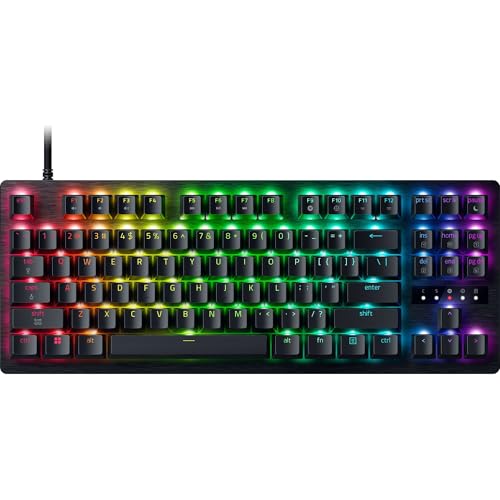
Razer Huntsman V3 TKL 8KHz

Razer Huntsman V3 Pro 8KHz

Razer BlackWidow V4 Pro 75%

Razer BlackWidow V4 TKL
Razer Pro Type Ergo Split
What Each Pick Brings To The Table
The Razer Huntsman V3 Pro TKL puts analog control in a compact tenkeyless layout, which appeals to competitive players who want rapid adjustments without a full number pad. I find the 0.1 to 4.0 mm actuation range more useful than a fixed setting because it can move between delicate and deliberate presses.
Compared with the full-size Razer Huntsman V3 Pro 8KHz later in the list, this model preserves the core analog experience while freeing desk space. The tradeoff appears in spreadsheets and shortcuts that depend on dedicated number keys.
Real-World Strengths
- Rapid Trigger resets a key after it rises, enabling repeated movement before full travel.
- The broad actuation range supports different play styles and personal sensitivity settings.
- The 8KHz polling rate samples input frequently for fast competitive actions.
- The TKL footprint keeps more mouse space available than a full-size model.
Practical Considerations
- Analog settings may need adjustment before they feel comfortable during ordinary typing.
- Number-pad-dependent work is less convenient without a dedicated keypad.
Key Specs
Who It Suits Best
Competitive shooters and esports players who want analog sensitivity in a compact gaming layout.
Where Another Pick Suits Better
The Razer Huntsman V3 Pro 8KHz suits players who also need a full-size layout and number pad.
Directional changes separate the Razer Huntsman V3 TKL 8KHz from the earlier Pro TKL. Its Snap Tap function recognizes the intended direction when two assigned movement keys are pressed together, which can help during frantic strafing in first-person games.
That priority system adds a distinct advantage to the same Gen 2 analog foundation. In my view, players who repeatedly fight for direction control may find this more valuable than the broader naming used by the Pro model.
Why It Works Well
- Snap Tap prioritizes the intended directional input during simultaneous presses.
- Rapid Trigger supports fast, repeated movement with reduced full-travel resets.
- Actuation can be tuned from 0.1 to 4.0 mm for different play styles.
- Its TKL layout leaves additional room for broad mouse movements.
Trade Offs
- Snap Tap is mainly relevant to games with assigned movement keys.
- The analog setup may take practice before it feels natural for general typing.
Feature Snapshot
Made For
First-person game players who often press multiple directional keys during fast movement sequences.
Consider Something Else When
The Razer BlackWidow V4 TKL suits competitive players who prefer tactile switches and wireless switching.
The Razer Huntsman V3 Pro 8KHz carries the analog tuning of the TKL model into a full-size layout. The added number pad makes it a more practical choice for spreadsheets, shortcuts, and games where numeric entries belong close to the movement keys.
It shares the Gen 2 optical switches, 0.1 to 4.0 mm actuation range, and Rapid Trigger with the compact Huntsman options. The extra width is the defining tradeoff: numerical convenience arrives at the cost of more desk space.
Where It Excels
- Full-size construction combines competitive controls with a dedicated number pad.
- Adjustable actuation supports light movement and more deliberate typing.
- Rapid Trigger suits games that reward repeated directional inputs.
- The stated 100-million-keystroke lifespan provides a manufacturer endurance figure.
Less Ideal Details
- The larger layout leaves less room for mouse movement than either TKL alternative.
- Analog controls require configuration, so they may not suit someone expecting a familiar mechanical keyboard immediately.
Right Fit For
Competitive players and office-focused users who need a number pad beside their gaming controls.
Not Your Match When
The Razer Huntsman V3 Pro TKL is a better fit for players who prioritize mouse space over numeric entry.
The Razer BlackWidow V4 Pro 75% changes the focus from pure speed to a feature-rich wireless desk. Its OLED display and Razer Command Dial put system information or custom graphics within reach, making the keyboard more useful during extended gaming breaks and streamed sessions.
Unlike the analog Huntsman models, this board uses orange switches and a hot-swappable design. That gives it a more conventional personality, while the 75% layout balances compactness with a fuller command set.
The Case For It
- Wireless operation removes a fixed cable from the desk setup.
- The OLED display provides a place for system metrics or custom graphics.
- The Command Dial adds physical control for display-related settings.
- Hot-swappable sockets make changing the preloaded orange switches more convenient.
Points To Note
- The display and dial add more controls than a plain gaming keyboard provides.
- Switch stem and pin details should be checked before ordering replacement switches.
At A Glance
Best Suited To
Players who want wireless freedom, tactile orange switches, and desk-level information controls in one keyboard.
Look Elsewhere When
The Razer Huntsman V3 TKL 8KHz fits competitive players who need adjustable analog actuation more than a display and command dial.
The Razer BlackWidow V4 TKL makes wireless switching practical for a desk that handles both work and play. It supports 2.4 GHz wireless, can pair a compatible Razer mouse through the same dongle, and can toggle among three Bluetooth devices.
That flexibility sets it apart from the focused esports designs here. Hot-swappable sockets accept both 3-pin and 5-pin switches, so the preloaded orange switches can be replaced with a preferred feel.
Where It Delivers
- 2.4 GHz wireless supports a cable-free gaming setup.
- Three Bluetooth device profiles suit people moving between a laptop, tablet, and other devices.
- A compatible Razer mouse can share the same wireless dongle.
- Support for 3-pin and 5-pin switches broadens the available switch choices.
Where It May Fall Short
- The TKL format omits a number pad, which may inconvenience spreadsheet-heavy work.
- Wireless and multi-device functions require a little more setup than a single wired board.
Who Will Love This
Hybrid workers and gamers who regularly move between computers while preferring tactile, interchangeable switches.
A Better Fit Elsewhere
The Razer Pro Type Ergo Split suits people whose main priority is a low-profile, posture-oriented typing layout.
The Razer Pro Type Ergo Split begins with posture rather than competitive triggers. Its divided layout, 10-degree base slope, and adjustable 4-degree or 7-degree foot angle let the hands settle into a more natural position during long typing or study sessions.
Low-profile fingertip-shaped keycaps use rounded indentations to help fingers find their placement. The dual B keys also give the left hand another thumb-accessible option, although the split design takes more desk width than a conventional board.
The Helpful Details
- The split construction separates the hands for a more natural typing position.
- Adjustable tilt options allow the typing angle to be changed as needed.
- Dual B keys provide an additional left-thumb input.
- Low-profile, indented keycaps help reduce finger travel and improve placement.
Some Limits To Know
- The split layout occupies more desk width than a standard keyboard.
- It prioritizes short-travel typing over the pronounced feedback of tactile gaming switches.
Core Details
Built With In Mind
Typists, students, and desk workers who spend extended periods at a computer and prefer a low-profile split layout.
Another Choice May Suit
The Razer BlackWidow V4 TKL fits competitive players who prefer orange-switch feedback, hot-swappable sockets, and a conventional TKL shape.
What Actually Shapes A Creamy Keyboard
Switch Feel And Actuation
A creamy feel often comes from smooth, consistent travel rather than a particular color or brand. Analog optical boards such as the Razer Huntsman V3 Pro TKL let me tune press depth, while orange-switch models offer a more familiar tactile response. The best match depends on whether a person values precise sensitivity or a clear tactile bump.
Layout And Desk Space
Tenkeyless layouts preserve mouse space but remove the number pad. Full-size boards suit numeric workflows, while 75% models balance compactness with additional controls. Split ergonomic designs need the most width, so measuring the available desk area prevents an awkward fit.
Connection And Responsiveness
Wired, 2.4 GHz, and Bluetooth connections serve different routines. High-frequency polling and adjustable actuation suit competitive play, while device switching helps people move between work and entertainment systems. I would choose the controls that match the actual setup rather than adding features that rarely get used.
Two Details That Change The Decision
Mistakes Worth Dodging
The common mistake is treating “creamy” as a measurable switch category rather than a personal preference. Another is choosing layout before checking desk space, switch behavior, or connection needs. Comparing the actual typing and gaming tasks prevents a costly mismatch.
When Paying More Pays Off
Additional spending may buy finer actuation control, a display, wireless flexibility, or an ergonomic frame. The premium feature earns its place only when it solves a recurring problem. A simpler keyboard remains the more sensible choice when the extra hardware never enters daily use.
Frequently Asked Questions
What Makes a Keyboard Feel Creamy?
Creamy generally describes smooth, consistent key travel with minimal harshness or unwanted resistance. The feeling varies by switch, case, keycap, and personal preference, so descriptions remain useful only as a starting point.
Are Analog Optical Switches Better for Gaming?
Analog optical switches are useful for players who want adjustable press sensitivity and early repeated inputs. Conventional mechanical or tactile switches may suit someone who prefers simpler operation and a familiar response.
Does a TKL Keyboard Include a Number Pad?
No, a tenkeyless keyboard omits the number pad and saves desk space. Full-size models include it, making them more convenient for numeric spreadsheets and shortcuts.
Is a Wireless Gaming Keyboard Practical for Competitive Play?
Wireless models are practical for mixed work and gaming setups, especially when they support low-latency 2.4 GHz connections. Competitive players who prioritize analog control may prefer the dedicated Huntsman models instead.
Is a Split Ergonomic Keyboard Suitable for Gaming?
A split ergonomic keyboard can suit gaming when its low-profile keys and posture support are comfortable. Players who need pronounced switch feedback, dense shortcuts, or a compact traditional layout may prefer a BlackWidow or Huntsman model.
Final Verdict
The Razer Huntsman V3 Pro TKL is my choice for finely controlled competitive play, while the Razer BlackWidow V4 Pro 75% adds more everyday desk features. Long-session typists may find the Razer Pro Type Ergo Split more comfortable, and the Razer BlackWidow V4 TKL handles mixed devices with the least friction. The right “creamy” keyboard comes down to the feel and layout that feel natural in daily use.
